
React Native 初步
【React Native 初步】
1、Create React Native App is the easiest way to start building a new React Native application. It allows you to start a project without installing or configuring any tools to build native code - no Xcode or Android Studio installation required
npm install -g create-react-native-app
2、Then run the following commands to create a new React Native project called "AwesomeProject":
create-react-native-app App
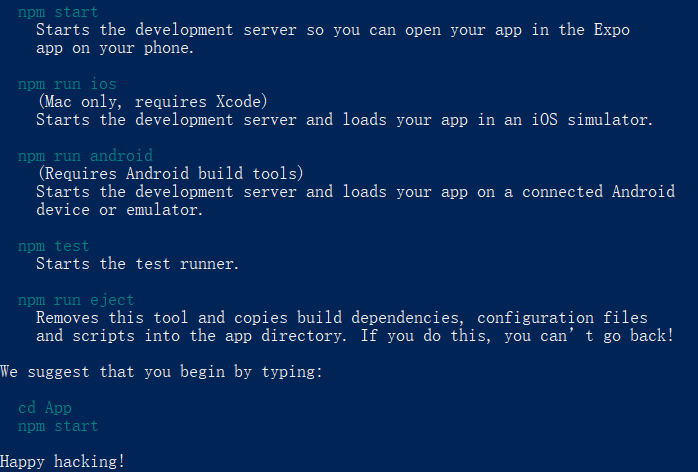
If you want to run your app on the iOS Simulator or an Android Virtual Device, please refer to the instructions for building projects with native code to learn how to install Xcode and set up your Android development environment. 然后按上述命令:
npm run ios 或 npm run android
3、Install the Expo client app on your iOS or Android phone and connect to the same wireless network as your computer. Using the Expo app, scan the QR code from your terminal to open your project.
Expo下载地址:https://expo.io/tools
4、警告
1)使用create-react-native-app创建的项目,没有编译任何Native Code,无法添加自定义antive模块。
只能使用 react-native api以及expo提供的 components。
2)eject用于将create-react-native-app创建的应用转移成为react-native应用,过程不可逆。
5、拥有独特的 react-native 库

6、AppRegistry
The AppRegistry just tells React Native which component is the root one for the whole application.
// skip this line if using Create React Native App

AppRegistry.registerComponent('AwesomeProject', () => HelloWorldApp);
7、Image 的使用
render() {

    let pic = {

      uri: 'https://upload.wikimedia.org/wikipedia/commons/d/de/Bananavarieties.jpg'

    };

    return (

      <Image source={pic} style={{width: 193, height: 110}}/>

    );

  }
8、View
A View is useful as a container for other components, to help control style and layout.
<View style={{alignItems: 'center'}}>

        <Greeting name='Rexxar' />

        <Greeting name='Jaina' />

        <Greeting name='Valeera' />

      </View>
参考:
http://facebook.github.io/react-native/docs/props.html
React Native 初步的更多相关文章
- react native初步常见问题
首先按照资料一步步搭建环境运行,然后成功了,很激动,可是,安卓就是没这么容易成功,还是太年轻了 could not get batchedbridge, make sure your bundle i ...
- React Native基础&入门教程:初步使用Flexbox布局
在上篇中,笔者分享了部分安装并调试React Native应用过程里的一点经验,如果还没有看过的同学请点击<React Native基础&入门教程:调试React Native应用的一小 ...
- React Native 从入门到原理
React Native 是最近非常火的一个话题,介绍如何利用 React Native 进行开发的文章和书籍多如牛毛,但面向入门水平并介绍它工作原理的文章却寥寥无几. 本文分为两个部分:上半部分用通 ...
- 携程React Native实践
React Native(下文简称 RN)开源已经一年多时间,国内各大互联网公司都在使用,携程也在今年 5 月份投入资源开始引入,并推广给多个业务团队使用,本文将会分享我们遇到的一些问题以及我们的优化 ...
- 关于React Native 火热的话题,从入门到原理
本文授权转载,作者:bestswifter(简书) React Native 是最近非常火的一个话题,介绍如何利用 React Native 进行开发的文章和书籍多如牛毛,但面向入门水平并介绍它工作原 ...
- React Native运行原理解析
Facebook 于2015年9月15日推出react native for Android 版本, 加上2014年底已经开源的IOS版本,至此RN (react-native)真正成为跨平台的客户端 ...
- React Native小白入门学习路径——二
万万没想到,RN组仅剩的一个学长也走了,刚进实验室没几天就被告知这样的事情,一下子还真的有点接受不了,现在RN组就成了为一个没有前辈带的组了,以后学习就更得靠自己了吧.唉,看来得再努力一点了. 这一周 ...
- React Native 从入门到原理一
React Native 从入门到原理一 React Native 是最近非常火的一个话题,介绍如何利用 React Native 进行开发的文章和书籍多如牛毛,但面向入门水平并介绍它工作原理的文章却 ...
- taro之React Native 端开发研究
初步结论:如果想把 React Native 集成到现有的原生项目中,不能使用taro的React Native 端开发功能(目前来说不能实现,以后再观察). RN开发有2种模式: 1.一是原生A ...
随机推荐
- python中logging模块的一些简单用法
用Python写代码的时候,在想看的地方写个print xx 就能在控制台上显示打印信息,这样子就能知道它是什么了,但是当我需要看大量的地方或者在一个文件中查看的时候,这时候print就不大方便了,所 ...
- myeclipse项目 不能打开
重启电脑后, myeclipse项目 不能打开了, 之前都是好好的!! 出现: Failed to read the project description file (.project) for ' ...
- Cannot run Eclipse; JVM terminated. Exit code=13
在myeclipse 上运行好好的, 在 eclipse 上就运行不了了. 运行eclipse.exe 就出现: Cannot run Eclipse; JVM terminated. Exit co ...
- .Net MVC 获取Response和Request对象
通过 System.Web.HttpContext.Current 获取 public static string ConstractExportExcel(List<ERP_Contrac ...
- ELK测试安装
https://blog.csdn.net/guyan0319/article/details/78749639 https://www.cnblogs.com/frankdeng/p/9139035 ...
- python大法好——修改文件、函数
1.修改文件 补充上次没洗完的: 想要修改某个文件里一块地方,可以使用seek函数找到位置write函数修改. 是不是觉得这很简单? 但是如果你这样操作很可能会出现乱码. 因为由于字节数的不同,编码的 ...
- leetcode1006
func clumsy(N int) int { var ary []int ; n-- { ary = append(ary, n) } re := N % //4个数字一组 firstgroup ...
- [转]J-Link Commander的妙用
转自http://maker.zlgmcu.com/portal.php?mod=view&aid=3685 J-Link Commander作为J-Link驱动软件包的一个工具之一,为工程师 ...
- node.js定时任务 node-schedule
先安装 node-schedule npm install node-schedule //1:确定时间 //例如:2014年2月14日,15:40执行 var schedule = require( ...
- ABAP-container拆分
1.界面 2.代码 *&---------------------------------------------------------------------* *& Report ...