
IOS绘图
#import "ViewController.h"
#import "DrawView.h"
@interface ViewController ()
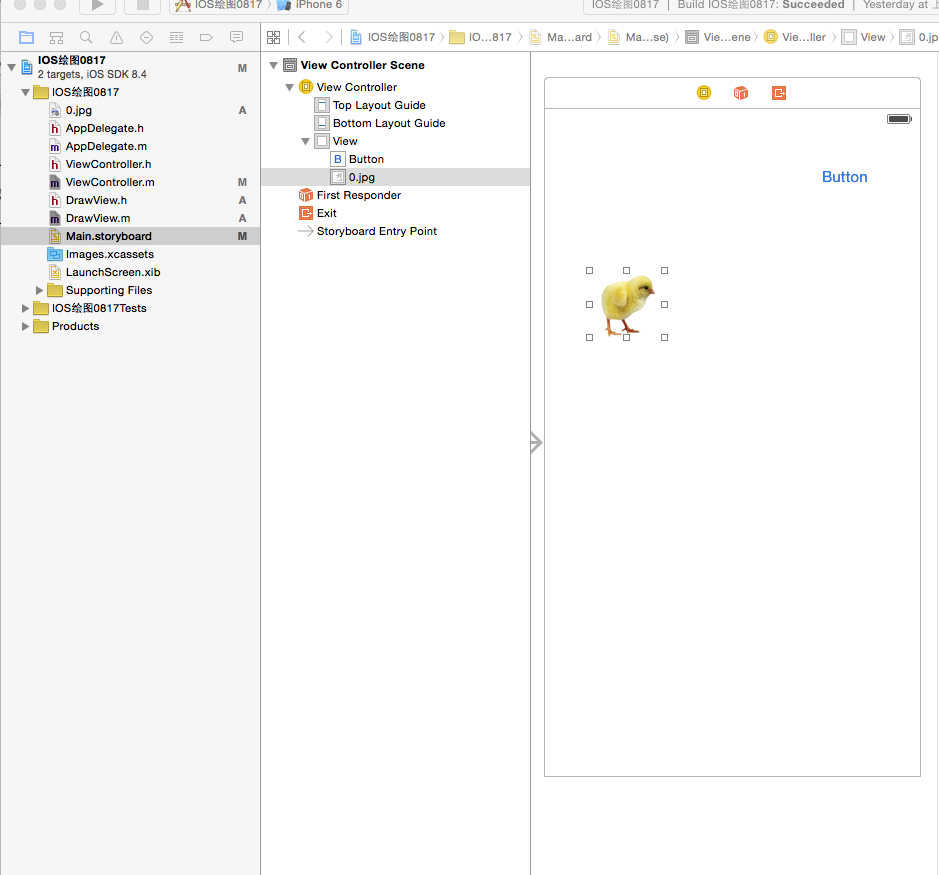
@property (weak, nonatomic) IBOutlet UIImageView *imageView;
- (IBAction)doTouchButton:(id)sender;
@end
@implementation ViewController
- (void)viewDidLoad {
[super viewDidLoad];
DrawView *view=[[DrawView alloc]initWithFrame:self.view.frame];
view.backgroundColor =[UIColor whiteColor];
// [self.view addSubview:view];//去掉注释后,显示绘图
}
- (void)didReceiveMemoryWarning {
[super didReceiveMemoryWarning];
// Dispose of any resources that can be recreated.
}
- (IBAction)doTouchButton:(id)sender {
//小鸡走五角星
CGMutablePathRef startPath=CGPathCreateMutable();//创建一个路径
CGPathMoveToPoint(startPath, NULL, 160, 100);
CGPathAddLineToPoint(startPath, NULL, 220, 280);
CGPathAddLineToPoint(startPath, NULL, 60, 170);
CGPathAddLineToPoint(startPath, NULL, 260, 170);
CGPathAddLineToPoint(startPath, NULL, 100, 280);
CGPathAddLineToPoint(startPath, NULL, 160, 100);
CAKeyframeAnimation *animation=[CAKeyframeAnimation animationWithKeyPath:@"position"];
animation.duration=5.0;//设置动画时间
[animation setPath:startPath];//设置路径
[_imageView.layer addAnimation:animation forKey:@"position"];
}
@end
/********************************************************/
//
// DrawView.h
// IOS绘图0817
//
// Created by 张艳锋 on 15/8/17.
// Copyright (c) 2015年 张艳锋. All rights reserved.
//
#import <UIKit/UIKit.h>
@interface DrawView : UIView
@end
/********************************************************/
//
#import "DrawView.h"
@implementation DrawView
// Only override drawRect: if you perform custom drawing.
// An empty implementation adversely affects performance during animation.
- (void)drawRect:(CGRect)rect {
// Drawing code
CGContextRef context=UIGraphicsGetCurrentContext();//绘制图形上下文
CGContextSetLineWidth(context, 2.0);//设直线条宽度
[[UIColor redColor]setStroke];//设置线条颜色
CGPoint point1=CGPointMake(160, 100);//上
CGPoint point2=CGPointMake(60, 170);//左
CGPoint point3=CGPointMake(260, 170);//右
CGPoint point4=CGPointMake(100, 280);//下左
CGPoint point5=CGPointMake(220, 280);//下右
CGContextMoveToPoint(context, point1.x, point1.y);
CGContextAddLineToPoint(context, point5.x, point5.y);
CGContextAddLineToPoint(context, point2.x, point2.y);
CGContextAddLineToPoint(context, point3.x, point3.y);
CGContextAddLineToPoint(context, point4.x, point4.y);
// CGContextAddLineToPoint(context, point1.x, point1.y);
CGContextClosePath(context);//闭合区域函数
// CGContextStrokePath(context);
[[UIColor orangeColor]setFill];//设置填充颜色
CGContextDrawPath(context, kCGPathFillStroke);//进行描绘函数
// kCGPathFill,//无边线,包围区域全部填充
// kCGPathEOFill,//无边线,包围区域重合部分不填充
// kCGPathStroke,//只显边线,不填充
// kCGPathFillStroke,//填充又显示边线
// kCGPathEOFillStroke//有边线包围区域重合部分不填充
//正方形
//CGContextAddRect矩形
//CGContextAddEllipseInRect椭圆 圆
CGContextSetRGBStrokeColor(context, 1, 0, 0, 1);//红色
CGContextSetLineWidth(context, 1.5);
CGContextAddRect(context, CGRectMake(100, 60, 80, 80));//正方形
CGContextAddRect(context, CGRectMake(200, 60, 100, 200));//矩形
CGContextAddEllipseInRect(context,CGRectMake(50, 100, 100, 60));//椭圆
CGContextAddEllipseInRect(context,CGRectMake(50, 200, 100, 100));//圆
CGContextStrokePath(context);
}
IOS绘图的更多相关文章
- 论文第4章:iOS绘图平台的实现
面向移动设备的矢量绘图平台设计与实现 Design and Implementation of Mobile Device-oriented Vector Drawing Platform 引用本论文 ...
- iOS绘图教程 (转,拷贝以记录)
本文是<Programming iOS5>中Drawing一章的翻译,考虑到主题完整性,在翻译过程中我加入了一些书中没有涉及到的内容.希望本文能够对你有所帮助. 转自:http://www ...
- iOS绘图教程
本文是<Programming iOS5>中Drawing一章的翻译,考虑到主题完整性,翻译版本中加入了一些书中未涉及到的内容.希望本文能够对你有所帮助.(本文由海水的味道翻译整理,转载请 ...
- iOS绘图框架CoreGraphics分析
由于CoreGraphics框架有太多的API,对于初次接触或者对该框架不是十分了解的人,在绘图时,对API的选择会感到有些迷茫,甚至会觉得iOS的图形绘制有些繁琐.因此,本文主要介绍一下iOS的绘图 ...
- iOS绘图系统UIKit与Core Graphics
概述 iOS主要的绘图系统有UIKit,Core Graphics,Core Animation,Core Image,Open GL等,本片博文主要介绍UIKit与Core Graphics的绘图系 ...
- IOS 绘图教程Quartz2D
http://www.cocoachina.com/industry/20140115/7703.html http://www.cnblogs.com/wendingding/p/3803020.h ...
- ios绘图时的坐标处理
在iOS中,进行绘图操作时,一般主要是在UIView:drawRect中调用 UIGraphicsBeginImageContextWithOptions等一系列函数,有时候直接画图就行,比如UIIm ...
- iOS绘图UIBezierPath 和 Core Graphics框架
前言 iOS系统本身提供了两套绘图的框架,即UIBezierPath 和 Core Graphics.而前者所属UIKit,其实是对Core Graphics框架关于path的进一步封装,所以使用起来 ...
- iOS绘图—— UIBezierPath 和 Core Graphics
前言 iOS系统本身提供了两套绘图的框架,即UIBezierPath 和 Core Graphics.而前者所属UIKit,其实是对Core Graphics框架关于path的进一步封装,所以使用起来 ...
随机推荐
- 《转》Java中HashMap详解
HashMap 和 HashSet 是 Java Collection Framework 的两个重要成员,其中 HashMap 是 Map 接口的常用实现类,HashSet 是 Set 接口的常用实 ...
- IPC——命名管道
Linux进程间通信——使用命名管道 转载:http://blog.csdn.net/ljianhui/article/details/10202699 在前一篇文章——Linux进程间通信——使用匿 ...
- 40 JavaScript Chart and Graph Libraries for Developers--reference
reference:http://www.egrappler.com/javascript-chart-and-graph-libraries-for-developers/ BY TEAMEGRAP ...
- C# 读取与修改配置文件
System.Configuration.ConfigurationSettings.AppSettings["Key"]; 但是现在FrameWork2.0已经明确表示此属性已经 ...
- cocos2dx3.0-执行cocos compile -p win32 命令出现错误 MSB8020 以及编译出来的exe 无法打开的问题
本文由@呆代待殆原创,转载请注明出处:http://www.cnblogs.com/coffeeSS/ 当博主准备把cocos工程用cocos命令行编译出来的时候,报出了MSB8020的错误,具体如下 ...
- 沈逸老师PHP魔鬼特训笔记(10)
为了防止代码让我们混淆不清,大家看视频中的分离方法 1.新建了一个文件夹叫code (这代表是代码) 2.再新建一个文件夹叫page (这代表是页面) 代码该怎么写呢? 这里要记住口诀 1.index ...
- 【Open Search产品评测】- 来往,7天轻松定制属于自己的搜索引擎
[Open Search产品评测]-- 来往,7天轻松定制属于自己的搜索引擎 [使用背景] 相信很多人都遇到过要给网站或者app做一个搜索功能的需求,很久之前自己折腾过lucene,搞了很久, ...
- vs2010 MFC Opengl实现
有的人说,学习要按部就班,学了几年的编程稍有点感悟,个人觉得面对技术的不断变化,以及需求的不断变更,如果按部就班的来搞,人生0.5的时间就浪费了,很多时候问自己,why I do need to le ...
- 利用spring自己实现观察者模式
利用spring,自己实现的一个观察者模式,写着玩玩,目的是为了加深理解,下次用Spring自带的玩一玩. 首先我们定义一个侦听类接口 package com.hyenas.common.listen ...
- Python时间,日期,时间戳之间转换
1.将字符串的时间转换为时间戳 方法: a = "2013-10-10 23:40:00" 将其转换为时间数组 import ...