
IOS绘图
#import "ViewController.h"
#import "DrawView.h"
@interface ViewController ()
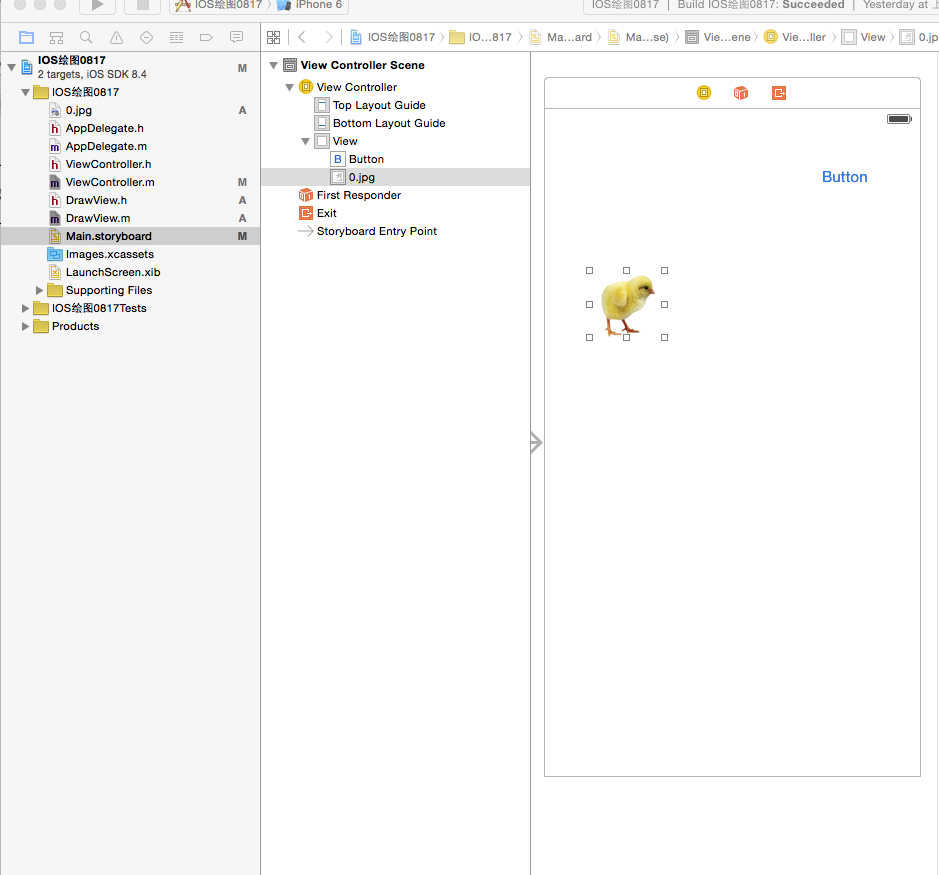
@property (weak, nonatomic) IBOutlet UIImageView *imageView;
- (IBAction)doTouchButton:(id)sender;
@end
@implementation ViewController
- (void)viewDidLoad {
[super viewDidLoad];
DrawView *view=[[DrawView alloc]initWithFrame:self.view.frame];
view.backgroundColor =[UIColor whiteColor];
// [self.view addSubview:view];//去掉注释后,显示绘图
}
- (void)didReceiveMemoryWarning {
[super didReceiveMemoryWarning];
// Dispose of any resources that can be recreated.
}
- (IBAction)doTouchButton:(id)sender {
//小鸡走五角星
CGMutablePathRef startPath=CGPathCreateMutable();//创建一个路径
CGPathMoveToPoint(startPath, NULL, 160, 100);
CGPathAddLineToPoint(startPath, NULL, 220, 280);
CGPathAddLineToPoint(startPath, NULL, 60, 170);
CGPathAddLineToPoint(startPath, NULL, 260, 170);
CGPathAddLineToPoint(startPath, NULL, 100, 280);
CGPathAddLineToPoint(startPath, NULL, 160, 100);
CAKeyframeAnimation *animation=[CAKeyframeAnimation animationWithKeyPath:@"position"];
animation.duration=5.0;//设置动画时间
[animation setPath:startPath];//设置路径
[_imageView.layer addAnimation:animation forKey:@"position"];
}
@end
/********************************************************/
//
// DrawView.h
// IOS绘图0817
//
// Created by 张艳锋 on 15/8/17.
// Copyright (c) 2015年 张艳锋. All rights reserved.
//
#import <UIKit/UIKit.h>
@interface DrawView : UIView
@end
/********************************************************/
//
#import "DrawView.h"
@implementation DrawView
// Only override drawRect: if you perform custom drawing.
// An empty implementation adversely affects performance during animation.
- (void)drawRect:(CGRect)rect {
// Drawing code
CGContextRef context=UIGraphicsGetCurrentContext();//绘制图形上下文
CGContextSetLineWidth(context, 2.0);//设直线条宽度
[[UIColor redColor]setStroke];//设置线条颜色
CGPoint point1=CGPointMake(160, 100);//上
CGPoint point2=CGPointMake(60, 170);//左
CGPoint point3=CGPointMake(260, 170);//右
CGPoint point4=CGPointMake(100, 280);//下左
CGPoint point5=CGPointMake(220, 280);//下右
CGContextMoveToPoint(context, point1.x, point1.y);
CGContextAddLineToPoint(context, point5.x, point5.y);
CGContextAddLineToPoint(context, point2.x, point2.y);
CGContextAddLineToPoint(context, point3.x, point3.y);
CGContextAddLineToPoint(context, point4.x, point4.y);
// CGContextAddLineToPoint(context, point1.x, point1.y);
CGContextClosePath(context);//闭合区域函数
// CGContextStrokePath(context);
[[UIColor orangeColor]setFill];//设置填充颜色
CGContextDrawPath(context, kCGPathFillStroke);//进行描绘函数
// kCGPathFill,//无边线,包围区域全部填充
// kCGPathEOFill,//无边线,包围区域重合部分不填充
// kCGPathStroke,//只显边线,不填充
// kCGPathFillStroke,//填充又显示边线
// kCGPathEOFillStroke//有边线包围区域重合部分不填充
//正方形
//CGContextAddRect矩形
//CGContextAddEllipseInRect椭圆 圆
CGContextSetRGBStrokeColor(context, 1, 0, 0, 1);//红色
CGContextSetLineWidth(context, 1.5);
CGContextAddRect(context, CGRectMake(100, 60, 80, 80));//正方形
CGContextAddRect(context, CGRectMake(200, 60, 100, 200));//矩形
CGContextAddEllipseInRect(context,CGRectMake(50, 100, 100, 60));//椭圆
CGContextAddEllipseInRect(context,CGRectMake(50, 200, 100, 100));//圆
CGContextStrokePath(context);
}
IOS绘图的更多相关文章
- 论文第4章:iOS绘图平台的实现
面向移动设备的矢量绘图平台设计与实现 Design and Implementation of Mobile Device-oriented Vector Drawing Platform 引用本论文 ...
- iOS绘图教程 (转,拷贝以记录)
本文是<Programming iOS5>中Drawing一章的翻译,考虑到主题完整性,在翻译过程中我加入了一些书中没有涉及到的内容.希望本文能够对你有所帮助. 转自:http://www ...
- iOS绘图教程
本文是<Programming iOS5>中Drawing一章的翻译,考虑到主题完整性,翻译版本中加入了一些书中未涉及到的内容.希望本文能够对你有所帮助.(本文由海水的味道翻译整理,转载请 ...
- iOS绘图框架CoreGraphics分析
由于CoreGraphics框架有太多的API,对于初次接触或者对该框架不是十分了解的人,在绘图时,对API的选择会感到有些迷茫,甚至会觉得iOS的图形绘制有些繁琐.因此,本文主要介绍一下iOS的绘图 ...
- iOS绘图系统UIKit与Core Graphics
概述 iOS主要的绘图系统有UIKit,Core Graphics,Core Animation,Core Image,Open GL等,本片博文主要介绍UIKit与Core Graphics的绘图系 ...
- IOS 绘图教程Quartz2D
http://www.cocoachina.com/industry/20140115/7703.html http://www.cnblogs.com/wendingding/p/3803020.h ...
- ios绘图时的坐标处理
在iOS中,进行绘图操作时,一般主要是在UIView:drawRect中调用 UIGraphicsBeginImageContextWithOptions等一系列函数,有时候直接画图就行,比如UIIm ...
- iOS绘图UIBezierPath 和 Core Graphics框架
前言 iOS系统本身提供了两套绘图的框架,即UIBezierPath 和 Core Graphics.而前者所属UIKit,其实是对Core Graphics框架关于path的进一步封装,所以使用起来 ...
- iOS绘图—— UIBezierPath 和 Core Graphics
前言 iOS系统本身提供了两套绘图的框架,即UIBezierPath 和 Core Graphics.而前者所属UIKit,其实是对Core Graphics框架关于path的进一步封装,所以使用起来 ...
随机推荐
- 《linux性能及调优指南》
http://blog.chinaunix.net/uid-26000296-id-4065871.html
- C#开源项目
原文: http://alance.iteye.com/blog/693987 一.AOP框架 Encase 是C#编写开发的为.NET平台提供的AOP框架.Encase 独特的提供了 ...
- 代码片段 - Golang 实现简单的 Web 服务器
------------------------------ 下面一段代码,实现了最简单的 Web 服务器: 编译环境: Linux Mint 18 Cinnamon 64-bit Golang 1. ...
- js中获取函数的参数
刘海波 2015/2/11 9:11:43 tmp = tmp.replace(/\{(\d+)\}/g, function($1, $2) {return addrow.arguments[pars ...
- 关于apache的重启
一:Apache重起的最好方法apachectl graceful http://blog.csdn.net/qianling3439/article/details/8622618 二:请问apac ...
- 配置Sublime Text 3的Python开发环境
最近的项目是用Python开发自动化测试脚本的,所以使用Python比较多.我用的编辑器是Sublime Text3. Sublime Text 3是一个轻量级的跨平台文字编辑器,一经面世便被认为是一 ...
- PHP.12-PHP-设计文件上传类
设计文件上传类 [PHP参数详解]{文件上传} ********************** *#构造方法编写 ********************** 此种传参方法规定必须用户必须按响应位置输入 ...
- 2.1.6 用ProtectX实现扫描的反击与追踪
ProtectX是一款在用户连接网络时保护电脑的工具,可以同时监视20个端口,还可以帮助追踪攻击者的来源.一旦有人尝试连接到用户的电脑,它即可发出声音警告并将入侵者的IP位址记录下来,可以防止黑客入侵 ...
- [转]Advanced Oracle SQL Developer Features
本文转自:http://www.oracle.com/technetwork/cn/server-storage/linux/sqldev-adv-otn-092384.html Advanced O ...
- 转: 在线office的协作工具列表
产品完备性.协作功能.功能完备性对比 <img src="https://pic2.zhimg.com/af14a86eedcb93962e41e47788de5989_b.p ...