
Listener监听器生命周期
一、Listener生命周期
listener是web三大组件之一,是servlet监听器,用来监听请求,监听服务端的操作。
listener分为:(都是接口类,必须实现相应方法)
1.生命周期监听器(3个)
- ServletContextListener
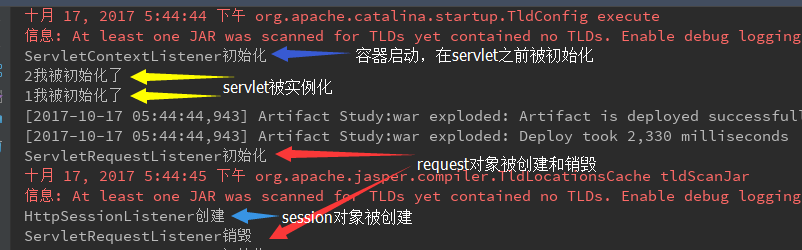
- requestInitialized 在容器启动时被调用(在servlet被实例化前执行)
- requestDestroyed 在容器销毁时调用(在servlet被销毁后执行)
- HttpSessionListener
- sessionCreated 在HttpSession创建后调用
- sessionDestroyed 在HttpSession销毁前调用(执行session.invalidate();方法)
- ServletRequestListener
- requestDestroyed 在request对象创建后调用(发起请求)
- requestInitialized 在request对象销毁前调用(请求结束)
- ServletContextListener
2.属性变化监听器(3个)
- attributeAdded(ServletContextAttributeEvent event) 向appliction中添加属性时调用
- attributeRemoved(ServletContextAttributeEvent event) 从appliction中删除属性时调用
- attributeReplaced(ServletContextAttributeEvent event) 替换application中的属性时调用
- HttpSessionAttributeListener
- attributeAdded(HttpSessionBindingEvent event)
- attributeRemoved(HttpSessionBindingEvent event)
- attributeReplaced(HttpSessionBindingEvent event)
- ServletRequestAttributeListener
- attributeAdded(ServletRequestAttributeEvent event)
- attributeRemoved(ServletRequestAttributeEvent event)
- attributeReplaced(ServletRequestAttributeEvent event)
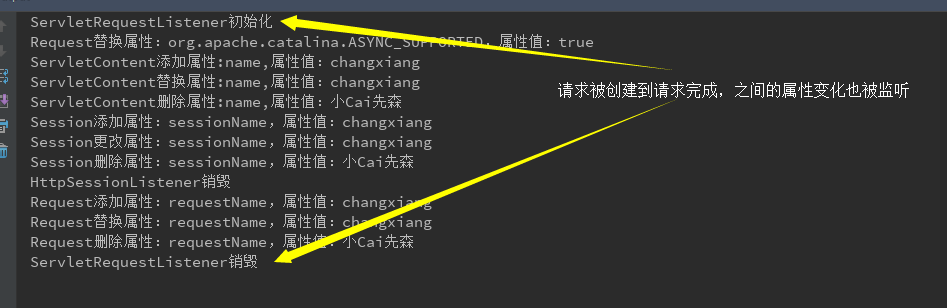
以上监听器接口除了传参不同,方法名都是一样的。分别监听application,session,request对象的属性变化。
3.session中指定类属性变化监听器(2)
- HttpSessionBindingListener
- valueBound(HttpSessionBindingEvent event) 当该类实例设置进session域中时调用
- valueUnbound(HttpSessionBindingEvent event) 当该类的实例从session域中移除时调用
- HttpSessionActivationListener
- sessionWillPassivate(HttpSessionEvent se) 当对象session被序列化(钝化)后调用
- sessionDidActivate(HttpSessionEvent se) 当对象session被反序列化(活化)后调用
- HttpSessionBindingListener
二、测试范例
1.生命周期监听:
ServletContentAttribute_Listener.java
 public class ServletContentAttribute_Listener implements ServletContextListener {

     /**

      * ServletContextListener实现方法

      * @param sce

      */

     public void contextInitialized(ServletContextEvent sce) {

         System.out.println("ServletContextListener初始化");

     }

     public void contextDestroyed(ServletContextEvent sce) {

         System.out.println("ServletContextListener销毁");

     }

 }
其他两个监听器类似,不在重复贴出。
在web.xml中配置
 <!-- 监听器 -->

   <!-- servlet监听器 -->

   <listener>

     <listener-class>study.myListener.ServletContentAttribute_Listener</listener-class>

   </listener>

   <!-- session监听器 -->

   <listener>

     <listener-class>study.myListener.HttpSessionAttribute_Listener</listener-class>

   </listener>

   <!-- request监听器-->

   <listener>

     <listener-class>study.myListener.ServletRequestAttribute_Listener</listener-class>

   </listener>
运行结果:

2.属性监听:
ServletContentAttribute_Listener.java
 public class ServletContentAttribute_Listener implements ServletContextAttributeListener{

     /**

      * ServletContextAttributeListener实现方法

      * @param event

      */

     public void attributeAdded(ServletContextAttributeEvent event) {

         String meg = MessageFormat.format("ServletContent添加属性:{0},属性值:{1}",event.getName(),event.getValue());

         System.out.println(meg);

     }

     public void attributeRemoved(ServletContextAttributeEvent event) {

         String meg = MessageFormat.format("ServletContent删除属性:{0},属性值:{1}",event.getName(),event.getValue());

         System.out.println(meg);

     }

     public void attributeReplaced(ServletContextAttributeEvent event) {

         String meg = MessageFormat.format("ServletContent替换属性:{0},属性值:{1}",event.getName(),event.getValue());

         System.out.println(meg);

     }

 }
另外两个监听器类似,不在赘诉。接下来用jsp页面测试
listenerDemo.jsp
 <%--

   Created by IntelliJ IDEA.

   User: Administrator

   Date: 2017/10/17

   Time: 15:28

   To change this template use File | Settings | File Templates.

 --%>

 <%@ page contentType="text/html;charset=UTF-8" language="java" %>

 <html>

 <head>

     <title>监听器设置</title>

 </head>

 <body>

     <%

         /**

          * servlet监听

          */

         application.setAttribute("name","changxiang");

         application.setAttribute("name","小Cai先森");

         application.removeAttribute("name");

         /**

          * session监听

          */

         session.setAttribute("sessionName","changxiang");

         session.setAttribute("sessionName","小Cai先森");

         session.removeAttribute("sessionName");

         session.invalidate();

         /**

          * request监听

          */

         request.setAttribute("requestName","changxiang");

         request.setAttribute("requestName","小Cai先森");

         request.removeAttribute("requestName");

     %>

 </body>

 </html>
执行结果如下:
注意:其中遇到一个问题:就是在启动tomcat的时候servletcontextListener监听执行了两次,最后删除掉server.xml中 Context 的手动配置,这样就不会加载两次了。
解决思路:http://blog.csdn.net/shaokai132333/article/details/53328258
Listener监听器生命周期的更多相关文章
- filter和listener的生命周期
filter(过滤器)和listener(监听器)的生命周期 老实说 生命周期要是说成作用的时间范围我会理解的更好 filter package com.javaweb.filter; import ...
- servelt filter listener 的生命周期
1. servlet 当第一次请求一个servlet资源时,servlet容器创建这个servlet实例,并调用他的 init(ServletConfig config)做一些初始化的工作,然后 ...
- Java实现生命周期管理机制
先扯再说 最近一直在研究某个国产开源的MySQL数据库中间件,拉下其最新版的代码到eclipse后,启动起来,然后做各种测试和代码追踪:用完想要关闭它时,拉出它的STOP类想要运行时,发现这个类里赫然 ...
- 在Listener(监听器)定时启动的TimerTask(定时任务)中使用Spring@Service注解的bean
1.有时候在项目中需要定时启动某个任务,对于这个需求,基于JavaEE规范,我们可以使用Listener与TimerTask来实现,代码如下: public class TestTaskListene ...
- [原创]java WEB学习笔记47:Servlet 监听器简介, ServletContext(Application 对象), HttpSession (Session 对象), HttpServletRequest (request 对象) 监听器,利用listener理解 三个对象的生命周期
本博客为原创:综合 尚硅谷(http://www.atguigu.com)的系统教程(深表感谢)和 网络上的现有资源(博客,文档,图书等),资源的出处我会标明 本博客的目的:①总结自己的学习过程,相当 ...
- JavaWEB 通过Listener理解域对象生命周期
利用 ServletRequestListener.HttpSessionListener 以及 ServletContextListener 可以把request,session,以及Applica ...
- JavaEE(16) - JPA生命周期及监听器
1. 理解实体的生命周期 2. 为实体生命周期事件定义监听器 3. 通过监听实现回调 4. 排除默认监听器和父类上定义的监听器 1. 理解实体的生命周期(Net Beans创建Java Project ...
- 在web.xml中配置监听器来控制ioc容器生命周期
5.整合关键-在web.xml中配置监听器来控制ioc容器生命周期 原因: 1.配置的组件太多,需保障单实例 2.项目停止后,ioc容器也需要关掉,降低对内存资源的占用. 项目启动创建容器,项目停止销 ...
- 无废话Android之activity的生命周期、activity的启动模式、activity横竖屏切换的生命周期、开启新的activity获取他的返回值、利用广播实现ip拨号、短信接收广播、短信监听器(6)
1.activity的生命周期 这七个方法定义了Activity的完整生命周期.实现这些方法可以帮助我们监视其中的三个嵌套生命周期循环: (1)Activity的完整生命周期 自第一次调用onCrea ...
随机推荐
- maven配置全局的jdk和配置局部的jdk
配置全局的jdk需要修改maven的setting.xml文件 <profile> <id>jdk17</id> <activation> <ac ...
- js在函数中未定义的变量的处理
<html> <head> <script type="text/javascript"> var z=1; function abc(){ x ...
- C++学习笔记第一天:基础
前言 N年前学的C,经过VB.JAVA.JS.C#等后辈的轮番蹂躏,当初学的那点儿东西早就还给老师了 现在有了在桌面端实现 Native + Web 的初衷,需要利用CEF开源组件来封装这个Nativ ...
- Spring 框架系列之事务管理
1.事务回顾 (1).什么是事务: 事务是逻辑上的一组操作,组成这组操作的各个逻辑单元,要么一起成功,要么一起失败. (2).事务特性(ACID) 原子性 :强调事务的不可分割 一致性 :事务的执行的 ...
- 转载微信公众号 测试那点事:Jmeter乱码解决
原文地址: http://mp.weixin.qq.com/s/4Li5z_-rT0HPPQx9Iyi5UQ 中文乱码一直都是比较让人棘手的问题,我们在使用Jmeter的过程中,也会遇到中文乱码问题 ...
- CEPH RGW集群和bucket的zone group 不一致导致的404异常解决 及 使用radosgw-admin metadata 命令设置bucket metadata 的方法
问题现象: 最近在研究zonegroup的配置操作,发现在配置zonegroup后修改了default zone,导致访问对象报404错误. 问题原因: rgw 日志 报异常'request fo ...
- 一个可以自由定制外观、支持拖拽消除的MaterialDesign风格Android BadgeView
为了尊重作者,先放上链接:https://github.com/qstumn/BadgeView BadgeView 一个可以自由定制外观.支持拖拽消除的MaterialDesign风格Android ...
- Android项目中的换肤总结
纵观现在各种Android app,其换肤需求可以归为 白天/黑夜主题切换(或者别的名字,通常2套),如同花顺/自选股/天天动听等,UI表现为一个switcher. 多种主题切换,通常为会员特权,如Q ...
- FFmpeg-音频和视频应用程序的瑞士军刀
FFmpeg是一个开源免费跨平台的视频和音频流方案,属于自由软件,采用LGPL或GPL许可证(依据你选择的组件).它提供了录制.转换以及流化音视频的完整解决方案.它包含了非常先进的音频/视频编解码库l ...
- dojo中引入FusionCharts柱状图报错
1.今天,做项目的过程中,我发现Java后台查询的数据都是正确的,并且拼接成JSON格式也正确,但是传到JSP页面时,图无法显示出来还报错,后来经过检查发现是JavaScript和引入FusionCh ...