
Along with all the above benefits, you cannot overlook the space efficiency and performance gains in using DataFrames and Dataset APIs for two reasons.
Of all the developers’ delight, a set of APIs that makes them productive, that are easy to use, and that are intuitive and expressive is the most attractive delight. One of Apache Spark’s appeal to developers has been its easy-to-use APIs, for operating on large datasets, across languages: Scala, Java, Python, and R.
In this blog, I explore three sets of APIs—RDDs, DataFrames, and Datasets—available in a pre-release preview of Apache Spark 2.0; why and when you should use each set; outline their performance and optimization benefits; and enumerate scenarios when to use DataFrames and Datasets instead of RDDs. Mostly, I will focus on DataFrames and Datasets, because in Apache Spark 2.0, these two APIs are unified.
Our primary motivation behind this unification is our quest to simplify Spark by limiting the number of concepts that you have to learn and by offering ways to process structured data. And through structure, Spark can offer higher-level abstraction and APIs as domain specific language constructs.
Resilient Distributed Dataset (RDD)
RDD was the primary user-facing API in Spark since its inception. At the core, an RDD is an immutable distributed collection of elements of your data, partitioned across nodes in your cluster that can be operated in parallel with a low-level API that offers transformations andactions.
When to use RDDs?
Consider these scenarios or common use cases for using RDDs when:
- you want low-level transformation and actions and control on your dataset;
- your data is unstructured, such as media streams or streams of text;
- you want to manipulate your data with functional programming constructs than domain specific expressions;
- you don’t care about imposing a schema, such as columnar format, while processing or accessing data attributes by name or column; and
- you can forgo some optimization and performance benefits available with DataFrames and Datasets for structured and semi-structured data.
What happens to RDDs in Apache Spark 2.0?
You may ask: Are RDDs being relegated as second class citizens? Are they being deprecated?
The answer is a resounding NO!
What’s more, as you will note below, you can seamlessly move between DataFrame or Dataset and RDDs at will—by simple API method calls—and DataFrames and Datasets are built on top of RDDs.
DataFrames
Like an RDD, a DataFrame is an immutable distributed collection of data. Unlike an RDD, data is organized into named columns, like a table in a relational database. Designed to make large data sets processing even easier, DataFrame allows developers to impose a structure onto a distributed collection of data, allowing higher-level abstraction; it provides a domain specific language API to manipulate your distributed data; and makes Spark accessible to a wider audience, beyond specialized data engineers.
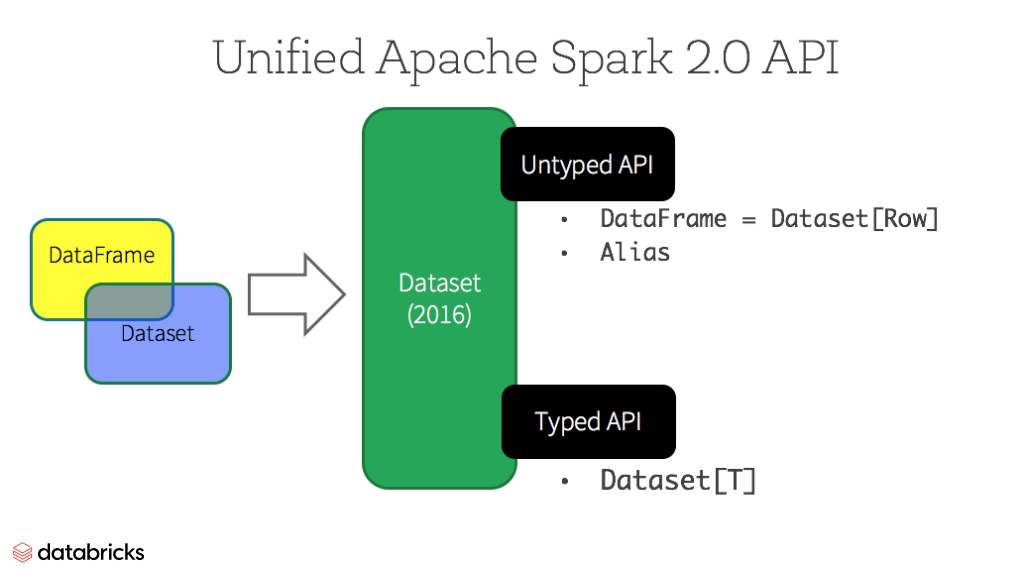
In our preview of Apache Spark 2.0 webinar and subsequent blog, we mentioned that in Spark 2.0, DataFrame APIs will merge with Datasets APIs, unifying data processing capabilities across libraries. Because of this unification, developers now have fewer concepts to learn or remember, and work with a single high-level and type-safe API called Dataset.
Datasets
Starting in Spark 2.0, Dataset takes on two distinct APIs characteristics: a strongly-typed API and an untyped API, as shown in the table below. Conceptually, consider DataFrame as an aliasfor a collection of generic objects Dataset[Row], where a Row is a generic untyped JVM object. Dataset, by contrast, is a collection of strongly-typed JVM objects, dictated by a case class you define in Scala or a class in Java.
Typed and Un-typed APIs
| Language | Main Abstraction |
|---|---|
| Scala | Dataset[T] & DataFrame (alias for Dataset[Row]) |
| Java | Dataset[T] |
| Python* | DataFrame |
| R* | DataFrame |
Note: Since Python and R have no compile-time type-safety, we only have untyped APIs, namely DataFrames.
Benefits of Dataset APIs
As a Spark developer, you benefit with the DataFrame and Dataset unified APIs in Spark 2.0 in a number of ways.
1. Static-typing and runtime type-safety
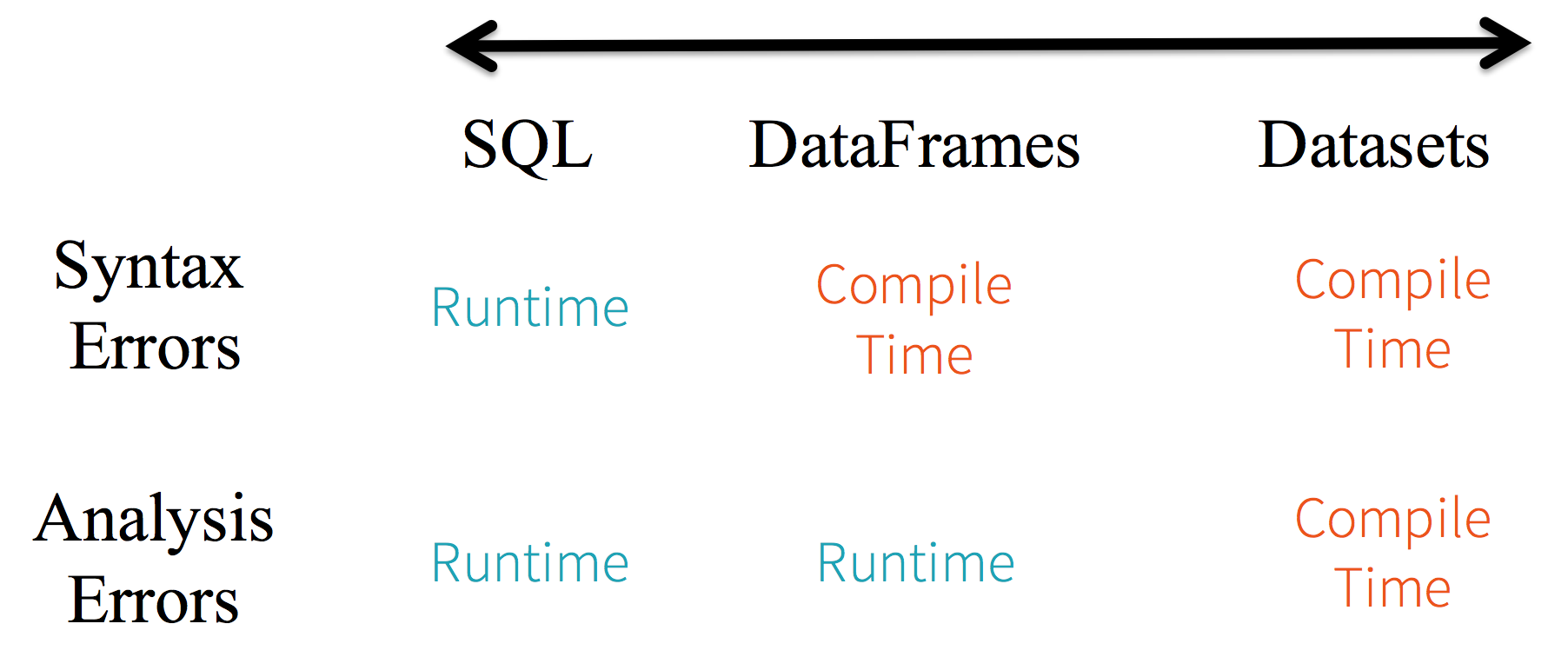
Consider static-typing and runtime safety as a spectrum, with SQL least restrictive to Dataset most restrictive. For instance, in your Spark SQL string queries, you won’t know a syntax error until runtime (which could be costly), whereas in DataFrames and Datasets you can catch errors at compile time (which saves developer-time and costs). That is, if you invoke a function in DataFrame that is not part of the API, the compiler will catch it. However, it won’t detect a non-existing column name until runtime.
At the far end of the spectrum is Dataset, most restrictive. Since Dataset APIs are all expressed as lambda functions and JVM typed objects, any mismatch of typed-parameters will be detected at compile time. Also, your analysis error can be detected at compile time too, when using Datasets, hence saving developer-time and costs.
All this translates to is a spectrum of type-safety along syntax and analysis error in your Spark code, with Datasets as most restrictive yet productive for a developer.
2. High-level abstraction and custom view into structured and semi-structured data
DataFrames as a collection of Datasets[Row] render a structured custom view into your semi-structured data. For instance, let’s say, you have a huge IoT device event dataset, expressed as JSON. Since JSON is a semi-structured format, it lends itself well to employing Dataset as a collection of strongly typed-specific Dataset[DeviceIoTData].
- {"device_id": 198164, "device_name": "sensor-pad-198164owomcJZ", "ip": "80.55.20.25", "cca2": "PL", "cca3": "POL", "cn": "Poland", "latitude": 53.080000, "longitude": 18.620000, "scale": "Celsius", "temp": 21, "humidity": 65, "battery_level": 8, "c02_level": 1408, "lcd": "red", "timestamp" :1458081226051}
You could express each JSON entry as DeviceIoTData, a custom object, with a Scala case class.
- case class DeviceIoTData (battery_level: Long, c02_level: Long, cca2: String, cca3: String, cn: String, device_id: Long, device_name: String, humidity: Long, ip: String, latitude: Double, lcd: String, longitude: Double, scale:String, temp: Long, timestamp: Long)
Next, we can read the data from a JSON file.
- // read the json file and create the dataset from the
- // case class DeviceIoTData
- // ds is now a collection of JVM Scala objects DeviceIoTData
- val ds = spark.read.json("/databricks-public-datasets/data/iot/iot_devices.json").as[DeviceIoTData]
Three things happen here under the hood in the code above:
- Spark reads the JSON, infers the schema, and creates a collection of DataFrames.
- At this point, Spark converts your data into DataFrame = Dataset[Row], a collection of generic Row object, since it does not know the exact type.
- Now, Spark converts the Dataset[Row] -> Dataset[DeviceIoTData] type-specific Scala JVM object, as dictated by the class DeviceIoTData.
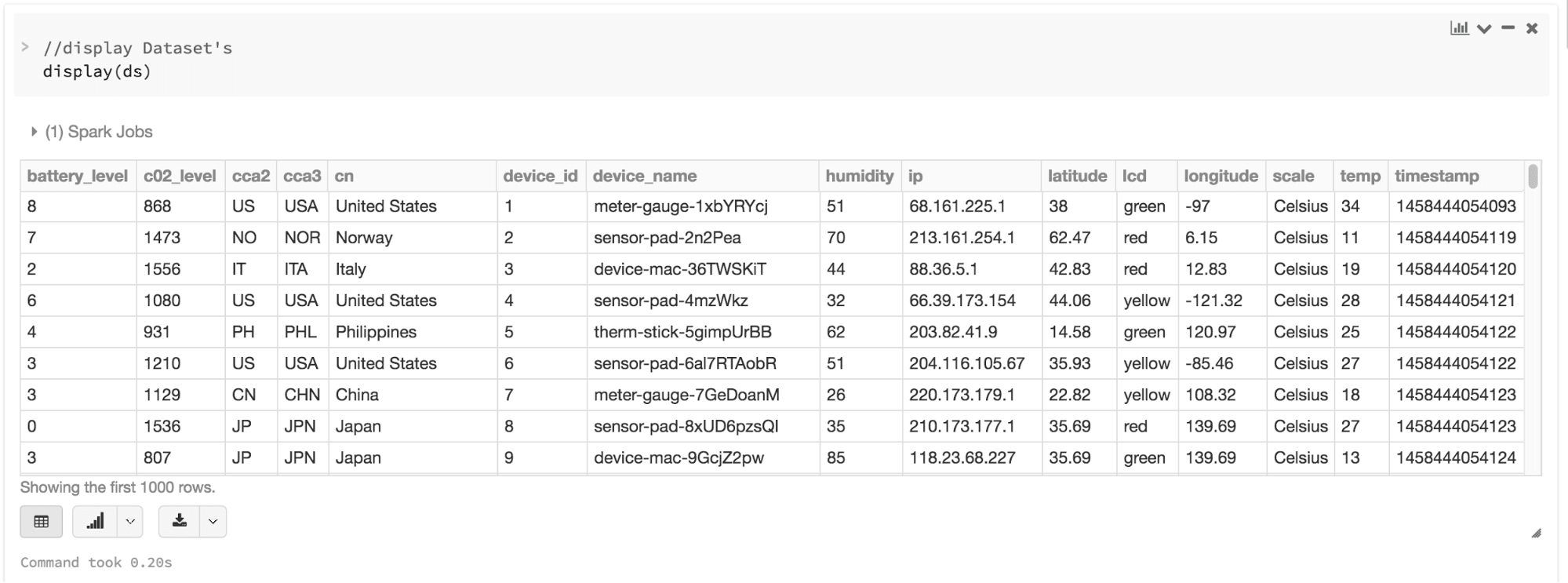
Most of us have who work with structured data are accustomed to viewing and processing data in either columnar manner or accessing specific attributes within an object. With Dataset as a collection of Dataset[ElementType] typed objects, you seamlessly get both compile-time safety and custom view for strongly-typed JVM objects. And your resulting strongly-typed Dataset[T]from above code can be easily displayed or processed with high-level methods.
3. Ease-of-use of APIs with structure
Although structure may limit control in what your Spark program can do with data, it introduces rich semantics and an easy set of domain specific operations that can be expressed as high-level constructs. Most computations, however, can be accomplished with Dataset’s high-level APIs. For example, it’s much simpler to perform agg, select, sum, avg, map, filter, or groupByoperations by accessing a Dataset typed object’s DeviceIoTData than using RDD rows’ data fields.
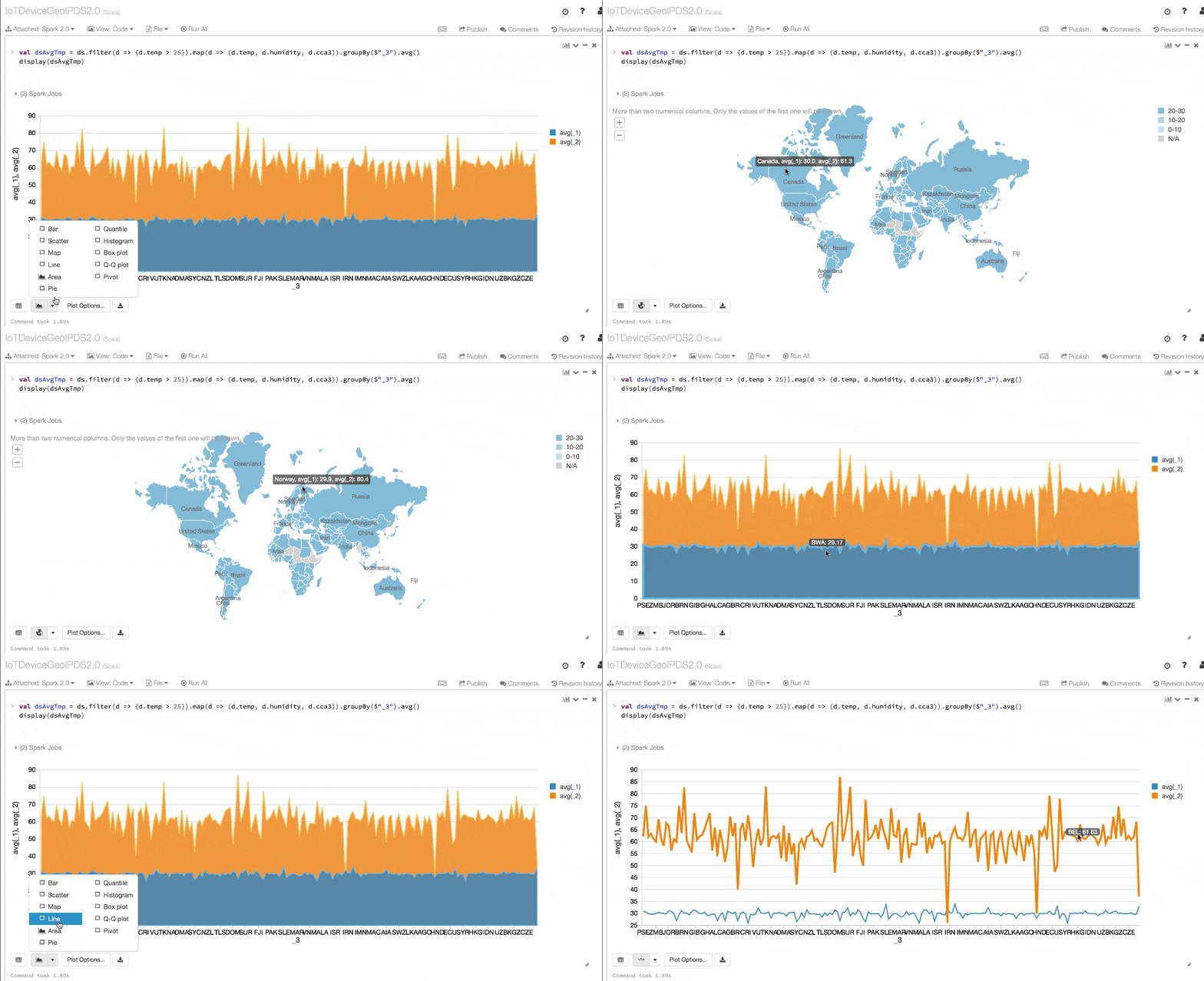
Expressing your computation in a domain specific API is far simpler and easier than with relation algebra type expressions (in RDDs). For instance, the code below will filter() and map() create another immutable Dataset.
- // Use filter(), map(), groupBy() country, and compute avg()
- // for temperatures and humidity. This operation results in
- // another immutable Dataset. The query is simpler to read,
- // and expressive
- val dsAvgTmp = ds.filter(d => {d.temp > 25}).map(d => (d.temp, d.humidity, d.cca3)).groupBy($"_3").avg()
- //display the resulting dataset
- display(dsAvgTmp)
4. Performance and Optimization
Along with all the above benefits, you cannot overlook the space efficiency and performance gains in using DataFrames and Dataset APIs for two reasons.
First, because DataFrame and Dataset APIs are built on top of the Spark SQL engine, it uses Catalyst to generate an optimized logical and physical query plan. Across R, Java, Scala, or Python DataFrame/Dataset APIs, all relation type queries undergo the same code optimizer, providing the space and speed efficiency. Whereas the Dataset[T] typed API is optimized for data engineering tasks, the untyped Dataset[Row] (an alias of DataFrame) is even faster and suitable for interactive analysis.
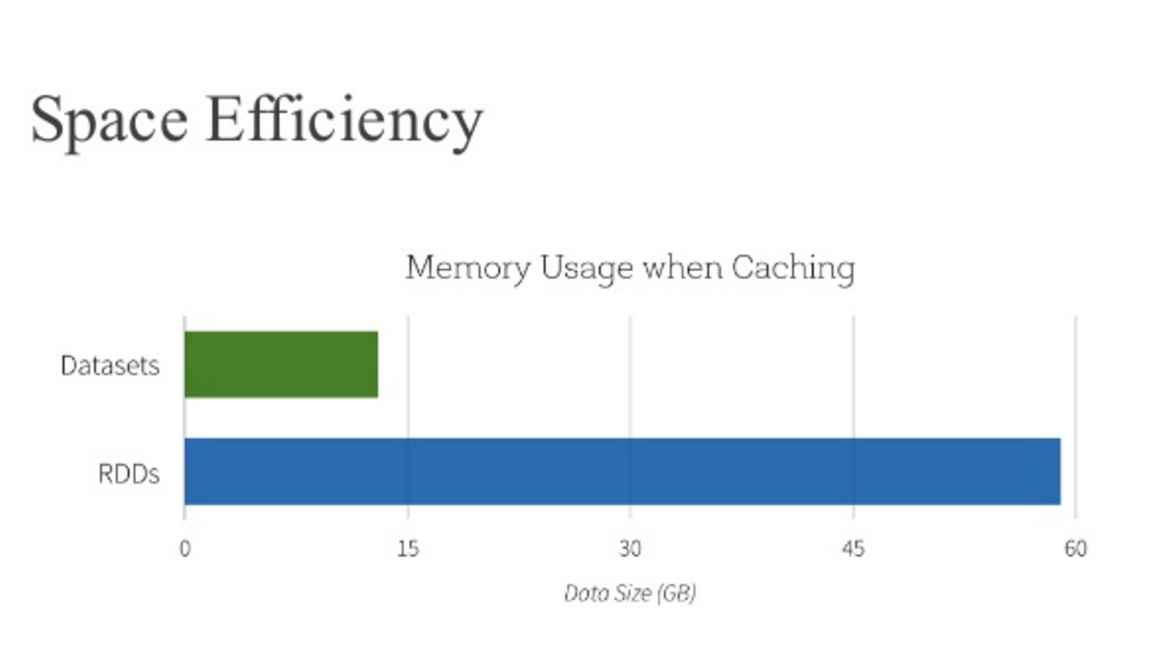
Second, since Spark as a compiler understands your Dataset type JVM object, it maps your type-specific JVM object to Tungsten’s internal memory representation using Encoders. As a result, Tungsten Encoders can efficiently serialize/deserialize JVM objects as well as generate compact bytecode that can execute at superior speeds.
When should I use DataFrames or Datasets?
- If you want rich semantics, high-level abstractions, and domain specific APIs, use DataFrame or Dataset.
- If your processing demands high-level expressions, filters, maps, aggregation, averages, sum, SQL queries, columnar access and use of lambda functions on semi-structured data, use DataFrame or Dataset.
- If you want higher degree of type-safety at compile time, want typed JVM objects, take advantage of Catalyst optimization, and benefit from Tungsten’s efficient code generation, use Dataset.
- If you want unification and simplification of APIs across Spark Libraries, use DataFrame or Dataset.
- If you are a R user, use DataFrames.
- If you are a Python user, use DataFrames and resort back to RDDs if you need more control.
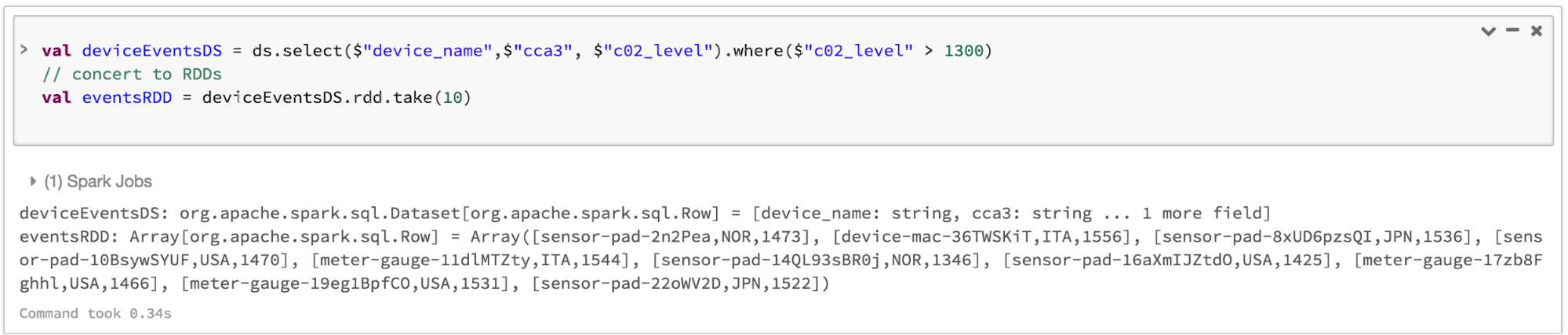
Note that you can always seamlessly interoperate or convert from DataFrame and/or Dataset to an RDD, by simple method call .rdd. For instance,
- // select specific fields from the Dataset, apply a predicate
- // using the where() method, convert to an RDD, and show first 10
- // RDD rows
- val deviceEventsDS = ds.select($"device_name", $"cca3", $"c02_level").where($"c02_level" > 1300)
- // convert to RDDs and take the first 10 rows
- val eventsRDD = deviceEventsDS.rdd.take(10)
Bringing It All Together
In summation, the choice of when to use RDD or DataFrame and/or Dataset seems obvious. While the former offers you low-level functionality and control, the latter allows custom view and structure, offers high-level and domain specific operations, saves space, and executes at superior speeds.
As we examined the lessons we learned from early releases of Spark—how to simplify Spark for developers, how to optimize and make it performant—we decided to elevate the low-level RDD APIs to a high-level abstraction as DataFrame and Dataset and to build this unified data abstraction across libraries atop Catalyst optimizer and Tungsten.
Pick one—DataFrames and/or Dataset or RDDs APIs—that meets your needs and use-case, but I would not be surprised if you fall into the camp of most developers who work with structure and semi-structured data.
What’s Next?
You can try the pre-release preview of Apache Spark 2.0 on Databricks and run this accompanying notebook. If you haven’t signed up yet, try Databricks now.
In the coming weeks, we’ll have a series of blogs on Structured Streaming. Stay tuned.

Along with all the above benefits, you cannot overlook the space efficiency and performance gains in using DataFrames and Dataset APIs for two reasons.的更多相关文章
- A Tale of Three Apache Spark APIs: RDDs, DataFrames, and Datasets(中英双语)
文章标题 A Tale of Three Apache Spark APIs: RDDs, DataFrames, and Datasets 且谈Apache Spark的API三剑客:RDD.Dat ...
- 11 Clever Methods of Overfitting and how to avoid them
11 Clever Methods of Overfitting and how to avoid them Overfitting is the bane of Data Science in th ...
- 刨根问底U3D---Vector3 你到底是蔬菜呢还是水果呢?
事情的起因还是因为一段代码,因为在做一个2D TileBase的游戏 所以需要有一个简单的 Tile坐标到世界坐标的变换 public static Vector3 GetTileWorldPosBy ...
- Codeforces Round #Pi (Div. 2) B. Berland National Library set
B. Berland National LibraryTime Limit: 2 Sec Memory Limit: 256 MB 题目连接 http://codeforces.com/contest ...
- [转]Efficiently Paging Through Large Amounts of Data
本文转自:http://msdn.microsoft.com/en-us/library/bb445504.aspx Scott Mitchell April 2007 Summary: This i ...
- Facebook MyRocks at MariaDB
Recently my colleague Rasmus Johansson announced that MariaDB is adding support for the Facebook MyR ...
- Temporary Segments: What Happens When a Sort Occurs (文档 ID 102339.1)
APPLIES TO: Oracle Database - Enterprise Edition - Version 8.1.7.4 to 11.2.0.1 [Release 8.1.7 to 11. ...
- Codeforces Round #Pi (Div. 2) B. Berland National Library 模拟
B. Berland National LibraryTime Limit: 20 Sec Memory Limit: 256 MB 题目连接 http://codeforces.com/contes ...
- Network Load Balancing Technical Overview--reference
http://technet.microsoft.com/en-us/library/bb742455.aspx Abstract Network Load Balancing, a clusteri ...
随机推荐
- promise 承诺
概念 ES6 原生提供了 Promise 对象. 所谓 Promise,就是一个对象,用来传递异步操作的消息.它代表了某个未来才会知道结果的事件(通常是一个异步操作),并且这个事件提供统一的 API, ...
- eval、exec、execfile
# -*- coding: utf-8 -*- #python 27 #xiaodeng #http://blog.csdn.net/azhao_dn/article/details/6921654 ...
- java 关于操作Collection的一点说明
java 中有一个工具类 Collections 其中的一个方法 static <T> boolean replaceAll(List<T> list, T oldVal, T ...
- 突破单机多实例Elasticsearch
默认大家都是单机单实例es,在实验环境下想尽可能模拟各种场景.单机多实例就出来了... 实验拓扑图 01.es安装这里就不说了 详情:http://www.cnblogs.com/xiaochina/ ...
- My Sql 高效分页
/* *普通分页 *在数据文件上偏移1000000查出10条 */ select * from zoldesk_92game_net_ecms_bj where classid=303 ORDER B ...
- div 模糊效果
-webkit-filter:blur(3px); -moz-filter:blur(3px); filter:url(blur.svg#blur); filter: progid:DXImageTr ...
- 转载:PHP JSON_ENCODE 不编码中文汉字的方法
1.PHP版本5.4(包含)+ json_encode($data, JSON_UNESCAPED_UNICODE); //必须PHP5.4+ 2.PHP版本5.4- function encode_ ...
- DataSnap对象传递
比较简单的方法: 1.引用DBXJSON, DBXJSONReflect 假设有一个类: type TKid = class FirstName: String; LastName: String; ...
- ubuntu(14.4) 安装phpmyadmin
1.下载phpmyadmin文件,然后上传到www目录下,直接通过ip地址进行访问,然后输入mysql账号就可以登录了
- 区块链的java实现
原文地址:http://blog.csdn.net/xiangzhihong8/article/details/53931213 本文90%来着于翻译,原文地址:http://java-lang-pr ...