
JavaScrip——练习(做悬浮框再进一步:悬浮窗后缀悬浮窗——用this.className)
对悬浮窗进一步改进:
用this.className
可以省略script
<!DOCTYPE html PUBLIC "-//W3C//DTD XHTML 1.0 Transitional//EN" "http://www.w3.org/TR/xhtml1/DTD/xhtml1-transitional.dtd">

<html xmlns="http://www.w3.org/1999/xhtml">

<head>

<meta http-equiv="Content-Type" content="text/html; charset=utf-8" />

<title>无标题文档</title>

<style type="text/css">

*{

    margin:0px;

    padding:0px;

    }

.aa

{

    background-color:#FF0;

    height: 40px;

    width: 100px;

    top: 60px;

    left: 100px;

    position: absolute;

    overflow: hidden;

    text-align: center;

    line-height:40px;

    }

    .aaa

{

    background-color:red;

    height: 40px;

    width: 100px;

    top: 60px;

    left: 100px;

    position: absolute;

    overflow:visible;

    text-align: center;

    line-height:40px;

    }

#bb{

    height:120px;

    width:100px;

    top:40px;

    left:0px;

    position:absolute;

    }

table{

    height:120px;

    width:100px;

    text-align:center;

    vertical-align:middle;

}

.tiyu

{

    height:40px;

    width:100px;

    position:absolute;

    overflow:hidden;

    left:0px;

    top:0px;

    }

.zuqiu

{

    height:40px;

    width:100px;

    position:absolute;

    overflow:visible;

    left:0px;

    top:0px;

    }

#zuqiu

{

    height:40px;

    width:100px;

    position:absolute;

    left:100px;

    top:0px;

    background-color:#C63;

    }

.yule

{

    height:40px;

    width:100px;

    position:absolute;

    overflow:hidden;

    left:0px;

    top:40px;

    }

    .bagua

{

    height:40px;

    width:100px;

    position:absolute;

    overflow:visible;

    left:0px;

    top:40px;

    }

#bagua

{

    height:40px;

    width:100px;

    position:absolute;

    left:100px;

    top:0px;

    background-color:#C63;

    }

.guoji

{

    height:40px;

    width:100px;

    position:absolute;

    overflow:hidden;

    left:0px;

    top:80px;

    }

.junshi

{

    height:40px;

    width:100px;

    position:absolute;

    overflow:visible;

    left:0px;

    top:80px;

    }

#junshi

{

    height:40px;

    width:100px;

    position:absolute;

    left:100px;

    top:0px;

    background-color:#C63;

    }

</style>

</head>

<body>

<div class="aa" onmousemove="this.className='aaa'" onmouseout="this.className='aa'">新闻动态

<div id="bb">

<table cellpadding="0" cellspacing="0">

<tr bgcolor="#0000FF">

<td height="40" width="100">

<div class="tiyu" onmouseover="this.className='zuqiu'" onmouseout="this.className='tiyu'">体育

<div id="zuqiu">足球</div></div></td>

</tr>

<tr bgcolor="#FFFF00">

<td height="40" width="100">

<div class="yule" onmousemove="this.className='bagua'" onmouseout="this.className='yule'">娱乐

<div id="bagua">八卦</div></div></td>

</tr>

<tr bgcolor="#00FFFF">

<td height="40" width="100">

<div class="guoji" onmouseover="this.className='junshi'" onmouseout="this.className='guoji'">国际新闻

<div id="junshi">军事</div></div></td>

</tr>

</table>

</div></div>

</body>

</html>
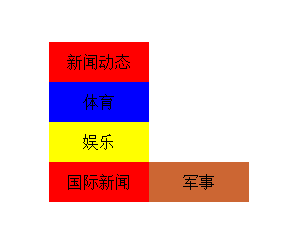
结果是一样的:
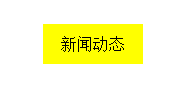
默认时
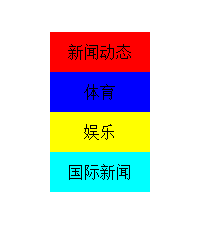
鼠标在新闻动态上面时
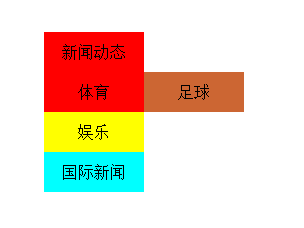
鼠标在体育上面时:
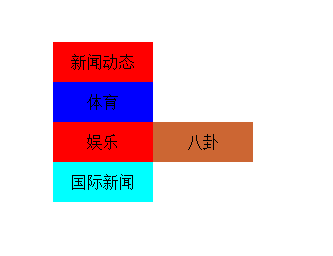
鼠标在娱乐上面时:
鼠标在国际新闻上面时:
JavaScrip——练习(做悬浮框再进一步:悬浮窗后缀悬浮窗——用this.className)的更多相关文章
- JavaScrip——练习(做悬浮框进一步:悬浮窗后缀悬浮窗【感觉这种方法比较麻烦】)
<!DOCTYPE html PUBLIC "-//W3C//DTD XHTML 1.0 Transitional//EN" "http://www.w3.org/ ...
- JavaScrip——练习(做悬浮框)
通过HTML.CSS.JSP来实现 1.首先确定通过div嵌套来实现: 大的div里放默认显示的一层,限制其总层次高,设置超出部分隐藏 小的div里放鼠标移过去时显示的一层:3行1列的表格 1.1.什 ...
- Android悬浮框,在Service中打开悬浮窗;在Service中打开Dialog;
文章介绍了如何在Service中显示悬浮框,在Service中弹出Dialog,在Service中做耗时的轮询操作: 背景需求: 公司的项目现在的逻辑是这样的:发送一个指令,然后3秒一次轮询去查询这个 ...
- Android音视频通话过程中最小化成悬浮框的实现(类似Android8.0画中画效果)
关于音视频通话过程中最小化成悬浮框这个功能的实现,网络上类似的文章很多,但是好像还没看到解释的较为清晰的,这里因为项目需要实现了这样的一个功能,今天我把它记录下来,一方面为了以后用到便于自己查阅,一方 ...
- 小米Adnroid默认禁止悬浮框的使用,导致开发的悬浮框无法接收事件
比如你建了一个悬浮框: WindowManager windowManager = getWindowManager(context); int screenWidth = windowManager ...
- Echarts ecomfe 触摸屏 touch 在IE10下无法显示悬浮框
问题描述: Windows 8 IE10浏览http://echarts.baidu.com/doc/example/line2.html 时,鼠标放置在数据点上时无法显示悬浮框. 正常情况为: 而现 ...
- C# 鼠标悬停在datagridview的某单元格,显示悬浮框效果
今天在做项目时,看到一软件做的悬浮框效果不错,从网上搜罗了一些资料,未见到有十分好的解决办法,只能自已动手,利用datagridview 的ToolTipText 来达到此效果. 以下是我简单实现的代 ...
- Android -- 使用WindowManager实现悬浮框效果
1,原文在这里http://blog.csdn.net/qq_17250009/article/details/52908791,我只是把里面的关键步骤给注释了一下,首先来看一下我们的效果,如图(电脑 ...
- 菜鸟学JS(三)——自动隐藏的悬浮框
今天写一个小实例,用js和css写一个可以自动隐藏的悬浮框.css肯定是用来控制样式的,js用来控制器显示与隐藏的.显示与隐藏通常有两种方法实现:1,用js控制其显示属性:2,用js控制其大小. 今天 ...
随机推荐
- IP数据包格式详解(转)
摘自:http://blog.163.com/hlz_2599/blog/static/1423784742011112195857956/</> TCP/IP协议定义了一个在因特网上传输 ...
- Swift代理造成内存泄漏的解决办法
在swift中,使用代理 ,可能很多人会这样实现: .首先定义一份协议. protocol ToolProrocol{ //代理方法 func didRecieveResults(result:Int ...
- WCF中可以使用SVCUtil.exe生成客户端代理类和配置文件
1.找到如下地址“C:\Windows\System32\cmd.exe” 命令行工具,右键以管理员身份运行(视系统是否为win7 而定) 2.输入如下命令: C:\>cd C ...
- (转)Stack Overflow 2016最新架构探秘
这篇文章主要揭秘 Stack Overflow 截止到 2016 年的技术架构. 首先给出一个直观的数据,让大家有个初步的印象. 相比于 2013 年 11 月,Stack Overflow 在 20 ...
- JQuery中event的preventDefault和stopPropagation介绍
event.preventDefault()阻止默认事件行为的触发. event.stopPropagation()防止事件冒泡到DOM树上,也就是不触发的任何前辈元素上的事件处理函数. <!D ...
- sql server中bit字段实现取反操作
update Fct_StockMove set Disabled=Disabled^1 WHERE MoveId='DCE268E0-2CB3-4D17-AC4E-0046FB459CAD'; 1. ...
- 使用Spring boot开发RestFul 风格项目PUT/DELETE方法不起作用
在使用Spring boot 开发restful 风格的项目,put.delete方法不起作用,解决办法. 实体类Student @Data public class Student { privat ...
- Spring Cloud构建微服务架构(四)分布式配置中心(续)
先来回顾一下,在前文中我们完成了什么: 构建了config-server,连接到Git仓库 在Git上创建了一个config-repo目录,用来存储配置信息 构建了config-client,来获取G ...
- Java:多线程,线程同步,synchronized关键字的用法(同步代码块、非静态同步方法、静态同步方法)
关于线程的同步,可以使用synchronized关键字,或者是使用JDK 5中提供的java.util.concurrent.lock包中的Lock对象.本文探讨synchronized关键字. sy ...
- 【Android】3.17 示例17--周边雷达功能
分类:C#.Android.VS2015.百度地图应用: 创建日期:2016-02-04 一.简介 周边雷达功能同步支持Android和iOS端.它本质是一个连接百度LBS开放平台前端SDK产品和后端 ...