
linux主机上,UnixBench性能测试工具使用
1,下载 wget http://soft.laozuo.org/scripts/UnixBench5.1.3.tgz
[root@VM_0_15_centos test]#

[root@VM_0_15_centos test]# wget http://soft.laozuo.org/scripts/UnixBench5.1.3.tgz

--2018-06-14 16:19:15--  http://soft.laozuo.org/scripts/UnixBench5.1.3.tgz

Resolving soft.laozuo.org (soft.laozuo.org)... 104.236.158.75

Connecting to soft.laozuo.org (soft.laozuo.org)|104.236.158.75|:80... connected.

HTTP request sent, awaiting response... 301 Moved Permanently

Location: https://soft.laozuo.org/scripts/UnixBench5.1.3.tgz [following]

--2018-06-14 16:19:16--  https://soft.laozuo.org/scripts/UnixBench5.1.3.tgz

Connecting to soft.laozuo.org (soft.laozuo.org)|104.236.158.75|:443... connected.

HTTP request sent, awaiting response... 200 OK

Length: 143259 (140K) [application/octet-stream]

Saving to: ‘UnixBench5.1.3.tgz’

100%[===================================================================================================================>] 143,259      178KB/s   in 0.8s

2018-06-14 16:19:17 (178 KB/s) - ‘UnixBench5.1.3.tgz’ saved [143259/143259]
[root@VM_0_15_centos tmp]# chmod 777 UnixBench5.1.3.tgz #解压
[root@VM_0_15_centos tmp]# ll
total 168
-rw-r--r-- 1 root root 504 Jun 5 15:18 cvm_init.log
-rw-r--r-- 1 root root 109 Jun 5 15:18 gpu_init.log
-rw-r--r-- 1 root root 140 Jun 5 15:18 net_affinity.log
-rw-r--r-- 1 root root 26 Jun 5 15:18 nv_gpu_conf.log
-rw-r--r-- 1 root root 154 Jun 5 15:18 setRps.log
drwx------ 3 root root 4096 Jun 5 17:13 systemd-private-f6d6c8ba83254f30889c0ee298bc76ca-ntpd.service-Eej4BN
-rwxrwxrwx 1 root root 143259 Jun 30 2017 UnixBench5.1.3.tgz
-rw------- 1 root root 2113 Jun 14 14:59 yum_save_tx.2018-06-14.14-59.1IElgP.yumtx
[root@VM_0_15_centos tmp]# tar -zxvf UnixBench5.1.3.tgz
UnixBench/
UnixBench/README
UnixBench/src/
UnixBench/src/looper.c
UnixBench/src/time-polling.c
………………
………………
UnixBench/Makefile
UnixBench/USAGE
[root@VM_0_15_centos tmp]# ll
total 172
-rw-r--r-- 1 root root 504 Jun 5 15:18 cvm_init.log
-rw-r--r-- 1 root root 109 Jun 5 15:18 gpu_init.log
-rw-r--r-- 1 root root 140 Jun 5 15:18 net_affinity.log
-rw-r--r-- 1 root root 26 Jun 5 15:18 nv_gpu_conf.log
-rw-r--r-- 1 root root 154 Jun 5 15:18 setRps.log
drwx------ 3 root root 4096 Jun 5 17:13 systemd-private-f6d6c8ba83254f30889c0ee298bc76ca-ntpd.service-Eej4BN
drwxr-xr-x 6 root root 4096 Jan 18 2011 UnixBench
-rwxrwxrwx 1 root root 143259 Jun 30 2017 UnixBench5.1.3.tgz
-rw------- 1 root root 2113 Jun 14 14:59 yum_save_tx.2018-06-14.14-59.1IElgP.yumtx
[root@VM_0_15_centos tmp]# cd UnixBench/
[root@VM_0_15_centos UnixBench]# ll
total 136
-rw-r--r-- 1 root root 9578 Jan 18 2011 Makefile
drwxr-xr-x 2 root root 4096 Jan 18 2011 pgms
-rw-r--r-- 1 root root 17753 Jan 18 2011 README
drwxr-xr-x 2 root root 4096 Jan 18 2011 results
-rwxr-xr-x 1 root root 57798 Jan 18 2011 Run
drwxr-xr-x 2 root root 4096 Jan 18 2011 src
drwxr-xr-x 2 root root 4096 Jan 18 2011 tmpdir
-rw-r--r-- 1 root root 17890 Jan 18 2011 USAGE
-rw-r--r-- 1 root root 4622 Jan 18 2011 WRITING_tmpS
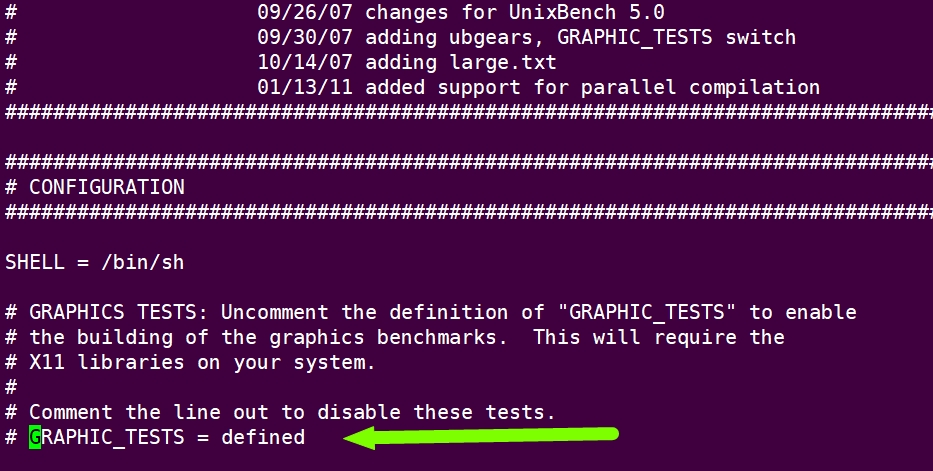
2,修改配置文件,将Makefile中的 GRAPHIC_TESTS = defined 整行注释掉,这样可以不进行图形界面的测试
[root@VM_0_15_centos UnixBench]# vi Makefile
3,make
[root@VM_0_15_centos UnixBench]# make

Checking distribution of files

./pgms  exists

./src  exists

./tmpdir  exists

./results  exists

gcc -o ./pgms/arithoh -DTIME -Wall -pedantic -ansi -O2 -fomit-frame-pointer -fforce-addr -ffast-math -Wall -Darithoh ./src/arith.c

gcc -o ./pgms/register -DTIME -Wall -pedantic -ansi -O2 -fomit-frame-pointer -fforce-addr -ffast-math -Wall -Ddatum='register int' ./src/arith.c

gcc -o ./pgms/short -DTIME -Wall -pedantic -ansi -O2 -fomit-frame-pointer -fforce-addr -ffast-math -Wall -Ddatum=short ./src/arith.c

gcc -o ./pgms/int -DTIME -Wall -pedantic -ansi -O2 -fomit-frame-pointer -fforce-addr -ffast-math -Wall -Ddatum=int ./src/arith.c

gcc -o ./pgms/long -DTIME -Wall -pedantic -ansi -O2 -fomit-frame-pointer -fforce-addr -ffast-math -Wall -Ddatum=long ./src/arith.c

gcc -o ./pgms/float -DTIME -Wall -pedantic -ansi -O2 -fomit-frame-pointer -fforce-addr -ffast-math -Wall -Ddatum=float ./src/arith.c

gcc -o ./pgms/double -DTIME -Wall -pedantic -ansi -O2 -fomit-frame-pointer -fforce-addr -ffast-math -Wall -Ddatum=double ./src/arith.c

gcc -o ./pgms/hanoi -DTIME -Wall -pedantic -ansi -O2 -fomit-frame-pointer -fforce-addr -ffast-math -Wall ./src/hanoi.c

gcc -o ./pgms/syscall -DTIME -Wall -pedantic -ansi -O2 -fomit-frame-pointer -fforce-addr -ffast-math -Wall ./src/syscall.c

./src/syscall.c: In function ‘main’:

./src/syscall.c:93:21: warning: null argument where non-null required (argument 2) [-Wnonnull]

                     execl("/bin/true", (char *) 0);

                     ^

gcc -o ./pgms/context1 -DTIME -Wall -pedantic -ansi -O2 -fomit-frame-pointer -fforce-addr -ffast-math -Wall ./src/context1.c

gcc -o ./pgms/pipe -DTIME -Wall -pedantic -ansi -O2 -fomit-frame-pointer -fforce-addr -ffast-math -Wall ./src/pipe.c

gcc -o ./pgms/spawn -DTIME -Wall -pedantic -ansi -O2 -fomit-frame-pointer -fforce-addr -ffast-math -Wall ./src/spawn.c

gcc -o ./pgms/execl -DTIME -Wall -pedantic -ansi -O2 -fomit-frame-pointer -fforce-addr -ffast-math -Wall ./src/execl.c

In file included from ./src/execl.c:34:0:

./src/big.c: In function ‘getwork’:

./src/big.c:452:11: warning: variable ‘c’ set but not used [-Wunused-but-set-variable]

     char  c;

           ^

cd ./src; gcc -c -DTIME -Wall -pedantic -ansi -DHZ= -O2 -fomit-frame-pointer -fforce-addr -ffast-math -Wall dhry_1.c

cd ./src; gcc -c -DTIME -Wall -pedantic -ansi -DHZ= -O2 -fomit-frame-pointer -fforce-addr -ffast-math -Wall dhry_2.c

gcc -o ./pgms/dhry2 -DTIME -Wall -pedantic -ansi -O2 -fomit-frame-pointer -fforce-addr -ffast-math -Wall ./src/dhry_1.o ./src/dhry_2.o

cd ./src; rm -f dhry_1.o dhry_2.o

cd ./src; gcc -c -DTIME -Wall -pedantic -ansi -DREG=register -DHZ= -O2 -fomit-frame-pointer -fforce-addr -ffast-math -Wall dhry_1.c -o dhry_1_reg.o

cd ./src; gcc -c -DTIME -Wall -pedantic -ansi -DREG=register -DHZ= -O2 -fomit-frame-pointer -fforce-addr -ffast-math -Wall dhry_2.c -o dhry_2_reg.o

gcc -o ./pgms/dhry2reg -DTIME -Wall -pedantic -ansi -O2 -fomit-frame-pointer -fforce-addr -ffast-math -Wall ./src/dhry_1_reg.o ./src/dhry_2_reg.o

cd ./src; rm -f dhry_1_reg.o dhry_2_reg.o

gcc -o ./pgms/looper -DTIME -Wall -pedantic -ansi -O2 -fomit-frame-pointer -fforce-addr -ffast-math -Wall ./src/looper.c

gcc -o ./pgms/fstime -DTIME -Wall -pedantic -ansi -O2 -fomit-frame-pointer -fforce-addr -ffast-math -Wall ./src/fstime.c

gcc -o ./pgms/whetstone-double -DTIME -Wall -pedantic -ansi -O2 -fomit-frame-pointer -fforce-addr -ffast-math -Wall -DDP -DUNIX -DUNIXBENCH ./src/whets.c -lm

[root@VM_0_15_centos UnixBench]#
4,执行测试
[root@VM_0_15_centos UnixBench]# ./Run

make all

make[1]: Entering directory `/tmp/UnixBench'

Checking distribution of files

./pgms  exists

./src  exists

./tmpdir  exists

./tmp  exists

./results  exists

make[1]: Leaving directory `/tmp/UnixBench'

sh: 3dinfo: command not found

   #    #  #    #  #  #    #          #####   ######  #    #   ####   #    #

   #    #  ##   #  #   #  #           #    #  #       ##   #  #    #  #    #

   #    #  # #  #  #    ##            #####   #####   # #  #  #       ######

   #    #  #  # #  #    ##            #    #  #       #  # #  #       #    #

   #    #  #   ##  #   #  #           #    #  #       #   ##  #    #  #    #

    ####   #    #  #  #    #          #####   ######  #    #   ####   #    #

   Version 5.1.3                      Based on the Byte Magazine Unix Benchmark

   Multi-CPU version                  Version 5 revisions by Ian Smith,

                                      Sunnyvale, CA, USA

   January 13, 2011                   johantheghost at yahoo period com

1 x Dhrystone 2 using register variables  1 2 3 4 5 6 7 8 9 10

1 x Double-Precision Whetstone  1 2 3 4 5 6 7 8 9 10

1 x Execl Throughput  1 2 3

1 x File Copy 1024 bufsize 2000 maxblocks  1 2 3

1 x File Copy 256 bufsize 500 maxblocks  1 2 3

1 x File Copy 4096 bufsize 8000 maxblocks  1 2 3

1 x Pipe Throughput  1 2 3 4 5 6 7 8 9 10

1 x Pipe-based Context Switching  1 2 3 4 5 6 7 8 9 10

1 x Process Creation  1 2 3

1 x System Call Overhead  1 2 3 4 5 6 7 8 9 10

1 x Shell Scripts (1 concurrent)  1 2 3

1 x Shell Scripts (8 concurrent)  1 2 3

========================================================================

   BYTE UNIX Benchmarks (Version 5.1.3)

   System: VM_0_15_centos: GNU/Linux

   OS: GNU/Linux -- 3.10.0-693.el7.x86_64 -- #1 SMP Tue Aug 22 21:09:27 UTC 2017

   Machine: x86_64 (x86_64)

   Language: en_US.utf8 (charmap="UTF-8", collate="UTF-8")

   CPU 0: Intel(R) Xeon(R) CPU E5-26xx v3 (4788.9 bogomips)

          Hyper-Threading, x86-64, MMX, Physical Address Ext, SYSENTER/SYSEXIT, SYSCALL/SYSRET

   16:23:27 up 9 days,  1:05,  2 users,  load average: 0.21, 0.14, 0.11; runlevel 3

------------------------------------------------------------------------

Benchmark Run: Thu Jun 14 2018 16:23:27 - 16:51:39

1 CPU in system; running 1 parallel copy of tmps

Dhrystone 2 using register variables       27236987.7 lps   (10.0 s, 7 samples)

Double-Precision Whetstone                     3608.1 MWIPS (9.9 s, 7 samples)

Execl Throughput                               4255.2 lps   (29.9 s, 2 samples)

File Copy 1024 bufsize 2000 maxblocks        730865.2 KBps  (30.0 s, 2 samples)

File Copy 256 bufsize 500 maxblocks          236248.9 KBps  (30.0 s, 2 samples)

File Copy 4096 bufsize 8000 maxblocks       1524676.7 KBps  (30.0 s, 2 samples)

Pipe Throughput                             1490548.0 lps   (10.0 s, 7 samples)

Pipe-based Context Switching                 319147.8 lps   (10.0 s, 7 samples)

Process Creation                              13927.6 lps   (30.0 s, 2 samples)

Shell Scripts (1 concurrent)                   5121.3 lpm   (60.0 s, 2 samples)

Shell Scripts (8 concurrent)                    672.4 lpm   (60.1 s, 2 samples)

System Call Overhead                        2287267.9 lps   (10.0 s, 7 samples)

System Benchmarks Index Values               BASELINE       RESULT    INDEX

Dhrystone 2 using register variables         116700.0   27236987.7   2333.9

Double-Precision Whetstone                       55.0       3608.1    656.0

Execl Throughput                                 43.0       4255.2    989.6

File Copy 1024 bufsize 2000 maxblocks          3960.0     730865.2   1845.6

File Copy 256 bufsize 500 maxblocks            1655.0     236248.9   1427.5

File Copy 4096 bufsize 8000 maxblocks          5800.0    1524676.7   2628.8

Pipe Throughput                               12440.0    1490548.0   1198.2

Pipe-based Context Switching                   4000.0     319147.8    797.9

Process Creation                                126.0      13927.6   1105.4

Shell Scripts (1 concurrent)                     42.4       5121.3   1207.8

Shell Scripts (8 concurrent)                      6.0        672.4   1120.6

System Call Overhead                          15000.0    2287267.9   1524.8

                                                                   ========

System Benchmarks Index Score                                        1298.1

[root@VM_0_15_centos UnixBench]#
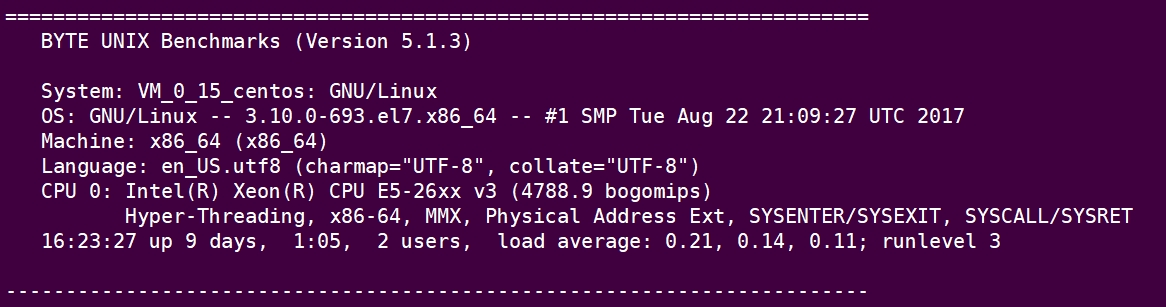
结果分析:

linux主机上,UnixBench性能测试工具使用的更多相关文章
- 使用scp将文件/目录拷贝到另一台Linux主机上
如何将一台Linux主机上的文件或目录拷贝到另一台Linux主机上,scp命令可以实现该需求 前提条件:两台Linux主机处于同一网段,可以互相ping通 操作如下: 文件拷贝 ①将本地文件拷贝到远端 ...
- linux命令 iperf-网络性能测试工具
博主推荐:更多网络测试相关命令关注 网络测试 收藏linux命令大全 iperf命令是一个网络性能测试工具.iperf可以测试TCP和UDP带宽质量.iperf可以测量最大TCP带宽,具有多种参数和 ...
- 通过java程序(JSch)运行远程linux主机上的shell脚本
如果您看完文章之后,觉得对您有帮助,请帮我点个赞,您的支持是我不竭的创作动力! 如果您看完文章之后,觉得对您有帮助,请帮我点个赞,您的支持是我不竭的创作动力! 如果您看完文章之后,觉得对您有帮助,请帮 ...
- Linux环境下apache性能测试工具ab使用详解
网站性能压力测试是服务器网站性能调优过程中必不可缺少的一环.只有让服务器处在高压情况下,才能真正体现出软件.硬件等各种设置不当所暴露出的问题. 性能测试工具目前最常见的有以下几种:ab.http_lo ...
- linux环境下 C++性能测试工具 gprof + kprof + gprof2dot
1.gprof 很有名了,google下很多教程 g++ -pg -g -o test test.cc ./test //会生成gmon.out gprof ./test > prof.l ...
- windows下如何正确使用Jconsole远程连接linux主机上的JVM
https://www.aliyun.com/jiaocheng/589230.html
- 如何在linux使用nmap端口扫描工具扫描网段内开放的端口
在另一个linux主机上,使用nmap命令即可 ,比如 我在1.1.1.2上开放了端口1111 -A -j ACCEPT 在1.1.1.1上执行 即可查到
- Linux 性能测试工具 sysbench 的安装与简单使用
文章目录 Linux 性能测试工具 sysbench 的安装与简单使用 一 背景 二 实验环境 2.1 操作系统 2.2 其他配 ...
- unixbench性能测试跑分工具
UnixBench是一个类unix系(Unix,BSD,Linux)统下的性能测试工具,一个开源工具,被广泛用与测试linux系统主机的性能 所谓跑分工具,不仅各项的测试有得分,最后跑完也会有一个综合 ...
随机推荐
- String系列01 - String 60%
1.String简介 String类实现CharSequence接口.(同时,实现Serializable, Comparable 接口). String类使用final修饰符,为final类,不可被 ...
- GCD 多线程技术
Grand Central Dispatch(GCD)是异步执行任务的技术之一.一般将应用程序中记述的线程管理用 的代码在系统级中实现.开发者只需要定义想执行的任务并追加到适当的Dispatch Qu ...
- S2-01
类: 类是对象的虚例,类是对象的集合,类是对象的模板. 对象是类的实例.(可以 0到多个.) .NET Framwork vs版本 .NET Framwork 1.0 /1.1 vs2003 .NET ...
- thinkPHP写txt日志文件
file_put_contents(DATA_PATH.'文件名.txt', '收到请求:' . date('Y-m-d H:i:s') . PHP_EOL . '通知信息:' . $显示的变量名. ...
- numpy.random.shuffle()与numpy.random.permutation()的区别
参考API:https://docs.scipy.org/doc/numpy/reference/routines.random.html 1. numpy.random.shuffle() AP ...
- python财经数据接口包Tushare pro的入门及简单使用方式(大数据,股票数据接口)
最近在做一个项目,需要用到股票的数据,我在网上查了很久,最终发现在股票数据上面还是tushare比较专业,而且对于将来做金融行业的大数据这一块的,tushare绝对是你的一个好帮手,所以下面我就简单介 ...
- web安全入门笔记
0x01 前言 这正邪两字,原本难分. 正派弟子若是心术不正,便是邪徒. 邪派中人只要一心向善,便是正人君子. 0x01 信息安全的定义 信息安全,意为保护信息及信息系统免受未经授权的进入.使用.披露 ...
- 怎样在windows上定时执行python脚本
作为一个需要在电脑上工作和学习的人,一件十分困扰我的事情就是怎样不受互联网中其他内容的干扰而专注于自己想要做的事情,有的时候真的是沉浸于微博上的消息,忘了自己本来想要做的事.不过我有一件神器,自己爱豆 ...
- 清华大学《C++语言程序设计基础》线上课程笔记03---数据的共享和保护&数组
数据的共享和保护 对象的生存期 static类型的局部变量,生存期在整个程序,局部可见. void example() { static a=1; int b=2 } 当调用完example函数后,b ...
- linux通过命令查找大文件
一:如果linux根分区使用量达到100%,会造成如下现象: root不能登录 系统不能正常启动 二:通过命令查找根分区内的大文件 1.du -sh /* 2>/dev/null | sort ...