
性能测试持续集成(Jenkins+Ant+Jmeter)
一、环境准备:
1、JDK:http://www.oracle.com/technetwork/java/javase/downloads/index.html
2、Jmeter:http://jmeter.apache.org/download_jmeter.cgi
3、Ant:http://ant.apache.org/bindownload.cgi
4、tomcat:http://tomcat.apache.org/
5、Jenkins:http://jenkins-ci.org/
三、Jemter脚本准备:
1、脚本内容:访问baidu首页
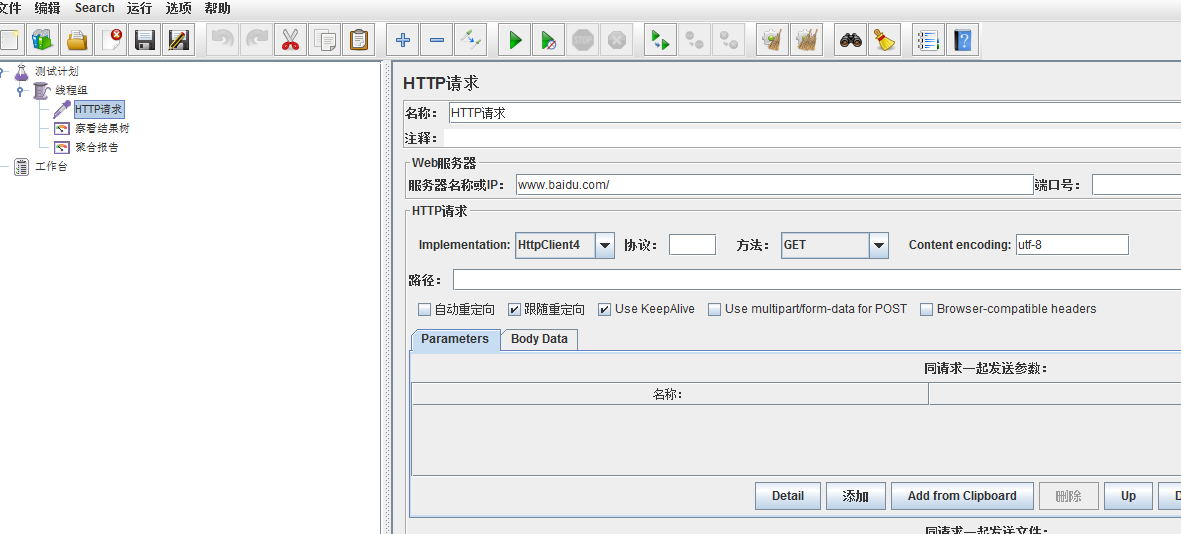
2、脚本路径:
D:\apache-jmeter-2.13\demo
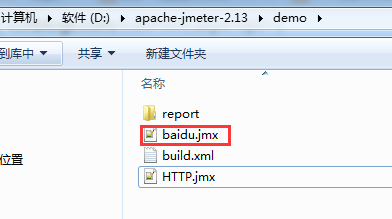
三、通过ant的 build.xml执行性能脚本(以jmx结尾)生成测试报告
1、首先将 jmeter的extras目录中ant-jmeter-1.1.1.jar包拷贝至ant安装目录下的lib目录中;
其次修改Jmeter的bin目录下jmeter.properties文件的配置:jmeter.save.saveservice.output_format=xml
2、编写build.xml
<?xml version="1.0"?>

<!--

   Licensed to the Apache Software Foundation (ASF) under one or more

   contributor license agreements.  See the NOTICE file distributed with

   this work for additional information regarding copyright ownership.

   The ASF licenses this file to You under the Apache License, Version 2.0

   (the "License"); you may not use this file except in compliance with

   the License.  You may obtain a copy of the License at

       http://www.apache.org/licenses/LICENSE-2.0

   Unless required by applicable law or agreed to in writing, software

   distributed under the License is distributed on an "AS IS" BASIS,

   WITHOUT WARRANTIES OR CONDITIONS OF ANY KIND, either express or implied.

   See the License for the specific language governing permissions and

   limitations under the License.

-->

<project name="ant-jmeter" default="all" basedir=".">

    <tstamp>

        <format property="time" pattern="yyyyMMddhhmm" />

    </tstamp>

    <description>

        Sample build file for use with ant-jmeter.jar

        See http://www.programmerplanet.org/pages/projects/jmeter-ant-task.php

    To run a test and create the output report:

        ant -Dtest=script

    To run a test only:

        ant -Dtest=script run

    To run report on existing test output

        ant -Dtest=script report

    The "script" parameter is the name of the script without the .jmx suffix.

    Additional options:

        -Dshow-data=y - include response data in Failure Details

        -Dtestpath=xyz - path to test file(s) (default user.dir).

                         N.B. Ant interprets relative paths against the build file

        -Djmeter.home=.. - path to JMeter home directory (defaults to parent of this build file)

        -Dreport.title="My Report" - title for html report (default is 'Load Test Results')

        Deprecated:

        -Dformat=2.0 - use version 2.0 JTL files rather than 2.1

    </description>

    <property name="testpath" value="${user.dir}"/>

    <!-- 需要改成自己本地的 Jmeter 目录-->

    <property name="jmeter.home" value="D:\apache-jmeter-2.13" />

    <!-- 需要改成自己本地的 Jmeter 中demo的目录-->

    <property name="test.dir" value="D:\apache-jmeter-2.13\demo" />

    <!-- jmeter生成测试报告的title名称-->

    <property name="report.title" value="Jmeter Test Results"/>

    <!-- jmeter生成jtl、html格式的结果报告的路径-->

    <property name="jmeter.result.jtl.dir" value="D:\apache-jmeter-2.13\demo\report\jtl" />

    <property name="jmeter.result.html.dir" value="D:\apache-jmeter-2.13\demo\report\html" />

    <!-- 测试报告名称-->

    <property name="ReportName" value="Load Test Report" />

    <property name="jmeter.result.jtlName" value="${jmeter.result.jtl.dir}/${ReportName}.jtl" />

    <property name="jmeter.result.htmlName" value="${jmeter.result.html.dir}/index.html" />

    <target name="all">

        <echo message="start..."/>

        <!--<antcall target="clean" /> -->

        <antcall target="run" />

        <antcall target="xslt-report" />

       </target>

    <!-- Name of test (without .jmx) -->

    <property name="test" value="Test"/>

    <!-- Should report include response data for failures? -->

    <property name="show-data" value="n"/>

    <property name="format" value="2.1"/>

    <condition property="style_version" value="">

        <equals arg1="${format}" arg2="2.0"/>

    </condition>

    <condition property="style_version" value="_21">

        <equals arg1="${format}" arg2="2.1"/>

    </condition>

    <condition property="funcMode">

        <equals arg1="${show-data}" arg2="y"/>

    </condition>

    <condition property="funcMode" value="false">

      <not>

        <equals arg1="${show-data}" arg2="y"/>

      </not>

    </condition>

    <!-- Allow jar to be picked up locally -->

    <path id="jmeter.classpath">

        <fileset dir="${basedir}">

          <include name="ant-jmeter*.jar"/>

        </fileset>

    </path>

    <taskdef name="jmeter"

        classpathref="jmeter.classpath"

        classname="org.programmerplanet.ant.taskdefs.jmeter.JMeterTask"/>

    <target name="run">

        <echo>funcMode = ${funcMode}</echo>

        <delete file="${testpath}/${test}.html"/>

        <taskdef name="jmeter" classname="org.programmerplanet.ant.taskdefs.jmeter.JMeterTask" />

        <jmeter jmeterhome="${jmeter.home}" resultlog="${jmeter.result.jtlName}">
             <!-- 执行这个目录下边所有以.jmx结尾文件 -->

            <testplans dir="${test.dir}" includes="*.jmx" />

            <property name="jmeter.save.saveservice.output_format" value="xml"/>

            <property name="jmeter.save.saveservice.assertion_results" value="all"/>

            <property name="jmeter.save.saveservice.bytes" value="true"/>

            <property name="file_format.testlog" value="${format}"/>

            <property name="jmeter.save.saveservice.response_data.on_error" value="${funcMode}"/>

        </jmeter>

    </target>

    <property name="lib.dir" value="${jmeter.home}/lib"/>

    <!-- Use xalan copy from JMeter lib directory to ensure consistent processing with Java 1.4+ -->

    <path id="xslt.classpath">

        <fileset dir="${lib.dir}" includes="xalan*.jar"/>

        <fileset dir="${lib.dir}" includes="serializer*.jar"/>

    </path>

    <target name="xslt-report" depends="_message_xalan">

        <xslt

            classpathref="xslt.classpath"

            force="true"

            in="${jmeter.result.jtlName}"

            out="${jmeter.result.htmlName}"

            style="${jmeter.home}/extras/jmeter-results-detail-report_21.xsl">

            <param name="showData" expression="${show-data}"/>

            <param name="titleReport" expression="${ReportName}${time}"/>

            <param name="dateReport" expression="${ReportName}${time}"/>

        </xslt>

        <!-- 因为上面生成报告的时候,不会将相关的图片也一起拷贝至目标目录,所以,需要手动拷贝 -->

        <copy todir="${jmeter.result.html.dir}">

             <fileset dir="${jmeter.home}/extras">

                 <include name="collapse.png" />

                <include name="expand.png" />

             </fileset>

       </copy>

    </target>

    <target name="verify-images">

        <condition property="samepath">

                <equals arg1="${testpath}" arg2="${basedir}" />

        </condition>

    </target>

    <!-- Check that the xalan libraries are present -->

    <condition property="xalan.present">

          <and>

              <!-- No need to check all jars; just check a few -->

            <available classpathref="xslt.classpath" classname="org.apache.xalan.processor.TransformerFactoryImpl"/>

            <available classpathref="xslt.classpath" classname="org.apache.xml.serializer.ExtendedContentHandler"/>

          </and>

    </condition>

    <target name="_message_xalan" unless="xalan.present">

          <echo>Cannot find all xalan and/or serialiser jars</echo>

        <echo>The XSLT formatting may not work correctly.</echo>

        <echo>Check you have xalan and serializer jars in ${lib.dir}</echo>

    </target>

</project>
3、执行build.xml
1)cmd进入脚本目录:D:\apache-jmeter-2.13\demo
2)输入:ant 或 ant run(run为build.xml中的task名),执行结果:
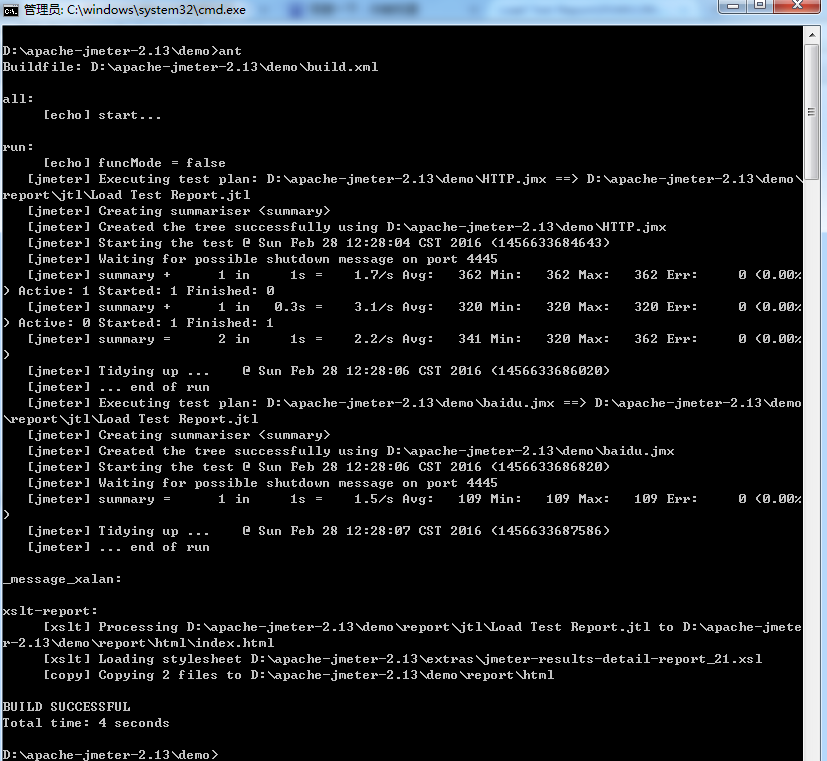
3)测试报告目录 D:\apache-jmeter-2.13\demo\report\html
因为在D:\apache-jmeter-2.13\demo目录下边有两个jmx文件,3个请求,所有结果如下3个url结果

三、Jenkins中集成ant,添加job在Jenkins中生成html样式性能测试报告
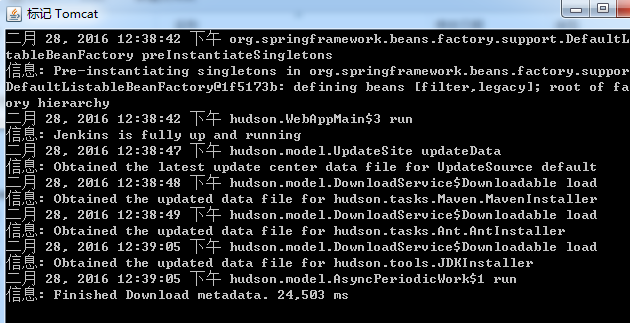
1、将Jenkins.war包放在tomcat目录D:\apache-tomcat-7.0.54\webapps下,并且启动D:\apache-tomcat-7.0.54\bin目录下边startup.bat脚本,如下表示启动成功:
2、访问Jenkins ,Jenkins在tomcat中默认启动端口8080 ,访问地址: http://localhost:8080/jenkins/
3、建立job 并且配置ant ,配置好信息进行保存;
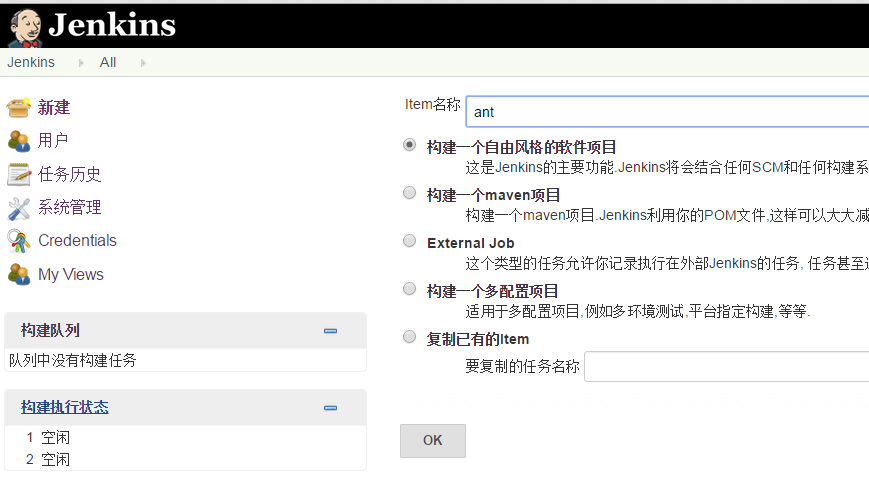
填写build.xml路径

4、在Jenkins里边添加Performance plugin 、 HTML Publisher plugin 、ant插件
在job配置 "增加构建后操作步骤"增加Publish HTML reports插件,并且添加报告目录,进行保存 如图:

5、执行job
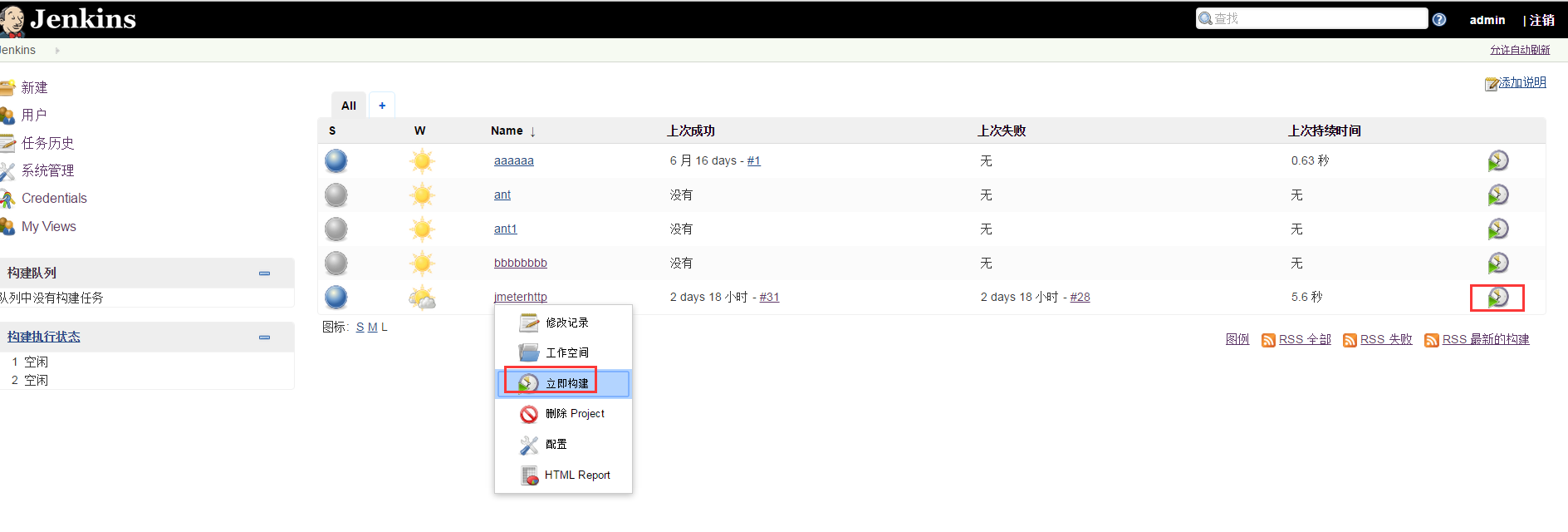
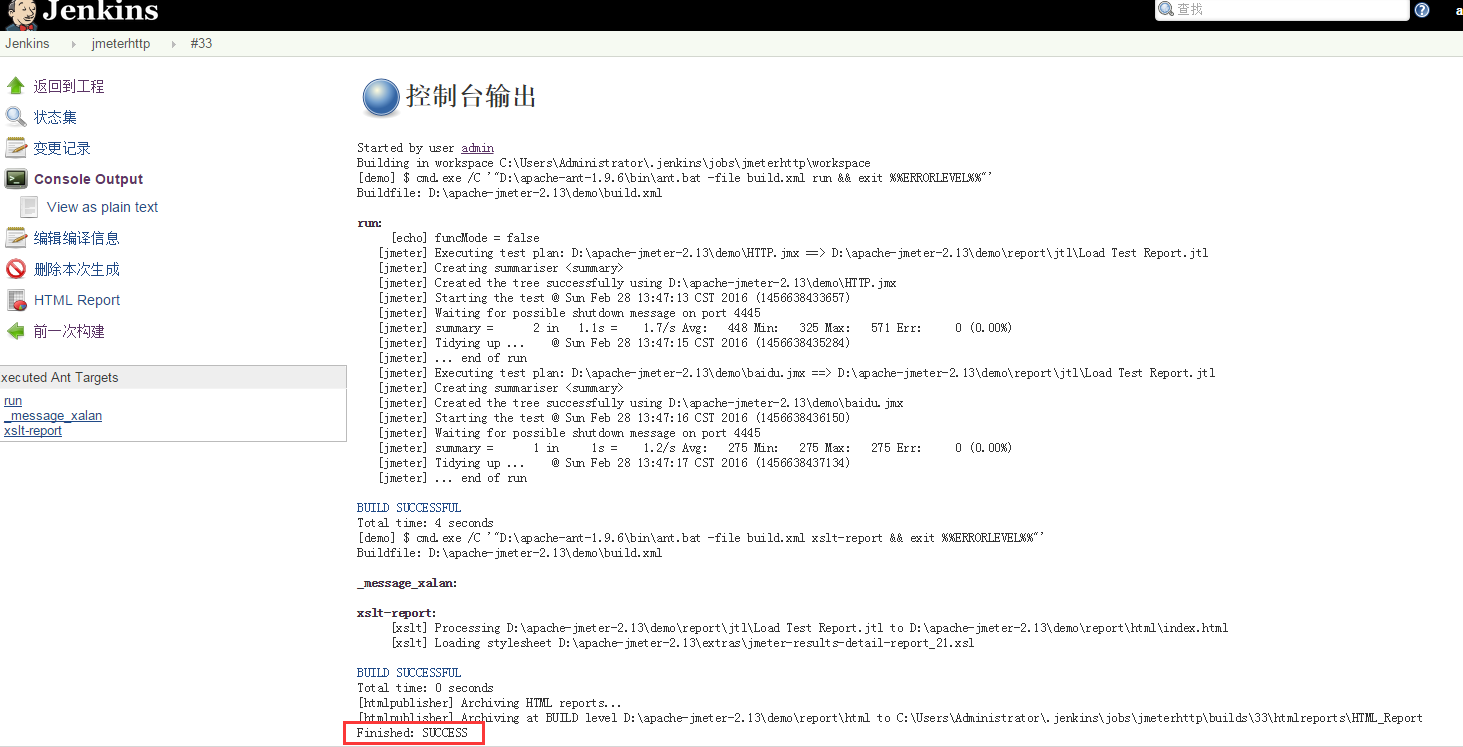
6、查看控制台,看到Finished: SUCCESS说明执行job成功已生成jtl和html报告;
7、查看Jenkins生成html报告
路径:http://localhost:8080/jenkins/job/jmeterhttp/HTML_Report/
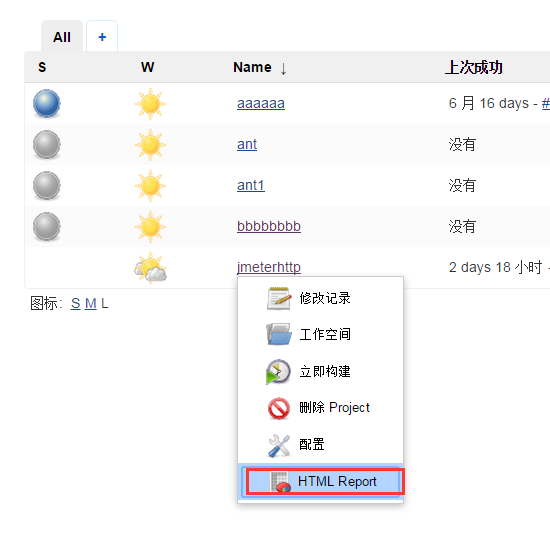
最终报告和用ant的build.xml效果一样 ,哈哈,大功搞成了;

参考地址博客: http://www.cnblogs.com/puresoul/p/4737716.html
性能测试持续集成(Jenkins+Ant+Jmeter)的更多相关文章
- jmeter --- 搭建持续集成接口测试平台(Jenkins+Ant+Jmeter)
jmeter --- 搭建持续集成接口测试平台(Jenkins+Ant+Jmeter) 一.环境准备: 1.JDK:http://www.oracle.com/technetwork/java/jav ...
- Jmeter+jenkins如何快速搭建接口和性能测试持续集成解决方案-[基于windows篇]
最近在用Jmeter本来想写一个详细的使用教程,突然看到有前辈已经写好了不错的教程,特此"借花献佛"整理出来分享给大家! Jenkins + Jmeter 构建接口.性能测试持续集 ...
- jenkins+ant+jmeter自动化性能测试平台
jenkins+ant+jmeter自动化性能测试平台 Jmeter是性能测试的工具,java编写.开源,小巧方便,可以图形界面运行也可以在命令行下运行.网上已经有人使用ant来运行,http://w ...
- Jenkins +Ant +Jmeter(apache-jmeter-5.1.1)自动化性能测试平台
1.安装配置好Jdk, 下载网址:https://www.cr173.com/soft/33894.html 2.Jmeter下载地址:http://jmeter.apache.org/downloa ...
- Jenkins+Ant+JMeter集成
Tomcat是jenkins运行的容器,jenkins实际上是依赖于Tomcat才能启动的.Jenkins可以调度ant的脚本. Ant和maven类似,maven是执行pom文件,ant是执行bui ...
- jenkins+ant+jmeter实现自动化集成(详解)
jenkins+ant+jmeter实现自动化集成 for window 一.jmeter 1.jmeter安装 二.ant 1.ant安装 三.ant运行 jmeter脚本 1.配置 四.jenki ...
- 性能测试四十八:Jenkins+Ant+Jmeter系统部署
工作步骤: 1.开发提交代码SVN/Git 2.代码编译.打war包 3.上传war包到服务器 4.重启web服务器 5.开始测试/自动化测试 6.发测试结果 Jenkins工作: 1.开发提交代码G ...
- Jenkins+Ant+Jmeter自动化测试平台
持续集成 持续集成是一种软件开发实践,即团队开发成员经常集成他们的工作,通常每个成员每天至少集成一次,也就意味着每天可能会发生多次集成.每次集成都通过自动化的构建(包括编译,发布,自动 ...
- Jenkins+Ant+JMeter报告自动化
1.参考Jenkins+Ant+JMeter集成,安装Jenkins(不需要安装Performance Plugin插件),建立Slave节点,连接Slave节点,创建任务等. 2.将Jenkins+ ...
- 这些年我们一起搞过的持续集成~Jenkins+Perl and Shell script
这些年我们一起搞过的持续集成~Jenkins+Perl and Shell script ##转载注明出处:http://www.cnblogs.com/wade-xu/p/4378224.html ...
随机推荐
- 关于iOS Block当中为什么要用weakSelf和strongSelf的思考
场景:当你在某个界面请求网络数据的时候,用户不愿意等待点击了返回按钮,此时在Block当中用如下的方式使用weakSelf的话,有可能会奔溃(因为在并发编程的情况下,虽然在if判断的时候weaksel ...
- L2-006 树的遍历 (后序中序求层序)
题目: 给定一棵二叉树的后序遍历和中序遍历,请你输出其层序遍历的序列.这里假设键值都是互不相等的正整数. 输入格式: 输入第一行给出一个正整数N(≤30),是二叉树中结点的个数.第二行给出其后序遍历序 ...
- 基于Centos7系统部署cobbler批量安装系统
前言 cobbler是一个可以实现批量安装系统的Linux应用程序.它有别于pxe+kickstart,cobbler可以实现同个服务器批量安装不同操作系统版本 系统环境的准备及下载cobbler 一 ...
- Contract Helper
using System; using Microsoft.Xrm.Sdk; using Microsoft.Crm.Sdk.Messages; using Microsoft.Xrm.Sdk.Que ...
- u-boot-1.1.6第1阶段分析之start.S、lowlevel_init.S文件
学习目标: 对start.S中每一行代码,都有基本了解 通过对start.S文件分析,对ARM920T架构的CPU的启动过程,有更清楚理解 U-boot属于两个阶段的Bootloader,第一阶段的文 ...
- 和IDEA一样好用的go语言IDE:Goland
因为IDEA和Goland来自同一家非常有名的捷克公司:JetBrains 很好用,智能化程度高 最新版下载地址:http://www.jetbrains.com/go/?fromMenu 相关使用手 ...
- 旭日图(sunburst chart)绘制:R语言 & excel
旭日图(sunburst chart)也叫太阳图,一种圆环镶接图,每一个圆环就代表了同一级别的比例数据,离原点越近的圆环级别越高,最内层的圆表示层次结构的顶级.除了圆环外,旭日图还有若干从原点放射出去 ...
- 20155220 2016-2017-2 《java程序设计》第四周总结
教材学习内容总结 第六章 继承与多态 继承 继承的基本原则是: 子类继承父类的所有成员变量(包括静态成员): 子类继承除父类构造方法外的所有成员方法(包括静态方法): 子类不能继承父类的构造方法,但在 ...
- linux 初学体验 20155317 王新玮
学习基于VirtualBox虚拟机安装Ubuntu图文教程在自己笔记本上安装Linux操作系统 通过询问同学和上网搜查百度,完成了虚拟机的安装,开始了linux的学习. 通过实践学习别出心裁的Linu ...
- Java技术——Interface与abstract类的区别
)抽象类是对类抽象,是面向整个类的自下而上的设计理念,一般是先有各种子类,再有把这些有关系的子类加以抽象为父类的需求.而接口是对行为的抽象,是面向行为的自上而下的设计理念,接口根本就不需要知道子类的存 ...