
基于Centos7系统部署cobbler批量安装系统
前言
cobbler是一个可以实现批量安装系统的Linux应用程序。它有别于pxe+kickstart,cobbler可以实现同个服务器批量安装不同操作系统版本
系统环境的准备及下载cobbler
一、系统环境
可以用任何模式来使用,不过要注意在局域网使用桥接容易出现DHCP分配IP换乱的问题,这里我们使用仅主机模式
[root@localhost network-scripts]# ip a ens37: <BROADCAST,MULTICAST,UP,LOWER_UP> mtu  qdisc pfifo_fast state UP qlen

    link/ether :0c::0d:4d: brd ff:ff:ff:ff:ff:ff

    inet 169.254.12.2/ brd 169.254.255.255 scope link ens37   #这是仅主机模式下的网卡

       valid_lft forever preferred_lft forever

    inet6 fe80::20c:29ff:fe0d:4d06/ scope link

       valid_lft forever preferred_lft forever
我使用了两块网卡,不过我这里只使用仅主机模式的网卡 ——169.254.12.2
二、关闭安全服务
不关闭防火墙无法连接
[root@localhost ~]# systemctl stop firewalld                   #关闭防火墙

[root@localhost ~]# setenforce 0                               #关闭selinux
三、下载cobbler及其所需服务程序
[root@songqi ~]# yum install cobbler dhcp tftp-server xinetd syslinux httpd -y
cobbler:核心程序不用多解释
dhcp:负责分配客户端IP,因为客户端没有IP,所以需要dhcp服务
tftp(Trivial File Transfer Protocol,简单文件传输协议):是TCP/IP协议族中的一个用来在客户机与服务器之间进行简单文件传输的协议,提供不复杂、开销不大的文件传输服务。端口号为69。
xinetd:xinetd已经取代了inetd,并且提供了访问控制、加强的日志和资源管理功能,已经成了Red Hat 7 和 Mandrake 7.2的Internet标准超级守护进程
syslinux:syslinux是一个功能强大的引导加载程序,而且兼容各种介质。它的目的是简化首次安装Linux的时间,并建立修护或其它特殊用途的启动盘。它提供pxelinux这个文件,pxelinux.0引导文件引导vmlinux和initrd两个启动文件
httpd:可以使别的主机可以从服务端获取镜像包
yum 安装需要下面两个源
[epel]

name=epel

enabled=

gpgcheck=

baseurl=https://mirrors.aliyun.com/epel/7/x86_64/

[centos]

name=centos base

enabled=

gpgcheck=

baseurl=http://mirrors.163.com/centos/7/os/x86_64/
配置相关服务
第一步、配置dhcp服务
必须提前打开不然后面会报错
[root@localhost ~]# vim /etc/dhcp/dhcpd.conf

subnet 169.254.12.0 netmask 255.255.0.0 {

  range 169.254.1.20 169.254.2.30;

  default-lease-time ;

  max-lease-time ;

  filename "pxelinux.0";                    #加入pxelinux引导程序

}
第二步、配置tftp
安装tftp服务器需要安装xinetd
[root@localhost ~]# vim /etc/xinetd.d/tftp

# default: off

# description: The tftp server serves files using the trivial file transfer \

#       protocol.  The tftp protocol is often used to boot diskless \

#       workstations, download configuration files to network-aware printers, \

#       and to start the installation process for some operating systems.

service tftp

{

        disable                 = no                #把yes改为no 表示开机自启

        socket_type             = dgram

        protocol                = udp

        wait                    = yes

        user                    = root

        server                  = /usr/sbin/in.tftpd

        server_args             = -B  -v -s /var/lib/tftpboot

        per_source              =

        cps                     =

        flags                   = IPv4

}
第三步、启动cobbler、httpd
[root@localhost ~]# systemctl restart cobblerd

[root@localhost ~]# systemctl restart httpd
第四步、检查cobbler配置
[root@ken ~]# cobbler check
The following are potential configuration items that you may want to fix:

1 : The 'server' field in /etc/cobbler/settings must be set to something other than localhost, or
 kickstarting features will not work.  This should be a resolvable hostname or IP for the boot server
 as reachable by all machines that will use it.
2 : For PXE to be functional, the 'next_server' field in /etc/cobbler/settings must be set to something
 other than 127.0.0.1, and should match the IP of the boot server on the PXE network.
3 : Some network boot-loaders are missing from /var/lib/cobbler/loaders, you may run 'cobbler get-loaders'
to download them, or, if you only want to handle x86/x86_64 netbooting, you may ensure that you have
installed a *recent* version of the syslinux package installed and can ignore this message entirely.
 Files in this directory, should you want to support all architectures, should include pxelinux.0, menu.c32,
 elilo.efi, and yaboot. The 'cobbler get-loaders' command is the easiest way to resolve these requirements.
4 : enable and start rsyncd.service with systemctl
5 : debmirror package is not installed, it will be required to manage debian deployments and repositories
6 : The default password used by the sample templates for newly installed machines (default_password_crypted
 in /etc/cobbler/settings) is still set to 'cobbler' and should be changed, try: "openssl passwd -1 -salt '
random-phrase-here' 'your-password-here'" to generate new one
7 : fencing tools were not found, and are required to use the (optional) power management features. install
 cman or fence-agents to use them

Restart cobblerd and then run 'cobbler sync' to apply changes
可以看到有7个错误,需要一一排错
五、排错
问题1.(文中红字标识错误位置)在 /etc/cobbler/setting中
cobbler文件默认是127.0.0.1本地回环地址,需要更改为提供cobbler服务的ip地址169.254.12.2,在384行
server: 169.254.12.2
问题2.(文中红字标识错误位置)在 /etc/cobbler/setting中
netx_server也是默认本地127.0.0.1回环地址,需要修改为提供cobbler服务的ip地址 同样是169.254.12.2,在272行出
next_server: 169.254.12.2
问题3.(可以忽略)
若想解决,直接运行 cobbler get-loaders即可
问题4.未启动rsync
启动rsync并让其开机自启
[root@songqi ~]# systemctl restart rsyncd

[root@songqi ~]# systemctl enable rsync
问题5.直接忽略
问题6.更改密码
[root@songqi ~]# openssl passwd - -salt "" ""

$$$7mft0jKnzzvAdU4t0unTG1
把新生成的密码填写进 /etc/cobbler/setting,也就是 $ 后面的加密数据
default_password_crypted: "$1$123$7mft0jKnzzvAdU4t0unTG1"
问题7.同样忽略
第六步、重启服务并检查
[root@songqi ~]# systemctl restart cobblerd

[root@songqi ~]# cobbler sync
Created symlink from /etc/systemd/system/multi-user.target.wants/rsyncd.service to /usr/lib/systemd/system/rsyncd.service.

[root@songqi ~]# cobbler check

The following are potential configuration items that you may want to fix:

 : Some network boot-loaders are missing from /var/lib/cobbler/loaders, you may run 'cobbler get-loaders' to download them, or,
 if you only want to handle x86/x86_64 netbooting, you may ensure that you have installed a *recent* version of the syslinux
package installed and can ignore this message entirely.  Files in this directory, should you want to support all architectures,
should include pxelinux., menu.c32, elilo.efi, and yaboot. The 'cobbler get-loaders' command is the easiest way to resolve these
 requirements.

 : debmirror package is not installed, it will be required to manage debian deployments and repositories

 : fencing tools were not found, and are required to use the (optional) power management features. install cman or fence-agents
to use them

Restart cobblerd and then run 'cobbler sync' to apply changes.
更改完毕
补充:如果出现 selinux enable 错误提示,关闭防火墙仍无效果时可重启系统便可解决
第七步、挂载光盘并进行数据导入
1.挂载光盘
[root@songqi ~]# mount /dev/cdrom /mnt
2.导入数据(耐心等待)
[root@songqi ~]# cobbler import --path=/mnt --name="centos7.5"

task started: --13_001927_import

task started (id=Media import, time=Wed Mar  :: )
distro : 发行版, 就是我们安装什么版本的linux操作系统的名称 一会我们会导入一个 distro.
profile : 类似于一个 配置文件,类似于你的 bash_profile, 里面包含你可以添加 kernel 参数,对应的kickstart 文件 以及 此profile 对应的 distro 等等.
查看distro
[root@songqi ~]# cobbler distro list

centos7.-x86_64
查看profile
[root@songqi ~]# cobbler profile list

centos7.-x86_64
第八步、准备kickstart
在root目录下找到ks文件,并移动到/var/lib/cobbler/kickstarts/到目录下改名为ks.cfg
[root@songqi ~]# mv anaconda-ks.cfg /var/lib/cobbler/kickstarts/ks.cfg

[root@songqi ~]# vim /var/lib/cobbler/kickstarts/ks.cfg

[root@songqi ~]# cat /var/lib/cobbler/kickstarts/ks.cfg

#version=DEVEL

# System authorization information

auth --enableshadow --passalgo=sha512

# Use CDROM installation media

url --url=http://192.168.182.128/cobbler/ks_mirror/centos7.5/  #这里需要更改为repodata所在的http地址

# Use graphical install

graphical

# Run the Setup Agent on first boot

firstboot --enable

ignoredisk --only-use=sda

# Keyboard layouts

keyboard --vckeymap=us --xlayouts='us'

# System language

lang en_US.UTF-

# Network information

network  --bootproto=dhcp --device=ens33 --ipv6=auto --no-activate

network  --hostname=localhost.localdomain

# Root password

rootpw --iscrypted $$7zu1wIUDgBGEFV1Y$KsLVeaGmyN92.QHr1fqKdTqPu8PDmd8K9V/s3Ru8NxE53NZz4gQKsmP6K0udcXVvDtponekICYUwBD7tYZJqU/

# System services

services --disabled="chronyd"

# System timezone

timezone Asia/Shanghai --isUtc --nontp

# System bootloader configuration

bootloader --location=mbr --boot-drive=sda

autopart --type=lvm

# Partition clearing information

clearpart --none --initlabel

%packages

@^minimal

@core

%end

%addon com_redhat_kdump --disable --reserve-mb='auto'

%end

%anaconda

pwpolicy root --minlen= --minquality= --notstrict --nochanges --notempty

pwpolicy user --minlen= --minquality= --notstrict --nochanges --emptyok

pwpolicy luks --minlen= --minquality= --notstrict --nochanges --notempty

%end
第九步、自定义profile
[root@songqi ~]#  cobbler profile add --distro=centos7.-x86_64
--name=centos7.5_songqi --kickstart=/var/lib/cobbler/kickstarts/ks.cfg

[root@songqi ~]# cobbler sync

task started: --13_002724_sync
第十步、查看删除
查看profile
[root@ken ~]# cobbler profile list

   centos7.-x86_64

   centos7.5_ken
删除原有profile
[root@ken ~]# cobbler profile remove --name=centos7.5-x86_64

[root@ken ~]# cobbler profile list

   centos7.5_ken
cobbler自动化安装测试
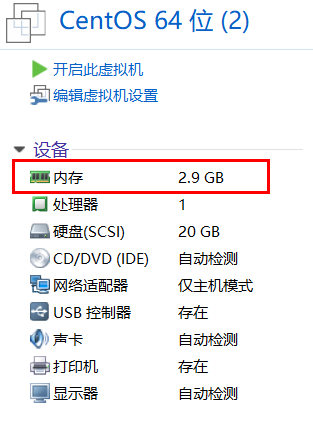
新建一个虚拟机,需要和cobbler服务器所在同一个虚拟网络中即与我们上面设置的cobbler服务器的主机模式。内存需要3个G以上。
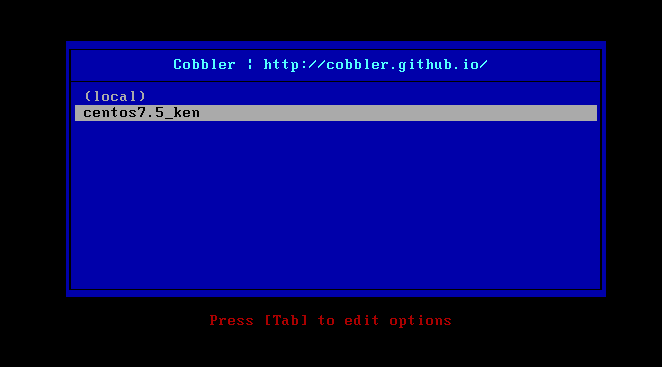
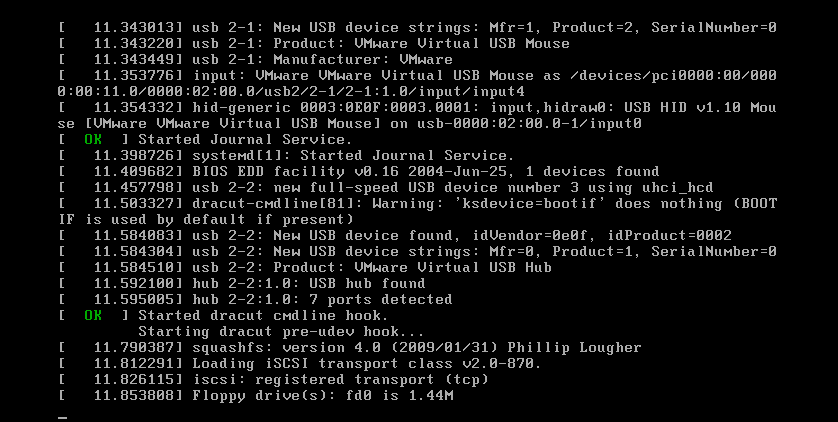
选择第我们自定义的包即可进行自动化安装。

基于Centos7系统部署cobbler批量安装系统的更多相关文章
- 基于CentOS7系统部署cobbler批量安装系统(week3_day5_part1)-技术流ken
前言 cobbler是一个可以实现批量安装系统的Linux应用程序.它有别于pxe+kickstart,cobbler可以实现同个服务器批量安装不同操作系统版本. 系统环境准备及其下载cobbler ...
- 末学者笔记--Centos7系统部署cobbler批量安装系统
[前言]: cobbler是一个可以实现批量安装系统的Linux应用程序.它有别于pxe+kickstart,cobbler可以实现同个服务器批量安装不同操作系统版本. 系统环境准备及其下载cob ...
- 006-(成功环境记录)基于Centos7系统部署cobbler批量安装系统
1.1 cobbler简介 Cobbler是一个Linux服务器安装的服务,可以通过网络启动(PXE)的方式来快速安装.重装物理服务器和虚拟机,同时还可以管理DHCP,DNS等. Cobbler可以使 ...
- centos7系统部署cobbler批量安装系统
系统环境: 一.开启两个网卡.一个仅主机模式,一个桥接模式,主机模式对内提供cobbler服务 [root@localhost ~]# ip a 1: lo: <LOOPBACK,UP,LOWE ...
- cobbler批量安装系统
cobbler是一个可以实现批量安装系统的Linux应用程序.它有别于pxe+kickstart,cobbler可以实现同个服务器批量安装不同操作系统版本. 1.系统环境准备及其下载cobbler 1 ...
- cobbler批量安装系统使用详解-技术流ken
前言 cobbler是一个可以实现批量安装系统的Linux应用程序.它有别于pxe+kickstart,cobbler可以实现同个服务器批量安装不同操作系统版本. 系统环境准备及其下载cobbler ...
- cobbler一键批量安装系统
cobbler是一个可以实现批量安装系统的Linux应用程序.它有别于pxe+kickstart,cobbler可以实现同个服务器批量安装不同操作系统版本. 一.系统环境准备及其下载cobbler 1 ...
- 其他综合-Cobbler无人值守安装系统 CentOS 7
Cobbler 无人值守安装系统 CentOS 7 1.实验描述 1.1 概述 作为运维,在公司经常遇到一些机械性重复工作要做,例如:为新机器装系统,一台两台机器装系统,可以用光盘.U盘等介质安装,1 ...
- cobbler自动化安装系统
笔者Q:972581034 交流群:605799367.有任何疑问可与笔者或加群交流 在很久很久以前,使用kickstart实现自动化安装的时候,我一直认为装系统是多么高大上的活,直到cobbler的 ...
随机推荐
- ContentProvider与ContentResolver
使用ContentProvider共享数据: 当应用继承ContentProvider类,并重写该类用于提供数据和存储数据的方法,就可以向其他应用共享其数据.虽然使用其他方法也可以对外共享数据,但数据 ...
- 浅谈搜索引擎SEO(HTML/CSS)
SEO:搜索引擎优化(免费): SEM:搜索引擎营销(付费). 它们两者的区别是: 1.SEM高投入,SEO低投入: 2.SEM短.效益块,SEO长期投入.增长慢: 3.新广告法颁布之后SEM广告位减 ...
- Mysql学习---索引的学习 180101
索引:约束 + 快速查找 索引是数据库中用于帮助用户快速查询数据的一种数据结构.类似于字典中的目录,查找字典内容时可以根据目录查找到数据的存放位置,然后直接获取即可. 问:为什么索引可以这么快?[类似 ...
- 沉淀,再出发:XPath的理解和使用
沉淀,再出发:XPath的理解和使用 一.前言 在很多查找的场合之下,我们需要使用正则表达式和其他的查找工具来进行内容的匹配和查找,特别是对于xml文件,我们可以使用xpath等工具来进行查找,通 ...
- CentOS使用PXE网络启动自动安装操作系统
PXE工作原理简介 PXE (Preboot Excution Environment) 预启动执行环境 工作环境介绍: 要实现PXE自动网络安装CentOS至少需要两台主机 1)PXE服务器PXE ...
- December 10th 2016 Week 50th Saturday
Storms make trees take deeper roots. 风暴使树木深深扎根. Sometimes, you may feel frustrated for failing to wi ...
- PetaPoco轻量级ORM框架 - Database API 手册
PetaPoco Database API #region IDisposable public void Dispose() #endregion #region Constructors publ ...
- GitLab-CI与GitLab-Runner
一.持续集成(Continuous Integration) 要了解GitLab-CI与GitLab Runner,我们得先了解持续集成是什么. 持续集成是一种软件开发实践,即团队开发成员经常集成他们 ...
- 翻译-QPKG开发工具快速开始指南
QPKG开发工具快速开始指南 指导你编译你自己的QPKG软件包 目录 什么是QDK 下载QDK 安装QDK 编译你自己的QPKG软件包 搭建QPKG编译环境 配置QPKG 定制QPKG程序 向QPKG ...
- css根据屏幕大小切换样式
首先html head之间加入: <meta content="width=device-width, initial-scale=1.0, minimum-scale=1.0, ma ...