
spring boot2.0
1. Spring boot 简介
1.1 spring boot的三大特性
- 组件自动装配:Web mvc, Web Flux,JDBC等
激活:@EnableAutoConfiguration
配置:/META-INF/spring.factories
实现:XXXAutoConfiguration

- 嵌入式web容器:Tomcat、Jetty以及underTow
- 生产准备特性
2.2. 传统Servlet
- Servlet组件:Servlet、Filter、Listener
- Servlet注册:Servlet注解、Spring Bean 、Registration Bean
- 异步非阻塞:异步Servlet(Servlet3.0)、非阻塞Servlet(Servlet3.1)
2. 自动装配
spring模式注解装配:
- 定义:声明在应用中扮演“组件”角色的注解
- 举例:@Component , @Service , @Configuration
- 装配:<context:component:scan /> 或者 @ComponentScan()
2.1 Spring framework 手动装配自定义注解
自定义模式注解:注解的‘’派生性、层次性‘’。
/**

 *  Component -> Repository -> FirstLevelRepository (每个注解中都要定义value属性)

 */

@Target({ElementType.TYPE})

@Retention(RetentionPolicy.RUNTIME)

@Documented

@Repository

public @interface FirstLevelRepository {

    String value() default "";

}
使用自定义注解:
@FirstLevelRepository(value = "myRepository")

public class MyRepository {

    public void show(){

        System.out.println("my repository...");

    }

}
启动测试:
@ComponentScan(basePackages = {"com.vstudy.web.repository"})

public class FirstLevelBootstrap {

    public static void main(String[] args) {

        ConfigurableApplicationContext context = new SpringApplicationBuilder(FirstLevelBootstrap.class)

                .web(WebApplicationType.NONE)

                .run(args);

        MyRepository myRepository = (MyRepository) context.getBean("myRepository");

        myRepository.show();

        context.close();

    }

}
2.2 @Enable装配,自动装配相同领域的功能组件集合- - 基于模块注解
定义:预备相同领域的功能组件集合,组合形成一个独立的单元
举例:@EnableWebMvc @EnableAutoConfiguration等。
实现:注解方式、变成方式
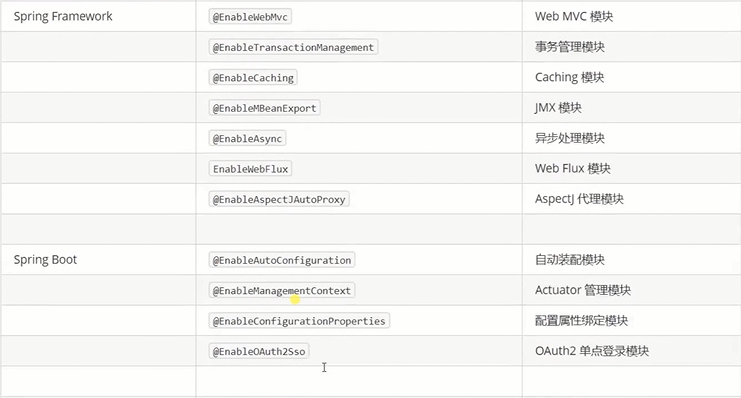
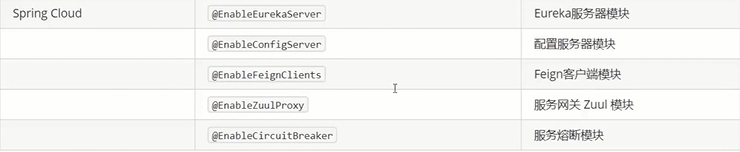
Enable自动装配
@Target(ElementType.TYPE)

@Retention(RetentionPolicy.RUNTIME)

@Documented

//@Import(HelloWorldConfiguration.class)

@Import(HelloWorldImportSelector.class)   // 装入Bean到容器中

public @interface EnableHelloWorld {

}
将Bean放入容器的配置
@Configuration

public class HelloWorldConfiguration {

    @Bean

    public String helloWorld() { // 方法名即 Bean 名称

        return "Hello,World 2018";

    }

}
启动测试:
@EnableHelloWorld

public class EnableHelloWorldBootstrap {

    public static void main(String[] args) {

        ConfigurableApplicationContext context = new SpringApplicationBuilder(EnableHelloWorldBootstrap.class)

                .web(WebApplicationType.NONE)

                .run(args);

        // helloWorld Bean 是否存在

        String helloWorld =

                context.getBean("helloWorld", String.class);

        System.out.println("helloWorld Bean : " + helloWorld);

        // 关闭上下文

        context.close();

    }

}
EnableHelloWorldBootstrap.java
2.3 条件装配
定义:在装配bean的前置判断
举例:@Profile @Condition
实现:注解方式、编程方式
注解方式:
@Profile("java7") @Profile("java8")
public interface SumService {

    /**

     * 计算多个整的的和

     * @param values  多个整数

     * @return

     */

    Integer sum(Integer ... values);

}
SumService.java
java7的实现:
@Profile("java7")  // 当jdk环境为java7时,Service注解生效

@Service

public class Java7SumServiceImpl implements SumService {

    @Override

    public Integer sum(Integer... values) {

        System.out.println("java 7的方式实现求和");

        Integer sum = 0;

        for (int i = 0; i < values.length; i++) {

            sum += values[i];

        }

        return sum;

    }

}
Java7SumServiceImpl .java
java8的实现:
/**

 * Java 7 for循环实现 {@link SumService}

 */

@Profile("java8")  // 当jdk环境为java7时,Service注解生效

@Service

public class Java8SumServiceImpl implements SumService {

    @Override

    public Integer sum(Integer... values) {

        System.out.println("java 8 的方式实现求和");

        Integer sum = Stream.of(values).reduce(0, Integer::sum);

        return sum;

    }

}
Java8SumServiceImpl
测试:
@SpringBootApplication(scanBasePackages = "com.vstudy.web.service")

public class SumServiceBootstrap {

    public static void main(String[] args) {

        ConfigurableApplicationContext context = new SpringApplicationBuilder(SumServiceBootstrap.class)

                .web(WebApplicationType.NONE)

                .profiles("java8")   //这里的profile参数和设定的环境对应

                .run(args);

        // CalculateService Bean 是否存在

        SumService calculateService = context.getBean(SumService.class);

        System.out.println("calculateService.sum(1...10) : " +

                calculateService.sum(1, 2, 3, 4, 5, 6, 7, 8, 9, 10));

        // 关闭上下文

        context.close();

    }

}
SumServiceBootstrap
2.4 Spring Boot自动装配
定义: 基于约定大于配置的原则,实现Spring组件自动装配目的
装配:模式装配、@Enable模块、条件装配、工厂加载机制
实现:
- 激活自动装配:@EnableAutoConfiguration
- 实现自动装配:XxxAutoConfiguration
- 配置自动装配实现:META-INF/spring.factories
@EnableAutoConfiguration -> spring.factories -> EnableAutoConfiguration -> HelloWorldAutoConfiguration ->
@EnableHelloWord -> HelloWorldConfiguration ->Hello World
1) 激活自动装配
//激活自动装配

@EnableAutoConfiguration

public class EnableAutoConfigBootstrap {

    public static void main(String[] args) {

        ConfigurableApplicationContext context = new SpringApplicationBuilder(EnableAutoConfigBootstrap.class)

                .web(WebApplicationType.NONE)

                .run(args);

        // helloWorld Bean 是否存在

        String helloWorld =

                context.getBean("helloWorld", String.class);

        System.out.println("helloWorld Bean : " + helloWorld);

        // 关闭上下文

        context.close();

    }

}
EnableAutoBootstrap.java
2) spring.factories 配置自动装配
# 自动装配

org.springframework.boot.autoconfigure.EnableAutoConfiguration=\

com.vstudy.web.configuration.HelloWorldAutoConfiguration
3)实现自动装配:
@Configuration // Spring 模式注解装配

@EnableHelloWorld // Spring @Enable 模块装配

//@ConditionalOnSystemProperty(name = "user.name", value = "Mercy") // 条件装配

public class HelloWorldAutoConfiguration {

}
总结:
- @Configuration类配置方式代替xml配置方式。
- 注解也层次性和派生性
- 在注解类(@EnableXxx)上可以使用@Import将配置类(可以不写@Configuration)放入spring容器中,该配置类的配置会生效,@Enable装配的粒度相对于@XxxAutoConfiguration较小
- 在@XxxAutoConfiguration(模块)上可以使用@EnableXxx完成模式装配,也可以在配置类中配置模块的其他信息。
3 SpringApplication
3.1 SpringApplication运行
SpringApplication.run(DemoApplication.class, args);
end
spring boot2.0的更多相关文章
- Spring Boot2.0 设置拦截器
所有功能完成 配置登录认证 配置拦截器 在spring boot2.0 之后 通过继承这个WebMvcConfigurer类 就可以完成拦截 新建包com.example.interceptor; 创 ...
- Spring Boot2.0 静态资源被拦截问题
在Spring Boot2.0+的版本中,只要用户自定义了拦截器,则静态资源会被拦截.但是在spring1.0+的版本中,是不会拦截静态资源的. 因此,在使用Spring Boot2.0+时,配置拦截 ...
- Spring Boot2.0使用Spring Security
一.Spring Secutity简介 Spring 是一个非常流行和成功的 Java 应用开发框架.Spring Security 基于 Spring 框架,提供了一套 Web 应用安全性 ...
- spring boot2.0(一 ) 基础环境搭建
1.基础配置 开发环境:window jdk版本:1.8(spring boot2.0最低要求1.8) 开发工具:eclipse 构建方式:maven3 2.POM配置文件 <project x ...
- Spring Boot2.0 整合 Kafka
Kafka 概述 Apache Kafka 是一个分布式流处理平台,用于构建实时的数据管道和流式的应用.它可以让你发布和订阅流式的记录,可以储存流式的记录,并且有较好的容错性,可以在流式记录产生时就进 ...
- Spring Boot2.0自定义配置文件使用
声明: spring boot 1.5 以后,ConfigurationProperties取消locations属性,因此采用PropertySource注解配合使用 根据Spring Boot2. ...
- Spring boot2.0 设置文件上传大小限制
今天把Spring boot版本升级到了2.0后,发现原来的文件上传大小限制设置不起作用了,原来的application.properties设置如下: spring.http.multipart.m ...
- spring boot 2.0(一)权威发布spring boot2.0
Spring Boot2.0.0.RELEASE正式发布,在发布Spring Boot2.0的时候还出现一个小插曲,将Spring Boot2.0同步到Maven仓库的时候出现了错误,然后Spring ...
- 【spring cloud】spring cloud2.X spring boot2.0.4调用feign配置Hystrix Dashboard 和 集成Turbine 【解决:Hystrix仪表盘Unable to connect to Command Metric Stream】【解决:Hystrix仪表盘Loading...】
环境: <java.version>1.8</java.version><spring-boot.version>2.0.4.RELEASE</spring- ...
- 【spring boot】整合LCN,启动spring boot2.0.3 启动报错:Unable to start ServletWebServerApplicationContext due to missing ServletWebServerFactory bean.
spring boot 2.0.3启动报错: Error starting ApplicationContext. To display the conditions report re-run yo ...
随机推荐
- Robolectric 单元测试中使用 Ressource
单元测试类中: @RunWith(RobolectricGradleTestRunner.class) @Config(constants=BuildConfig.class, sdk = 21) 获 ...
- WebService-php- 1(16)
最近看了挺多关于php中webservice的资料,感谢燕十八的分享,帮助了我构建服务端的过程.将学习笔记记录如下,其中包含燕十八的笔记. WebService 1 快速了解WebService 通俗 ...
- Elasticsearch学习(5) Elasticsearch+logstash +filebeat+log4j的日志系统
最近需要使用Elasticsearch做一个日志系统,本文只介绍log4j内容同步到Elasticsearch,至于日志的查询和分类,会在后面介绍. 一.配置并打开Elasticsearch 这个操作 ...
- Centos 7.x 安装配置tomcat-8过程梳理
----------注意CentOS7.x中的selinux和firewalld都关闭.而且一.二.三部分都是独立的,所以发现8081和8080端口时不要慌哦. 原创,朋友们转载时请著名出处. 一.安 ...
- html实现时间输入框
<!DOCTYPE html> <html lang="en"> <head> <meta charset="UTF-8&quo ...
- kinect 2 for xbox畸变矫正
kinect 2 for xbox畸变矫正 畸变校正的详细方法在iai_kinect2/kinect2_calibration的readme文件中. 由于通过kinect2获得的图像数据有不同的模式( ...
- RN47 中通过 JS 调用 Native 方法
每一个模块.方法都有一个 ID,通过 ID 来调用. m_registry->callNativeMethod(call.moduleId, call.methodId, std::move(c ...
- Dubbo自定义日志拦截器
前言 上一篇文章 Spring aop+自定义注解统一记录用户行为日志 记录了 web层中通过自定义注解配合Spring aop自动记录用户行为日志的过程.那么按照分布式架构中Dubbo服务层的调用过 ...
- Linux磁盘分区、挂在
分区基础知识分区的方式:1) mbr分区:1.最多支持四个主分区2.系统只能安装在主分区3.扩展分区要占一个主分区4.MBR最大只支持2TB,但拥有最好的兼容性2) gtp分区:1.支持无限多个主分区 ...
- springcloud(七)-Feign声明式REST调用
前言 前面我们使用的RestTemplate实现REST API调用,代码大致如下: public User findById(@PathVariable Long id) { return rest ...