
MySQL data sync to Oracle with OGG(Remote Delivery)
MySQL to Oracle with OGG
1. Install MySQL:
yum install mysql-community-server
[root@localhost ~]# yum install mysql-community-server
Loaded plugins: refresh-packagekit, security, ulninfo
Setting up Install Process
mysql-connectors-community | 2.5 kB 00:00
mysql-connectors-community/primary_db | 17 kB 00:00
mysql-tools-community | 2.5 kB 00:00
mysql-tools-community/primary_db | 38 kB 00:00
mysql57-community | 2.5 kB 00:00
mysql57-community/primary_db | 130 kB 00:00
Resolving Dependencies
--> Running transaction check
---> Package mysql-community-server.x86_64 0:5.7.20-1.el6 will be obsoletin
--> Processing Dependency: mysql-community-common(x86-64) = 5.7.20-1.el6 fokage: mysql-community-server-5.7.20-1.el6.x86_64
--> Processing Dependency: mysql-community-client(x86-64) >= 5.7.9 for packmysql-community-server-5.7.20-1.el6.x86_64
---> Package mysql-server.x86_64 0:5.1.73-8.0.1.el6_8 will be obsoleted
--> Running transaction check
---> Package mysql.x86_64 0:5.1.73-8.0.1.el6_8 will be obsoleted
---> Package mysql-community-client.x86_64 0:5.7.20-1.el6 will be obsoletin
--> Processing Dependency: mysql-community-libs(x86-64) >= 5.7.9 for packagsql-community-client-5.7.20-1.el6.x86_64
---> Package mysql-community-common.x86_64 0:5.7.20-1.el6 will be installed
--> Running transaction check
---> Package mysql-community-libs.x86_64 0:5.7.20-1.el6 will be obsoleting
---> Package mysql-libs.x86_64 0:5.1.73-8.0.1.el6_8 will be obsoleted
--> Processing Dependency: libmysqlclient.so.16()(64bit) for package: 2:pos2.6.6-6.el6_5.x86_64
--> Processing Dependency: libmysqlclient.so.16()(64bit) for package: perl-ySQL-4.013-3.el6.x86_64
--> Processing Dependency: libmysqlclient.so.16(libmysqlclient_16)(64bit) fckage: 2:postfix-2.6.6-6.el6_5.x86_64
--> Processing Dependency: libmysqlclient.so.16(libmysqlclient_16)(64bit) fckage: perl-DBD-MySQL-4.013-3.el6.x86_64
--> Running transaction check
---> Package mysql-community-libs-compat.x86_64 0:5.7.20-1.el6 will be obsog
---> Package postfix.x86_64 2:2.6.6-6.el6_5 will be updated
---> Package postfix.x86_64 2:2.6.6-8.el6 will be an update
--> Finished Dependency Resolution
Dependencies Resolved
===========================================================================
Package Arch Version Repository
===========================================================================
Installing:
mysql-community-client x86_64 5.7.20-1.el6 mysql57-community
replacing mysql.x86_64 5.1.73-8.0.1.el6_8
mysql-community-libs x86_64 5.7.20-1.el6 mysql57-community 2
replacing mysql-libs.x86_64 5.1.73-8.0.1.el6_8
mysql-community-libs-compat x86_64 5.7.20-1.el6 mysql57-community 1
replacing mysql-libs.x86_64 5.1.73-8.0.1.el6_8
mysql-community-server x86_64 5.7.20-1.el6 mysql57-community 1
replacing mysql-server.x86_64 5.1.73-8.0.1.el6_8
Installing for dependencies:
mysql-community-common x86_64 5.7.20-1.el6 mysql57-community 3
Updating for dependencies:
postfix x86_64 2:2.6.6-8.el6 public_ol6_latest 2
Transaction Summary
===========================================================================
Install 5 Package(s)
Upgrade 1 Package(s)
Total download size: 181 M
Is this ok [y/N]: y
Downloading Packages:
(1/6): mysql-community-client-5.7.20-1.el6.x86_64.rpm | 23 MB 00:25
(2/6): mysql-community-common-5.7.20-1.el6.x86_64.rpm | 329 kB 00:01
(3/6): mysql-community-libs-5.7.20-1.el6.x86_64.rpm | 2.1 MB 00:16
(4/6): mysql-community-libs-compat-5.7.20-1.el6.x86_64.r | 1.6 MB 00:11
(5/6): mysql-community-server-5.7.20-1.el6.x86_64.rpm | 152 MB 03:10
(6/6): postfix-2.6.6-8.el6.x86_64.rpm | 2.0 MB 00:03
---------------------------------------------------------------------------
Total 724 kB/s | 181 MB 04:16
warning: rpmts_HdrFromFdno: Header V3 DSA/SHA1 Signature, key ID 5072e1f5:
Retrieving key from file:///etc/pki/rpm-gpg/RPM-GPG-KEY-mysql
Importing GPG key 0x5072E1F5:
Userid : MySQL Release Engineering <mysql-build@oss.oracle.com>
Package: mysql57-community-release-el6-8.noarch (installed)
From : /etc/pki/rpm-gpg/RPM-GPG-KEY-mysql
Is this ok [y/N]: y
Running rpm_check_debug
Running Transaction Test
Transaction Test Succeeded
Running Transaction
Warning: RPMDB altered outside of yum.
Installing : mysql-community-common-5.7.20-1.el6.x86_64
Installing : mysql-community-libs-5.7.20-1.el6.x86_64
Installing : mysql-community-libs-compat-5.7.20-1.el6.x86_64
Installing : mysql-community-client-5.7.20-1.el6.x86_64
Installing : mysql-community-server-5.7.20-1.el6.x86_64
Updating : 2:postfix-2.6.6-8.el6.x86_64
Erasing : mysql-server-5.1.73-8.0.1.el6_8.x86_64
Erasing : mysql-5.1.73-8.0.1.el6_8.x86_64
Cleanup : 2:postfix-2.6.6-6.el6_5.x86_64
Erasing : mysql-libs-5.1.73-8.0.1.el6_8.x86_64 1
Verifying : mysql-community-common-5.7.20-1.el6.x86_64
Verifying : mysql-community-libs-compat-5.7.20-1.el6.x86_64
Verifying : 2:postfix-2.6.6-8.el6.x86_64
Verifying : mysql-community-libs-5.7.20-1.el6.x86_64
Verifying : mysql-community-client-5.7.20-1.el6.x86_64
Verifying : mysql-community-server-5.7.20-1.el6.x86_64
Verifying : mysql-server-5.1.73-8.0.1.el6_8.x86_64
Verifying : mysql-libs-5.1.73-8.0.1.el6_8.x86_64
Verifying : 2:postfix-2.6.6-6.el6_5.x86_64
Verifying : mysql-5.1.73-8.0.1.el6_8.x86_64 1
Installed:
mysql-community-client.x86_64 0:5.7.20-1.el6
mysql-community-libs.x86_64 0:5.7.20-1.el6
mysql-community-libs-compat.x86_64 0:5.7.20-1.el6
mysql-community-server.x86_64 0:5.7.20-1.el6
Dependency Installed:
mysql-community-common.x86_64 0:5.7.20-1.el6
Dependency Updated:
postfix.x86_64 2:2.6.6-8.el6
Replaced:
mysql.x86_64 0:5.1.73-8.0.1.el6_8
mysql-libs.x86_64 0:5.1.73-8.0.1.el6_8
mysql-server.x86_64 0:5.1.73-8.0.1.el6_8
Complete!
2. Start service
[root@localhost log]# service mysqld start
Starting mysqld: [ OK ]
[root@localhost log]# grep 'temporary password' /var/log/mysqld.log
2018-01-08T13:17:47.001764Z 1 [Note] A temporary password is generated for localhost: Ba(*ZrtNa7l6
3. Change the temporary password
[root@localhost log]# mysql -u root -p
Enter password:
Welcome to the MySQL monitor. Commands end with ; or \g.
Your MySQL connection id is 10
Server version: 5.7.20
Copyright (c) 2000, 2017, Oracle and/or its affiliates. All rights reserved
Oracle is a registered trademark of Oracle Corporation and/or its
affiliates. Other names may be trademarks of their respective
owners.
Type 'help;' or '\h' for help. Type '\c' to clear the current input stateme
mysql> set password =password('Welcome_1');
Query OK, 0 rows affected, 1 warning (0.00 sec)
mysql> alter user 'root'@'localhost' password expire never;
Query OK, 0 rows affected (0.00 sec)
mysql> flush privileges;
Query OK, 0 rows affected (0.00 sec)
mysql> exit
Bye
[root@localhost log]# mysql -u root -p
Enter password:
Welcome to the MySQL monitor. Commands end with ; or \g.
Your MySQL connection id is 11
Server version: 5.7.20 MySQL Community Server (GPL)
4. Create database:
mysql> create database mydb;
Query OK, 1 row affected (0.00 sec)
mysql> use mydb;
Database changed
mysql> show tables;
Empty set (0.00 sec)
5. Install the OGG for MySQL
Unzip the package to the folder
6. Install the Oracle Client
Choose one with networking services

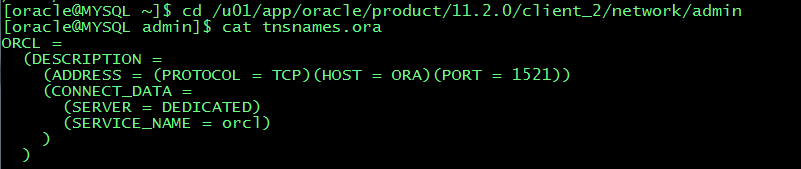
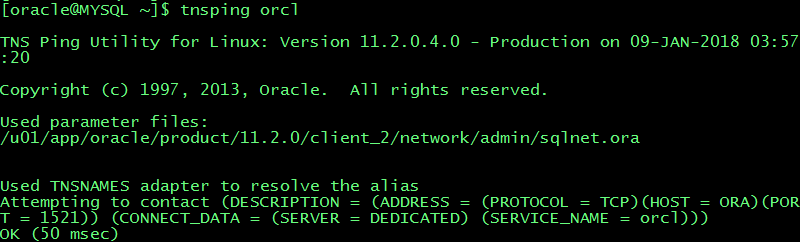
Update the tnsnames.ora of the target and add the target host into /etc/hosts

tnsping
7. Change the folder privilege
Chmod 777 for mysql-bin.index and oracle
[oracle@MYSQL mysql]$ ll
total 122928
-rw-r-----. 1 oracle oracle 56 Jan 9 06:44 auto.cnf
-rwxrwxrwx. 1 oracle oracle 351 Jan 9 05:29 ib_buffer_pool
-rwxrwxrwx. 1 oracle oracle 12582912 Jan 9 06:44 ibdata1
-rwxrwxrwx. 1 oracle oracle 50331648 Jan 9 06:44 ib_logfile0
-rwxrwxrwx. 1 oracle oracle 50331648 Jan 8 08:17 ib_logfile1
-rw-r-----. 1 oracle oracle 12582912 Jan 9 06:44 ibtmp1
drwxrwxrwx. 2 oracle oracle 4096 Jan 9 05:17 mydb
drwxrwxrwx. 2 oracle oracle 4096 Jan 8 08:17 mysql
-rwxrwxrwx. 1 oracle oracle 177 Jan 9 06:42 mysql-bin.000001
-rw-r-----. 1 oracle oracle 154 Jan 9 06:44 mysql-bin.000002
-rwxrwxrwx. 1 oracle oracle 64 Jan 9 06:44 mysql-bin.index
srwxrwxrwx. 1 oracle oracle 0 Jan 9 06:44 mysql.sock
-rw-------. 1 oracle oracle 6 Jan 9 06:44 mysql.sock.lock
drwxrwxrwx. 2 oracle oracle 4096 Jan 8 08:17 performance_schema
drwxrwxrwx. 2 oracle oracle 12288 Jan 8 08:17 sys
8. my.cnf file
[oracle@MYSQL mysql]$ cat /etc/my.cnf
# For advice on how to change settings please see
# http://dev.mysql.com/doc/refman/5.7/en/server-configuration-defaults.html
[mysqld]
#
# Remove leading # and set to the amount of RAM for the most important data
# cache in MySQL. Start at 70% of total RAM for dedicated server, else 10%.
# innodb_buffer_pool_size = 128M
#
# Remove leading # to turn on a very important data integrity option: logging
# changes to the binary log between backups.
# log_bin
#
# Remove leading # to set options mainly useful for reporting servers.
# The server defaults are faster for transactions and fast SELECTs.
# Adjust sizes as needed, experiment to find the optimal values.
# join_buffer_size = 128M
# sort_buffer_size = 2M
# read_rnd_buffer_size = 2M
datadir=/var/lib/mysql
socket=/var/lib/mysql/mysql.sock
# Disabling symbolic-links is recommended to prevent assorted security risks
symbolic-links=0
log-error=/var/log/mysqld.log
pid-file=/var/run/mysqld/mysqld.pid
#Update for OGG
server-id=11223344
log-bin=/var/lib/mysql/mysql-bin
#log-bin-index=/var/lib/mysql/mysql-bin.index
binlog_format=row
9. OGG setup
Extract:
Extract extmysql
ExtTrail ./dirdat/aa
SourceDB mydb, UserID root, Password Welcome_1
TranLogOptions AltLogDest /var/lib/mysql/mysql-bin.index
Table mydb.TCUSTMER;
Pump:
Extract pummysql
RmtHost MYSQL, MgrPort 7909
RmtTrail ./dirdat/ac
Passthru
Table mydb.TCUSTMER;
Replicat:
Replicat repmysql
UserID ogg@orcl, password ogg
DiscardFile ./dirrpt/repmysql.dsc, purge
map mydb.TCUSTMER,target ogg.TCUSTMER;
Add groups:
--adding extract group by
add extract extmysql,tranlog,begin now
add exttrail ./dirdat/aa,extract extmysql
--adding pump group by
add extract pummysql,exttrailsource ./dirdat/aa
add rmttrail ./dirdat/ac,extract pummysql
--adding replicat group by
add replicat repmysql,exttrail ./dirdat/ac
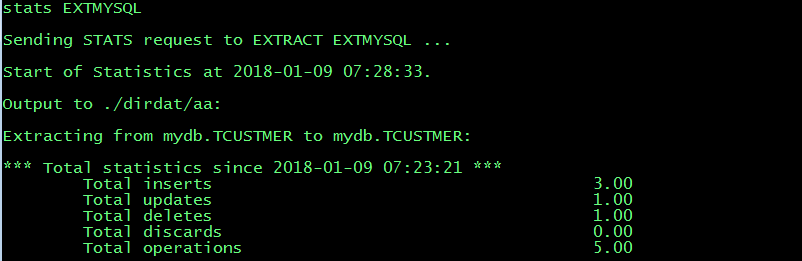
10. Test DML
Create table:
--source MySQL
CREATE TABLE TCUSTMER
(
CUST_CODE VARCHAR(4) NOT NULL,
NAME VARCHAR(30),
CITY VARCHAR(20),
STATE CHAR(2),
PRIMARY KEY (CUST_CODE)
);
--target Oracle
CREATE TABLE tcustmer
(
cust_code VARCHAR2(4),
name VARCHAR2(30),
city VARCHAR2(20),
state CHAR(2),
PRIMARY KEY (cust_code)
USING INDEX
);
Test SQL:
INSERT INTO TCUSTMER
VALUES
(
'Alex',
'Alex&Lina INC.',
'LA',
'CA'
);
INSERT INTO TCUSTMER
VALUES
(
'JANE',
'ROCKY FLYER INC.',
'DENVER',
'CO'
);
INSERT INTO TCUSTMER
VALUES
(
'WILL',
'BG SOFTWARE CO.',
'SEATTLE',
'WA'
);
delete from TCUSTMER where CUST_CODE='WILL';
update TCUSTMER set city='LA' where CUST_CODE='JANE';
11. Test result
Extract:
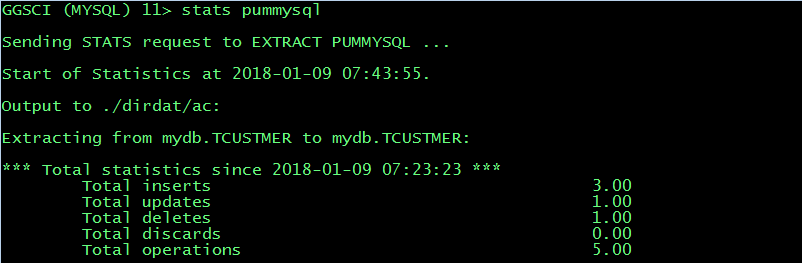
Pump:
Replicate:
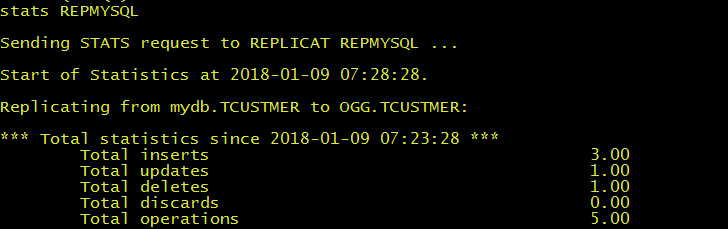
MySQL source table:

Oracle target table:

MySQL data sync to Oracle with OGG(Remote Delivery)的更多相关文章
- PCB .NET连接MySQL与Oracle DLL文分享件 MySql.Data,Oracle.ManagedDataAccess
虽然我们C#对SQL SERVER天然的支持,但对于C#要连接MYSQL或Oracle就不同了, 需要用到第3方组件才行,本文将2个组件连接数据库代码与DLL下载地址贴出. 一.C#连接MYSQL ...
- Oracle GoldenGate OGG管理员手册(较早资料)
第一章 系统实现简述 前言 编写本手册的目的是为系统管理员以及相关操作人员提供 Oracle Goldengat 软 件的日常维护和使用的技术参考: 3 ORACLE 第二章 OGG 日常维护操作 ...
- 【Oracle】OGG(Oracle GoldenGate)简介及搭建过程
GoldenGate公司简介 GoldenGate公司专注于数据同步领域,是实现数据同步技术的领导者.至2007年,在全球35个国家售出超过2000个许可证,客户分布在政府.银行.电信.证券.传媒.医 ...
- Oracle GoldenGate OGG管理员手册
第一章 系统实现简述 前言 编写本手册的目的是为系统管理员以及相关操作人员提供 Oracle Goldengat 软 件的日常维护和使用的技术参考: 3 ORACLE 第二章 OGG 日常维护操作 ...
- mysql导入数据到oracle中
mysql导入数据到oracle中. 建立Oracle表: CREATE TABLE "GG_USER" ( "USERID" BYTE) NOT NULL, ...
- 600万用户数据导入MYSQL、MSSQL、Oracle数据库方法【转】
1.导入MySql数据库 参考文献:http://zhuaxia.org/blog/post/145 1.1.LOAD DATA INFILE语法 因为获得的数据库文件是一个文本文件www.csd ...
- Oracle数据库学习(二):Oracle Linux下oracle、ogg的挂载与参数配置
准备工作:打开虚拟机端的Oracle Linux Server 6.9的系统,然后使用root用户登录.打开终端界面,输入ifconfig -a查看IP地址. 然后在本地打开XShell软件使用以下命 ...
- 一次Mysql连接池卡死导致服务无响应问题分析(.Net Mysql.Data 6.9.9)
问题: 进程启动后,线程数迅速上升至最小线程数后,缓慢上升(线程池限制)到数千,然后由于线程过多,CPU飙升到90%. 对外表现为Api无响应或连接超时. 背景 有些数据存在于另一个机房,通过内网专线 ...
- 【Oracle】OGG单向复制配置
实验环境: 源端: Ip:192.168.40.10 DataBase:Oracle 11.2.0.1.0 ORCL OS:OEL5.6 OGG:fbo_ggs_Linux_x86_ora11g_32 ...
随机推荐
- Linux常用命令——关机重启命令
Linux常用命令--关机重启命令 Linux shutdown 语法:shutdown [选项] 时间 -c 取消前一个关机命令 -h 关机 -r 重启 示例:shutdown -r now 其它 ...
- .net 去除特殊字符
str = Regex.Replace(str, @"<script[^>]*?>.*?</script>", "", Regex ...
- [php] 添加接口访问日志(文件)
日志参数: 请求参数,请求地址,响应结果 步骤: 1. 定义日志目录,没有的需要创建 2. 定义日志名称 3. 以追加的形式写入日志文件 FILE_APPEND public function ad ...
- dp入门之01背包问题
...通过暴力手推得到的一点点感觉 动态规划是相对于贪心算法的一种取得最优解的算法,通过对每一步的取舍判断从 0 推到所拥有的第 n 件物品,每次判断可以列写出状态转移方程,通过记忆化相对暴力地取得最 ...
- Python绘制温度变化曲线
导入必要的第三方库 from requests import get import matplotlib.pyplot as plt /usr/lib/python3/dist-packages/ma ...
- 用Python实现简单通讯录
一个简单的通讯录例子 #!/usr/bin/python __author__ = 'fierce' #coding:utf-8 import os #引用os模块 import pickle #应用 ...
- 自定义 Cordova插件(基础篇)
cordova自定义插件 注意:存放自定义cordova插件目录不能有空格可能会报错 cordova的安装 下载node.js,安装完成后你可以在命令行中使用node和npm. 安装cordova使用 ...
- spring AOP AspectJ 定义切面实现拦截
总结记录一下AOP常用的应用场景及使用方式,如有错误,请留言. 1. 讲AOP之前,先来总结web项目的几种拦截方式 A: 过滤器 使用过滤器可以过滤URL请求,以及请求和响应的信息,但是过 ...
- oracle drop 表后 恢复
1.查看回收站中表 select object_name,original_name,partition_name,type,ts_name,createtime,droptime from recy ...
- css选择器以及使用场景
1.选择器以及使用场景 id选择器:#header{} 类选择器:.header{} 元素选择器:div{} 子选择器:ul > li{} 后代选择器:div p{} 伪类选择器:a:hover ...