
Android 简单登陆 涉及 Button CheckBox TextView EditText简单应用
GitHub地址:https://github.com/1165863642/LoginDemo
直接贴代码<?xml version="1.0" encoding="utf-8"?<LinearLayout
xmlns:android="http://schemas.android.com/apk/res/android"

    xmlns:app="http://schemas.android.com/apk/res-auto"

    xmlns:tools="http://schemas.android.com/tools"

    android:layout_width="match_parent"

    android:layout_height="match_parent"

    android:gravity="center"

    android:orientation="vertical"

    tools:context=".MainActivity">

    <LinearLayout

        android:layout_width="wrap_content"

        android:layout_height="wrap_content"

        android:orientation="horizontal">

        <TextView

            android:layout_width="wrap_content"

            android:layout_height="wrap_content"

            android:text="用户名:"

            android:textSize="20sp"

            android:textStyle="bold"/>

        <EditText

            android:id="@+id/et_user"

            android:layout_width="200dp"

            android:layout_height="wrap_content"/>

    </LinearLayout>

    <LinearLayout

        android:layout_width="wrap_content"

        android:layout_height="wrap_content"

        android:layout_marginTop="10dp"

        android:orientation="horizontal">

        <TextView

            android:layout_width="wrap_content"

            android:layout_height="wrap_content"

            android:text="密    码:"

            android:textSize="20sp"

            android:textStyle="bold"/>

        <EditText

            android:id="@+id/et_pass"

            android:layout_width="200dp"

            android:layout_height="wrap_content"/>

    </LinearLayout>

    <CheckBox

        android:id="@+id/cb_remember"

        android:layout_width="wrap_content"

        android:layout_height="wrap_content"

        android:layout_gravity="left"

        android:layout_marginLeft="65dp"

        android:layout_marginTop="10dp"

        android:text="记住用户名"

        android:textStyle="bold"/>

    <LinearLayout

        android:layout_width="wrap_content"

        android:layout_height="wrap_content"

        android:orientation="horizontal">

        <Button

            android:id="@+id/btn_login"

            android:layout_width="wrap_content"

            android:layout_height="wrap_content"

            android:text="登陆"/>

        <Button

            android:id="@+id/btn_cancel"

            android:layout_width="wrap_content"

            android:layout_height="wrap_content"

            android:layout_marginLeft="30dp"

            android:text="取消"/>

    </LinearLayout>

</LinearLayout><?xml version="1.0" encoding="utf-8"?>

<LinearLayout

    xmlns:android="http://schemas.android.com/apk/res/android"

    xmlns:app="http://schemas.android.com/apk/res-auto"

    xmlns:tools="http://schemas.android.com/tools"

    android:layout_width="match_parent"

    android:layout_height="match_parent"

    android:gravity="center"

    android:orientation="vertical"

    tools:context=".MainActivity">

    <LinearLayout

        android:layout_width="wrap_content"

        android:layout_height="wrap_content"

        android:orientation="horizontal">

        <TextView

            android:layout_width="wrap_content"

            android:layout_height="wrap_content"

            android:text="用户名:"

            android:textSize="20sp"

            android:textStyle="bold"/>

        <EditText

            android:id="@+id/et_user"

            android:layout_width="200dp"

            android:layout_height="wrap_content"/>

    </LinearLayout>

    <LinearLayout

        android:layout_width="wrap_content"

        android:layout_height="wrap_content"

        android:layout_marginTop="10dp"

        android:orientation="horizontal">

        <TextView

            android:layout_width="wrap_content"

            android:layout_height="wrap_content"

            android:text="密    码:"

            android:textSize="20sp"

            android:textStyle="bold"/>

        <EditText

            android:id="@+id/et_pass"

            android:layout_width="200dp"

            android:layout_height="wrap_content"/>

    </LinearLayout>

    <CheckBox

        android:id="@+id/cb_remember"

        android:layout_width="wrap_content"

        android:layout_height="wrap_content"

        android:layout_gravity="left"

        android:layout_marginLeft="65dp"

        android:layout_marginTop="10dp"

        android:text="记住用户名"

        android:textStyle="bold"/>

    <LinearLayout

        android:layout_width="wrap_content"

        android:layout_height="wrap_content"

        android:orientation="horizontal">

        <Button

            android:id="@+id/btn_login"

            android:layout_width="wrap_content"

            android:layout_height="wrap_content"

            android:text="登陆"/>

        <Button

            android:id="@+id/btn_cancel"

            android:layout_width="wrap_content"

            android:layout_height="wrap_content"

            android:layout_marginLeft="30dp"

            android:text="取消"/>

    </LinearLayout>

</LinearLayout>
 package com.example.a11658.logindemo;

 import android.content.SharedPreferences;

 import android.os.Bundle;

 import android.support.v7.app.AppCompatActivity;

 import android.text.Editable;

 import android.text.TextUtils;

 import android.text.TextWatcher;

 import android.view.View;

 import android.widget.Button;

 import android.widget.CheckBox;

 import android.widget.EditText;

 import android.widget.Toast;

 public class MainActivity extends AppCompatActivity {

     Button btn_login, btn_cancel;

     EditText et_user, et_pass;

     CheckBox cb_remember;

     SharedPreferences spf;

     @Override

     protected void onCreate(Bundle savedInstanceState) {

         super.onCreate(savedInstanceState);

         setContentView(R.layout.activity_main);

         initView();

     }

     //初始化控件

     private void initView() {

         spf = getSharedPreferences("test", MODE_PRIVATE);

         //关联控件

         btn_cancel = findViewById(R.id.btn_cancel);

         btn_login = findViewById(R.id.btn_login);

         et_pass = findViewById(R.id.et_pass);

         et_user = findViewById(R.id.et_user);

         cb_remember = findViewById(R.id.cb_remember);

         et_user.setText(spf.getString("username", "111"));

         //点击事件

         btn_login.setOnClickListener(new View.OnClickListener() {

             @Override

             public void onClick(View v) {

                 //登陆

                 //1.获取用户名密码

                 String username = et_user.getText().toString().trim();

                 String password = et_pass.getText().toString().trim();

                 //2.判断是否记住用户名

                 if (cb_remember.isChecked()) {  //判断CheckBox选中状态

                     spf.edit().putString("username", username).commit();

                 } else {

                     spf.edit().clear().commit();

                 }

                 //3.判断用户名密码是否正确

                 if (!TextUtils.isEmpty(username) && !TextUtils.isEmpty(password)) {

                     if (username.equals("user") && password.equals("pass")) {

                         Toast.makeText(MainActivity.this, "登陆成功", Toast.LENGTH_SHORT).show();

                     } else {

                         Toast.makeText(MainActivity.this, "用户名密码不正确", Toast.LENGTH_SHORT).show();

                     }

                 } else {

                     Toast.makeText(MainActivity.this, "输入框不能为空", Toast.LENGTH_SHORT).show();

                 }

             }

         });

         btn_cancel.setOnClickListener(new View.OnClickListener() {

             @Override

             public void onClick(View v) {

                 finish();

             }

         });

         et_pass.addTextChangedListener(new TextWatcher() {

             @Override

             public void beforeTextChanged(CharSequence s, int start, int count, int after) {

                 //文字改变前

                 Toast.makeText(MainActivity.this,"请输入", Toast.LENGTH_SHORT).show();

             }

             @Override

             public void onTextChanged(CharSequence s, int start, int before, int count) {

                 //正在输入

                 Toast.makeText(MainActivity.this,"正在输入", Toast.LENGTH_SHORT).show();

             }

             @Override

             public void afterTextChanged(Editable s) {

                 //输入结束后

                 Toast.makeText(MainActivity.this,"输入结束后", Toast.LENGTH_SHORT).show();

             }

         });

     }

 }
效果图::
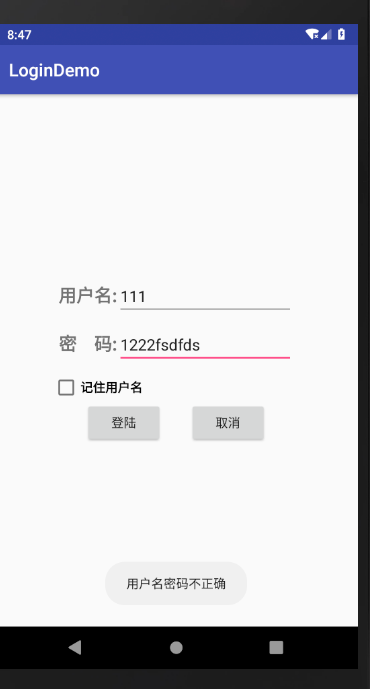
代码地址:https://github.com/1165863642/LoginDemo
涉及到的一些知识点 不懂的可以咨询我 扣:1165863642 共同学习
Android 简单登陆 涉及 Button CheckBox TextView EditText简单应用的更多相关文章
- Android开发8:UI组件TextView,EditText,Button
版本:Android4.3 API18 学习整理:liuxinming TextView 概述 TextView直接继承了View(EditText.Button两个UI组件类的父类) TextVie ...
- Android 动态的给Button、TextView、ImageView等控件设置了background后,再设置padding属性时该属性不起作用
也许大家遇到这样一个问题,有时我们根据业务需要在一个ViewGroup中动态的(程序运行过程中)添加View.例如添加Button,就需要给Button添加background.padding.mar ...
- Android Studio登陆界面+Button不变色问题
今日所学内容: 1.初始相对布局 2.AS登录界面 3.一个可以下载小图标的阿里的网站iconfont-阿里巴巴矢量图标库 用GitHub账号绑定就可以免费下载 4.取颜色工具ColorCop 遇到的 ...
- android入门系列- TextView EditText Button ImageView 的简单应用
第一篇原创,其实自己就是一菜鸟,简单分享点基本知识吧.希望能有所帮助吧. TextView EditText Button ImageView 这几个控件可能是Android开发中最常用.最基本的几个 ...
- Android简单登陆页面
布局: 线性布局+相对布局 日志打印: 利用LogCat和System.out.println打印观察. Onclick事件是采用过的第四种: 在配置文件中给Button添加点击时间 涉及知识: 通过 ...
- Android笔记-4-实现登陆页面并跳转和简单的注册页面
实现登陆页面并跳转和简单的注册页面 首先我们来看看布局的xml代码 login.xml <span style="font-family:Arial;font-size:18px; ...
- 【Android 应用开发】Android UI 设计之 TextView EditText 组件属性方法最详细解析
. 作者 :万境绝尘 转载请注明出处 : http://blog.csdn.net/shulianghan/article/details/18964835 . TextView 相关类的继承结构 ...
- Android UI 设计之 TextView EditText 组件属性方法最详细解析
. 作者 :万境绝尘 转载请注明出处 : http://blog.csdn.net/shulianghan/article/details/18964835 . TextView 相关类的继承结构 ...
- Android 有关在ListView RecycleView 中使用EditText Checkbox的坑
这是一篇文字超多的博客,哈哈哈,废话自行过滤··· 遇到问题 在开发中我们常会在ListView , RecycleView 列表中添加EditText输入框,或者checkbox复选框. 复选框 ...
随机推荐
- http请求抓包神器-Fiddler(记录和检查你电脑的所有http通讯)
Fiddler是做什么的,能帮助我们做什么? 1.能够监听http/httpS的流量,可以截获从浏览器或者客户端软件向服务器发送的http/https请求: 2.对截获之后的请求,我们还能够查看请求中 ...
- [Swift]LeetCode123. 买卖股票的最佳时机 III | Best Time to Buy and Sell Stock III
Say you have an array for which the ith element is the price of a given stock on day i. Design an al ...
- [Swift]LeetCode202. 快乐数 | Happy Number
Write an algorithm to determine if a number is "happy". A happy number is a number defined ...
- Data - Tools
数据工具汇总 史上最全的大数据分析和制作工具 全球100款大数据工具汇总 SQL 数据分析常用语句 01 - NumPy HomePage:http://www.numpy.org/ NumPy(数值 ...
- [Reversing.kr] Easy Crack Writeup
题目:http://reversing.kr/ Easy Crack IDA打开.分析可知Sub_401080是关键函数.F5后. 当满足 则跳转成功.拼接后得到flag flag: Ea5yR3ve ...
- 11.Git分支-远程跟踪分支的概念、多个远程仓库的使用
1.远程跟踪分支的概念 远程引用是对远程仓库的引用,包括分支.标签等等. 1.可以通过 git ls-remote <remote> 来获得远程引用的完整列表 2.git remote ...
- Kafka从入门到进阶
1. Apache Kafka是一个分布式流平台 1.1 流平台有三个关键功能: 发布和订阅流记录,类似于一个消息队列或企业消息系统 以一种容错的持久方式存储记录流 在流记录生成的时候就处理它们 ...
- RabbitMQ学习笔记(一) Hello World
RabbitMQ是做什么的? RabbitMQ可以类比现实生活中的邮政服务. 现实中邮件服务处理的是邮件,发件人写好信件投入邮箱,邮递员收取信件存入邮局,邮局根据信件地址,分配邮递员投递信件到指定地点 ...
- Linux~连接windows的ftp,unzip出现的问题
在linux进行连接windows下的ftp服务器 ftp://192.168.2.71 输入用户名和密码登陆成功
- Chapter 5 Blood Type——5
"Well…" He paused, and then the rest of the words followed in a rush. "嗯..." 他顿顿 ...