
RabbitMQ in Action (1): Understanding messaging
1. Consumers and producers
Producers create messages and publish (send) them to a broker server (RabbitMQ).
A message has two parts: a payload and a label.
- The payload is the data you want to transmit. It can be anything from a JSON array to an MPEG-4 of your favorite iguana Ziggy.
- The label describes the payload.
- Rabbit sends it to interested receivers based on that label.
Consumers attach to a broker server and subscribe to a queue. Think of a queue as a named mailbox.

Channels:
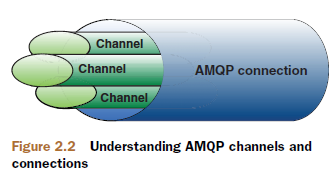
- When connecting to RabbitMQ server, you’re creating a TCP connection between your app and the Rabbit broker.
- Once the TCP connection is open (and you’re authenticated), your app then creates an AMQP channel.
- This channel is a virtual connection inside the “real” TCP connection, and it’s over the channel that you issue AMQP commands.
- Every channel has a unique ID assigned to it.
- Whether you’re publishing a message, subscribing to a queue, or receiving a message, it’s all done over a channel.
- because setting up and tearing down TCP sessions is expensive for an operating system.
2. Building from the bottom: queues
three parts to any successful routing of an AMQP message: exchanges, queues, andbindings.
The exchanges are where producers publish their messages, queues are where the messages end up and are received by consumers, and bindings are how the messages get routed from the exchange to particular queues.

Consumers receive messages from a particular queue in one of two ways:
- By subscribing to it via the basic.consume AMQP command.
- This will place the channel into a receive mode until unsubscribed from the queue.
- While subscribed, your consumer will automatically receive another message from the queue (as available) after consuming (or rejecting) the last received message.
- Sometimes, you just want a single message from a queue and don’t need to be persistently subscribed. Requesting a single message from the queue is done by using the basic.get AMQP command.
- basic.get essentially subscribes to the queue, retrieves a single message, and then unsubscribes every time you issue the command.
If one or more consumers are subscribed to a queue, messages are sent immediately to the subscribed consumers.
If a message arrives at a queue with no subscribed consumers, the message waits in the queue.
When a Rabbit queue has multiple consumers, messages received by the queue are served in a round-robin fashion to the consumers.
Each message is sent to only one consumer subscribed to the queue.
Let’s say you had a queue named seed_bin and consumers Farmer Bob and Farmer Esmeralda subscribed to seed_bin.
1 Message_A arrives in the seed_bin queue.
2 RabbitMQ sends Message_A to Farmer Bob.
3 Farmer Bob acknowledges receipt of Message_A.
4 RabbitMQ removes Message_A from the seed_bin queue.
5 Message_B arrives in the seed_bin queue.
6 RabbitMQ sends Message_B to Farmer Esmeralda.
7 Farmer Esmeralda acknowledges receipt of Message_B.
8 RabbitMQ removes Message_B from the seed_bin queue.
Every message that’s received by a consumer is required to be acknowledged. Either the consumer must explicitly send an acknowledgement to RabbitMQ using the basic.ack AMQP command, or it can set the auto_ack parameter to true when it subscribes to the queue.
The acknowledgements are a way for the consumer to confirm to RabbitMQ that the consumer has correctly received the message and RabbitMQ can safely remove it from the queue.
If a consumer receives a message and then disconnects from Rabbit (or unsubscribes from the queue) before acknowledging, RabbitMQ will consider the message undelivered and redeliver it to the next subscribed consumer.
if your consumer app has a bug and forgets to acknowledge a message, Rabbit won’t send the consumer any more messages. This is because Rabbit considers the consumer not ready to receive another message until it acknowledges the last one it received.
if you want to specifically reject a message rather than acknowledge it, use the basic.reject AMQP command. If you set the requeue parameter of
the reject command to true, RabbitMQ will redeliver the message to the next subscribed consumer. Setting requeue to false will cause RabbitMQ to remove the message from the queue immediately without resending it to a new consumer.
Both consumers and producers can create queues by using the queue.declare AMQP command.
But consumers can’t declare a queue while subscribed to another one on the same channel. They must first unsubscribe in order to place the channel in a “transmit” mode.
Here are some other useful properties you can set for the queue:
- exclusive—When set to true, your queue becomes private and can only be consumed by your app.
- auto-delete—The queue is automatically deleted when the last consumer unsubscribes.
if you try to declare a queue that already exists, Rabbit will do nothing and return successfully as though the queue had been created.
With passive set to true, queue.declare will return successfully if the queue exists, and return an error without creating the queue if it doesn’t exist.
Messages that get published into an exchange but have no queue to be routed to are discarded by Rabbit.
So if you can’t afford for your messages to be black-holed, both your producers and your consumers should attempt to create the queues that will be needed.
3. Getting together: exchanges and bindings
the broker will route messages from exchanges to queues based on routing keys
four types of exchanges:direct, fanout, topic, and headers.
headers exchange allows you to match against a header in the AMQP message instead of the routing key. low performance.
The direct exchange is pretty simple: if the routing key matches, then the message is delivered to the corresponding queue.

fanout exchange will multicast the received message to the bound queues. The messaging pattern is simple: when you send a message to a fanout exchange, it’ll be delivered to all the queues attached to this exchange.

You have several logging levels, like error, info, and warning, and at the same time your application is separated into modules like user-profile, image-gallery, msg-inbox, and so forth.
if you want to report an error when the send message action failed, you can do so with the following code:
$channel->basic_publish($msg, 'logs-exchange', 'error.msg-inbox');
if you declared a queue msg-inbox-errors :
$channel->queue_bind('msg-inbox-errors', 'logs-exchange', 'error.msg-inbox');
if you want to have a queue listening to all kinds of error levels that happen in the msg-inbox module:
$channel->queue_bind('msg-inbox-logs', 'logs-exchange', '*.msg-inbox');
for receiving all the logs:
$channel->queue_bind('all-logs', 'logs-exchange', '#');
Multiple tenants: virtual hosts and separation
Within every RabbitMQ server is the ability to create virtual message brokers called virtual hosts (vhosts).
Each one is essentially a mini-RabbitMQ server with its own queues, exchanges, and bindings and its own permissions.
When you create a user in Rabbit, it’s usually assigned to at least one vhost and will only be able to access queues, exchanges, and bindings on those assigned vhosts.
To create a vhost simply run rabbitmqctl add_vhost [vhost_name], where [vhost_name] is the vhost you want to create.
Deleting a vhost is similarly simple: rabbitmqctl delete_vhost [vhost_name].
Once a vhost has been created, you can connect to it and start adding your queues and exchanges.
Where’s my message? Durability and you
A message that’s in flight inside Rabbit to survive a crash, the message must:
- Have its delivery mode option set to 2 (persistent)
- Be published into a durable exchange
- Arrive in a durable queue
The way that RabbitMQ ensures persistent messages survive a restart is by writing them to the disk inside of a persistency log file.
The act of writing messages to disk is much slower than just storing them in RAM.
Though RabbitMQ clustering allows you to talk to any queue present in the cluster from any node, those queues are actually evenly distributed among the nodes without redundancy. If the cluster node hosting your seed_bin queue crashes, the queue disappears from the cluster until the node is restored (if durable). More important, while the node is down its queues aren’t available and the durable ones can’t be re-created. This can lead to black-holing of messages.
Other ways : your producer could listen to a reply queue on a separate channel. Every time it publishes a message, it includes the name of the reply queue so that the consumer can send a reply back to confirm receipt. If a message isn’t replied to within a reasonable amount of time, the producer can republish the message.
In AMQP, after you place a channel into transaction mode, you send it the publish you want to confirm, followed by zero or more other AMQP commands that should be executed or ignored depending on whether the initial publish succeeded. Once you’ve sent all of the commands, you commit the transaction. If the transaction’s initial publish succeeds, then the channel will complete the other AMQP commands in the transaction. If the publish fails, none of the other AMQP commands will be executed.
a better way to ensure message delivery: publisher confirms
Once a channel is in confirm mode, every message published on the channel will be assigned a unique ID number (starting at 1). Once the message has been delivered to all queues that have bindings matching the message’s routing key, the channel will issue a publisher confirm to the producer app
It is asynchronous. Once a message has been published, the producer app can go on to the next message while waiting for the confirm. When the confirm for that message is finally received, a callback function in the producer app will be fired so it can wake up and handle the confirmation.
Putting it all together: a day in the life of a message


Using publisher confirms to verify delivery
the first message published on any channel, will have an ID of 1, and every subsequent message on the channel will increment that
ID by 1.
The message IDs are unique to the channel.
RabbitMQ doesn’t have to tell you the ID of the message you just published; you keep track of it yourself in a counter internal to your app and increment that counter every time your app’s channel publishes.


RabbitMQ in Action (1): Understanding messaging的更多相关文章
- RabbitMQ in Action (2): Running and administering Rabbit
Server management the Erlang node and the Erlang application Starting nodes multiple Erlang applicat ...
- RabbitMQ in Action(5): Clustering and dealing with failure
Batteries included: RabbitMQ clustering The clustering built in to RabbitMQ was designed with two go ...
- 《RabbitMQ in action》
Producers create messages and publish (send) them to a broker server (RabbitMQ).What’s a message? A ...
- 别以为真懂Openstack: 虚拟机创建的50个步骤和100个知识点(2)
二.nova-api 步骤3:nova-api接收请求 nova-api接收请求,也不是随便怎么来都接收的,而是需要设定rate limits,默认的实现是在ratelimit的middleware里 ...
- Understanding When to use RabbitMQ or Apache Kafka
https://content.pivotal.io/rabbitmq/understanding-when-to-use-rabbitmq-or-apache-kafka How do humans ...
- 如何优雅的使用RabbitMQ
RabbitMQ无疑是目前最流行的消息队列之一,对各种语言环境的支持也很丰富,作为一个.NET developer有必要学习和了解这一工具.消息队列的使用场景大概有3种: 1.系统集成,分布式系统的设 ...
- RabbitMQ介绍6 - 其它
深入话题 Exchange实现路由的方法 http://www.rabbitmq.com/blog/2010/09/14/very-fast-and-scalable-topic-routing-pa ...
- (转)[Erlang 0080] RabbitMQ :VHost,Exchanges, Queues,Bindings and Channels
和RabbitMQ这个项目的缘分好奇怪,很长一段时间内是只关注源代码,真的是Erlang开源项目中的典范;现在要在项目中应用RabbitMQ,从新的视角切入,全新的感觉.仿佛旧情人换了新衣,虽是熟稔却 ...
- ASP.NET MVC的Action Filter
一年前写了一篇短文ASP.NET MVC Action Filters,整理了Action Filter方面的资源,本篇文章详细的描述Action Filter.Action Filter作为一个可以 ...
随机推荐
- js 获取 时间戳的三种方法
new Date() *1 自动数据类型转换为数字 new Date().getTime() Date.now();
- JAVA 数组作为方法返回值—返回地址
package Code411;/*一个方法可以有0,1,多个 参数,但只能有0和1个返回值希望一个方法产生多个结果数据进行返回 数组作为方法的参数,传递进去的是数组的地址值. */public cl ...
- 在ubuntu18 安装nginx过程,以及遇到的错误!
1.下载 nginx下载的地址:https://nginx.org/en/download.html 2.解压 指定一个目录下面放置下载的文件,然后解压文件 命令:tar zxvf nginx-1.6 ...
- mysql 与 oracle 的时间查询
关于时间区间查询 1.mysql select * from t_date a where date_format (a.delete_time,'%Y-%m-%d') <date_format ...
- iOS开发之将字典、数组转为JSON字符串方法
//将字典转换成json格式字符串,不含\n这些符号 + (NSString *)gs_jsonStringCompactFormatForDictionary:(NSDictionary *)dic ...
- AI阅粒app
项目架构 前端 lve 后端 php+flask 实现的功能 在app底栏上有首页,标签,评论,和我的.能够通过首页浏览文章,通过标签查看对应的文章,每个标签里边的文章底下都有对应的评论数,浏览人数, ...
- java思维导图
https://www.edrawsoft.cn/viewer/public/s/eeca7704686971
- CF1065F Up and Down the Tree
题解: 和正解方法不太一样 正解的大概意思就是先向下走可以走回来的 再走不能走回来的 能走回来的就是到这个儿子后最近的叶子可以返回的 然后这样可以O(n)计算 我自己做的时候以为这样不太能做.. 所以 ...
- SQL查询时,根据日期范围查询周
周数据会有weekbegin和weekend两个字段,用来描述周的开始日期和结束日期. 现在项目中的日历控件不支持周查询,只支持日期查询,所以目前面临的问题是,根据时间范围,查询周. 最终sql如下: ...
- Mapreduce求气温值项目
Mapreduce前提工作 简单的来说map是大数据,reduce是计算<运行时如果数据量不大,但是却要分工做这就比较花时间了> 首先想要使用mapreduce,需要在linux中进行一些 ...