
Docker日志管理--docker部署安装ELK (十一)--技术流ken
Docker logs
对于一个运行的容器,Docker 会将日志发送到 容器的 标准输出设备(STDOUT)和标准错误设备(STDERR),STDOUT 和 STDERR 实际上就是容器的控制台终端。
举个例子,用下面的命令运行 httpd 容器:
[root@host1 ~]# docker run -p : httpd

Unable to find image 'httpd:latest' locally

latest: Pulling from library/httpd

5e6ec7f28fb7: Pull complete

566e675a8212: Pull complete

ef5a8026039b: Pull complete

22ecb0106557: Pull complete

91cc511c603e: Pull complete

Digest: sha256:44daa8e932a32ab6e50636d769ca9a60ad412124653707e5ed59c0209c72f9b3

Status: Downloaded newer image for httpd:latest

AH00558: httpd: Could not reliably determine the server's fully qualified domain name, using 172.17.0.12. Set the 'ServerName' directive globally to suppress this message

AH00558: httpd: Could not reliably determine the server's fully qualified domain name, using 172.17.0.12. Set the 'ServerName' directive globally to suppress this message

[Mon Jan  ::25.168252 ] [mpm_event:notice] [pid :tid ] AH00489: Apache/2.4. (Unix) configured -- resuming normal operations

[Mon Jan  ::25.182578 ] [core:notice] [pid :tid ] AH00094: Command line: 'httpd -D FOREGROUND'
因为我们在启动日志的时候没有用-d 参数,httpd 容器以前台方式启动,日志会直接打印在当前的终端窗口。
如果加上-d 参数以后台方式运行容器,我们就看不到输出的日志了。
[root@host1 ~]# docker run -d -p : httpd

98d1fe5f1d074c345f578ef7767e8b2543977e61bb241f5629509c54502a7218
这种情况下,查看容器日志推荐的方法是用docker logs命令。
[root@host1 ~]# docker logs -f 98d1fe5f1d07

AH00558: httpd: Could not reliably determine the server's fully qualified domain name, using 172.17.0.12. Set the 'ServerName' directive globally to suppress this message

AH00558: httpd: Could not reliably determine the server's fully qualified domain name, using 172.17.0.12. Set the 'ServerName' directive globally to suppress this message

[Mon Jan  ::09.352502 ] [mpm_event:notice] [pid :tid ] AH00489: Apache/2.4. (Unix) configured -- resuming normal operations

[Mon Jan  ::09.353740 ] [core:notice] [pid :tid ] AH00094: Command line: 'httpd -D FOREGROUND'
docker logs能够打印出自容器启动以来完整的日志,并且-f 参数可以继续打印出新产生的日志,效果上与 Linux 命令tail -f 一样。
logging driver
Docker 提供了多种日志机制帮助用户从运行的容器中提取日志信息。这些机制被称作 logging driver。
Docker 的默认 logging driver 是json-file。
[root@host1 ~]# docker info | grep 'Logging Driver'

Logging Driver: json-file
jason-file会将容器的日志保存在 json 文件中,Docker 负责格式化其内容并输出到 STDOUT 和 STDERR。
我们可以在 Host 的容器目录中找到这个文件,器路径为 /var/lib/docker/containers/<contariner ID>/<contariner ID>-json.log
比如我们可以查看前面 httpd 容器 json 格式的日志文件。
可以看到下面四条日志记录
[root@host1 ~]# cat /var/lib/docker/containers/c633eb9e8ddd2f4fe134ebfdc157398d97c281552c8ae357f4f4879f8dc6483b/c633eb9e8ddd2f4fe134ebfdc157398d97c281552c8ae357f4f4879f8dc6483b-json.log

{"log":"AH00558: httpd: Could not reliably determine the server's fully qualified domain name, using 172.17.0.12. Set the 'ServerName' directive globally to suppress this message\n","stream":"stderr","time":"2019-01-28T09:08:22.784008521Z"}

{"log":"AH00558: httpd: Could not reliably determine the server's fully qualified domain name, using 172.17.0.12. Set the 'ServerName' directive globally to suppress this message\n","stream":"stderr","time":"2019-01-28T09:08:22.792051336Z"}

{"log":"[Mon Jan 28 09:08:22.792515 2019] [mpm_event:notice] [pid 1:tid 139740890547392] AH00489: Apache/2.4.38 (Unix) configured -- resuming normal operations\n","stream":"stderr","time":"2019-01-28T09:08:22.798741115Z"}

{"log":"[Mon Jan 28 09:08:22.793583 2019] [core:notice] [pid 1:tid 139740890547392] AH00094: Command line: 'httpd -D FOREGROUND'\n","stream":"stderr","time":"2019-01-28T09:08:22.798792809Z"}
ELK介绍
在开源的日志管理方案中,最出名的莫过于 ELK 了。ELK 是三个软件的合称:Elasticsearch、Logstash、Kibana。
Elasticsearch
一个近乎实时查询的全文搜索引擎。Elasticsearch 的设计目标就是要能够处理和搜索巨量的日志数据。
Logstash
读取原始日志,并对其进行分析和过滤,然后将其转发给其他组件(比如 Elasticsearch)进行索引或存储。Logstash 支持丰富的 Input 和 Output 类型,能够处理各种应用的日志。
Kibana
一个基于 JavaScript 的 Web 图形界面程序,专门用于可视化 Elasticsearch 的数据。Kibana 能够查询 Elasticsearch 并通过丰富的图表展示结果。用户可以创建 Dashboard 来监控系统的日志。
接下来讨论如何用 ELK 这组黄金搭档来监控 Docker 容器的日志。
ELK日志处理流程
下图展示了 Docker 部署环境下典型的 ELK 日志处理流程:
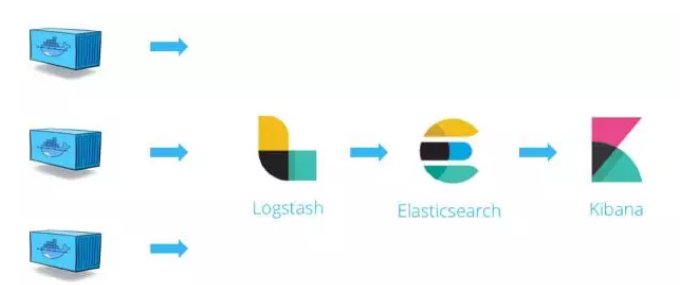
Logstash 负责从各个 Docker 容器中提取日志,Logstash将日志转发到 Elasticsearch 进行索引和保存,Kibana 分析和可视化数据。
部署ELK
第一步:安装
调整内存4个G以上
[root@host1 ~]# docker run -p : -p : -p : -it --name elk sebp/elk
我们使用的是 sebp/elk 这个现成的 image,里面已经包含了整个 ELK stack。容器启动后 ELK 各组件将分别监听如下端口:
5601 - Kibana web 接口
9200 - Elasticsearch JSON 接口
5044 - Logstash 日志接收接口
如果出现下面的错误
max virtual memory areas vm.max_map_count [] is too low, increase to at least []
执行下面的命令
sysctl -w vm.max_map_count=
第二步:浏览器访问
先访问一下 Kibana http://[Host IP]:5601/ 看看效果

当前 Kibana 没有可显示的数据,因为当前 Elasticsearch 还没有任何日志数据。
接下来的工作就是将 Docker 的日志导入 ELK
filebeat
前面我们已经知道 Docker 会将容器日志记录到 /var/lib/docker/containers/<contariner ID>/<contariner ID>-json.log,那么只要我们能够将此文件发送给 ELK 就可以实现日志管理。
要实现这一步其实不难,因为 ELK 提供了一个配套小工具 Filebeat,它能将指定路径下的日志文件转发给 ELK。同时 Filebeat 很聪明,它会监控日志文件,当日志更新时,Filebeat 会将新的内容发送给 ELK。
第一步:安装filebeat
[root@ken ~]# curl -L -O https://artifacts.elastic.co/downloads/beats/filebeat/filebeat-6.5.4-x86_64.rpm
[root@ken ~]# rpm -vi filebeat-6.5.4-x86_64.rpm
Filebeat 可能已经有了更新的版本,请参考最新的安装文档 https://www.elastic.co/guide/en/beats/filebeat/current/filebeat-installation.html
第二步:配置filebeat
Filebeat 的配置文件为 /etc/filebeat/filebeat.yml,我们需要告诉 Filebeat 两件事:
监控哪些日志文件?
将日志发送到哪里?
首先回答第一个问题。
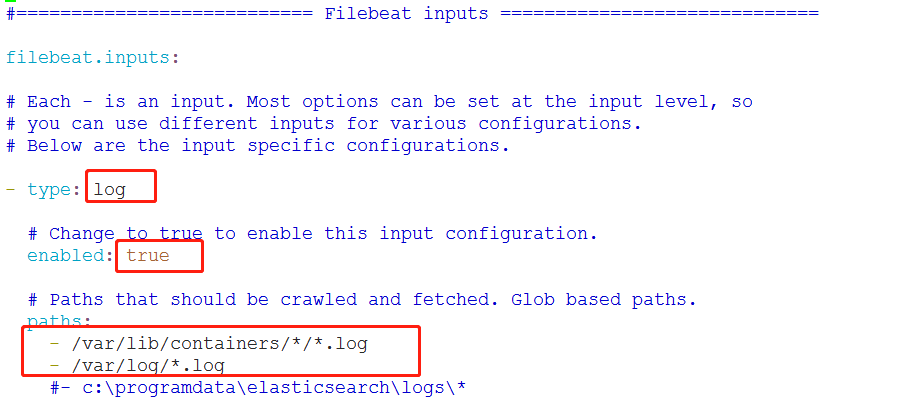
在 paths 中我们配置了两条路径:
/var/lib/docker/containers/*/*.log 是所有容器的日志文件。
/var/log/*.log 是 Host 操作系统的 log。
接下来告诉 Filebeat 将这些日志发送给 ELK。
Filebeat 可以将日志发送给 Elasticsearch 进行索引和保存;也可以先发送给 Logstash 进行分析和过滤,然后由 Logstash 转发给 Elasticsearch。
为了不引入过多的复杂性,我们这里将日志直接发送给 Elasticsearch。
下面的内容不需要任何的修改
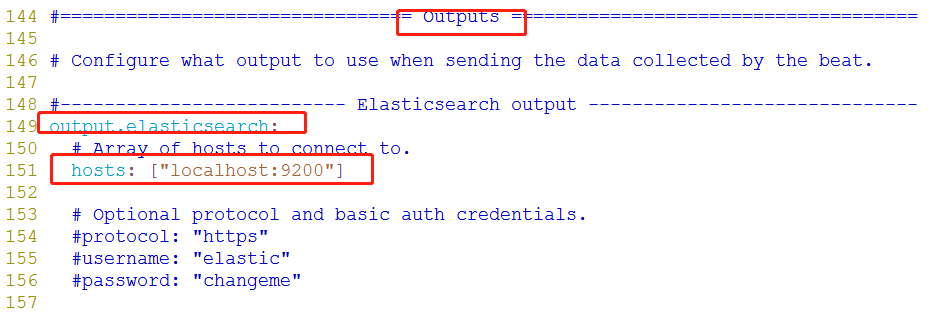
第三步:启动filebeat
[root@ken ~]# systemctl start filebeat
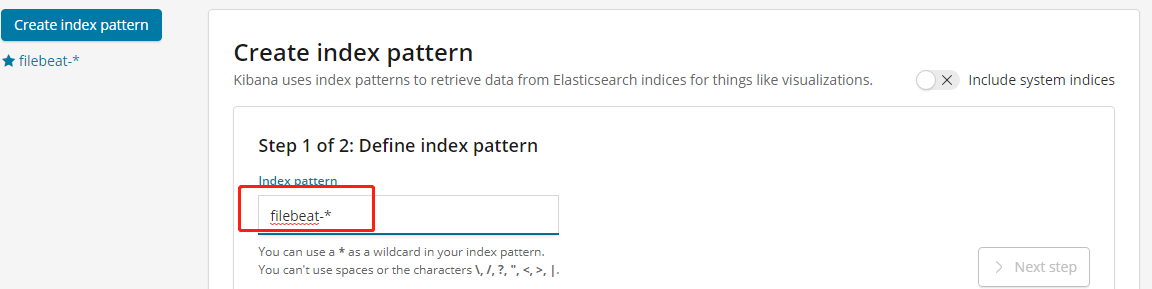
第四步:首先需要配置一个index pattern即告诉 Kibana 查询和分析 Elasticsearch 中的哪些日志。
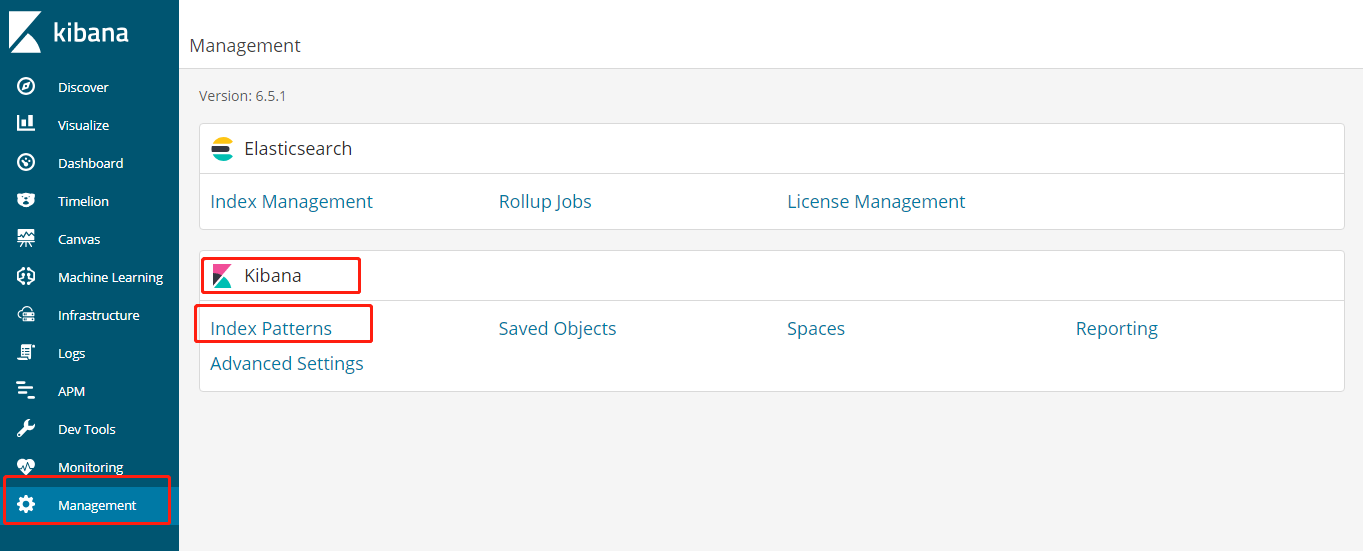
指定 index pattern 为 filebeat-*,这与 Elasticsearch 中的 index一致。
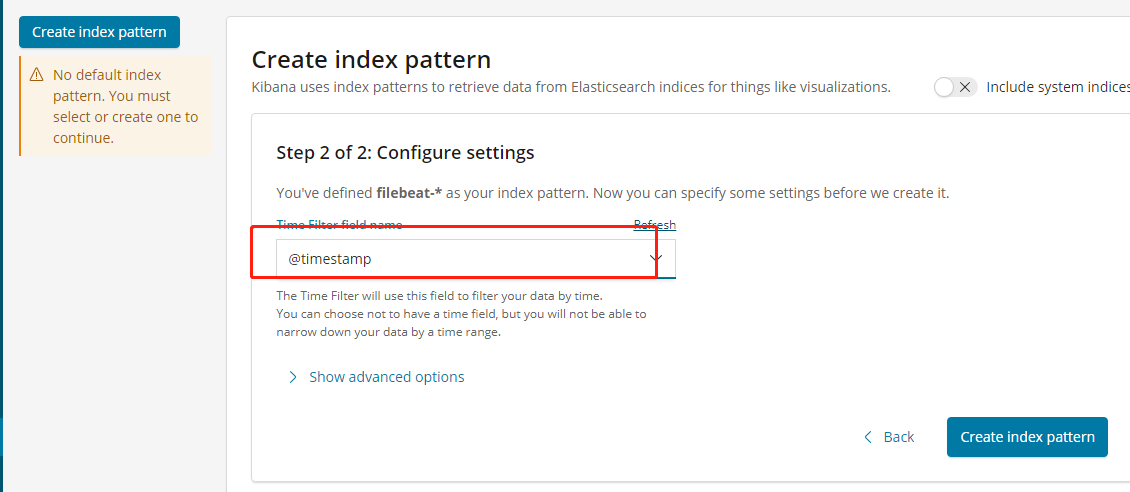
Time-field name 选择 @timestamp。
点击 Create 创建 index pattern。
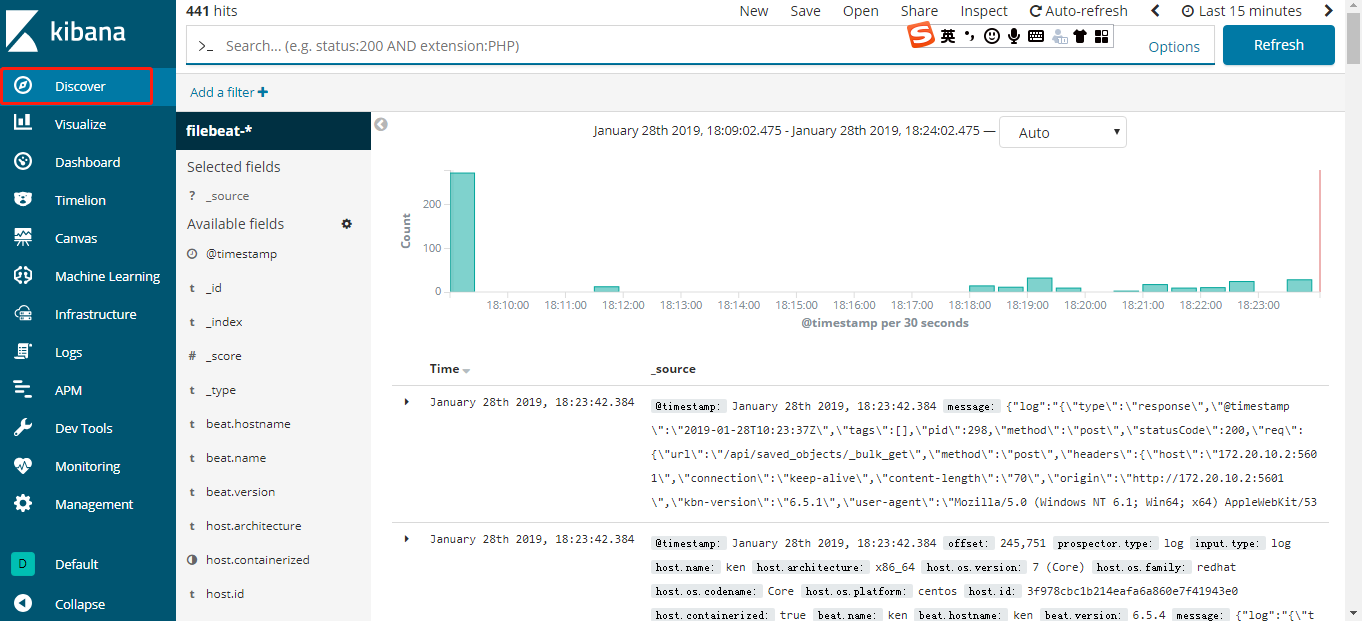
第五步:查看日志
点击 Kibana 左侧Discover 菜单,便可看到容器和 syslog 日志信息。
第六步:测试
下面我们启动一个新的容器,该容器将向控制台打印信息,模拟日志输出。
[root@ken ~]# docker run busybox sh -c 'while true; do echo "This is a log message from container busybox!"; sleep 10; done;'

This is a log message from container busybox!

This is a log message from container busybox!
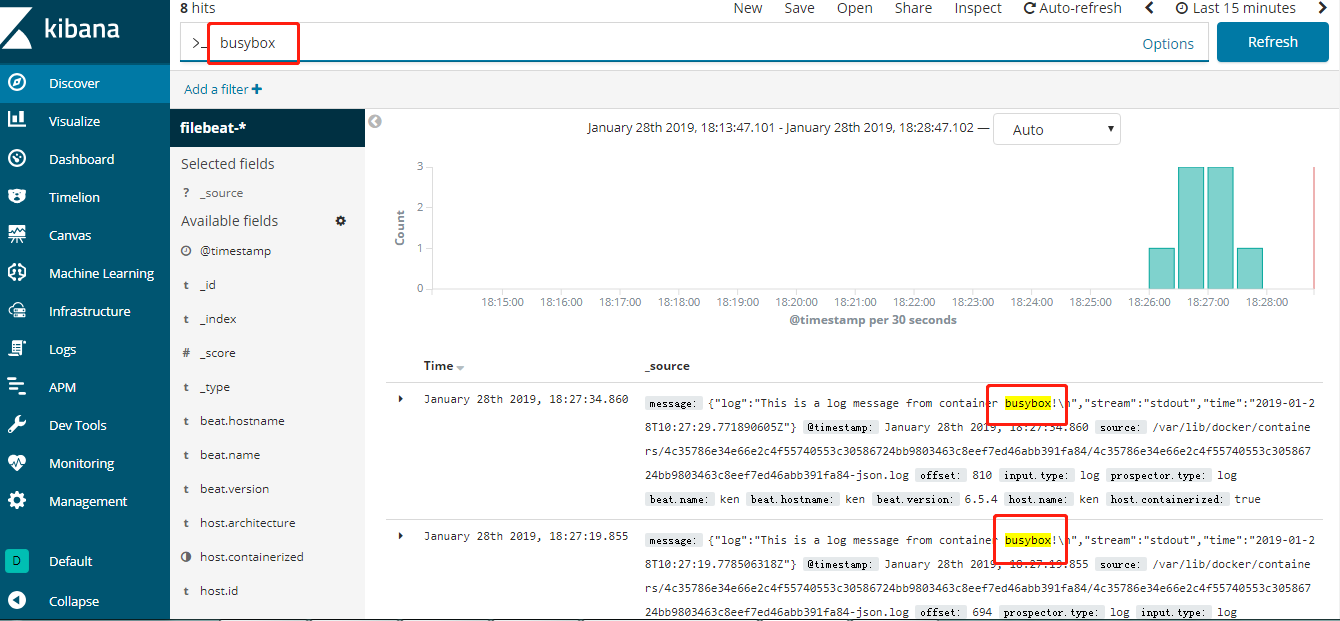
刷新 Kibana 页面马上就能看到 busybox 的日志。
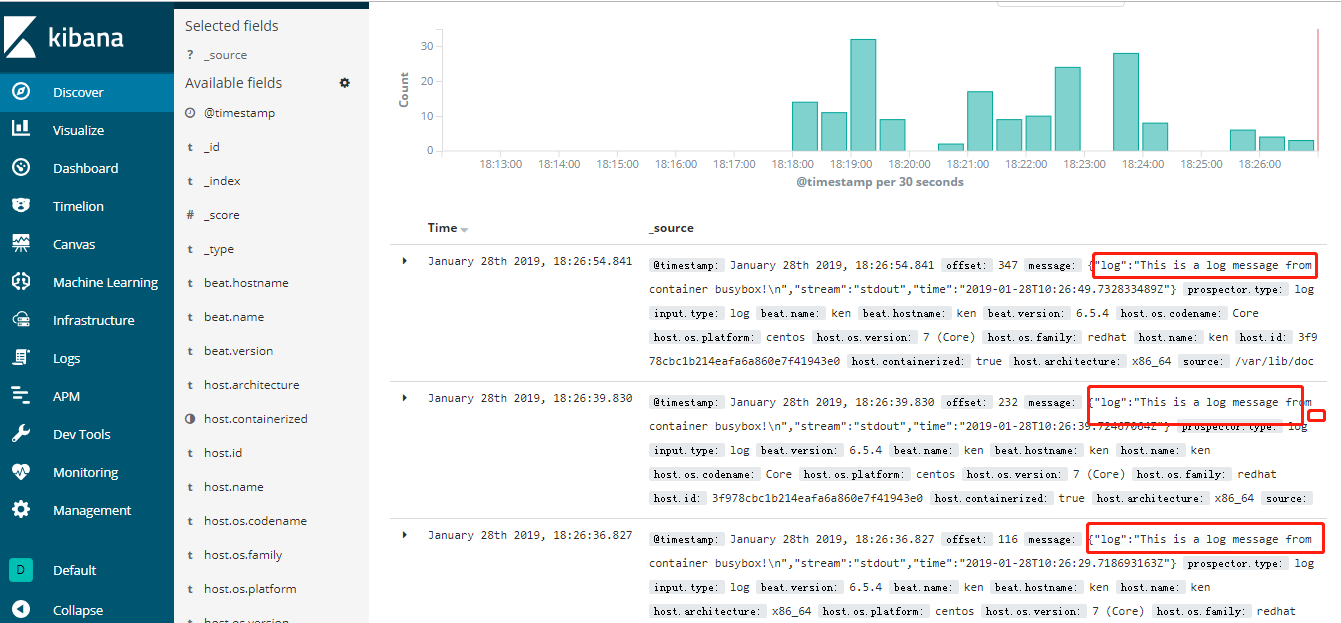
Kibana 也提供了强大的查询功能,比如输入关键字busybox 能搜索出所有匹配的日志条目。
Docker日志管理--docker部署安装ELK (十一)--技术流ken的更多相关文章
- 实战!基于lamp安装Discuz论坛-技术流ken
简介 我前面的博客已经详细介绍了lamp采用yum安装以及编译安装的方式,这篇博客将基于yum安装的lamp架构来实战安装Discuz论坛,你可以任选其一来完成. 系统环境 centos7.5 服务器 ...
- Docker日志管理–docker部署安装ELK (十一)
Docker logs 对于一个运行的容器,Docker 会将日志发送到 容器的 标准输出设备(STDOUT)和标准错误设备(STDERR),STDOUT 和 STDERR 实际上就是容器的控制台终端 ...
- Docker公共&本地镜像仓库(七)--技术流ken
分发镜像 我们已经会构建自己的镜像了,那么如果在多个docker主机上使用镜像那?有如下的几种可用的方法: 用相同的Dockerfile在其他host上构建镜像 将镜像上传到公共registry(比如 ...
- Docker 日志管理最佳实践
开源Linux 回复"读书",挑选书籍资料~ Docker-CE Server Version: 18.09.6 Storage Driver: overlay2 Kernel V ...
- 使用Docker Registry管理Docker镜像
文章目录 使用Docker Registry管理Docker镜像 1.使用Docker Hub管理镜像 1.1注册与登录 1.2创建仓库 1.3推送镜像 2. 使用私有仓库管理镜像 2.1 搭建私有仓 ...
- Docker网络(五)--技术流ken
本章内容 1.dokcer默认自带的几种网络介绍 2. 自定义网络 3. 容器间通信 4. 容器与外界交互 docker网络分为单个主机上的容器网络和多个主机上的哇网络,本文主要讲解单个主机上的容器网 ...
- Docker数据卷Volume实现文件共享、数据迁移备份(三)--技术流ken
前言 前面已经写了两篇关于docker的博文了,在工作中有关docker的基本操作已经基本讲解完了.相信现在大家已经能够熟练配置docker以及使用docker来创建镜像以及容器了.本篇博客将会讲解如 ...
- Docker之使用Dockerfile创建定制化镜像(四)--技术流ken
前言 在之前的博客<Docker端口映射及创建镜像演示(二)--技术流ken>,演示了如何使用一个现有容器创建一个镜像,以及镜像在阿里云的上传和下载. 但是这样的镜像有很大的局限性,不能根 ...
- Docker端口映射及创建镜像演示(二)--技术流ken
前言 在上一篇博客<Docker介绍及常用操作演示--技术流ken>中,已经详细介绍了docker相关内容以及有关镜像和容器的使用命令演示. 现在我们已经可以自己下载镜像,以及创建容器了. ...
随机推荐
- [GIT] 更新.repo目录
cd .repo/manifests/ git co -f git pull
- gridlayout代码注释
<div class="wrapper"> //定义一节或者一部分区域,它的css样式对应的css中class选择器的wrapper <div class=&qu ...
- 团队项目:Recycle
一.团队名字 地球保卫队(EPT) 二.团队阵容 1.项目部分 小组成员思维活跃,仅仅在一节课的时间里提出了n个颠覆软件开发界的思维的idea,最后在层层pk最后留下了八个惊世骇俗的想法.其中包括了要 ...
- Java for Android 第二周课上实验一
(一)命令行下程序开发 (二)IDEA下程序开发调试 Mac OS系统下使用的IDEA为 Netbeans (三)测试题我的学号后两位为10 使用简单的PHP小程序得我的题目为2:实现简单四则运算(能 ...
- JPG、PNG、GIF、SVG 等格式图片区别
1.图片 2. 前言 首先,我们要清楚的是,图片从类型上分,可以分为 位图 和 矢量图. 位图:位图又叫点阵图或像素图,计算机屏幕上的图是由屏幕上的发光点(即像素)构成的,每个点用二进制数据来描述其颜 ...
- 【CSS 第五天】背景,边框
总结一下今天所学习的内容,如下: 背景 属性 例子或作用 background background: #00FF00 url(bgimage.gif) no-repeat fixed top; ba ...
- class A<T> where T:new()
class A<T> where T:new() 这是类型参数约束,where表明了对类型变量T的约束关系.where T:A 表示类型变量是继承于A的,或者是A本身.where T: n ...
- Python基础之面向对象思维解决游戏《天龙八部》
一.程序设计思维: 以面向对象的思维设计<天龙八部>游戏技能,使得技能效果在增加或者减少时,游戏技能整体框架不改变,仅仅增加或者减少技能效果 二.思路流程图如下: 三.变成框架实现代码: ...
- 神经网络_线性神经网络 3 (Nerual Network_Linear Nerual Network 3)
1 LMS 学习规则_解方程组 1.1 LMS学习规则举例 X1=[0 0 1]T,t1=0:X2=[1 0 1]T,t2=0:X3=[0 1 1]T,t3=0:X1=[1 1 1]T,t1=1. 设 ...
- HBuilder git合作-上传项目到Git Hub
1.初始项目的创建 这里假设你已经在Git Hub上面建立好了代码的远程仓库,并已经邀请好了队员 在HBuidler中创建好初始的项目,然后右键,"Team"->" ...