
微信小程序60秒倒计时
新增了小程序60秒倒计时插件,下载: http://smsow.zhenzikj.com/doc/sdk.html
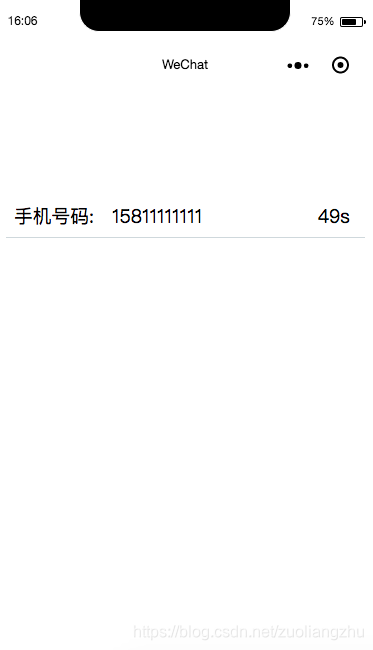
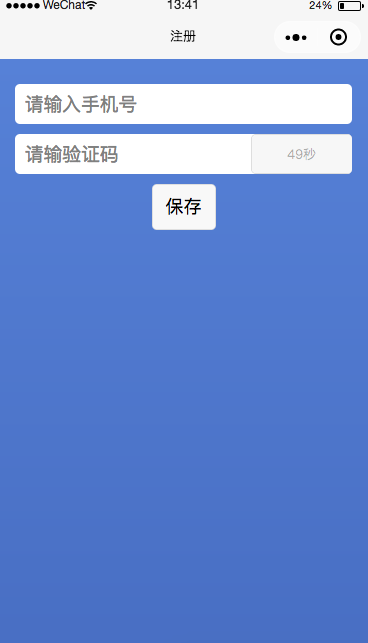
微信小程序发送短信验证码后60秒倒计时功能,效果图:
完整代码
index.wxml
<!--index.wxml-->

<view class="container">

  <view class="section">

    <text>手机号码:</text>

        <input placeholder="请输入手机号码" type="number" maxlength="11" bindinput="inputPhoneNum" auto-focus />

        <text wx:if="{{send}}" class="sendMsg" bindtap="sendMsg">发送</text>

        <text wx:if="{{alreadySend}}" class="sendMsg" >{{second+"s"}}</text>

    </view>

</view>
index.wxss
/**index.wxss**/

.userinfo {

  display: flex;

  flex-direction: column;

  align-items: center;

}

.section {

display: flex;

margin: 16rpx;

padding: 16rpx;

border-bottom: 1rpx solid #CFD8DC;

}

text {

  width: 200rpx;

}

button {

  margin: 16rpx;

}

.sendMsg {

  font-size: 12;

  margin-right: 0;

  padding: 0;

  height: inherit;

  width: 80rpx;

}
index.js
//index.js

//获取应用实例

const app = getApp()

Page({

  data: {

    send: true,

    alreadySend: false,

    second: 60,

    disabled: true,

    phoneNum: ''

  },

  // 手机号部分

  inputPhoneNum: function (e) {

    let phoneNum = e.detail.value

    this.setData({

      phoneNum: phoneNum

    })

  },

  sendMsg: function () {

    var phoneNum = this.data.phoneNum;

    if(phoneNum == ''){

      wx.showToast({

        title: '请输入手机号码',

        icon: 'none',

        duration: 2000

      })

      return ;

    }

    //此处省略发送短信验证码功能

    this.setData({

      alreadySend: true,

      send: false

    })

    this.timer()

  },

  showSendMsg: function () {

    if (!this.data.alreadySend) {

      this.setData({

        send: true

      })

    }

  },

  hideSendMsg: function () {

    this.setData({

      send: false,

      disabled: true,

      buttonType: 'default'

    })

  },

  timer: function () {

    let promise = new Promise((resolve, reject) => {

      let setTimer = setInterval(

        () => {

          this.setData({

            second: this.data.second - 1

          })

          if (this.data.second <= 0) {

            this.setData({

              second: 60,

              alreadySend: false,

              send: true

            })

            resolve(setTimer)

          }

        }

        , 1000)

    })

    promise.then((setTimer) => {

      clearInterval(setTimer)

    })

  },

})
完整的短信验证码登录实例可参考: http://smsow.zhenzikj.com/bbs/question/detail/40.html
微信小程序60秒倒计时的更多相关文章
- 微信小程序验证码获取倒计时
wxml <button disabled='{{disabled}}' bindtap="goGetCode">{{code}}</button> js ...
- 微信小程序注册60s倒计时功能 使用JS实现注册60s倒计时功能
微信小程序+WEB使用JS实现注册[60s]倒计时功能开发步骤: 1.wxml页面代码: <text>绑定手机</text> <form bindsubmit=" ...
- 微信小程序动态显示项目倒计时效果
效果: wxml代码: <view class='spellNum'> <view> <text style='color: #fff;'>团长</text& ...
- 微信小程序实现验证码倒计时效果
效果图 wxml <input class='input-pwd' placeholder="新密码" placeholder-style='color: #000' pas ...
- 微信小程序中的倒计时
这是我项目中的例子,如果有更好的建议欢迎留言 ,一起学习 //获取时间 var sekillStartTime = resultLis[0].planGroup0.sekillStartTime;// ...
- 微信小程序 转盘抽奖 倒计时 整点
xml: <view id="luckdraw_box"> <view id="luckdraw_back"> <image st ...
- 微信小程序获取验证码倒计时
getVerificationCode: function() { var that = this; var currentTime = that.data.currentTime; that.set ...
- 微信小程序之倒计时插件 wxTimer
微信小程序之倒计时插件 wxTimer 介绍: 用于在微信小程序中进行倒计时的组件. 功能: 1.最基础的当然就是倒计时功能了. 2.可以设置倒计时结束后执行的事件. 3.可以设置倒计时执行过程中 ...
- 微信小程序+PHP:动态显示项目倒计时(格式:4天7小时58分钟39秒)
1.一般我们说的显示秒杀都是指的单条数据,循环我没做. 效果: 2.wxml代码: <p class="endtime_act">距报名截止还有: <block ...
随机推荐
- 爬取json Swaggerui界面
对一个静态的网页进行爬取. 要获取的内容分别为 paths 标签下的 1./quota/开头的路径 2. get 这样的httpmode 3 description对应的描述 4 summary 5 ...
- AngularJS指令基础(一)
AngularJS指令基础(一) 1.什么是指令:粗暴的理解就是,自定义HTML标签.专业理解是指,angularJS扩展具有自定义功能的HTML元素的途径. 2.什么时候用到指令:需求是变化的.多样 ...
- MySQL ERROR 1045 (28000)
mysql ERROR 1045 (28000): Access denied for user 'ODBC'@'localhost' (using password: YES) 到配置文件my.in ...
- RROR: [XSIM 43-3238] Failed to link the design.
仿真时遇到上述错误,在tcl下运行 set_property -name {xsim.elaborate.xelab.more_options} -value {-cc clang} -objects ...
- 算法工程师<机器学习基础>
<机器学习基础> 逻辑回归,SVM,决策树 1.逻辑回归和SVM的区别是什么?各适用于解决什么问题? https://www.zhihu.com/question/24904422 2.L ...
- 分割字符串和截取字符串:split 和substring
//按“,”截取字符串 String id="123123,234534,453456"; String[] idArry = id.trim().split(",&qu ...
- ArrayList源码学习
1.ArrayList:基于数据实现,允许出现空值和重复元素,当ArrayList中添加的元素数量大于底层数组容量是,会通过扩容机制重新生成一个更大的数组.(非线程安全) 2.源码分析 构造函数 /* ...
- Python 包管理(PYPA)
Python包的管理可以通过Python 自带的管理 工具,例如:package-autoremove,package-list-packages, package-install 等,使用起来也非常 ...
- centos/redhat/ubuntu不同之处
前言:最近用久了ubuntu,发现这个和centos还是有很大差别的,以下是我的个人总结: centos/redhat/ubuntu不同之处: 1.关系理解:centos和redhat,你可以理解为是 ...
- Docker使用docker-compose.yml构建Asp.Net Core和Mysql镜像并与Mysql数据库通信
version: '3' services: mycore01: build: context: . container_name: 'mycore01' #自定义容器名 dockerfile ...