
4.3 thymeleaf模板引擎的使用
参考说明:以下笔记参考来自尚硅谷springboot教学中的笔记!
thymeleaf官网docs: https://www.thymeleaf.org/documentation.html
模板引擎:
JSP、Velocity、Freemarker、Thymeleaf
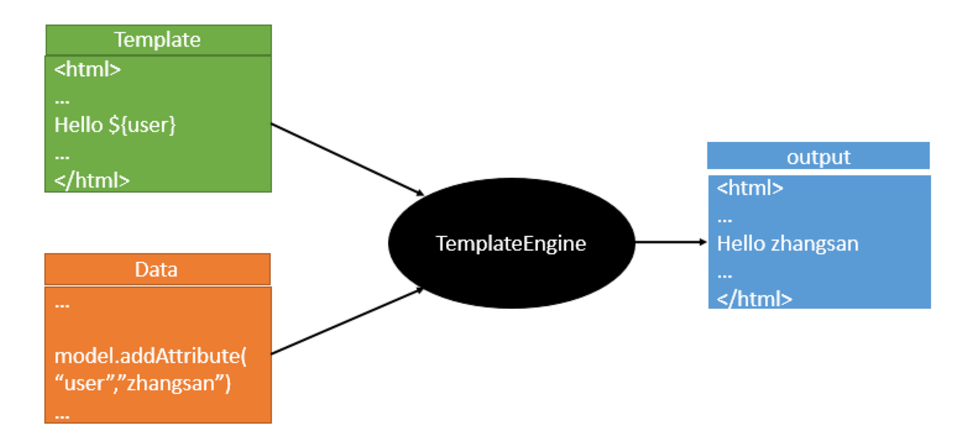
SpringBoot推荐的Thymeleaf;
语法更简单,功能更强大;
1、引入thymeleaf:
<dependency>

       <groupId>org.springframework.boot</groupId>
       <artifactId>spring-boot-starter-thymeleaf</artifactId>

              2.1.6

</dependency>

切换thymeleaf版本

<properties>

        <thymeleaf.version>3.0.9.RELEASE</thymeleaf.version>

        <!-- 布局功能的支持程序  thymeleaf3主程序  layout2以上版本 -->

        <!-- thymeleaf2   layout1-->

        <thymeleaf-layout-dialect.version>2.2.2</thymeleaf-layout-dialect.version>

  </properties>
2、Thymeleaf使用
@ConfigurationProperties(prefix = "spring.thymeleaf")

public class ThymeleafProperties {

    private static final Charset DEFAULT_ENCODING = Charset.forName("UTF-8");

    private static final MimeType DEFAULT_CONTENT_TYPE = MimeType.valueOf("text/html");

    public static final String DEFAULT_PREFIX = "classpath:/templates/";

    public static final String DEFAULT_SUFFIX = ".html";

      //
以上是package org.springframework.boot.autoconfigure.thymeleaf;包中的源码,放在这里主要是告诉你模块该如何配置;
只要我们把HTML页面放在classpath:/templates/,thymeleaf就能自动渲染;
使用:
(1) 导入thymeleaf的名称空间(导入后有语法提示)
<html lang="en" xmlns:th="http://www.thymeleaf.org">
(2) 使用thymeleaf语法:
<!DOCTYPE html>

<html lang="en" xmlns:th="http://www.thymeleaf.org">

<head>

    <meta charset="UTF-8">

    <title>Title</title>

</head>

<body>

    <h1>成功!</h1>

    <!--th:text 将div里面的文本内容设置为 -->

    <div th:text="${hello}">这是显示欢迎信息</div>

</body>

</html>
3、语法规则
1)、th:text;改变当前元素里面的文本内容;
th:任意html属性;来替换原生属性的值(eg: th:id=1改变id的值, th:class=“c1”改变class的值)

补充:
<div th:remove="tag">
    <div>唐嫣</div>  //包含标记的标签将被删除,即这里的外层div将被删除         参考:th:remove用法
</div>
2)、表达式?
1、Simple expressions:(表达式语法)

    (1)Variable Expressions: ${...}:获取变量值;OGNL;

            1)、获取对象的属性、调用方法

            2)、使用内置的基本对象:

                #ctx : the context object.

                #vars: the context variables.

                #locale : the context locale.

                #request : (only in Web Contexts) the HttpServletRequest object.

                #response : (only in Web Contexts) the HttpServletResponse object.

                #session : (only in Web Contexts) the HttpSession object.

                #servletContext : (only in Web Contexts) the ServletContext object.

                ${session.foo}

            3)、内置的一些工具对象:

                #execInfo : information about the template being processed.

                #messages : methods for obtaining externalized messages inside variables expressions, in the same way as they would be obtained using #{…} syntax.

                #uris : methods for escaping parts of URLs/URIs

                #conversions : methods for executing the configured conversion service (if any).

                #dates : methods for java.util.Date objects: formatting, component extraction, etc.

                #calendars : analogous to #dates , but for java.util.Calendar objects.

                #numbers : methods for formatting numeric objects.

                #strings : methods for String objects: contains, startsWith, prepending/appending, etc.

                #objects : methods for objects in general.

                #bools : methods for boolean evaluation.

                #arrays : methods for arrays.

                #lists : methods for lists.

                #sets : methods for sets.

                #maps : methods for maps.

                #aggregates : methods for creating aggregates on arrays or collections.

                #ids : methods for dealing with id attributes that might be repeated (for example, as a result of an iteration).

    (2)Selection Variable Expressions: *{...}:选择表达式:和${}在功能上是一样;

        补充:配合 th:object="${session.user}:#只有作为全局变量使用的时候才是不一样的

        eg:  用th:object从session里面取出user对象(即将取出来的对象赋值给Object),以后要用user对象的值,就可以在当前的div里面,
       "*"号就代表刚才的th:object对象,然后直接获取对象的属性即可。
    <div th:object="${session.user}">

            <p>Name: <span th:text="*{firstName}">Sebastian</span>.</p>

            <p>Surname: <span th:text="*{lastName}">Pepper</span>.</p>

            <p>Nationality: <span th:text="*{nationality}">Saturn</span>.</p>

        </div>
    --以上方式等于如下方式$和*号功能是一样的,而且$和*可以混合使用
    <div th:object="${session.user}">
      <p>Name: <span th:text="*{firstName}">Sebastian</span>.</p>
      <p>Surname: <span th:text="${session.user.lastName}">Pepper</span>.</p>
      <p>Nationality: <span th:text="*{nationality}">Saturn</span>.</p>
    </div>

    (3)Message Expressions: #{...}:获取国际化内容

    (4)Link URL Expressions: @{...}:定义URL;

         @{/order/process(execId=${execId},execType='FAST')}

    (5)Fragment Expressions: ~{...}:片段引用表达式

         <div th:insert="~{commons :: main}">...</div>

2、Literals(字面量)

      Text literals: 'one text' , 'Another one!' ,…

      Number literals: 0 , 34 , 3.0 , 12.3 ,…

      Boolean literals: true , false

      Null literal: null

      Literal tokens: one , sometext , main ,…

3、Text operations:(文本操作)

    String concatenation: +

    Literal substitutions: |The name is ${name}|

4、Arithmetic operations:(数学运算)

    Binary operators: + , - , * , / , %

    Minus sign (unary operator): -

5、Boolean operations:(布尔运算)

    Binary operators: and , or

    Boolean negation (unary operator): ! , not

6、Comparisons and equality:(比较运算)

    Comparators: > , < , >= , <= ( gt , lt , ge , le )

    Equality operators: == , != ( eq , ne )

7、Conditional operators:条件运算(三元运算符)

    If-then: (if) ? (then)

    If-then-else: (if) ? (then) : (else)

    Default: (value) ?: (defaultvalue)

8、Special tokens(特殊操作):

    No-Operation: _

9、内联表达式
<p>Hello, [[${session.user.name}]]!</p>
任何在th:text或th:utext属性中使⽤的表达式都可以出现在[[]]或[()]中.
[[...]]等价于th:text(即结果将被HTML转义) , [(...)]等价于th:utext, 不会执⾏任何HTML转义
4.3 thymeleaf模板引擎的使用的更多相关文章
- (二)SpringBoot基础篇- 静态资源的访问及Thymeleaf模板引擎的使用
一.描述 在应用系统开发的过程中,不可避免的需要使用静态资源(浏览器看的懂,他可以有变量,例:HTML页面,css样式文件,文本,属性文件,图片等): 并且SpringBoot内置了Thymeleaf ...
- 【Springboot】Springboot整合Thymeleaf模板引擎
Thymeleaf Thymeleaf是跟Velocity.FreeMarker类似的模板引擎,它可以完全替代JSP,相较与其他的模板引擎,它主要有以下几个特点: 1. Thymeleaf在有网络和无 ...
- 三、thymeleaf模板引擎构建前台html, 后台使用 ModelAndView 和 Model 模型
项目源码:https://github.com/y369q369/springBoot.git -> thymeleaf 私聊QQ: 1486866853 1.pom.xml中 ...
- SpringBoot使用thymeleaf模板引擎
(1).添加pom依赖 <dependency> <groupId>org.springframework.boot</groupId> <artifactI ...
- Spring Boot 2.0 整合Thymeleaf 模板引擎
本节将和大家一起实战Spring Boot 2.0 和thymeleaf 模板引擎 1. 创建项目 2. 使用Spring Initlizr 快速创建Spring Boot 应用程序 3. 填写项目配 ...
- Thymeleaf模板引擎的初步使用
在springboot中,推荐使用的模板引擎是Thymeleaf模板引擎,它提供了完美的Spring MVC的支持.下面就简单的介绍一下Thymeleaf模板引擎的使用. 在controller层中, ...
- spring boot: thymeleaf模板引擎使用
spring boot: thymeleaf模板引擎使用 在pom.xml加入thymeleaf模板依赖 <!-- 添加thymeleaf的依赖 --> <dependency> ...
- SpringBoot入门篇--使用Thymeleaf模板引擎进行页面的渲染
在做WEB开发的时候,我们不可避免的就是在前端页面之间进行跳转,中间进行数据的查询等等操作.我们在使用SpringBoot之前包括我在内其实大部分都是用的是JSP页面,可以说使用的已经很熟悉.但是我们 ...
- (二)SpringBoot2.0基础篇- 静态资源的访问及Thymeleaf模板引擎的使用
一.描述 在应用系统开发的过程中,不可避免的需要使用静态资源(浏览器看的懂,他可以有变量,例:HTML页面,css样式文件,文本,属性文件,图片等): 并且SpringBoot内置了Thymeleaf ...
- thymeleaf模板引擎
thymeleaf模板引擎 thymeleaf是现代化服务器端的Java模板引擎,不同于JSP和FreeMarker,Thymeleaf的语法更加接近HTML,并且也有不错的扩展性.详细资料可以浏览官 ...
随机推荐
- Markdown学习示例
Markdown学习示例 什么是Markdown Markdown是一种在web显示带样式风格文本的方式.你能通过它控制文本的字体样式.插入图片.插入列表等.通常,Markdown使用一些特殊的非字母 ...
- linux将apache设置为系统服务和开机自启
1> 查看一下/etc/init.d/下是否存在httpd这个服务 ls /etc/init.d/ | grep httpd 如果没有执行下一步 2>将自己安装目录下的apachect1复 ...
- #WEB安全基础 : HTTP协议 | 0x9 GET和POST请求以及请求URI的方式
请求URI的方式 1.URI为完整的请求URI GET http://hackr.jp/index.htm HTTP/1.1 2.在首部字段Host中写明域名或IP地址 GET/index.htm H ...
- H.264学习--1
1.宏块(Macro Block):一个编码图像首先要划分成多个块(4x4 像素)才能进行处理,显然宏块应该是整数个块组成,通常宏块大小为 ...
- 前端学习历程--http与https
一.CA(证书授权中心)证书 1.ca是通信的中介,具有足够的权威性 2.信任可嵌套如:C 信任 A1,A1 信任 A2,A2 信任 A3 二.根本区别 1.https需要基于ssl的ca证书认证(判 ...
- Excel坐标自动在AutoCad绘图_3
众所周知,Excel对数据处理的功能非常强大,它可以进行数据处理.统计分析已经辅助决策的操作,该软件已经渗透到各个领域.作为一个测绘人,GISer, 也经常利用excel完成一些测量表格的自动化计算, ...
- 信用评分卡(A卡/B卡/C卡)的模型简介及开发流程|干货
https://blog.csdn.net/varyall/article/details/81173326 如今在银行.消费金融公司等各种贷款业务机构,普遍使用信用评分,对客户实行打分制,以期对客户 ...
- java基础语法-char数据类型
1.java中的char描述了UTF-16中的一个代码单元,因此对于基本的多语言层面可以随意的用char表示 ;//int值只能在0到65535即0000到FFFF 对于其他16个代码级别(两个代码单 ...
- Python 第八阶段 学习记录之---算法
算法(Algorithm): 一个计算过程, 解决问题的方法 1.递归的两个特点 - 调用自身 - 结束条件 时间复杂度 - 时间复杂度是用来估计算法运行时间的一个式子(单位) - 一般来说,时间复杂 ...
- UDP广播-缓冲区过小
上次介绍到了关于客户端实时刷新摄像头所识别的图片的一些方法,采用了了UDP广播的技术做处理.理论上是没有问题的,将客户端运行在不同电脑上也能很好的看到效果,运行日志也没看出啥问题,结果今天翻看日志的时 ...