
IOS Animation-CAShapeLayer、UIBezierPath与Animation的结合
在阅读本文之前,对CAShapeLayer、UIBezierPath不熟悉的话,可以先阅读文章 贝塞尔曲线与Layer
如果对动画不熟悉的话,先阅读文章 动画基础、深入
Layer是绘图的画板,Bezier是画图的画笔,Animation是画图的动作。现在我们可以通过下面例子更好的让它们更好地结合在一起。
1)画一个小屋子动画
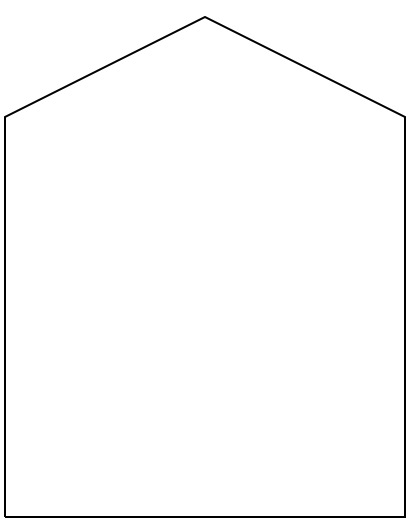
我们首先通过定义CAShapeLayer画板,然后定义path来确定画图路径。最后使用动画。如下面代码
     //让一个屋子的线画起来的动画效果

     func addCAShapeLayerAnimationStrokeEnd() {

         //创建CAShapeLayer,屋子的layer

         let slayer = CAShapeLayer.init()

         slayer.strokeColor = UIColor.blackColor().CGColor

         slayer.fillColor = UIColor.clearColor().CGColor

         //创建屋子的路径path

         let path = UIBezierPath.init()

         path.moveToPoint(CGPointMake(, ))

         path.addLineToPoint(CGPointMake(, ))

         path.addLineToPoint(CGPointMake(, ))

         path.addLineToPoint(CGPointMake(, ))

         path.addLineToPoint(CGPointMake(, ))

         path.addLineToPoint(CGPointMake(, ))

         //把画图的路径path添加到layer中

         slayer.path = path.CGPath

         //添加slayer到view.layer

         self.view.layer.addSublayer(slayer)

         //创建动画,strokeEnd。让线画起来的效果

         let ani = CABasicAnimation(keyPath: "strokeEnd")

         ani.fromValue =

         ani.toValue =

         ani.repeatCount =

         ani.duration =

         slayer.addAnimation(ani, forKey: "addCAShapeLayerAnimationStrokeEnd")

     }
2)小屋子+画笔的动画
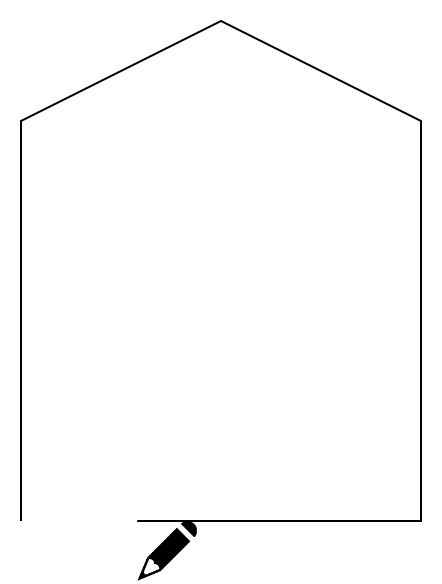
上面1)中我们画了一个屋子的动画,那么如果我们想在屋子上面添加一个画笔来画,让动画更加生动。所以我们用到keyframe动画来添加path。
     //让一个屋子的线画起来的动画效果

     func addCAShapeLayerAnimationStrokeEnd2() {

         //---创建CAShapeLayer,屋子的layer start---

         let pathLayer = CAShapeLayer.init()

         pathLayer.strokeColor = UIColor.blackColor().CGColor

         pathLayer.fillColor = UIColor.clearColor().CGColor

         //创建屋子的路径path

         let path = UIBezierPath.init()

         path.moveToPoint(CGPointMake(, ))

         path.addLineToPoint(CGPointMake(, ))

         path.addLineToPoint(CGPointMake(, ))

         path.addLineToPoint(CGPointMake(, ))

         path.addLineToPoint(CGPointMake(, ))

         path.addLineToPoint(CGPointMake(, ))

         //把画图的路径path添加到layer中

         pathLayer.path = path.CGPath

         //添加slayer到view.layer

         self.view.layer.addSublayer(pathLayer)

         //---创建CAShapeLayer,屋子的layer end---

         //---创建画笔layer start---

         let panLayer = CALayer.init()

         panLayer.anchorPoint = CGPointZero

         panLayer.frame = CGRectMake(, , , )

         panLayer.contents = UIImage(named: "pan.png")?.CGImage

         self.view.layer.addSublayer(panLayer)

         //---创建画笔layer end---

         //---创建动画,strokeEnd。让线画起来的效果 start---

         let strokeEndAnimation = CABasicAnimation(keyPath: "strokeEnd")

         strokeEndAnimation.fromValue =

         strokeEndAnimation.toValue =

         strokeEndAnimation.repeatCount =

         strokeEndAnimation.duration =

         pathLayer.addAnimation(strokeEndAnimation, forKey: "strokeEndAnimation")

         //---创建动画,strokeEnd。让线画起来的效果 end---

         //---让画笔动起来动画start---

         let panAnimation = CAKeyframeAnimation(keyPath: "position")

         panAnimation.path = path.CGPath

         panAnimation.calculationMode = kCAAnimationPaced

         panAnimation.duration =

         panAnimation.repeatCount =

         panLayer.addAnimation(panAnimation, forKey: "panAnimation")

         //---让画笔动起来动画end---

     }
IOS Animation-CAShapeLayer、UIBezierPath与Animation的结合的更多相关文章
- Android动画总结#补间动画(Tween Animation/View Animation) #帧动画(Frame Animation/Drawable Animation)#属性动画(PropertyAnimation)
1.共有三种动画,英文名字多种叫法如下 第一种动画:补间动画(Tween Animation/View Animation) 四个:RotateAnimation旋转. AlphaAnimation透 ...
- iOS 动画篇 之 Core Animation (一)
iOS中实现动画有两种方式,一种是自己不断的通过drawRect:方法来绘制,另外一种就是使用核心动画(Core Animation). 导语: 核心动画提供高帧速率和流畅的动画,而不会增加CPU的负 ...
- iOS Swift最简单的Animation
最近发现Animation是一个iOS开发中非常好玩的元素,能给应用的交互性增色不少.比如很多音乐应用的菜单从底部弹出和隐藏的效果. Animation最核心的当然就是UIView的animateWi ...
- iOS 动画效果:Core Animation & Facebook's pop
本文转载至 http://www.cocoachina.com/ios/20151223/14739.html 感谢原创作者分享 前言相信很多人对实现 iOS 中的动画效果都特别头疼,往往懒得动手,功 ...
- IOS 核心动画(Core Animation)
Core Animation,中文翻译为核心动画,它是一组非常强大的动画处理API,使用它 能做出非常炫丽的动画效果,而且往往是事半功倍.也就是说,使用少量的代码就 可以实现非常强大的功能. Core ...
- iOS 图形图像动画 Core Animation
//Core Animation #define WeakSelf __weak __typeof(self) weakSelf = self #define StrongSelf __strong ...
- iOS关于CAShapeLayer与UIBezierPath的知识内容
使用CAShapeLayer与UIBezierPath可以实现不在view的drawRect方法中就画出一些想要的图形 . 1:UIBezierPath: UIBezierPath是在 UIKit 中 ...
- IOS中的动画——Core Animation
一.基础动画 CABasicAnimation //初始化方式 CABasicAnimation * cabase=[CABasicAnimation animation]; //通过keyPath设 ...
- CAShapeLayer + UIBezierPath
UIBezierPath: UIBezierPath是在 UIKit 中的一个类,继承于NSObject,可以创建基于矢量的路径.使用此类可以定义常见的圆形.多边形等形状 .我们使用直线.弧(arc) ...
随机推荐
- SharePoint 2013异常信息的查看
刚刚学习SharePoint开发的时候,经常遇到一些异常,却不能直接看到详细信息,很郁闷.这里做下简单的整理,方便查找: 1.代码未处理异常出现黄页——”‘/’应用程序中的服务器错误.运行时错误“. ...
- liunx 防火墙开放端口的设置
今天在liunx 服务器上遇到一个问题,tomcat服务启动后怎么也访问不到项目,找了好久的原因,终于发现原来是liunx服务防火墙限制服务端口的访问,也就不多说了,看下面解决方法. 1.查看防火墙的 ...
- redis命令总结
Redis命令总结 redis 127.0.0.1:6379> info #查看server版本内存使用连接等信息 redis 127.0.0.1:6379> client list ...
- 一个豆瓣API的使用——拒绝思维定式
好久没写博客了,最近一直在用豆瓣API爬数据,不知道以前的是什么样,毕竟刚开始用没多久,就用最新的V2版本,以前的不更新了,可以参照https://developers.douban.com/wiki ...
- 【ImageView】ImageView点击事件报错空指针
今天在使用自定义圆形imageview的时候,想利用其点击事件来实现查看个人资料功能,但是该空间在Activity中的onCreate方法中调用点击事件总是出现空指针异常,每次程序都进不去主页面,到处 ...
- [UCSD白板题] Maximize the Value of an Arithmetic Expression
Problem Introduction In the problem, your goal is to add parentheses to a given arithmetic expressio ...
- android 中View的优化
在android开发中Listview是一个很重要的组件,它以列表的形式根据数据的长自适应展示具体内容,用户可以自由的定义listview每一列的布局,但当listview有大量的数据需要加载的时候, ...
- Ubuntu下设置(增加/删除)开机启动项
As said above, you have to edit /etc/xdg/autostart/ and either: remove the NoDisplay=true lines; or ...
- 使用github与jekyll搭建个人博客(一)
虽然使用博客园还没有多久,但是最近看到一些大神的博客觉得很是炫酷.于是突发奇想,想要搭建自己的博客站点儿.编程菜鸟一枚,还是想要记录下最近的搭建博客经历. 使用github搭建个人博客的方式有很多,百 ...
- Centos配置查看
Reference: [1] http://www.centoscn.com/CentOS/help/2013/0928/1743.html [2] http://www.cnblogs.com/hi ...