
使用VideoToolbox硬编码H.264<转>
文/落影loyinglin(简书作者)
原文链接:http://www.jianshu.com/p/37784e363b8a
著作权归作者所有,转载请联系作者获得授权,并标注“简书作者”。
===========================================
使用VideoToolbox硬编码H.264
前言
H.264是目前很流行的编码层视频压缩格式,目前项目中的协议层有rtmp与http,但是视频的编码层都是使用的H.264。
在熟悉H.264的过程中,为更好的了解H.264,尝试用VideoToolbox硬编码与硬解码H.264的原始码流。
介绍
1、H.264
H.264由视讯编码层(Video Coding Layer,VCL)与网络提取层(Network Abstraction Layer,NAL)组成。
H.264包含一个内建的NAL网络协议适应层,藉由NAL来提供网络的状态,让VCL有更好的编译码弹性与纠错能力。
H.264的介绍看这里
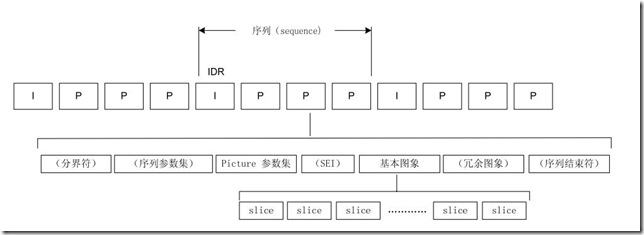
H.264的码流结构
重点对象:
- 序列参数集SPS:作用于一系列连续的编码图像;
- 图像参数集PPS:作用于编码视频序列中一个或多个独立的图像;
2、VideoToolbox
VideoToolbox是iOS8以后开放的硬编码与硬解码的API,一组用C语言写的函数。使用流程如下:
- 1、
-initVideoToolBox中调用VTCompressionSessionCreate创建编码session,然后调用VTSessionSetProperty设置参数,最后调用VTCompressionSessionPrepareToEncodeFrames开始编码; - 2、开始视频录制,获取到摄像头的视频帧,传入
-encode:,调用VTCompressionSessionEncodeFrame传入需要编码的视频帧,如果返回失败,调用VTCompressionSessionInvalidate销毁session,然后释放session; - 3、每一帧视频编码完成后会调用预先设置的编码函数
didCompressH264,如果是关键帧需要用CMSampleBufferGetFormatDescription获取CMFormatDescriptionRef,然后用
CMVideoFormatDescriptionGetH264ParameterSetAtIndex取得PPS和SPS;
最后把每一帧的所有NALU数据前四个字节变成0x00 00 00 01之后再写入文件; - 4、调用VTCompressionSessionCompleteFrames完成编码,然后销毁session:VTCompressionSessionInvalidate,释放session。
效果展示
下图是解码出来的图像

贴贴代码
- 创建session
 int width = , height = ;

     OSStatus status = VTCompressionSessionCreate(NULL, width, height, kCMVideoCodecType_H264, NULL, NULL, NULL, didCompressH264, (__bridge void *)(self),  &EncodingSession);
设置session属性
// 设置实时编码输出(避免延迟)

     VTSessionSetProperty(EncodingSession, kVTCompressionPropertyKey_RealTime, kCFBooleanTrue);

     VTSessionSetProperty(EncodingSession, kVTCompressionPropertyKey_ProfileLevel, kVTProfileLevel_H264_Baseline_AutoLevel);

     // 设置关键帧(GOPsize)间隔

     int frameInterval = ;

     CFNumberRef  frameIntervalRef = CFNumberCreate(kCFAllocatorDefault, kCFNumberIntType, &frameInterval);

     VTSessionSetProperty(EncodingSession, kVTCompressionPropertyKey_MaxKeyFrameInterval, frameIntervalRef);

     // 设置期望帧率

     int fps = ;

     CFNumberRef  fpsRef = CFNumberCreate(kCFAllocatorDefault, kCFNumberIntType, &fps);

     VTSessionSetProperty(EncodingSession, kVTCompressionPropertyKey_ExpectedFrameRate, fpsRef);

     //设置码率,上限,单位是bps

     int bitRate = width * height *  *  * ;

     CFNumberRef bitRateRef = CFNumberCreate(kCFAllocatorDefault, kCFNumberSInt32Type, &bitRate);

     VTSessionSetProperty(EncodingSession, kVTCompressionPropertyKey_AverageBitRate, bitRateRef);

     //设置码率,均值,单位是byte

     int bitRateLimit = width * height *  * ;

     CFNumberRef bitRateLimitRef = CFNumberCreate(kCFAllocatorDefault, kCFNumberSInt32Type, &bitRateLimit);

     VTSessionSetProperty(EncodingSession, kVTCompressionPropertyKey_DataRateLimits, bitRateLimitRef);
传入编码帧
CVImageBufferRef imageBuffer = (CVImageBufferRef)CMSampleBufferGetImageBuffer(sampleBuffer);

 // 帧时间,如果不设置会导致时间轴过长。

 CMTime presentationTimeStamp = CMTimeMake(frameID++, );

 VTEncodeInfoFlags flags;

 OSStatus statusCode = VTCompressionSessionEncodeFrame(EncodingSession,

                                                       imageBuffer,

                                                       presentationTimeStamp,

                                                       kCMTimeInvalid,

                                                       NULL, NULL, &flags);
关键帧获取SPS和PPS
 bool keyframe = !CFDictionaryContainsKey( (CFArrayGetValueAtIndex(CMSampleBufferGetSampleAttachmentsArray(sampleBuffer, true), )), kCMSampleAttachmentKey_NotSync);

 // 判断当前帧是否为关键帧

 // 获取sps & pps数据

 if (keyframe)

 {

     CMFormatDescriptionRef format = CMSampleBufferGetFormatDescription(sampleBuffer);

     size_t sparameterSetSize, sparameterSetCount;

     const uint8_t *sparameterSet;

     OSStatus statusCode = CMVideoFormatDescriptionGetH264ParameterSetAtIndex(format, , &sparameterSet, &sparameterSetSize, &sparameterSetCount,  );

     if (statusCode == noErr)

     {

         // Found sps and now check for pps

         size_t pparameterSetSize, pparameterSetCount;

         const uint8_t *pparameterSet;

         OSStatus statusCode = CMVideoFormatDescriptionGetH264ParameterSetAtIndex(format, , &pparameterSet, &pparameterSetSize, &pparameterSetCount,  );

         if (statusCode == noErr)

         {

             // Found pps

             NSData *sps = [NSData dataWithBytes:sparameterSet length:sparameterSetSize];

             NSData *pps = [NSData dataWithBytes:pparameterSet length:pparameterSetSize];

             if (encoder)

             {

                 [encoder gotSpsPps:sps pps:pps];

             }

         }

     }

 }
写入数据
CMBlockBufferRef dataBuffer = CMSampleBufferGetDataBuffer(sampleBuffer);

 size_t length, totalLength;

 char *dataPointer;

 OSStatus statusCodeRet = CMBlockBufferGetDataPointer(dataBuffer, , &length, &totalLength, &dataPointer);

 if (statusCodeRet == noErr) {

     size_t bufferOffset = ;

     static const int AVCCHeaderLength = ; // 返回的nalu数据前四个字节不是0001的startcode,而是大端模式的帧长度length

     // 循环获取nalu数据

     while (bufferOffset < totalLength - AVCCHeaderLength) {

         uint32_t NALUnitLength = ;

         // Read the NAL unit length

         memcpy(&NALUnitLength, dataPointer + bufferOffset, AVCCHeaderLength);

         // 从大端转系统端

         NALUnitLength = CFSwapInt32BigToHost(NALUnitLength);

         NSData* data = [[NSData alloc] initWithBytes:(dataPointer + bufferOffset + AVCCHeaderLength) length:NALUnitLength];

         [encoder gotEncodedData:data isKeyFrame:keyframe];

         // Move to the next NAL unit in the block buffer

         bufferOffset += AVCCHeaderLength + NALUnitLength;

     }

 }
总结
在网上找到的多个VideoToolboxDemo代码大都类似,更重要是自己尝试实现。
学习硬编码与硬解码,目的是对H264码流更清晰的了解,实则我们开发过程中并不会触碰到H264的真正编码与解码过程,故而难度远没有想象中那么大。
这里有代码地址
使用VideoToolbox硬编码H.264<转>的更多相关文章
- 01:***VideoToolbox硬编码H.264
最近接触了一些视频流H264的编解码知识,之前项目使用的是FFMpeg多媒体库,利用CPU做视频的编码和解码,俗称为软编软解.该方法比较通用,但是占用CPU资源,编解码效率不高.一般系统都会提供GPU ...
- iOS VideoToolbox硬编H.265(HEVC)H.264(AVC):2 H264数据写入文件
本文档为iOS VideoToolbox硬编H.265(HEVC)H.264(AVC):1 概述续篇,主要描述: CMSampleBufferRef读取实际数据 序列参数集(Sequence Para ...
- iOS VideoToolbox硬编H.265(HEVC)H.264(AVC):1 概述
本文档尝试用Video Toolbox进行H.265(HEVC)硬件编码,视频源为iPhone后置摄像头.去年做完硬解H.264,没做编码,技能上感觉有些缺失.正好刚才发现CMFormatDescri ...
- 【流媒体】 Android 实时视频编码—H.264硬编码
[流媒體] Android 实时视频编码—H.264硬编码 SkySeraph Apr 4th 2012 Email:skyseraph00@163.com 1 硬编码 & 软编码 硬编码: ...
- iOS硬解H.264:-VideoToolboxDemo源码分析[草稿]
来源:http://www.cnblogs.com/michaellfx/p/understanding_-VideoToolboxDemo.html iOS硬解H.264:-VideoToolbox ...
- How to use VideoToolbox to decompress H.264 video stream
来源:http://stackoverflow.com/questions/29525000/how-to-use-videotoolbox-to-decompress-h-264-video-str ...
- Android 实时视频编码—H.264硬编码
from://http://www.cnblogs.com/skyseraph/archive/2012/04/04/2431771.html 1 硬编码 & 软编码 硬编码:通过调用And ...
- iOS VideoToolbox硬编H.265(HEVC)H.264(AVC):4 同步编码
本文档描述Video Toolbox实现同步编码的办法. Video Toolbox在头文件描述了编码方式为异步,实际开发中也确实为异步. This function may be called as ...
- iOS使用VideoToolbox硬编码录制H264视频
http://blog.csdn.net/shawnkong/article/details/52045894
随机推荐
- Android应用开发-网络编程(二)(重制版)
Apache HttpClient框架 GET方式请求提交数据 1. 创建一个HttpClient HttpClient hc = new DefaultHttpClient(); 2. 创建一个Ht ...
- iPhone4下window各个部分的高度
- .NET的ExcelOperate
using System; using System.Web; using Excel = Microsoft.Office.Interop.Excel; namespace Comm { /// & ...
- Spring Security 3整合CAS 实现SSO
spring security 3整合cas client用于实现各Application之间的单点登录. 1. 需要准备的jar spring-security-core-3.0.8.RELEASE ...
- How Garbage Collection Really Works
Java Memory Management, with its built-in garbage collection, is one of the language's finest achiev ...
- Spark Job的提交与task本地化分析(源码阅读八)
我们又都知道,Spark中任务的处理也要考虑数据的本地性(locality),Spark目前支持PROCESS_LOCAL(本地进程).NODE_LOCAL(本地节点).NODE_PREF.RACK_ ...
- 解析PHP正则提取或替换img标记属性
<?php/*PHP正则提取图片img标记中的任意属性*/$str = '<center><img src="/uploads/images/20100516000. ...
- android 对sqlite数据库的增删改查等各种操作
转载:http://blog.csdn.net/vrix/article/details/6717090 package com.sqlite.main; import java.io.File; i ...
- php面向对象学习笔记
PHP 面向对象技术(全面讲解) Ø 主要内容 v 1.面向对象的概念 v 2.什么是类,什么是对象,类和对象之间的关系 v 3.什么是面向对象编程呢? v 4.如何抽象出一个类? v 5.如何实例化 ...
- Chrome和Firefox浏览器执行new Date() 函数传参数得到不同结果的陷阱
某日,同事问到关于new Date() 函数传参数,在火狐浏览器和谷歌浏览器控制台运行,会得到不同的结果,刚开始觉得不可能,后来实际操作才发现此陷阱 var date = new Date('2014 ...