
spring mvc: 注解和JavaConfig实例
通过javaConfig来配置config,并能正常访问url。
先看图
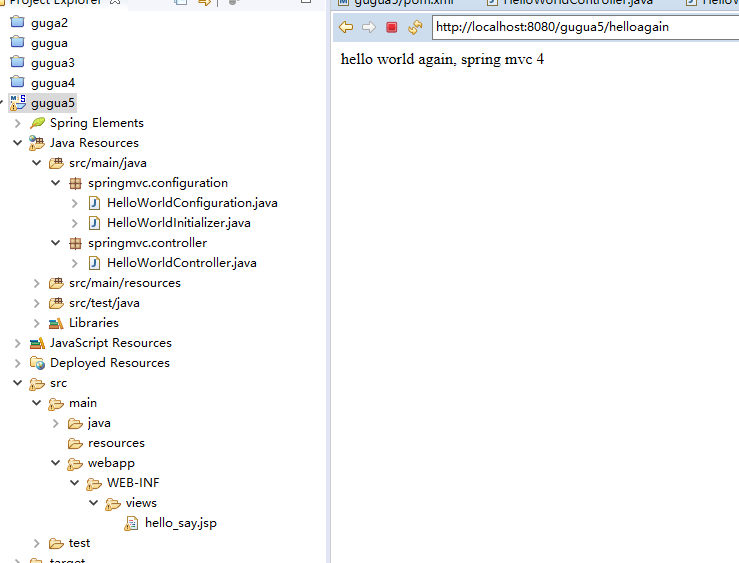
访问地址:http://localhost:8080/gugua5/
http://localhost:8080/gugua5/helloagain
先看下pom.xml
<project xmlns="http://maven.apache.org/POM/4.0.0" xmlns:xsi="http://www.w3.org/2001/XMLSchema-instance"

  xsi:schemaLocation="http://maven.apache.org/POM/4.0.0 http://maven.apache.org/maven-v4_0_0.xsd">

  <modelVersion>4.0.0</modelVersion>

  <groupId>gugua4</groupId>

  <artifactId>gugua5</artifactId>

  <packaging>war</packaging>

  <version>0.0.1-SNAPSHOT</version>

  <name>gugua5 Maven Webapp</name>

  <url>http://maven.apache.org</url>

  <dependencies>

     <!-- spring-test支持 -->

    <dependency>

    	<groupId>org.springframework</groupId>

    	<artifactId>spring-test</artifactId>

    	<version>${springVersion}</version>

    </dependency>

    <dependency>

      <groupId>junit</groupId>

      <artifactId>junit</artifactId>

      <version>4.11</version>

      <scope>test</scope>

    </dependency>

    <!-- spring模块库 -->

    <dependency>

    	<groupId>org.springframework</groupId>

    	<artifactId>spring-beans</artifactId>

    	<version>${springVersion}</version>

    </dependency>

    <dependency>

    	<groupId>org.springframework</groupId>

    	<artifactId>spring-jdbc</artifactId>

    	<version>${springVersion}</version>

    </dependency>

    <dependency>

    	<groupId>org.springframework</groupId>

    	<artifactId>spring-web</artifactId>

    	<version>${springVersion}</version>

    </dependency>

    <dependency>

    	<groupId>org.springframework</groupId>

    	<artifactId>spring-webmvc</artifactId>

    	<version>${springVersion}</version>

    </dependency>

    <dependency>

	    <groupId>org.springframework</groupId>

	    <artifactId>spring-expression</artifactId>

	    <version>${springVersion}</version>

	</dependency>

	<!-- (aop)@Aspect注解及代理 -->

	<!-- https://mvnrepository.com/artifact/org.aspectj/aspectjweaver -->

	<dependency>

	    <groupId>org.aspectj</groupId>

	    <artifactId>aspectjweaver</artifactId>

	    <version>1.6.8</version>

	</dependency>

	<!-- https://mvnrepository.com/artifact/cglib/cglib-nodep -->

	<dependency>

	    <groupId>cglib</groupId>

	    <artifactId>cglib-nodep</artifactId>

	    <version>2.1_3</version>

	</dependency>

    <!-- 依赖的持久化类库 -->

    <dependency>

    	<groupId>mysql</groupId>

    	<artifactId>mysql-connector-java</artifactId>

    	<version>5.1.8</version>

    </dependency>

	<!-- https://mvnrepository.com/artifact/org.springframework/spring-tx -->

	<dependency>

	    <groupId>org.springframework</groupId>

	    <artifactId>spring-tx</artifactId>

	    <version>3.0.5.RELEASE</version>

	</dependency>

    <!-- io流/上传类插件 -->

	<!-- https://mvnrepository.com/artifact/commons-io/commons-io -->

	<dependency>

	    <groupId>commons-io</groupId>

	    <artifactId>commons-io</artifactId>

	    <version>2.5</version>

	</dependency>

	<!-- https://mvnrepository.com/artifact/commons-fileupload/commons-fileupload -->

	<dependency>

	    <groupId>commons-fileupload</groupId>

	    <artifactId>commons-fileupload</artifactId>

	    <version>1.3.2</version>

	</dependency>

     <!-- 连接池 -->

    <dependency>

    	<groupId>commons-dbcp</groupId>

    	<artifactId>commons-dbcp</artifactId>

    	<version>${commonsDbcpVersion}</version>

    </dependency>

    <!-- 公共基础类(字符处理,数组,日期,范围) -->

	<dependency>

	    <groupId>org.apache.commons</groupId>

	    <artifactId>commons-lang3</artifactId>

	    <version>3.0</version>

	</dependency>

	 <!-- jsp依赖的web模块库 -->

	 <dependency>

	   <groupId>javax.servlet</groupId>

	   <artifactId>jsp-api</artifactId>

	   <version>2.0</version>

	   <scope>provided</scope>

	</dependency>

	<dependency>

         <groupId>javax.servlet</groupId>

         <artifactId>jstl</artifactId>

         <version>1.2</version>

         <scope>runtime</scope>

    </dependency>

    <dependency>

         <groupId>taglibs</groupId>

         <artifactId>standard</artifactId>

         <version>1.1.2</version>

     </dependency>

    <!-- servlet(HttpServletRequest,HttpServletResponse) -->

    <dependency>

	    <groupId>javax.servlet</groupId>

		<artifactId>javax.servlet-api</artifactId>

		<version>3.1.0</version>

	    <!--

	    <artifactId>servlet-api</artifactId>

	    <version>2.5</version>

	    <scope>provided</scope>

	    -->

	</dependency>

  </dependencies>

  <build>

  <!-- javaConfig配置 -->

  	<pluginManagement>

  		<plugins>

  			<plugin>

  				<groupId>org.apache.maven.plugins</groupId>

  				<artifactId>maven-war-plugin</artifactId>

  				<version>2.6</version>

  				<configuration>

  					<!-- jsp目录 -->

  					<warSourceDirectory>src/main/webapp</warSourceDirectory>

  					<warName>gugua5</warName>

  					<!-- 取消xml配置:web.xml -->

  					<failOnMissingWebXml>false</failOnMissingWebXml>

  				</configuration>

  			</plugin>

  		</plugins>

  	</pluginManagement>

    <finalName>gugua5</finalName>

  </build>

  <properties>

  	<springVersion>4.3.5.RELEASE</springVersion>

  	<mysqlVersion>5.0.11</mysqlVersion>

  	<commonsDbcpVersion>1.4</commonsDbcpVersion>

  	<aspectjweaverVersion>1.8.13</aspectjweaverVersion>

  	<commonsLoggingVersion>1.2</commonsLoggingVersion>

  </properties>

</project>
额外说下,build配置
首先要注意这里maven-war-plugin 插件的声明。正如我们将完全删除web.xml ,我们需要配置这个插件,以避免Maven构建war包失败。第二个变化是加入了JSP/Servlet/Jstl 的依赖关系,这些我们可能需要,因为我们将要使用 servlet API和JSTL视图在我们的代码中.
<build>

  <!-- javaConfig配置 -->

  	<pluginManagement>

  		<plugins>

  			<plugin>

  				<groupId>org.apache.maven.plugins</groupId>

  				<artifactId>maven-war-plugin</artifactId>

  				<version>2.6</version>

  				<configuration>

  					<!-- jsp目录 -->

  					<warSourceDirectory>src/main/webapp</warSourceDirectory>

                                        <!-- 项目名/url -->

  					<warName>gugua5</warName>

  					<!-- 取消xml配置:web.xml/applicationContext.xml/xxx-servlet.xml -->

  					<failOnMissingWebXml>false</failOnMissingWebXml>

  				</configuration>

  			</plugin>

  		</plugins>

  	</pluginManagement>

    <finalName>gugua5</finalName>

  </build>
HelloController.java
package springmvc.controller;

import org.springframework.stereotype.Controller;

import org.springframework.web.bind.annotation.RequestMapping;

import org.springframework.web.bind.annotation.RequestMethod;

import org.springframework.ui.ModelMap;

@Controller

@RequestMapping(value="/")

public class HelloWorldController {

	@RequestMapping(method=RequestMethod.GET)

	public String sayHello(ModelMap model)

	{

		model.addAttribute("greeting", "hello world from spring mvc 4");

		return "hello_say";

	}

	@RequestMapping(value="/helloagain", method=RequestMethod.GET)

	public String sayHelloAgain(ModelMap model)

	{

		model.addAttribute("greeting", "hello world again, spring mvc 4");

		return "hello_say";

	}

}
添加配置类
HelloWorldConfiguration.java
在src/main/java下添加下面提到的类指定的包,如下图所示。这种构造类可以被看作是一个替代 spring-servlet.xml,因为它包含了所有必需的组件的扫描和视图解析器的信息。
@Configuration指明该类包含注解为@Bean 生产 bean管理是由Spring容器的一个或多个bean方法。
@EnableWebMvc 等同于 mvc:annotation-driven 在XML中. 它能够为使用@RequestMapping向特定的方法传入的请求映射@Controller-annotated 类。
@ComponentScan 等同于 context:component-scan base-package="..." 提供 spring 在哪里寻找 管理 beans/classes.
package springmvc.configuration;

import org.springframework.context.annotation.Bean;

import org.springframework.context.annotation.ComponentScan;

import org.springframework.context.annotation.Configuration;

import org.springframework.web.servlet.ViewResolver;

import org.springframework.web.servlet.config.annotation.EnableWebMvc;

import org.springframework.web.servlet.view.InternalResourceViewResolver;

import org.springframework.web.servlet.view.JstlView;

@Configuration

@EnableWebMvc

@ComponentScan(basePackages="springmvc")

public class HelloWorldConfiguration {

	@Bean

	public ViewResolver viewResolver()

	{

		InternalResourceViewResolver viewResolver = new InternalResourceViewResolver();

		viewResolver.setViewClass(JstlView.class);

		viewResolver.setPrefix("/WEB-INF/views/");

		viewResolver.setSuffix(".jsp");

		return viewResolver;

	}

}
添加一个初始化类实现 WebApplicationInitializer 在src/main/java 中使用如下图所示指定包(在这种情况下,作为替代在 web.xml 中定义的任何 Spring 配置)。在Servlet 3.0的容器启动时,这个类将被加载并初始化,并在启动由servlet容器调用方法。
package springmvc.configuration;

import org.springframework.web.servlet.support.AbstractAnnotationConfigDispatcherServletInitializer;

public class HelloWorldInitializer extends AbstractAnnotationConfigDispatcherServletInitializer {

	@Override

	protected Class<?>[] getRootConfigClasses() {

		// TODO Auto-generated method stub

		return new Class[] { HelloWorldConfiguration.class };

	}

	@Override

	protected Class<?>[] getServletConfigClasses() {

		// TODO Auto-generated method stub

		return null;

	}

	@Override

	protected String[] getServletMappings() {

		// TODO Auto-generated method stub

		return new String [] { "/" };

	}

}
https://www.yiibai.com/spring_mvc/spring-4-mvc-helloworld-tutorial-annotation-javaconfig-full-example.html
spring mvc: 注解和JavaConfig实例的更多相关文章
- Spring MVC注解的一些案列
1. spring MVC-annotation(注解)的配置文件ApplicationContext.xml <?xml version="1.0" encoding=& ...
- spring mvc(注解)上传文件的简单例子
spring mvc(注解)上传文件的简单例子,这有几个需要注意的地方1.form的enctype=”multipart/form-data” 这个是上传文件必须的2.applicationConte ...
- spring mvc 注解入门示例
web.xml <?xml version="1.0" encoding="UTF-8"?> <web-app xmlns:xsi=" ...
- spring mvc 注解示例
springmvc.xml <?xml version="1.0" encoding="UTF-8"?> <beans xmlns=" ...
- 关于Spring mvc注解中的定时任务的配置
关于spring mvc注解定时任务配置 简单的记载:避免自己忘记,不是很确定我理解的是否正确.有错误地方望请大家指出. 1,定时方法执行配置: (1)在applicationContext.xml中 ...
- spring mvc 注解@Controller @RequestMapping @Resource的详细例子
现在主流的Web MVC框架除了Struts这个主力 外,其次就是Spring MVC了,因此这也是作为一名程序员需要掌握的主流框架,框架选择多了,应对多变的需求和业务时,可实行的方案自然就多了.不过 ...
- Spring+Spring MVC+Hibernate框架搭建实例
前言:这里只是说明整个搭建流程,并不进行原理性的讲解 一 下面所需要用到的数据库配置: 数据库方面,使用mysql创建一个users表,具体代码如下: 1 2 3 4 5 6 7 8 9 10 11 ...
- Spring4 MVC HelloWorld 注解和JavaConfig实例
在这一节中,我们以 Spring4 MVC HelloWorld 注释/JavaConfig为示例,一步一步以简单的方式学习Spring4 MVC 的注解,项目设置,代码,部署和运行. 在先前的 Sp ...
- spring mvc:练习:javaConfig配置和注解
Spring4 MVC HelloWorld 注释/JavaConfig为示例,一步一步以简单的方式学习Spring4 MVC 的注解,项目设置,代码,部署和运行. 我们已经使用XML配置开发了一个H ...
随机推荐
- 汇编的WEAK关键字
一般来说,这个关键字使用在IMPORT和EXPORT这两个声明段. ////////////////////////////////////////////////////////////////// ...
- 11、classmethod和staticmethod
类中定义的函数有两大类(3小种)用途,一类是绑定方法,另外一类是非绑定方法 1. 绑定方法:特点:绑定给谁就应该由谁来调用,谁来调用就会将谁当作第一个参数自动传入1.1 绑定给对象的:类中定义的函数默 ...
- for…else和while…else
当while语句配备else子句时,如果while子句内嵌的循环体在整个循环过程中没有执行break语句(循环体中没有break语句,或者循环体中有break语句但是始终未执行),那么循环过程结束后, ...
- kubernetes Metrics-server 安装
一.Metrics-server安装: 由于使用自动扩容,得安装heapster或metrics-server(由于heapster停止更新故用metrics-server): 1.安装之前需要为ku ...
- 46. Permutations (全排列)
Given a collection of distinct numbers, return all possible permutations. For example,[1,2,3] have t ...
- JavaScript 操作JSON总结
JSON(JavaScript Object Notation) 是一种轻量级的数据交换格式,采用完全独立于语言的文本格式,是理想的数据交换格式.同时,JSON是 JavaScript 原生格式,这意 ...
- Ubuntu安装dlib后import出现libstdc++.so.6: version `GLIBCXX_3.4.21' not found
1 问题描述 先安装依赖包cmake,libboost,再安装dlib sudo apt-get install cmake sudo apt-get install libboost-python- ...
- python3_UUID模块详解
1.知识背景 UUID是128位的全局唯一标识符,通常有32字节的字母表示.它可以保证时间和空间的唯一性. UUID——Universally unique identifier 在python中叫U ...
- 异常信息 Exception
void GetExceptionMsg(Exception ex, StringBuilder sb, string Prefix = "") { sb.AppendLine(P ...
- 20145313张雪纯 《Java程序设计》第5周学习总结
20145313张雪纯 <Java程序设计>第5周学习总结 教材学习内容总结 JAVA中所有错误都会被打包成对象,可以用尝试(try)捕捉(catch)代表错误的对象后做一些处理.使用tr ...