
caffe:自己搭建网络来训练
1.准备样本
要训练自己的样本,首先需要把样本准备好,需要准备的是训练集和测试集,caffe支持直接使用图片,当然把样本转换为leveldb或lmdb格式的话训练起来会更快一点。这里我先偷个懒,直接使用图片吧 [尴尬.jpg]
训练集和测试集是一样的,不过样本不要重叠。首先我把训练集的图片都放在一个目录,然后shift+右键选择该目录,打开cmd,使用命令 dir /s/b >train.txt ,这样就在该目录下生成了一份所有图片的列表,效果如下
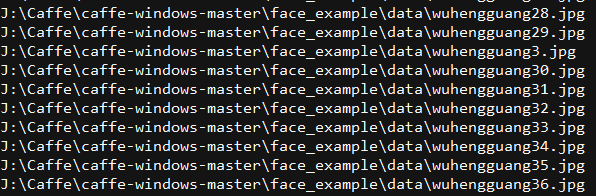
然后使用查找替换功能把它修改成下面这个样子,后面的0,1,,序号是为每个类别的样本分配的标签,需要从0开始:
位置/../xx1.jpg

位置/../xx2.jpg

位置/../xx3.jpg

位置/../xx4.jpg

位置/../xx5.jpg

位置/../xx6.jpg

.....................
这里样本的准备已经差不多了,最后一步是需要生成均值文件 binaryproto,生成均值文件之前需要先将图片转换为lmdb,这里可以使用caffe自带的工具来生成(vs编译后会在bin文件夹下生成comput_image_mean.exe 和 convert_imageset.exe)
打开cmd,然后运行:
convert_imageset -shuffle -resize_height= -resize_width= J:/Caffe/train/ J:/Caffe/train/train.txt J:/Caffe/train/lmdb
使用命令生成均值文件:
compute_image_mean J:/Caffe/train/lmdb J:/Caffe/train/train.binaryproto
到这里训练集已经准备好了,然后测试集同上,最后我把它们全放在了data文件夹下,该文件夹下包含训练和测试所需的所有图片,图片列表train.txt和test.txt,均值文件train.binaryproto(我的测试也是使用这个均值文件)
2. 编写配置文件solver,我在caffe目录下的face_example目录下新建了my_solver.prototxt,编写如下:
net: "face_example/my_train.prototxt" # 网络结构文件的位置

test_iter: # 迭代次数,根据batch大小来

test_interval: # 测试间隔

base_lr:0.001 # 学习率

lr_policy: "multistep"

gamma: 0.1

stepvalue:  # 设置学习率什么时候减小

stepvalue:

stepvalue:

stepvalue:

max_iter:  # 最大迭代次数

display:  # 每训练100次显示一次

momentum: 0.9 # 设置冲量

weight_decay: 0.0005

snapshot:  # 每200次保存一个快照文件

snapshot_prefix: "face_example/face_snapshot" # 快照文件保存位置

solver_mode:GPU # 使用GPU训练
3. 编写网络定义文件,新建 my_train.prototxt ,编写如下:
name: "my_caffe_test"

layer{

    name: "data"

    type: "ImageData"

    top: "data"

    top: "label"

    include{

        phase:TRAIN

    }

    transform_param{

        mean_file:"face_example/train.binaryproto"

        scale: 0.0078125

        mirror:true

    }

    image_data_param{

        source:"face_example/data/train.txt"

        batch_size:

        shuffle:true

    }

}

layer{

    name: "data"

    type: "ImageData"

    top: "data"

    top: "label"

    include{

        phase:TEST

    }

    transform_param{

        mean_file:"face_example/train.binaryproto"

        scale: 0.0078125

        mirror:true

    }

    image_data_param{

        source:"face_example/data/test.txt"

        batch_size:

        shuffle:true

    }

}

layer{

    name: "conv1"

    type: "Convolution"

    bottom: "data"

    top: "conv1"

    param{

        lr_mult:  # 和base_lr相乘

        decay_mult:

    }

    convolution_param{

        num_output:

        kernel_size:

        stride:

        weight_filler{

            type: "xavier"

        }

        bias_filler{

            type: "constant"

            value:

        }

    }

}

layer{

    name: "relu1"

    type: "PReLU"

    bottom: "conv1"

    top: "conv1"

}

layer{

    name: "conv2"

    type: "Convolution"

    bottom: "conv1"

    top: "conv2"

    param{

        lr_mult:

        decay_mult:

    }

    convolution_param{

        num_output:

        kernel_size:

        stride:  # 步长

        weight_filler{

            type: "xavier"

        }

        bias_filler{

            type: "constant"

            value:

        }

    }

}

layer{

    name: "relu2"

    type: "PReLU"

    bottom: "conv2"

    top: "conv2"

}

layer{

    name: "pool1"

    type: "Pooling"

    bottom: "conv2"

    top: "pool1"

    pooling_param{

        pool: MAX

        kernel_size:

        stride:

    }

}

layer{

    name: "conv3"

    type: "Convolution"

    bottom: "pool1"

    top: "conv3"

    param{

        lr_mult:

        decay_mult:

    }

    convolution_param{

        num_output:

        kernel_size:

        stride:

        weight_filler{

            type: "xavier"

        }

        bias_filler{

            type: "constant"

            value:

        }

    }

}

layer{

    name: "relu3"

    type: "PReLU"

    bottom: "conv3"

    top: "conv3"

}

layer{

    name: "fc1"

    type: "InnerProduct"

    bottom: "conv3"

    top: "fc1"

    param{

        lr_mult:

        decay_mult:

    }

    inner_product_param{

        num_output:

        weight_filler{

            type: "xavier"

        }

        bias_filler{

            type: "constant"

            value:

        }

    }

}

layer{

    name: "fc2"

    type: "InnerProduct"

    bottom: "fc1"

    top: "fc2"

    param{

        lr_mult:

        decay_mult:

    }

    inner_product_param{

        num_output:

        weight_filler{

            type: "xavier"

        }

        bias_filler{

            type: "constant"

            value:

        }

    }

}

layer{

    name: "softmax_loss"

    type: "SoftmaxWithLoss"

    bottom: "fc2"

    bottom: "label"

    top: "softmax_loss"

}
4. 然后开始训练,打开cmd,输入命令:
caffe train -solver=face_example/my_solver.prototxt
caffe:自己搭建网络来训练的更多相关文章
- PyQt5+Caffe+Opencv搭建人脸识别登录界面
PyQt5+Caffe+Opencv搭建人脸识别登录界面(转载) 最近开始学习Qt,结合之前学习过的caffe一起搭建了一个人脸识别登录系统的程序,新手可能有理解不到位的情况,还请大家多多指教. 我的 ...
- Pytorch从0开始实现YOLO V3指南 part2——搭建网络结构层
本节翻译自:https://blog.paperspace.com/how-to-implement-a-yolo-v3-object-detector-from-scratch-in-pytorch ...
- Caffe fine-tuning 微调网络
转载请注明出处,楼燚(yì)航的blog,http://www.cnblogs.com/louyihang-loves-baiyan/ 目前呢,caffe,theano,torch是当下比较流行的De ...
- 孤荷凌寒自学python第八十四天搭建jTessBoxEditor来训练tesseract模块
孤荷凌寒自学python第八十四天搭建jTessBoxEditor来训练tesseract模块 (完整学习过程屏幕记录视频地址在文末) 由于本身tesseract模块针对普通的验证码图片的识别率并不高 ...
- 使用Caffe完成图像目标检测 和 caffe 全卷积网络
一.[用Python学习Caffe]2. 使用Caffe完成图像目标检测 标签: pythoncaffe深度学习目标检测ssd 2017-06-22 22:08 207人阅读 评论(0) 收藏 举报 ...
- CNN tflearn处理mnist图像识别代码解说——conv_2d参数解释,整个网络的训练,主要就是为了学那个卷积核啊。
官方参数解释: Convolution 2D tflearn.layers.conv.conv_2d (incoming, nb_filter, filter_size, strides=1, pad ...
- pytorch基础-搭建网络
搭建网络的步骤大致为以下: 1.准备数据 2. 定义网络结构model 3. 定义损失函数4. 定义优化算法 optimizer5. 训练 5.1 准备好tensor形式的输入数据和标签(可选) 5. ...
- Caffe系列1——网络文件和求解分析
1. 首先,我们先看一个完整的文件:lenet_train_test.prototxt name: "LeNet" #整个网络的名称 layer { #数据层——训练数据 name ...
- pytorch搭建网络,保存参数,恢复参数
这是看过莫凡python的学习笔记. 搭建网络,两种方式 (1)建立Sequential对象 import torch net = torch.nn.Sequential( torch.nn.Line ...
随机推荐
- dev-server.js详解
转载自:https://www.cnblogs.com/ye-hcj/p/7091706.html dev-server.js详解 require('./check-versions')() var ...
- html-4, form 表单 输入、传文件、单选、多选、下拉菜单、文本描述、重置、submit、按钮限制输入
<!-- form HTTP协议 action:提交的服务器网址 method:get(默认)| post(应用:登录注册.上传文件) 页面中的a img link 默认是get请求 input ...
- Python中正则模块re.compile、re.match及re.search函数用法
import rehelp(re.compile)'''输出结果为:Help on function compile in module re: compile(pattern, flags=0) C ...
- ABP官方文档翻译 1.5 多租户
多租户 什么是多租户? 数据库和部署架构 多部署-多数据库 单部署-多数据库 单部署-单数据库 单部署-混合数据库 多部署-单/多/混合数据库 ABP的多租户 启用多租户 租主和租户 会话 决定当前租 ...
- MVC readioButtonList的创作过程及运用
using System; using System.Collections.Generic; using System.Linq; using System.Web; using System.Li ...
- 深入 CommonJs 与 ES6 Module
目前主流的模块规范 UMD CommonJs es6 module umd 模块(通用模块) (function (global, factory) { typeof exports === 'obj ...
- 20144303 《Java程序设计》课程总结
20144303 <Java程序设计>课程总结 每周读书笔记链接汇总 第一周:http://www.cnblogs.com/20144303sys/p/5248979.html 第二周:h ...
- oracle update set select from 关联更新
工作中有个需求,现在新表中有一些数据跟老表的基本一样,这样只需要把老表中数据搬到新表中就可以了,同时把不同的字段修改下数据即可,在修改字段时发现,需要指定一个条件,比如主键id,来修改某条记录,这样一 ...
- ISSCC 2017论文导读 Session 14 Deep Learning Processors,A 2.9TOPS/W Deep Convolutional Neural Network SOC
最近ISSCC2017大会刚刚举行,看了关于Deep Learning处理器的Session 14,有一些不错的东西,在这里记录一下. A 2.9TOPS/W Deep Convolutional N ...
- Android 图形基础类Rect,扎实基础助腾飞
转载请注明出处:王亟亟的大牛之路 上周把"垃圾桶动画写完了",然后这礼拜寻思着学习点啥,脑子闷逼了大半天,然后就找了点基础源码读读,把看的经历分享给大家. 先安利:https:// ...