
Android--JUnit单元测试
Android--JUnit单元测试
前言
本篇博客说明一下在Android开发中,如何使用JUnit进行单元测试。首先来了解一下什么是JUnit,JUnit测试是白盒测试,即主要是程序员自己对开发的方法进行功能性测试。JUnit是一套框架,Android中也沿用了这一套框架。
JUnit
在Android中使用JUnit测试大致分如下几个步骤:
- 在AndroidManifest.xml中增加对JUnit的支持,并制定测试项目包。
- 在AndroidManifest.xml中<application.../>节点中增加一个<uses-library...>节点,name属性为android.test.runner。
- 在编写待测试方法后,新建一个类,继承AndroidTestCase,在其中编写测试用例代码。
- 鼠标左键在测试用例方法上,Run As→Android JUnit Test。
下面就上面几个步骤,详细讲解一下,新建一个Android项目,在AndroidManifest.xml中,添加一个Instrumentation:

指定Instrumentation的name与TargetPackage:

在<application.../>节点中增加<uses-library android:name="android.test.runner" />
完成后AndroidManifest.xml代码如下:

 1 <?xml version="1.0" encoding="utf-8"?>

 2 <manifest xmlns:android="http://schemas.android.com/apk/res/android"

 3     package="com.example.junittestdemo"

 4     android:versionCode="1"

 5     android:versionName="1.0" >

 6

 7     <uses-sdk

 8         android:minSdkVersion="8"

 9         android:targetSdkVersion="17" />

10

11     <instrumentation

12         android:name="android.test.InstrumentationTestRunner"

13         android:targetPackage="com.example.junittestdemo" >

14     </instrumentation>

15

16     <application

17         android:allowBackup="true"

18         android:icon="@drawable/ic_launcher"

19         android:label="@string/app_name"

20         android:theme="@style/AppTheme" >

21         <uses-library android:name="android.test.runner" />

22

23         <activity

24             android:name="com.example.junittestdemo.MainActivity"

25             android:label="@string/app_name" >

26             <intent-filter>

27                 <action android:name="android.intent.action.MAIN" />

28

29                 <category android:name="android.intent.category.LAUNCHER" />

30             </intent-filter>

31         </activity>

32     </application>

33

34 </manifest>
编写一个简单的进度百分比计算方法:
 1 package com.example.service;

 2

 3 public class ProgressService {

 4     public ProgressService() {

 5

 6     }

 7     public Integer getCurrentProgerss(double current, double max) {

 8         Integer i=(int)((current / max) * 100) ;

 9         return i;

10     }

11 }
编写一个测试类,这个类需要继承AndroidTestCase,针对百分比方法进行测试:
 1 package com.example.junit;

 2

 3 import android.test.AndroidTestCase;

 4 import android.util.Log;

 5

 6

 7 import com.example.service.ProgressService;

 8

 9 public class ProgressServiceJUnit extends AndroidTestCase {

10     private final String TAG="main";

11

12     public ProgressServiceJUnit() {

13         // TODO Auto-generated constructor stub

14     }

15

16     public void getCurrentProgerssTest(){

17         ProgressService progressService=new ProgressService();

18         Integer pro=progressService.getCurrentProgerss(20, 70);

19         Log.i(TAG, pro.toString());

20     }

21 }
左键getCurrentProgerssTest()方法,选中Android JUnit Test,如果需要调试,可以选择Debug As下的Android JUnit Test:

当执行成功后,会显示绿色,如果是其他颜色,则为出错:

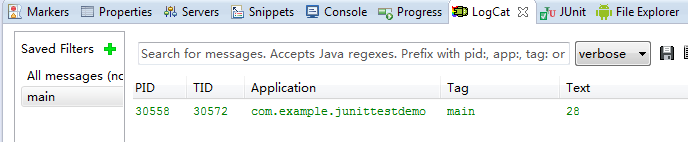
可以在LogCat日志中看到测试结果:
Android--JUnit单元测试的更多相关文章
- Android+Junit单元测试1
学习参考: http://my.oschina.net/liux/blog/52469 http://mobile.51cto.com/android-229614.htm 一,权限配置 <ap ...
- 在Android Studio进行“简单配置”单元测试(Android Junit)
起因 在Android studio 刚出.本人就想弄单元测试,可惜当时Android studio不知道抽什么风(准确来说,应该是我不会弄而已).无法执行到相应的代码.后来今天突然自己又抽风.又想去 ...
- Android系列----JUnit单元测试的使用
[声明] 欢迎转载,但请保留文章原始出处→_→ 生命壹号:http://www.cnblogs.com/smyhvae/ 文章来源:http://www.cnblogs.com/smyhvae/p/ ...
- Android学习笔记-junit单元测试
我们都知道测试对于程序员来说是必不可少的,所以,做Android程序,也要学会使用junit,这里比着java的junit测试,要稍微复杂一点,需要一些配置,下面饿哦就介绍一下怎样使用junit的测试 ...
- Android Junit测试框架
对应用进行单元测试: 使用Junit测试框架,是正规Android开发的必用技术.在Junit中可以得到组件,可以模拟发送事件和检测程序处理的正确性. 1.配置指令集和函数库: (1)配置指令集,指定 ...
- Android Studio单元测试入门
Android Studio单元测试入门 通常在开发Android app的时候经常会写一些小函数并验证它是否运行正确,通常做法我们是把这个函数放到某个界面(Activity上)执行一下,运行整个工程 ...
- Android:单元测试
通过单元测试的方法可以轻松判断BUG 第一步:首先在AndroidManifest.xml中加入下面红色代码: 打开AndroidManifest.xml,选择instrumentation ,选择N ...
- JUnit单元测试框架的使用
http://blog.csdn.net/mao520741111/article/details/51462215 原文地址 http://www.open-open.com/lib/view/op ...
- Android JUnit 入门指南
自动化单元测试可以做许多的事,并帮你节省时间.它也可以被用作快速检验新建工程或进行冒烟测试.始终,单元测试是作为一种有效的.系统的检验应用程序各功能执行的方式.Android SDK支持JUnit的自 ...
- junit单元测试(keeps the bar green to keeps the code clean)
error是程序错误,failure是测试错误. junit概要: JUnit是由 Erich Gamma (设计模式的创始人)和 Kent Beck (敏捷开发的创始人之一)编写的一个回归测试框架( ...
随机推荐
- WF4.0入门(一)
WF的全称是Windows Workflow Foundation .这是 Microsoft 快速构建基于工作流的应用程序的编程模型.引擎和工具.NET Framework 4 中这个 WF 版本更 ...
- Unity3D The Blacksmith Demo部分内容学习
1.Plane Reflection 平面反射 在角色包的例子里可以看到,该脚本使用一个特定的相机渲染反射内容 官方介绍说这是优于反射探头的一种做法 2.HairRenderer 毛发渲染器 单独写的 ...
- [问题2014S09] 解答
[问题2014S09] 解答 充分性: 先证明对 Jordan 块 \(J_r(1)\) 以及任意的正整数 \(m\), 均有 \(J_r(1)^m\) 相似于 \(J_r(1)\). 设 \(N ...
- Apache Solr 访问权限控制
Current state of affairs SSL support was added in version 4.2 (SolrCloud v4.7). Protection of Zookee ...
- BZOJ 2600: [Ioi2011]ricehub
2600: [Ioi2011]ricehub Time Limit: 10 Sec Memory Limit: 128 MBSubmit: 628 Solved: 325[Submit][Stat ...
- PHP下拉框内容随单选框内容变化
这久在修改一个项目的小东西,要求把下拉框改为单选框,由于代码封闭,修改不了获取函数,所以想了个办法让下拉框的内容随单选框的内容变化,下面把代码分享给大家: <!DOCTYPE html PUBL ...
- CSS cursor属性
介绍: 该属性规定要显示的光标的类型,该属性定义了鼠标指针放在一个元素边界范围之内的时候所用的光标的形状. 常用的属性值: default:默认光标 auto:浏览器默认的光标 pointer:光标呈 ...
- kafka集群zookeeper集群详细配置
http://www.cnblogs.com/luotianshuai/p/5206662.html
- swig之于c++
[namespace] namespace nsTest1 { int nsAdd(int a, int b) { return a + b; } } namespace nsTest2 { int ...
- Spirng中Mongodb中write-concern的解释
Spring在插入数据库时没有返回状态配置:write-concern获取异常<beans xmlns="http://www.springframework.org/schema/b ...