
springMVC之国际化
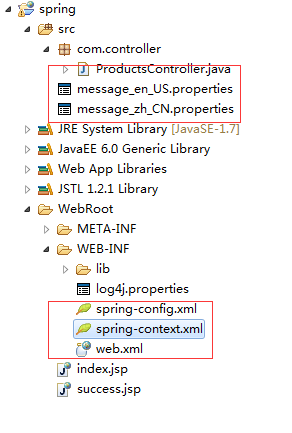
1、工程结构
2、jar包

3、配置文件spring-config.xml,springMVC配置文件
<?xml version="1.0" encoding="UTF-8"?>

<beans xmlns="http://www.springframework.org/schema/beans"

    xmlns:xsi="http://www.w3.org/2001/XMLSchema-instance" xmlns:oxm="http://www.springframework.org/schema/oxm"

    xmlns:context="http://www.springframework.org/schema/context"

    xmlns:aop="http://www.springframework.org/schema/aop" xmlns:tx="http://www.springframework.org/schema/tx"

    xsi:schemaLocation="http://www.springframework.org/schema/beans

       http://www.springframework.org/schema/beans/spring-beans-3.0.xsd

       http://www.springframework.org/schema/oxm

       http://www.springframework.org/schema/oxm/spring-oxm-3.0.xsd

       http://www.springframework.org/schema/context

       http://www.springframework.org/schema/context/spring-context-3.0.xsd

       http://www.springframework.org/schema/tx

        http://www.springframework.org/schema/tx/spring-tx-3.0.xsd

         http://www.springframework.org/schema/aop

         http://www.springframework.org/schema/aop/spring-aop-3.0.xsd">

    <!--  通知spring容器通过注解的方式装配bean -->

      <context:annotation-config />

    <!--  通知spring容器采用自动扫描机制查找注解的bean -->

      <context:component-scan base-package="com.*" />

    <bean id="viewResolver" class="org.springframework.web.servlet.view.UrlBasedViewResolver">

        <property name="viewClass"

            value="org.springframework.web.servlet.view.JstlView" />

        <property name="prefix" value="/" />

        <property name="suffix" value=".jsp" />

    </bean>

</beans>
4、spring-context.xml,浏览器国际化配置
<?xml version="1.0" encoding="UTF-8"?>

<beans xmlns="http://www.springframework.org/schema/beans"

    xmlns:xsi="http://www.w3.org/2001/XMLSchema-instance"

    xmlns:p="http://www.springframework.org/schema/p"

    xmlns:tx="http://www.springframework.org/schema/tx"

    xmlns:aop="http://www.springframework.org/schema/aop"

    xmlns:context="http://www.springframework.org/schema/context"

    xsi:schemaLocation="http://www.springframework.org/schema/beans http://www.springframework.org/schema/beans/spring-beans-3.1.xsd

    http://www.springframework.org/schema/tx http://www.springframework.org/schema/tx/spring-tx.xsd

    http://www.springframework.org/schema/aop http://www.springframework.org/schema/aop/spring-aop-3.1.xsd

    http://www.springframework.org/schema/context http://www.springframework.org/schema/context/spring-context-3.1.xsd">

   <context:component-scan base-package="com.*" />

   <!-- 定义国际化消息-->

   <bean id="messageSource" class="org.springframework.context.support.ResourceBundleMessageSource">

     <!--   其中basename用来指定properties文件的通用名

              如实例中的message_en_US.properties,message_zh_CN.properties通用名都是message

      -->

     <property name="basename" value="message"/>

     <property name="useCodeAsDefaultMessage" value="true" />

   </bean>

</beans>
注:<property name="basename" value="message"/>,这里的message即为国际化内容配置文件的前缀
5、web.xml,需要在这里配置对国际化的监听,加载国际化配置文件
<?xml version="1.0" encoding="UTF-8"?>

<web-app xmlns:xsi="http://www.w3.org/2001/XMLSchema-instance"

    xmlns="http://java.sun.com/xml/ns/javaee"

    xmlns:web="http://java.sun.com/xml/ns/javaee/web-app_2_5.xsd"

    xsi:schemaLocation="http://java.sun.com/xml/ns/javaee

    http://java.sun.com/xml/ns/javaee/web-app_3_0.xsd" id="WebApp_ID" version="3.0">

      <display-name>spring</display-name>

      <!-- 加载国际化配置 -->

      <context-param>

        <param-name>contextConfigLocation</param-name>

        <param-value>/WEB-INF/spring-context.xml</param-value>

    </context-param>

    <listener>

        <listener-class>org.springframework.web.context.ContextLoaderListener</listener-class>

    </listener>

      <!-- log4j配置文件路径 -->

    <context-param>

        <param-name>log4jConfigLocation</param-name>

        <param-value>/WEB-INF/log4j.properties</param-value>

    </context-param>

    <context-param>

        <param-name>log4jRefreshInterval</param-name>

        <param-value>6000</param-value>

    </context-param>

    <!-- 加载log4j配置文件 -->

    <listener>

        <listener-class>org.springframework.web.util.Log4jConfigListener</listener-class>

    </listener>

    <!-- springmvc配置 -->

      <servlet>

        <servlet-name>springMVC</servlet-name>

        <servlet-class>org.springframework.web.servlet.DispatcherServlet</servlet-class>

        <init-param>

            <param-name>contextConfigLocation</param-name>

            <param-value>/WEB-INF/spring-config.xml</param-value>

        </init-param>

        <load-on-startup>1</load-on-startup>

    </servlet>

    <servlet-mapping>

        <servlet-name>springMVC</servlet-name>

        <url-pattern>/</url-pattern>

    </servlet-mapping>

  <welcome-file-list>

    <welcome-file>index.html</welcome-file>

    <welcome-file>index.htm</welcome-file>

    <welcome-file>index.jsp</welcome-file>

    <welcome-file>default.html</welcome-file>

    <welcome-file>default.htm</welcome-file>

    <welcome-file>default.jsp</welcome-file>

  </welcome-file-list>

</web-app>
6、index.jsp
<%@ page language="java" import="java.util.*" pageEncoding="UTF-8"%>

<%@ taglib prefix="spring" uri="http://www.springframework.org/tags" %>

<%

String path = request.getContextPath();

String basePath = request.getScheme()+"://"+request.getServerName()+":"+request.getServerPort()+path+"/";

%>

<!DOCTYPE HTML PUBLIC "-//W3C//DTD HTML 4.01 Transitional//EN">

<html>

  <head>

    <base href="<%=basePath%>">

    <title>index</title>

  </head>

  <body>

    <!-- 使用message 标签配置需要显示的国际化文本,

           code  对应国际化文件中对应的键的名称  -->

    <span style="color: #2D2D2D;">

        <spring:message code="main.title"/>

    </span>

    <br>

    <input type="text" value="<spring:message code="main.target"/>">

  </body>

</html>
7、message_zh_CN.properties
main.title=\u4e2d\u56fd

main.target=\u6211\u7231\u4f60
8、message_en_US.properties
main.title=\u4e2d\u56fd

main.target=\u6211\u7231\u4f60
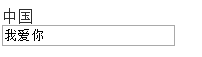
9、页面结果
springMVC之国际化的更多相关文章
- springMVC项目国际化(i18n)实现方法
SpringMVC项目国际化(i18n)实现方法 按照作息规律,每周五晚必须是分享知识的时间\(^o^)/~,这周讲点儿啥呢,项目需要逼格,咱们国际化吧(* ̄rǒ ̄)~,项目中碰到这类需求的童鞋可能并 ...
- SpringMVC实现国际化过程中所遇问题
前言:在利用SpringMVC实现国际化的过程中,看似简单,实则还是遇到了一些小问题,现在笔者对所遇问题总结如下. 注:笔者所用的编辑器为Intellij IEDA 14.1.7版本 1.国际化资源文 ...
- SpringMVC的国际化
关于SpringMVC的国际化,http://www.cnblogs.com/liukemng/p/3750117.html这篇文章已经讲的很好了.它讲了有如下几种国际化方式 1:基于Http的hea ...
- 一起学SpringMVC之国际化
随着网络的发展,在Web开发中,系统的国际化需求已经变得非常的普遍.本文主要讲解SpringMVC框架对多语言的支持,仅供学习分享使用,如有不足之处,还请指正. 什么是国际化? 国际化(interna ...
- Java SpringMVC实现国际化整合案例分析(i18n)
所谓国际化就是支持多种语言,web应用在不同的浏览环境中可以显示出不同的语言,比如说汉语.英语等.下面我将以具体的实例来举例说明: (1)新建动态Javaweb项目,并导入几个SpringMVC必需的 ...
- SpringMVC 资源国际化实现以及常见问题
资源国际化可以很方便的实现web项目语言的切换,解决了web项目按需显示不同语言界面的问题. SpringMVC 的资源国际化基于JDK的java.util.ResourceBundle实现,经过Sp ...
- Java SpringMVC实现国际化整合案例分析(i18n) 专题
所谓国际化就是支持多种语言,web应用在不同的浏览环境中可以显示出不同的语言,比如说汉语.英语等.下面我将以具体的实例来举例说明: (1)新建动态Javaweb项目,并导入几个SpringMVC必需的 ...
- 转-SpringMVC——之 国际化
原文地址:http://www.cnblogs.com/liukemng/p/3750117.html 在系列(7)中我们讲了数据的格式化显示,Spring在做格式化展示的时候已经做了国际化处理,那么 ...
- springmvc 资源国际化
<!-- 关于国际化: 1. 在页面上能够根据浏览器语言设置的情况对文本(不是内容), 时间, 数值进行本地化处理 2. 可以在 bean 中获取国际化资源文件 Locale 对应的消息 3. ...
随机推荐
- [转]vim编辑器---批量注释与反注释
转 在使用vim编写代码的时候,经常需要用到批量注释与反注释一段代码.下面简要介绍其操作. 方法一 块选择模式 插入注释: 用v进入virtual模式 用上下键选中需要注释的行数 按Control+v ...
- sql between and
sql中的 a between 'a' and 'b' 基本上是代表 'a'>=a and 'b'<=a
- audio patch(10.9.3) [2.6.1]
; Basic Block Input Regs: rax - Killed Regs: <nothing>0000000000048353 3D8419D411 ...
- 怎样用命令行编译C#程序
1. 把程序拷贝至记事本 2.另存为*cs格式 3.找到VS2015提供的命令提示 4.要把命令行指向程序所在的目录(可以有个小软件) 如果在其他的盘符,先敲D:,然后再cd 5.输入csc hell ...
- 结合Hadoop,简单理解SSH
在启动dfs和yarn时,需要多次输入密码,不但启动本机进程还有辅服务器启动那些节点也需要相应密码,主与辅服务器之间是通过SSH连接的,并发送操作指令 一.ssh密码远程登录 1.使用ssh连接另一台 ...
- Jetty 简单使用
Jetty与Tomcat类似,也是一种Servlet引擎,可以用来运行Java Web项目. 其常被嵌入到项目中,以便于开发.测试,以及Demo等项目的运行. 1.作为插件——作为开发.测试时项目运行 ...
- Python标准库:内置函数hasattr(object, name)
Python标准库:内置函数hasattr(object, name) 本函数是用来判断对象object的属性(name表示)是否存在.如果属性(name表示)存在,则返回True,否则返回False ...
- You Can Do Research Too
You Can Do Research Too I was recently discussing gatekeeping and the process of getting started in ...
- css隔行换色
.tab1 tr:nth-of-type(odd){ background:#eeeeee;} .tab1 tr:nth-of-type(even){ background:#f8f8f8;} .ta ...
- 菜鸟疑问之新建网站与新建web应用程序区别
学习asp.net一定少不了这困惑:新建网站与新建web应用程序有什么区别? 新建web应用程序 新建网站 呵呵,其实从名字看一个是webApplication,一个是webSite.名字不同罢了? ...