
DSP using MATLAB 示例Example3.9

用到的性质

上代码:
n = 0:100; x = cos(pi*n/2);

k = -100:100; w = (pi/100)*k;                 % freqency between -pi and +pi  ,   [0,pi] axis divided into 101 points.

X = x * (exp(-j*pi/100)) .^ (n'*k);           % DTFT of x

% signal multiplied

y = exp(j*pi*n/4) .* x;                    % signal multiplied by exp(j*pi*n*4)

Y = y * (exp(-j*pi/100)) .^ (n'*k);        % DTFT of y

magX = abs(X); angX = angle(X); realX = real(X); imagX = imag(X);

magY = abs(Y); angY = angle(Y); realY = real(Y); imagY = imag(Y);

%verification

%Y_check = (exp(-j*2) .^ w) .* X;             % multiplication by exp(-j2w)

%error = max(abs(Y-Y_check));                 % Difference

figure('NumberTitle', 'off', 'Name', 'x & y sequence')

set(gcf,'Color','white');

subplot(2,1,1); stem(n,x); title('x=cos(\pin/2) sequence');             xlabel('n'); ylabel('x(n)'); grid on;

subplot(2,1,2); stem(n,y); title('y=exp(j\pin/4)cos(\pin/2) sequence'); xlabel('n'); ylabel('y(n)'); grid on;

%% --------------------------------------------------------------

%%        START X's  mag ang real imag

%% --------------------------------------------------------------

figure('NumberTitle', 'off', 'Name', 'X its Magnitude and Angle, Real and Imaginary Part');

set(gcf,'Color','white');

subplot(2,2,1); plot(w/pi,magX); grid on;  % axis([-2,2,0,15]);

title('Magnitude Part');

xlabel('frequency in \pi units'); ylabel('Magnitude  |X|');

subplot(2,2,3); plot(w/pi, angX/pi); grid on;  % axis([-2,2,-1,1]);

title('Angle Part');

xlabel('frequency in \pi units'); ylabel('Radians/\pi');

subplot('2,2,2'); plot(w/pi, realX); grid on;

title('Real Part');

xlabel('frequency in \pi units'); ylabel('Real');

subplot('2,2,4'); plot(w/pi, imagX); grid on;

title('Imaginary Part');

xlabel('frequency in \pi units'); ylabel('Imaginary');

%% --------------------------------------------------------------

%%        END X's  mag ang real imag

%% --------------------------------------------------------------

%% --------------------------------------------------------------

%%        START Y's  mag ang real imag

%% --------------------------------------------------------------

figure('NumberTitle', 'off', 'Name', 'Y its Magnitude and Angle, Real and Imaginary Part');

set(gcf,'Color','white');

subplot(2,2,1); plot(w/pi,magY); grid on;  % axis([-2,2,0,15]);

title('Magnitude Part');

xlabel('frequency in \pi units'); ylabel('Magnitude  |Y|');

subplot(2,2,3); plot(w/pi, angY/pi); grid on;  % axis([-2,2,-1,1]);

title('Angle Part');

xlabel('frequency in \pi units'); ylabel('Radians/\pi');

subplot('2,2,2'); plot(w/pi, realY); grid on;

title('Real Part');

xlabel('frequency in \pi units'); ylabel('Real');

subplot('2,2,4'); plot(w/pi, imagY); grid on;

title('Imaginary Part');

xlabel('frequency in \pi units'); ylabel('Imaginary');

%% --------------------------------------------------------------

%%        END Y's  mag ang real imag

%% --------------------------------------------------------------

%% ----------------------------------------------------------------

%%        START Graphical verification

%% ----------------------------------------------------------------

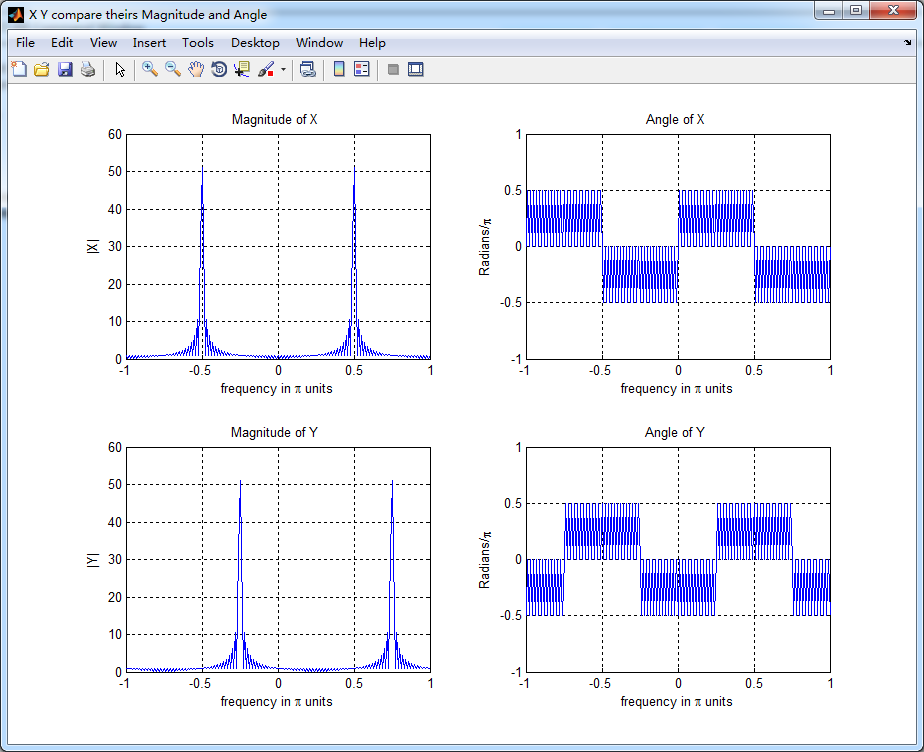
figure('NumberTitle', 'off', 'Name', 'X Y compare theirs Magnitude and Angle');

set(gcf,'Color','white');

subplot(2,2,1); plot(w/pi,magX); grid on; axis([-1,1,0,60]);

xlabel('frequency in \pi units'); ylabel('|X|'); title('Magnitude of X ');

subplot(2,2,2); plot(w/pi,angX/pi); grid on; axis([-1,1,-1,1]);

xlabel('frequency in \pi units'); ylabel('Radians/\pi'); title('Angle of X ');

subplot(2,2,3); plot(w/pi,magY); grid on; axis([-1,1,0,60]);

xlabel('frequency in \pi units'); ylabel('|Y|'); title('Magnitude of Y ');

subplot(2,2,4); plot(w/pi,angY/pi); grid on; axis([-1,1,-1,1]);

xlabel('frequency in \pi units'); ylabel('Radians/\pi'); title('Angle of Y ');

%% ----------------------------------------------------------------

%%        END Graphical verification

%% ----------------------------------------------------------------
运行结果:


DSP using MATLAB 示例Example3.9的更多相关文章
- DSP using MATLAB 示例Example3.21
代码: % Discrete-time Signal x1(n) % Ts = 0.0002; n = -25:1:25; nTs = n*Ts; Fs = 1/Ts; x = exp(-1000*a ...
- DSP using MATLAB 示例 Example3.19
代码: % Analog Signal Dt = 0.00005; t = -0.005:Dt:0.005; xa = exp(-1000*abs(t)); % Discrete-time Signa ...
- DSP using MATLAB示例Example3.18
代码: % Analog Signal Dt = 0.00005; t = -0.005:Dt:0.005; xa = exp(-1000*abs(t)); % Continuous-time Fou ...
- DSP using MATLAB 示例Example3.23
代码: % Discrete-time Signal x1(n) : Ts = 0.0002 Ts = 0.0002; n = -25:1:25; nTs = n*Ts; x1 = exp(-1000 ...
- DSP using MATLAB示例Example3.16
代码: b = [0.0181, 0.0543, 0.0543, 0.0181]; % filter coefficient array b a = [1.0000, -1.7600, 1.1829, ...
- DSP using MATLAB 示例Example3.22
代码: % Discrete-time Signal x2(n) Ts = 0.001; n = -5:1:5; nTs = n*Ts; Fs = 1/Ts; x = exp(-1000*abs(nT ...
- DSP using MATLAB 示例Example3.17
- DSP using MATLAB 示例 Example3.15
上代码: subplot(1,1,1); b = 1; a = [1, -0.8]; n = [0:100]; x = cos(0.05*pi*n); y = filter(b,a,x); figur ...
- DSP using MATLAB 示例 Example3.13
上代码: w = [0:1:500]*pi/500; % freqency between 0 and +pi, [0,pi] axis divided into 501 points. H = ex ...
- DSP using MATLAB 示例 Example3.12
用到的性质 代码: n = -5:10; x = sin(pi*n/2); k = -100:100; w = (pi/100)*k; % freqency between -pi and +pi , ...
随机推荐
- oracle触发器加条件判断
oracle触发器加条件判断,如果某个字段,isnode=0,那么不执行下面的方法,数据如下: create or replace trigger tr_basestation_insert_emp ...
- 重写Equals为什么要同时重写GetHashCode
.NET程序员都知道,如果我们重写一个类的Equals方法而没有重写GetHashCode,则VS会提示警告 :“***”重写 Object.Equals(object o)但不重写 Object.G ...
- JPA查询语句(转载)
JPQL就是一种查询语言,具有与SQL 相类似的特征,JPQL是完全面向对象的,具备继承.多态和关联等特性,和hibernate HQL很相似. 查询语句的参数 JPQL语句支持两种方式的参数定义 ...
- 【linux】配置SSH免密码登陆
1.输入ssh-keygen -t dsa -P '' -f ~/.ssh/id_dsa 其中''里的是登陆的密码,因为要设置免密码,所以''里是什么都没有的,空格也不行 2.输入 cat ~/.ss ...
- 【XLL API 函数】xlfUnregister (Form 1)
此函数可以被 Excel 已经载入的 XLL 或 DLL 调用.它等效于宏表函数 UNREGISTER. xlfUnregister 有两种调用形式: 形式1:Unregister 单独的命令或函数 ...
- IOS 去掉导航栏(UINavigationBar)下方的横线
这是导航栏的问题,将下边的代码放在 viewWillAppear 方法中就可以实现效果: - (void)viewWillAppear:(BOOL)animated{ // Called when ...
- [Android] 深入浅出Android App耗电量统计
reference to : http://www.cnblogs.com/hyddd/p/4402621.html 前言 在Android统计App耗电量比较麻烦,直至Android 4.4,它仍没 ...
- Maven构建Hadoop Maven构建Hadoop工程
一.安装maven linux eclipse3.6.1 maven安装 二:官网依赖库 我们可以直接去官网查找我们需要的依赖包的配置pom,然后加到项目中. 官网地址:http://mvnrepos ...
- Xcode因为证书问题经常报的那些错
去开始做 iOS开发的时候,因为证书问题 Xcode 经常报这样或那样的错,经过实践,现在看见 Xcode 报错已经心平气和了,经常报的错就那么多,整理一下. 1. 确认下证书是不是开发证书,如果是发 ...
- AJAX 三级联动
新的封装类 <?php class DBDA { public $host="localhost";//服务器地址 public $uid="root"; ...