
DSP using MATLAB 示例 Example3.12

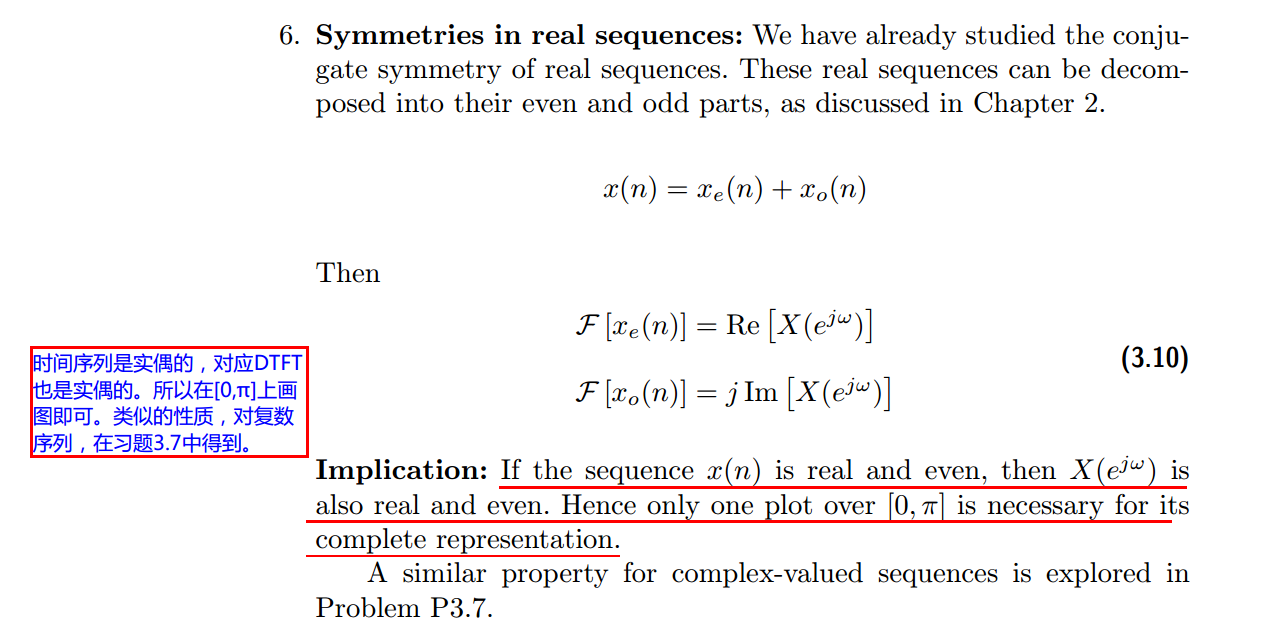
用到的性质
代码:
n = -5:10; x = sin(pi*n/2);

k = -100:100; w = (pi/100)*k;                 % freqency between -pi and +pi  ,   [0,pi] axis divided into 101 points.

X = x * (exp(-j*pi/100)) .^ (n'*k);           % DTFT of x

% signal decomposition

[xe,xo,m] = evenodd(x,n);                     % even and odd parts

XE = xe * (exp(-j*pi/100)) .^ (m'*k);         % DTFT of xe

XO = xo * (exp(-j*pi/100)) .^ (m'*k);         % DTFT of xo

magXE = abs(XE); angXE = angle(XE); realXE = real(XE); imagXE = imag(XE);

magXO = abs(XO); angXO = angle(XO); realXO = real(XO); imagXO = imag(XO);

magX  = abs(X);  angX  = angle(X);  realX  = real(X);  imagX  = imag(X);

%verification

XR = real(X);                                  % real part of X

error1 = max(abs(XE-XR));                      % Difference

XI = imag(X);                                  % imag part of X

error2 = max(abs(XO-j*XI));                    % Difference

figure('NumberTitle', 'off', 'Name', 'x sequence')

set(gcf,'Color','white');

stem(n,x); title('x sequence'); xlabel('n'); ylabel('x(n)'); grid on;

figure('NumberTitle', 'off', 'Name', 'xe & xo sequence')

set(gcf,'Color','white');

subplot(2,1,1); stem(m,xe); title('xe sequence ');   xlabel('m'); ylabel('xe(m)'); grid on;

subplot(2,1,2); stem(m,xo); title('xo sequence ');   xlabel('m'); ylabel('xo(m)'); grid on;

%% --------------------------------------------------------------------

%%              START X's  mag ang real imag

%% --------------------------------------------------------------------

figure('NumberTitle', 'off', 'Name', 'X its Magnitude and Angle, Real and Imaginary Part');

set(gcf,'Color','white');

subplot(2,2,1); plot(w/pi,magX); grid on;  axis([-1,1,0,9]);

title('Magnitude Part');

xlabel('frequency in \pi units'); ylabel('Magnitude  |X|');

subplot(2,2,3); plot(w/pi, angX/pi); grid on;  axis([-1,1,-1,1]);

title('Angle Part');

xlabel('frequency in \pi units'); ylabel('Radians/\pi');

subplot('2,2,2'); plot(w/pi, realX); grid on;

title('Real Part');

xlabel('frequency in \pi units'); ylabel('Real');

subplot('2,2,4'); plot(w/pi, imagX); grid on;

title('Imaginary Part');

xlabel('frequency in \pi units'); ylabel('Imaginary');

%% -------------------------------------------------------------------

%%             END X's  mag ang real imag

%% -------------------------------------------------------------------

%% --------------------------------------------------------------

%%           START XE's  mag ang real imag

%% --------------------------------------------------------------

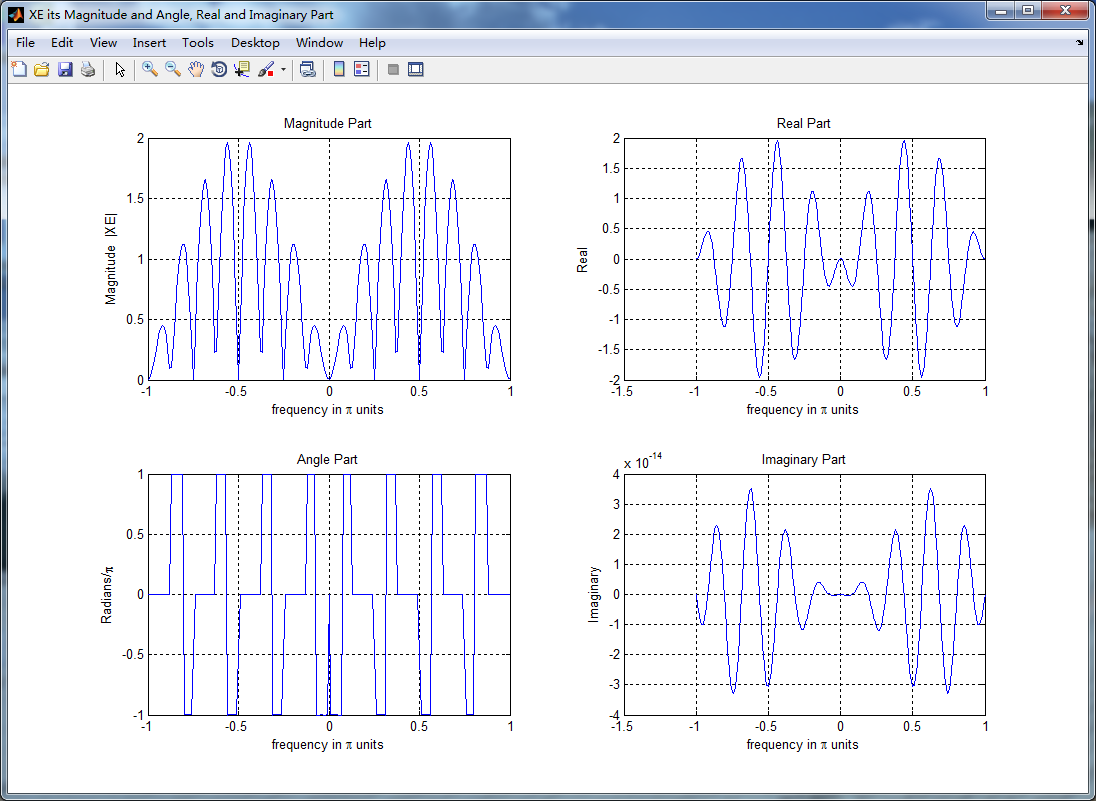
figure('NumberTitle', 'off', 'Name', 'XE its Magnitude and Angle, Real and Imaginary Part');

set(gcf,'Color','white');

subplot(2,2,1); plot(w/pi,magXE); grid on;  axis([-1,1,0,2]);

title('Magnitude Part');

xlabel('frequency in \pi units'); ylabel('Magnitude  |XE|');

subplot(2,2,3); plot(w/pi, angXE/pi); grid on;  axis([-1,1,-1,1]);

title('Angle Part');

xlabel('frequency in \pi units'); ylabel('Radians/\pi');

subplot('2,2,2'); plot(w/pi, realXE); grid on;

title('Real Part');

xlabel('frequency in \pi units'); ylabel('Real');

subplot('2,2,4'); plot(w/pi, imagXE); grid on;

title('Imaginary Part');

xlabel('frequency in \pi units'); ylabel('Imaginary');

%% --------------------------------------------------------------

%%             END XE's  mag ang real imag

%% --------------------------------------------------------------

%% --------------------------------------------------------------

%%           START XO's  mag ang real imag

%% --------------------------------------------------------------

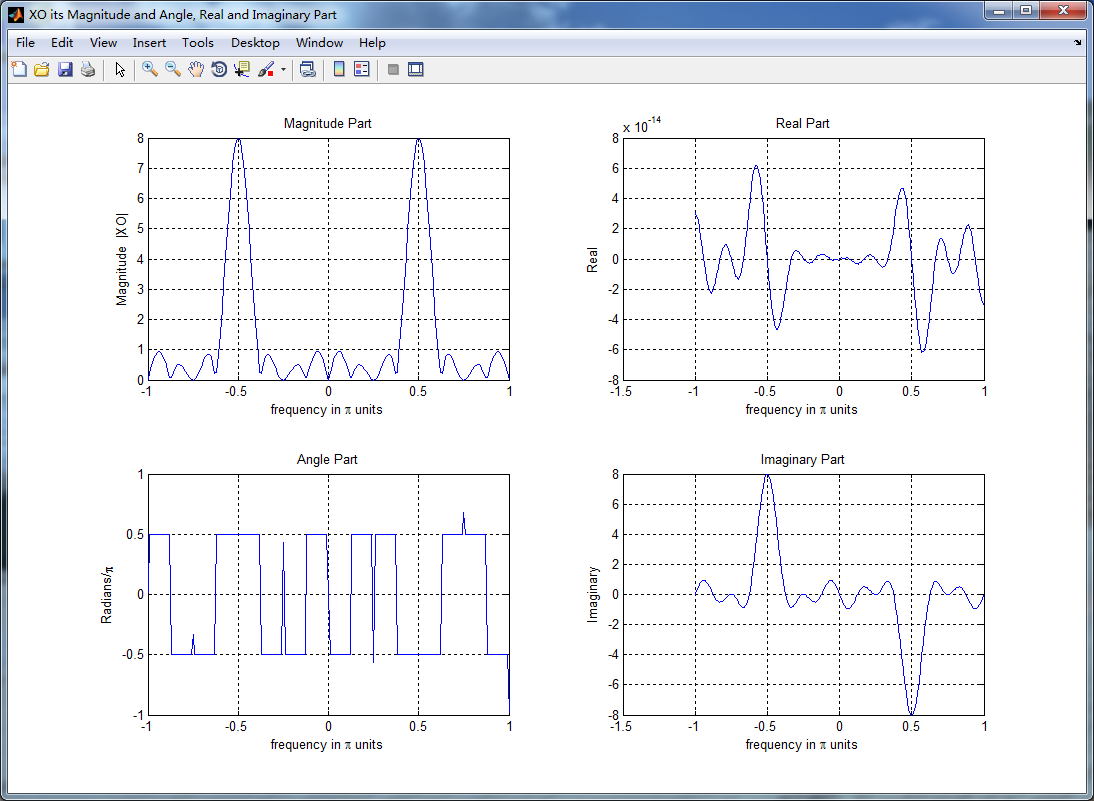
figure('NumberTitle', 'off', 'Name', 'XO its Magnitude and Angle, Real and Imaginary Part');

set(gcf,'Color','white');

subplot(2,2,1); plot(w/pi,magXO); grid on;  axis([-1,1,0,8]);

title('Magnitude Part');

xlabel('frequency in \pi units'); ylabel('Magnitude  |XO|');

subplot(2,2,3); plot(w/pi, angXO/pi); grid on;  axis([-1,1,-1,1]);

title('Angle Part');

xlabel('frequency in \pi units'); ylabel('Radians/\pi');

subplot('2,2,2'); plot(w/pi, realXO); grid on;

title('Real Part');

xlabel('frequency in \pi units'); ylabel('Real');

subplot('2,2,4'); plot(w/pi, imagXO); grid on;

title('Imaginary Part');

xlabel('frequency in \pi units'); ylabel('Imaginary');

%% --------------------------------------------------------------

%%             END XO's  mag ang real imag

%% --------------------------------------------------------------

%% ----------------------------------------------------------------

%%        START Graphical verification

%% ----------------------------------------------------------------

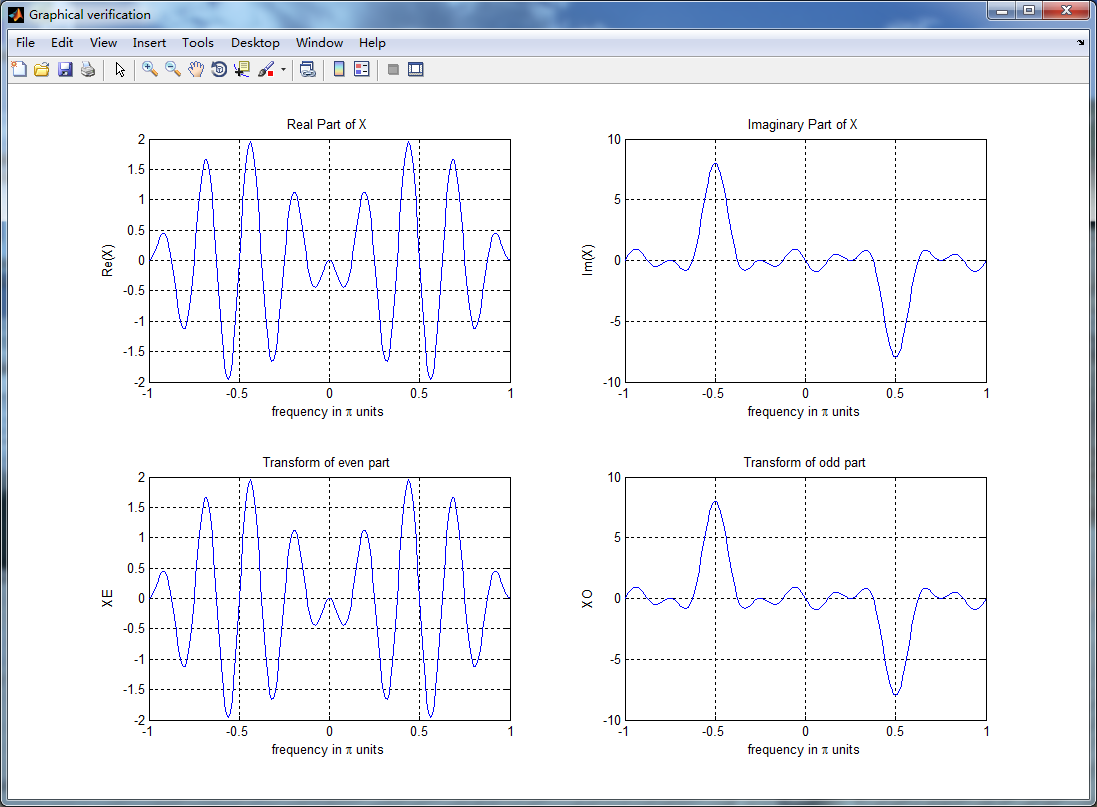
figure('NumberTitle', 'off', 'Name', 'Graphical verification');

set(gcf,'Color','white');

subplot(2,2,1); plot(w/pi,XR); grid on; axis([-1,1,-2,2]);

xlabel('frequency in \pi units'); ylabel('Re(X)'); title('Real Part of X ');

subplot(2,2,2); plot(w/pi,XI); grid on; axis([-1,1,-10,10]);

xlabel('frequency in \pi units'); ylabel('Im(X)'); title('Imaginary Part of X ');

subplot(2,2,3); plot(w/pi,realXE); grid on; axis([-1,1,-2,2]);

xlabel('frequency in \pi units'); ylabel('XE'); title('Transform of even part ');

subplot(2,2,4); plot(w/pi,imagXO); grid on; axis([-1,1,-10,10]);

xlabel('frequency in \pi units'); ylabel('XO'); title('Transform of odd part');

%% ----------------------------------------------------------------

%%        END Graphical verification

%% ----------------------------------------------------------------
运行结果:


DSP using MATLAB 示例 Example3.12的更多相关文章
- DSP using MATLAB 示例Example3.21
代码: % Discrete-time Signal x1(n) % Ts = 0.0002; n = -25:1:25; nTs = n*Ts; Fs = 1/Ts; x = exp(-1000*a ...
- DSP using MATLAB 示例 Example3.19
代码: % Analog Signal Dt = 0.00005; t = -0.005:Dt:0.005; xa = exp(-1000*abs(t)); % Discrete-time Signa ...
- DSP using MATLAB示例Example3.18
代码: % Analog Signal Dt = 0.00005; t = -0.005:Dt:0.005; xa = exp(-1000*abs(t)); % Continuous-time Fou ...
- DSP using MATLAB 示例Example3.23
代码: % Discrete-time Signal x1(n) : Ts = 0.0002 Ts = 0.0002; n = -25:1:25; nTs = n*Ts; x1 = exp(-1000 ...
- DSP using MATLAB示例Example3.16
代码: b = [0.0181, 0.0543, 0.0543, 0.0181]; % filter coefficient array b a = [1.0000, -1.7600, 1.1829, ...
- DSP using MATLAB 示例 Example3.11
用到的性质 上代码: n = -5:10; x = rand(1,length(n)); k = -100:100; w = (pi/100)*k; % freqency between -pi an ...
- DSP using MATLAB 示例 Example3.10
用到的性质 上代码: n = -5:10; x = rand(1,length(n)) + j * rand(1,length(n)); k = -100:100; w = (pi/100)*k; % ...
- DSP using MATLAB 示例Example3.22
代码: % Discrete-time Signal x2(n) Ts = 0.001; n = -5:1:5; nTs = n*Ts; Fs = 1/Ts; x = exp(-1000*abs(nT ...
- DSP using MATLAB 示例Example3.17
随机推荐
- Android 支付宝以及微信支付快速接入流程
简介 随着移动支付的普及,越来越多的App采用第三发支付,在这里我们以支付宝为例,做一个快速集成! 一.Android快速实现支付宝支付 1.首先,我们需要前往支付宝开放平台,申请我们的支付功能:ht ...
- Windows update 失败的解决方案
由于刚刚装了新的系统,结果在电脑用了刚刚一周之后,我打开了自动更新,结果电脑就一直处于更新状态中.期初我以为是更新比较慢,等等可能就结束了,结果等了足足一晚上,到了第二天,电脑显示是:配置更新失败,正 ...
- 【gsl】生成随机数
来自:http://hsxqwanting.blog.163.com/blog/static/16945437201301042830815/ 使用GSL生成随机数时的三个步骤: (1)gsl_ ...
- 使用按钮控制HTML5背景音乐开关
<!DOCTYPE HTML> <html> <head> <meta charset="utf-8"> <meta name ...
- 数独检测器:帝国理工C++作业
#include <fstream> #include <vector> #include <iostream> #include <string> u ...
- eclipse svn设置忽略文件
- xth的旅行(codevs 1450)
题目描述 Description 毕业了,Xth很高兴,因为他要和他的 rabbit 去双人旅行了.他们来到了水城威尼斯.众所周知(⊙﹏⊙b汗),这里的水路交通很发达,所以 xth 和 rabbit ...
- iOS中常见的一些宏
原文链接 1.处理NSLog事件(开发者模式打印,发布者模式不打印) #ifdef DEBUG #define NSLog(FORMAT, ...) fprintf(stderr,"%s:% ...
- IOS管理文件和目录NSFileManager
1.常见的NSFileManager文件方法 -(NSData *)contentsAtPath:path //从一个文件读取数据 -(BOOL)createFileAtPath: path cont ...
- springmvc上传List,
@RequestMapping("pay") public ModelAndView pay(String orderNo, TransactionDTO transaction, ...