
In Depth : Android Shutdown Sequence
What happened when I long press power button ?
What is shutdown sequence ?
How is it different from desktop linux shutdown sequence?
How to change shutdown menu ?
Many questions pop-up in mind when we think about Android shutdown sequence. Before you read about shutdown sequence I suggest you to read aboutboot sequence article.
In this article I am going to explain shutdown sequence for Android only. Please refer"Linux Boot and Shutdown Process" for details of desktop linux shutdown process.
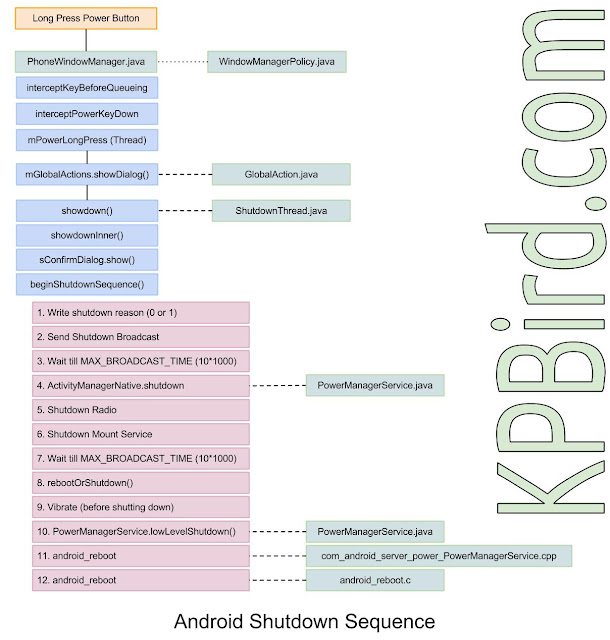
Following diagram illustrate shutdown sequence in detail.
/** {@inheritDoc} */

@Override

public int interceptKeyBeforeQueueing(KeyEvent event, int policyFlags, boolean isScreenOn) {

....

....

....

case KeyEvent.KEYCODE_POWER: {

     result &= ~ACTION_PASS_TO_USER;

       if (down) {

         if (isScreenOn && !mPowerKeyTriggered

               && (event.getFlags() & KeyEvent.FLAG_FALLBACK) == 0) {

                   mPowerKeyTriggered = true;

                   mPowerKeyTime = event.getDownTime();

                   interceptScreenshotChord();

            }

               ITelephony telephonyService = getTelephonyService();

                boolean hungUp = false;

               if (telephonyService != null) {

                   try {

                       if (telephonyService.isRinging()) {

                           // Pressing Power while there's a ringing incoming

                           // call should silence the ringer.

                            telephonyService.silenceRinger();

                       } else if ((mIncallPowerBehavior

                                & Settings.Secure.INCALL_POWER_BUTTON_BEHAVIOR_HANGUP) != 0

                               && telephonyService.isOffhook()) {

                            // Otherwise, if "Power button ends call" is enabled,

                           // the Power button will hang up any current active call.

                            hungUp = telephonyService.endCall();

                       }

                   } catch (RemoteException ex) {

                        Log.w(TAG, "ITelephony threw RemoteException", ex);

                   }

               }

               interceptPowerKeyDown(!isScreenOn || hungUp

                       || mVolumeDownKeyTriggered || mVolumeUpKeyTriggered);

           } else {

               mPowerKeyTriggered = false;

               cancelPendingScreenshotChordAction();

               if (interceptPowerKeyUp(canceled || mPendingPowerKeyUpCanceled)) {

                   result = (result & ~ACTION_WAKE_UP) | ACTION_GO_TO_SLEEP;

               }

               mPendingPowerKeyUpCanceled = false;

           }

          break;

      }

....

....

....

}
private void interceptPowerKeyDown(boolean handled) {

  mPowerKeyHandled = handled;

  if (!handled) {

       mHandler.postDelayed(mPowerLongPress, ViewConfiguration.getGlobalActionKeyTimeout());

  }

}
Following code represent mPowerLongPress thread
private final Runnable mPowerLongPress = new Runnable() {

        @Override

        public void run() {

            // The context isn't read

            if (mLongPressOnPowerBehavior < 0) {

                mLongPressOnPowerBehavior = mContext.getResources().getInteger(

                        com.android.internal.R.integer.config_longPressOnPowerBehavior);

            }

            int resolvedBehavior = mLongPressOnPowerBehavior;

            if (FactoryTest.isLongPressOnPowerOffEnabled()) {

                resolvedBehavior = LONG_PRESS_POWER_SHUT_OFF_NO_CONFIRM;

            }

            switch (resolvedBehavior) {

            case LONG_PRESS_POWER_NOTHING:

                break;

            case LONG_PRESS_POWER_GLOBAL_ACTIONS:

                mPowerKeyHandled = true;

                if (!performHapticFeedbackLw(null, HapticFeedbackConstants.LONG_PRESS, false)) {

                    performAuditoryFeedbackForAccessibilityIfNeed();

                }

                sendCloseSystemWindows(SYSTEM_DIALOG_REASON_GLOBAL_ACTIONS);

                showGlobalActionsDialog();

                break;

            case LONG_PRESS_POWER_SHUT_OFF:

            case LONG_PRESS_POWER_SHUT_OFF_NO_CONFIRM:

                mPowerKeyHandled = true;

                performHapticFeedbackLw(null, HapticFeedbackConstants.LONG_PRESS, false);

                sendCloseSystemWindows(SYSTEM_DIALOG_REASON_GLOBAL_ACTIONS);

                mWindowManagerFuncs.shutdown(resolvedBehavior == LONG_PRESS_POWER_SHUT_OFF);

                break;

            }

        }

    };
void showGlobalActionsDialog() {

    if (mGlobalActions == null) {

        mGlobalActions = new GlobalActions(mContext, mWindowManagerFuncs);

    }

    final boolean keyguardShowing = keyguardIsShowingTq();

    mGlobalActions.showDialog(keyguardShowing, isDeviceProvisioned());

    if (keyguardShowing) {

         // since it took two seconds of long press to bring this up,

        // poke the wake lock so they have some time to see the dialog.

        mKeyguardMediator.userActivity();

    }

}

private static void beginShutdownSequence(Context context) {

        synchronized (sIsStartedGuard) {

            if (sIsStarted) {

                Log.d(TAG, "Shutdown sequence already running, returning.");

                return;

            }

            sIsStarted = true;

        }

        // throw up an indeterminate system dialog to indicate radio is

        // shutting down.

        ProgressDialog pd = new ProgressDialog(context);

        pd.setTitle(context.getText(com.android.internal.R.string.power_off));

        pd.setMessage(context.getText(com.android.internal.R.string.shutdown_progress));

        pd.setIndeterminate(true);

        pd.setCancelable(false);

        pd.getWindow().setType(WindowManager.LayoutParams.TYPE_KEYGUARD_DIALOG);

        pd.show();

        sInstance.mContext = context;

        sInstance.mPowerManager = (PowerManager)context.getSystemService(Context.POWER_SERVICE);

        // make sure we never fall asleep again

        sInstance.mCpuWakeLock = null;

        try {

            sInstance.mCpuWakeLock = sInstance.mPowerManager.newWakeLock(

                    PowerManager.PARTIAL_WAKE_LOCK, TAG + "-cpu");

            sInstance.mCpuWakeLock.setReferenceCounted(false);

            sInstance.mCpuWakeLock.acquire();

        } catch (SecurityException e) {

            Log.w(TAG, "No permission to acquire wake lock", e);

            sInstance.mCpuWakeLock = null;

        }

        // also make sure the screen stays on for better user experience

        sInstance.mScreenWakeLock = null;

        if (sInstance.mPowerManager.isScreenOn()) {

            try {

                sInstance.mScreenWakeLock = sInstance.mPowerManager.newWakeLock(

                        PowerManager.FULL_WAKE_LOCK, TAG + "-screen");

                sInstance.mScreenWakeLock.setReferenceCounted(false);

                sInstance.mScreenWakeLock.acquire();

            } catch (SecurityException e) {

                Log.w(TAG, "No permission to acquire wake lock", e);

                sInstance.mScreenWakeLock = null;

            }

        }

        // start the thread that initiates shutdown

        sInstance.mHandler = new Handler() {

        };

        sInstance.start();

    }
Run method, start actual shutdown process
 public void run() {

        BroadcastReceiver br = new BroadcastReceiver() {

            @Override public void onReceive(Context context, Intent intent) {

                // We don't allow apps to cancel this, so ignore the result.

                actionDone();

            }

        };

        /*

         * Write a system property in case the system_server reboots before we

         * get to the actual hardware restart. If that happens, we'll retry at

         * the beginning of the SystemServer startup.

         */

        {

            String reason = (mReboot ? "1" : "0") + (mRebootReason != null ? mRebootReason : "");

            SystemProperties.set(SHUTDOWN_ACTION_PROPERTY, reason);

        }

        /*

         * If we are rebooting into safe mode, write a system property

         * indicating so.

         */

        if (mRebootSafeMode) {

            SystemProperties.set(REBOOT_SAFEMODE_PROPERTY, "1");

        }

        Log.i(TAG, "Sending shutdown broadcast...");

        // First send the high-level shut down broadcast.

        mActionDone = false;

        Intent intent = new Intent(Intent.ACTION_SHUTDOWN);

        intent.addFlags(Intent.FLAG_RECEIVER_FOREGROUND);

        mContext.sendOrderedBroadcastAsUser(intent,

                UserHandle.ALL, null, br, mHandler, 0, null, null);

        final long endTime = SystemClock.elapsedRealtime() + MAX_BROADCAST_TIME;

        synchronized (mActionDoneSync) {

            while (!mActionDone) {

                long delay = endTime - SystemClock.elapsedRealtime();

                if (delay <= 0) {

                    Log.w(TAG, "Shutdown broadcast timed out");

                    break;

                }

                try {

                    mActionDoneSync.wait(delay);

                } catch (InterruptedException e) {

                }

            }

        }

        Log.i(TAG, "Shutting down activity manager...");

        final IActivityManager am =

            ActivityManagerNative.asInterface(ServiceManager.checkService("activity"));

        if (am != null) {

            try {

                am.shutdown(MAX_BROADCAST_TIME);

            } catch (RemoteException e) {

            }

        }

        // Shutdown radios.

        shutdownRadios(MAX_RADIO_WAIT_TIME);

        // Shutdown MountService to ensure media is in a safe state

        IMountShutdownObserver observer = new IMountShutdownObserver.Stub() {

            public void onShutDownComplete(int statusCode) throws RemoteException {

                Log.w(TAG, "Result code " + statusCode + " from MountService.shutdown");

                actionDone();

            }

        };

        Log.i(TAG, "Shutting down MountService");

        // Set initial variables and time out time.

        mActionDone = false;

        final long endShutTime = SystemClock.elapsedRealtime() + MAX_SHUTDOWN_WAIT_TIME;

        synchronized (mActionDoneSync) {

            try {

                final IMountService mount = IMountService.Stub.asInterface(

                        ServiceManager.checkService("mount"));

                if (mount != null) {

                    mount.shutdown(observer);

                } else {

                    Log.w(TAG, "MountService unavailable for shutdown");

                }

            } catch (Exception e) {

                Log.e(TAG, "Exception during MountService shutdown", e);

            }

            while (!mActionDone) {

                long delay = endShutTime - SystemClock.elapsedRealtime();

                if (delay <= 0) {

                    Log.w(TAG, "Shutdown wait timed out");

                    break;

                }

                try {

                    mActionDoneSync.wait(delay);

                } catch (InterruptedException e) {

                }

            }

        }

        rebootOrShutdown(mReboot, mRebootReason);

    }
Step 7: With rebootOrShutdown() method controls transfer to the native function of com_android_server_power_PowerManagerService.cpp file, and finally control goes to android_reboot.c file which is final step of shutdown sequence.
static void nativeShutdown(JNIEnv *env, jclass clazz) {

    android_reboot(ANDROID_RB_POWEROFF, 0, 0);

}
In Depth : Android Shutdown Sequence的更多相关文章
- In Depth : Android Boot Sequence / Process
In Depth : Android Boot Sequence / Process What happened when I press power on button in my Android ...
- I.MX6 android shutdown 内核崩溃
/**************************************************************************** * I.MX6 android shutdo ...
- I.MX6 Android shutdown shell command
/******************************************************************************* * I.MX6 Android shu ...
- Android Framework层Power键关机流程(二,关机流程)
二,关机流程 从前一篇博文我们知道,当用户长按Power键时会弹出(关机.重启,飞行模式等选项)对话框,我们点击关机,则会弹出关机确认对话框.那么从选项对话框到关机确认对话框又是一个什么流程呢.下面我 ...
- Android关机流程源码分析
上一篇文章Android 开关机动画显示源码分析详细介绍了开关机动画的显示过程,Android系统开机时,在启动SurfaceFlinger服务过程中通过Android属性系统方式来启动bootani ...
- Android 4.1.2系统添加重启功能
对于Android的的手机或者平板长期使用,感觉会出现慢的情况,所以偶尔还是需要重启一下,而长按电源键弹出的菜单又没有重启选项,所以特在此记录自己添加这个功能的过程. 首先关机的那个弹出菜单是在fra ...
- 深入解析Android关机
下图详细阐释了Android的关机顺序. 第一步: 按住电源按钮半秒钟(500ms). 第二步: 之后,PhoneWindowManager.java 将捕获长按电源按钮这一事件并调用“interce ...
- Android 9.0 关机流程分析
极力推荐文章:欢迎收藏 Android 干货分享 阅读五分钟,每日十点,和您一起终身学习,这里是程序员Android 本篇文章主要介绍 Android 开发中的部分知识点,通过阅读本篇文章,您将收获以 ...
- No shutdown animation in the electricity display only 1%
低电量自动关机时无关机动画 低电量自动关机时无关机动画1. 问题描述2. 分析3. solution4. 总结 1. 问题描述 DEFECT DESCRIPTION: No shutdown anim ...
随机推荐
- queue 之团队队列(摘)
有t个团队的人正在排一个长队.每次新来一个人时,如果他有队友在排队,那么这个新人会插队到最后一个队友的身后.如果没有任何一个队友排队,则他会排到长队的队尾. 输入每个团队中所有队员的编号,要求支持如下 ...
- Mysql优化之创建高性能索引(二)
1.索引的优点 索引可以让服务器快速地定位到表的指定位置.总结下来有三大优点: 索引大大减少了服务器需要扫描的数据量 索引可以帮助服务器避免排序和临时表 索引可以将随机I/O变为顺序I/O 2.高性能 ...
- activiti 部署在oracle多用户下不能自动建表问题的解决!
在activiti配置文件中的SpringProcessEngineConfiguration的配置项中添加<property name= "databaseSchema" ...
- js中邦定事件与解绑支持匿名函数
和一个朋友讨论了一下,DOM2绑定方式都是有名的函数,匿名的处理起来有些麻烦,而且即使是有名的函数,在IE低版本的浏览器也是解除不掉的,this指向需要修改,着实费了一番功夫,这个是兼容ie低版本的, ...
- CS0016: 未能写入输出文件*****目录名称无效
一大早,杀毒软件弹出删除隐私记录.清理空间一堆堆的提醒,一般我都是无视它,今天顺便点了下清理,然后出问题. 昨晚下班提交的代码,程序运行好好地,今早清理完系统,竟然就出问题了, 具体如下 CS0016 ...
- TensorFlow深度学习笔记 Tensorboard入门
转载请注明作者:梦里风林 Github工程地址:https://github.com/ahangchen/GDLnotes 欢迎star,有问题可以到Issue区讨论 官方教程: https://ww ...
- SQL Server 的各种查询和要申请的锁
前期准备: 1.建表 create table T_Btree(X int primary key,Y nvarchar(4000)); create table T_Heap( ...
- SQL Server 造成cpu 使用率高的 6 原因
第一种: 编译和重编译执行计划. 第二种: 排序与聚合. 第三种: 表格连接操作. 第四种: max degree of parallelism. 第五种: max worker threads. 第 ...
- UIButton控件
UIButton继承关系如下: UIButton-->UIControl-->UIView-->UIResponder-->NSObject 由于继承层次过多,下面只重点介绍U ...
- 载入OpenSSL的动态库——学会使用tryToLoadOpenSslWin32Library和QPair
Libraries name of openssl? The "library" portion of OpenSSL consists of two libraries. On ...