
iOS:UITableViewCell自定义单元格
UITableViewCell:自定义的单元格,可以在xib中创建单元格,也可以在storyBorad中创建单元格。有四种创建方式
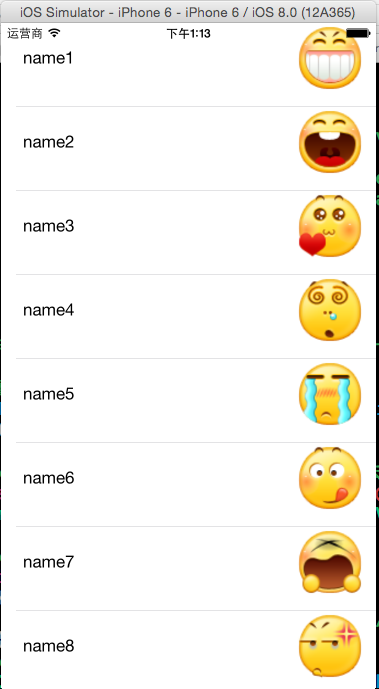
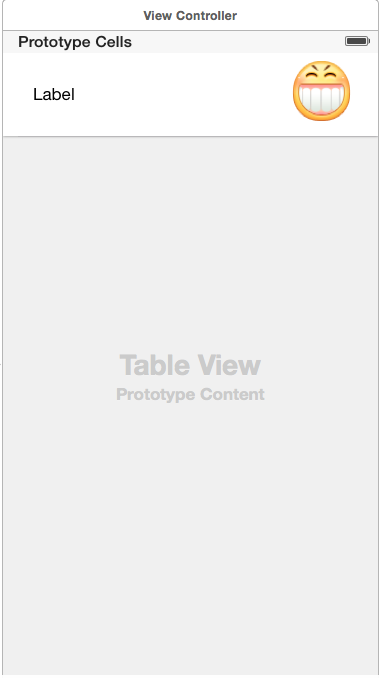

 #import <Foundation/Foundation.h>

 @interface Contact : NSObject

 @property (copy,nonatomic)NSString *name;

 @property (copy,nonatomic)NSString *faceName;

 -(instancetype)initWithName:(NSString*)name andFaceName:(NSString*) faceName;

 @end
 #import "Contact.h"

 @implementation Contact

 -(instancetype)initWithName:(NSString*)name andFaceName:(NSString*) faceName

 {

     self = [super init];

     if(self)

     {

         _name = [name copy];

         _faceName = [faceName copy];

     }

     return self;

 }

 @end
在视图控制器中完成代码:(需要用tag获取单元格的属性控件)
 #import "ViewController.h"

 #import "Contact.h"

 @interface ViewController ()<UITableViewDataSource>

 @property (weak, nonatomic) IBOutlet UITableView *tableView;

 @property (strong,nonatomic)NSMutableArray *contacts;

 @end

 @implementation ViewController

 - (void)viewDidLoad {

     [super viewDidLoad];

     //初始化数据

     self.contacts = [NSMutableArray arrayWithCapacity:];

     for(int i=; i<; i++)

     {

         Contact *conatct = [[Contact alloc]initWithName:[NSString stringWithFormat:@"name%d",i+] andFaceName:[NSString stringWithFormat:@"%d.png",i]];

         [self.contacts addObject:conatct];

     }

     //设置tableView的数据源

     self.tableView.dataSource = self;

 }

 #pragma mark -tableView的数据源方法

 //每一组多少行

 -(NSInteger)tableView:(UITableView *)tableView numberOfRowsInSection:(NSInteger)section

 {

     return self.contacts.count;

 }

 //设置每一个单元格的内容

 -(UITableViewCell *)tableView:(UITableView *)tableView cellForRowAtIndexPath:(NSIndexPath *)indexPath

 {

     //1.根据reuseIdentifier,先到对象池中去找重用的单元格对象

     static NSString *reuseIdentifier = @"myCell";

     UITableViewCell *cell = [self.tableView dequeueReusableCellWithIdentifier:reuseIdentifier];

     //2.设置单元格对象的内容

     Contact *contact = [self.contacts objectAtIndex:indexPath.row];

     UILabel *label = (UILabel*)[cell viewWithTag:];

     label.text = contact.name;

     UIImageView *imageView = (UIImageView*)[cell viewWithTag:];

     [imageView setImage:[UIImage imageNamed:contact.faceName]];

     return cell;

 }

 @end
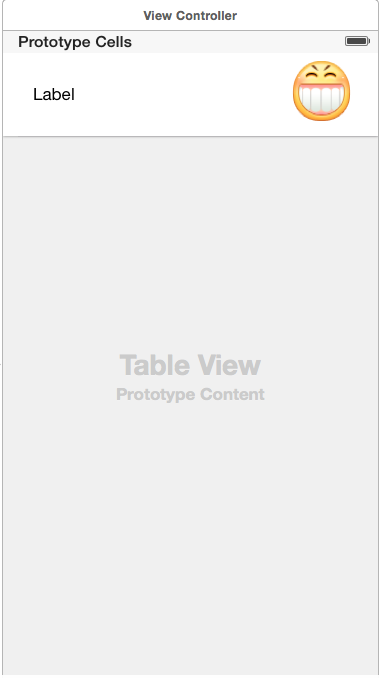
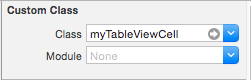
方法二:直接在storyBoard中创建单元格并关联自定义的类并直接加载,自定义的单元格位置一个UITableView的上面
#import <Foundation/Foundation.h>

@interface Contact : NSObject

@property (copy,nonatomic)NSString *name;

@property (copy,nonatomic)NSString *faceName;

-(instancetype)initWithName:(NSString*)name andFaceName:(NSString*) faceName;

@end

#import "Contact.h"

@implementation Contact

-(instancetype)initWithName:(NSString*)name andFaceName:(NSString*) faceName

{

    self = [super init];

    if(self)

    {

        _name = [name copy];

        _faceName = [faceName copy];

    }

    return self;

}

@end
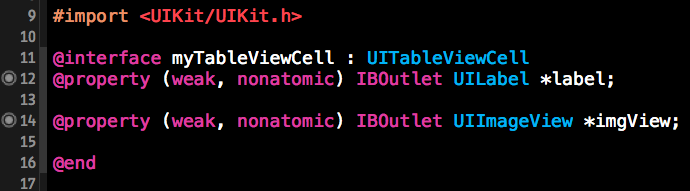
与单元格关联的自定义的类,关联单元格的属性控件(不需要再用tag获取了,直接用self.获取)
还是在视图控制器中完成加载:
 #import "ViewController.h"

 #import "Contact.h"

 #import "myTableViewCell.h"

 @interface ViewController ()<UITableViewDataSource>

 @property (weak, nonatomic) IBOutlet UITableView *tableView;

 @property (strong,nonatomic)NSMutableArray *contacts;

 @end

 @implementation ViewController

 - (void)viewDidLoad {

     [super viewDidLoad];

     //初始化数据

     self.contacts = [NSMutableArray arrayWithCapacity:];

     for(int i=; i<; i++)

     {

         Contact *conatct = [[Contact alloc]initWithName:[NSString stringWithFormat:@"name%d",i+] andFaceName:[NSString stringWithFormat:@"%d.png",i]];

         [self.contacts addObject:conatct];

     }

     //设置tableView的数据源

     self.tableView.dataSource = self;

 }

 #pragma mark -tableView的数据源方法

 //每一组多少行

 -(NSInteger)tableView:(UITableView *)tableView numberOfRowsInSection:(NSInteger)section

 {

     return self.contacts.count;

 }

 //设置每一个单元格的内容

 -(UITableViewCell *)tableView:(UITableView *)tableView cellForRowAtIndexPath:(NSIndexPath *)indexPath

 {

     //1.根据reuseIdentifier,先到对象池中去找重用的单元格对象

     static NSString *reuseIdentifier = @"myCell";

     myTableViewCell *cell = [self.tableView dequeueReusableCellWithIdentifier:reuseIdentifier];

     //2.设置单元格对象的内容

     Contact *contact = [self.contacts objectAtIndex:indexPath.row];

     cell.label.text = contact.name;

     [cell.imgView setImage:[UIImage imageNamed:contact.faceName]];

     return cell;

 }

 @end
方法三:在xib文件中创建单元格,然后再视图控制器中直接加载使用
首先在storyBoard中添加一个UITableView
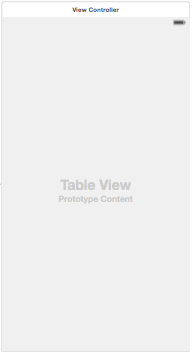
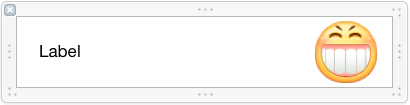
然后在已经创建好的MyCell.xib中创建自定义的单元格为:
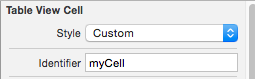
设置该单元格的重用标识符identifier:
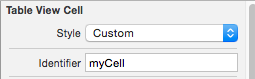
创建一个联系人初始化的类:
 #import <Foundation/Foundation.h>

 @interface Contact : NSObject

 @property (copy,nonatomic)NSString *name;

 @property (copy,nonatomic)NSString *faceName;

 -(instancetype)initWithName:(NSString*)name andFaceName:(NSString*) faceName;

 @end

 #import "Contact.h"

 @implementation Contact

 -(instancetype)initWithName:(NSString*)name andFaceName:(NSString*) faceName

 {

     self = [super init];

     if(self)

     {

         _name = [name copy];

         _faceName = [faceName copy];

     }

     return self;

 }

 @end
还是在视图控制器中完成加载:
 #import "ViewController.h"

 #import "Contact.h"

 #import "myTableViewCell.h"

 @interface ViewController ()<UITableViewDataSource>

 @property (weak, nonatomic) IBOutlet UITableView *tableView;

 @property (strong,nonatomic)NSMutableArray *contacts;

 @end

 @implementation ViewController

 - (void)viewDidLoad {

     [super viewDidLoad];

     //初始化数据

     self.contacts = [NSMutableArray arrayWithCapacity:];

     for(int i=; i<; i++)

     {

         Contact *conatct = [[Contact alloc]initWithName:[NSString stringWithFormat:@"name%d",i+] andFaceName:[NSString stringWithFormat:@"%d.png",i]];

         [self.contacts addObject:conatct];

     }

     //设置tableView的数据源

     self.tableView.dataSource = self;

 }

 #pragma mark -tableView的数据源方法

 //每一组多少行

 -(NSInteger)tableView:(UITableView *)tableView numberOfRowsInSection:(NSInteger)section

 {

     return self.contacts.count;

 }

 //直接从xib文件中加载

 //设置每一个单元格的内容

 -(UITableViewCell *)tableView:(UITableView *)tableView cellForRowAtIndexPath:(NSIndexPath *)indexPath

 {

     //1.根据reuseIdentifier,先到对象池中去找重用的单元格对象

     static NSString *reuseIdentifier = @"myCell";

       UITableViewCell *cell = [self.tableView dequeueReusableCellWithIdentifier:reuseIdentifier];

     //2.如果没找到,就自己创建cell

     if(!cell)

     {

         //从xib文件中加载视图

        NSArray *views = [[NSBundle mainBundle]loadNibNamed:@"MyCell" owner:nil options:nil];

         cell = (UITableViewCell*)[views lastObject];

     }

     //3.设置单元格对象的内容

     Contact *contact = [self.contacts objectAtIndex:indexPath.row];

     UILabel *label = (UILabel*)[cell viewWithTag:];

     label.text = contact.name;

     UIImageView *imgView = (UIImageView*)[cell viewWithTag:];

     [imgView setImage:[UIImage imageNamed:contact.faceName]];

     return cell;

 }
方法四:在xib文件中创建单元格,并创建与之关联的的类,然后将加载过程封装到它的类中帮助初始化完成,同时该类提供类方法,最后再视图控制器中通过这个类方法获取单元格。
首先在storyBoard中添加一个UITableView

然后在已经创建好的MyCell.xib中创建自定义的单元格为:

给单元格设置重用标识符identifier

将单元格与自定义的类关联
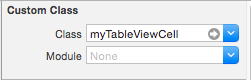
创建一个联系人初始化的类:
 #import <Foundation/Foundation.h>

  @interface Contact : NSObject

  @property (copy,nonatomic)NSString *name;

  @property (copy,nonatomic)NSString *faceName;

  -(instancetype)initWithName:(NSString*)name andFaceName:(NSString*) faceName;

  @end

 #import "Contact.h"

 @implementation Contact

 -(instancetype)initWithName:(NSString*)name andFaceName:(NSString*) faceName

 {

     self = [super init];

     if(self)

     {

         _name = [name copy];

         _faceName = [faceName copy];

     }

     return self;

 }

 @end
创建一个与单元格关联的类:(将加载单元格的过程和属性封装起来)
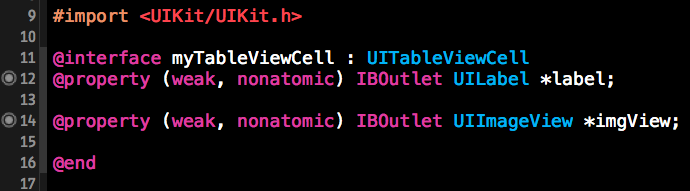
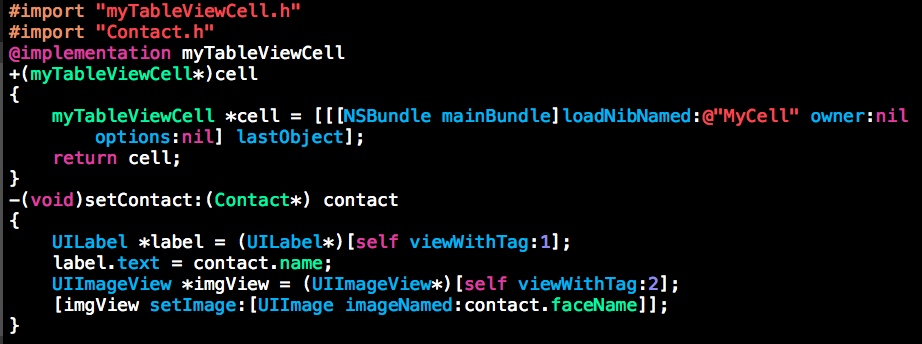
在视图控制器中通过上面的类方法获取单元格
 #import "ViewController.h"

 #import "Contact.h"

 #import "myTableViewCell.h"

 @interface ViewController ()<UITableViewDataSource>

 @property (weak, nonatomic) IBOutlet UITableView *tableView;

 @property (strong,nonatomic)NSMutableArray *contacts;

 @end

 @implementation ViewController

 - (void)viewDidLoad {

     [super viewDidLoad];

     //初始化数据

     self.contacts = [NSMutableArray arrayWithCapacity:];

     for(int i=; i<; i++)

     {

         Contact *conatct = [[Contact alloc]initWithName:[NSString stringWithFormat:@"name%d",i+] andFaceName:[NSString stringWithFormat:@"%d.png",i]];

         [self.contacts addObject:conatct];

     }

     //设置tableView的数据源

     self.tableView.dataSource = self;

 }

 #pragma mark -tableView的数据源方法

 //每一组多少行

 -(NSInteger)tableView:(UITableView *)tableView numberOfRowsInSection:(NSInteger)section

 {

     return self.contacts.count;

 }

 //在与xib关联的类中加载xib文件(其实就是封装了一下而已)

 //设置每一个单元格的内容

 -(UITableViewCell *)tableView:(UITableView *)tableView cellForRowAtIndexPath:(NSIndexPath *)indexPath

 {

     //1.根据reuseIdentifier,先到对象池中去找重用的单元格对象

     static NSString *reuseIdentifier = @"myCell";

     myTableViewCell *cell = [self.tableView dequeueReusableCellWithIdentifier:reuseIdentifier];

     //2.如果没找到,就自己创建cell

     if(!cell)

     {

         cell = [myTableViewCell cell];//调用类方法

     }

     //3.设置单元格对象的内容

     Contact *contact = [self.contacts objectAtIndex:indexPath.row];

     [cell setContact:contact];//调用实例方法

     return cell;

 }

 @end
iOS:UITableViewCell自定义单元格的更多相关文章
- Swift - 自定义单元格实现微信聊天界面
1,下面是一个放微信聊天界面的消息展示列表,实现的功能有: (1)消息可以是文本消息也可以是图片消息 (2)消息背景为气泡状图片,同时消息气泡可根据内容自适应大小 (3)每条消息旁边有头像,在左边表示 ...
- 浅谈DevExpress<五>:TreeList简单的美化——自定义单元格,加注释以及行序号
今天就以昨天的列表为例,实现以下效果:预算大于110万的单元格突出显示,加上行序号以及注释,如下图:
- jQuery MiniUI自定义单元格
监听处理"drawcell"事件 使用"drawcell"事件,可以自定义单元格内容.样式.行样式等. grid.on("drawcell" ...
- 使用VUE组件创建SpreadJS自定义单元格(一)
作为近五年都冲在热门框架排行榜首的Vue,大家一定会学到的一部分就是组件的使用.前端开发的模块化,可以让代码逻辑更加简单清晰,项目的扩展性大大加强.对于Vue而言,模块化的体现集中在组件之上,以组件为 ...
- 使用VUE组件创建SpreadJS自定义单元格(二)
在上篇中,我们介绍了如何通过设置runtimeCompiler为true,在Vue中实现了动态创建电子表格组件.想了解具体内容可看点击查看使用VUE组件创建SpreadJS自定义单元格(一). 但是在 ...
- 自己的自定义单元格(IOS)
定义自己的单位格有三种方法 - 代码 - xib - storyboard(推荐) 操作方法故事板 1.在TableView财产Prototype Cells至1.莫感觉1: 2.须要创建自己定义的单 ...
- IOS 取消表格单元格 TableViewCell 去掉高亮状态 点击Cell取消选择状态
以下是两种实现效果 1. 自定义cell 继承UITableViewCell 重写 -(void)setSelected:(BOOL)selected animated:(BOOL)animated ...
- UITableView自定义单元格
随手笔记: RootViewController代码 #import "RootViewController.h" #import "AddressContact.h&q ...
- NPOI 自定义单元格背景颜色-Excel
NPOI针对office2003使用HSSFWorkbook,对于offce2007及以上使用XSSFWorkbook:今天我以HSSFWorkbook自定义颜色为例说明,Office2007的未研究 ...
随机推荐
- ECSHOP中 {insert name='ads' id=$ads_id num=$ads_num}含义
<div class="smallban"> <ul> <!-- TemplateBeginEditabl ...
- HashMap+双向链表手写LRU缓存算法/页面置换算法
import java.util.Hashtable; class DLinkedList { String key; //键 int value; //值 DLinkedList pre; //双向 ...
- 这套完美的Java环境安装教程,完整,详细,清晰可观,让你一目了然,简单易懂。⊙﹏⊙
JDK下载与安装教程 2017年06月18日 22:53:16 Danishlyy1995 阅读数:349980 版权声明:本文为博主原创文章,未经博主允许不得转载. https://blog.cs ...
- 跑对抗样本库 CleverHans 的例子时,遇到的问题
环境:Ubuntu+TensorFlow 首先是GPU被其他人占用了,怎么也跑不起来最简单的TensorFlow小例子. 所以先学会如何查看显卡使用情况,转去使用其他空闲显卡. Linux查看Nvid ...
- 日报 18/07/15 Java 性能优化
尽量指定类和方法的final修饰符 带有final修饰符的类是不可派生的 在java核心api中 有许多应用final的例子 例如 java.lang.string整个类都是final的 为类指定fi ...
- 错误:SSL peer shut down incorrectly
韩梦飞沙 韩亚飞 313134555@qq.com yue31313 han_meng_fei_sha 打开这个界面 ,修改一下.对照自己以前的没问题的项目.我的是3.3. 错误:Failed ...
- CodeForces1070A Find a Number 图论
令状态$f(i, j)$表示模$d$为$i$,和为$j$时的最小数 可以通过$bfs$来转移 然而就没了... 复杂度$O(10ds)$ #include <queue> #include ...
- 【转载】利用一个堆溢出漏洞实现 VMware 虚拟机逃逸
1. 介绍 2017年3月,长亭安全研究实验室(Chaitin Security Research Lab)参加了 Pwn2Own 黑客大赛,我作为团队的一员,一直专注于 VMware Worksta ...
- bzoj 4176: Lucas的数论 -- 杜教筛,莫比乌斯反演
4176: Lucas的数论 Time Limit: 30 Sec Memory Limit: 256 MB Description 去年的Lucas非常喜欢数论题,但是一年以后的Lucas却不那么 ...
- C# .NET 获取网络适配器信息和路径信息
C# .NET 获取网络适配器信息 1:NetworkInterface 类: 该类位于 System.Net.NetworkInformation 命名空间 该类可以方便的检测本机有多少个网卡(网络 ...