
[Git ] Git 使用规范流程
reference : http://www.ruanyifeng.com/blog/2015/08/git-use-process.html
团队开发中,遵循一个合理、清晰的Git使用流程,是非常重要的。
否则,每个人都提交一堆杂乱无章的commit,项目很快就会变得难以协调和维护。
下面是Git使用规范流程。我从中学到了很多,推荐你也这样使用Git。
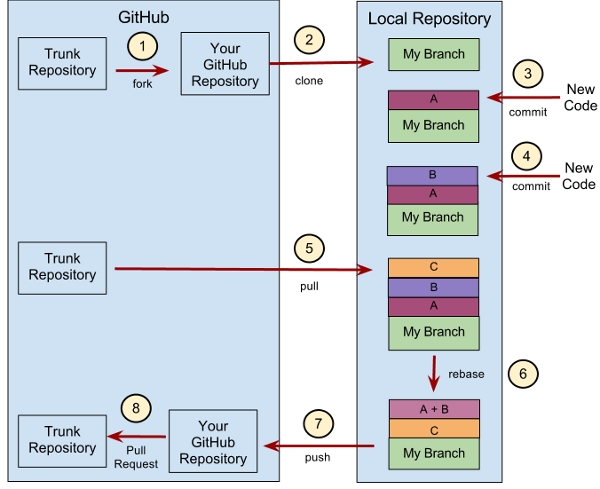
第一步:新建分支
首先,每次开发新功能,都应该新建一个单独的分支(这方面可以参考《Git分支管理策略》)。
# 获取主干最新代码

$ git checkout master

$ git pull

# 新建一个开发分支myfeature

$ git checkout -b myfeature
第二步:提交分支commit
分支修改后,就可以提交commit了。
$ git add --all

$ git status

$ git commit --verbose
git add 命令的all参数,表示保存所有变化(包括新建、修改和删除)。从Git 2.0开始,all是 git add 的默认参数,所以也可以用 git add . 代替。
git status 命令,用来查看发生变动的文件。
git commit 命令的verbose参数,会列出 diff 的结果。
第三步:撰写提交信息
提交commit时,必须给出完整扼要的提交信息,下面是一个范本。
Present-tense summary under 50 characters

* More information about commit (under 72 characters).

* More information about commit (under 72 characters).

http://project.management-system.com/ticket/123
第一行是不超过50个字的提要,然后空一行,罗列出改动原因、主要变动、以及需要注意的问题。最后,提供对应的网址(比如Bug ticket)。
第四步:与主干同步
分支的开发过程中,要经常与主干保持同步。
$ git fetch origin

$ git rebase origin/master
第五步:合并commit
分支开发完成后,很可能有一堆commit,但是合并到主干的时候,往往希望只有一个(或最多两三个)commit,这样不仅清晰,也容易管理。
那么,怎样才能将多个commit合并呢?这就要用到 git rebase 命令。
$ git rebase -i origin/master
git rebase命令的i参数表示互动(interactive),这时git会打开一个互动界面,进行下一步操作。
下面采用Tute Costa的例子,来解释怎么合并commit。
pick 07c5abd Introduce OpenPGP and teach basic usage

pick de9b1eb Fix PostChecker::Post#urls

pick 3e7ee36 Hey kids, stop all the highlighting

pick fa20af3 git interactive rebase, squash, amend

# Rebase 8db7e8b..fa20af3 onto 8db7e8b

#

# Commands:

#  p, pick = use commit

#  r, reword = use commit, but edit the commit message

#  e, edit = use commit, but stop for amending

#  s, squash = use commit, but meld into previous commit

#  f, fixup = like "squash", but discard this commit's log message

#  x, exec = run command (the rest of the line) using shell

#

# These lines can be re-ordered; they are executed from top to bottom.

#

# If you remove a line here THAT COMMIT WILL BE LOST.

#

# However, if you remove everything, the rebase will be aborted.

#

# Note that empty commits are commented out
上面的互动界面,先列出当前分支最新的4个commit(越下面越新)。每个commit前面有一个操作命令,默认是pick,表示该行commit被选中,要进行rebase操作。
4个commit的下面是一大堆注释,列出可以使用的命令。
        pick:正常选中

        reword:选中,并且修改提交信息;

        edit:选中,rebase时会暂停,允许你修改这个commit(参考这里)

        squash:选中,会将当前commit与上一个commit合并

        fixup:与squash相同,但不会保存当前commit的提交信息

        exec:执行其他shell命令
上面这6个命令当中,squash和fixup可以用来合并commit。先把需要合并的commit前面的动词,改成squash(或者s)。
pick 07c5abd Introduce OpenPGP and teach basic usage

s de9b1eb Fix PostChecker::Post#urls

s 3e7ee36 Hey kids, stop all the highlighting

pick fa20af3 git interactive rebase, squash, amend
这样一改,执行后,当前分支只会剩下两个commit。第二行和第三行的commit,都会合并到第一行的commit。提交信息会同时包含,这三个commit的提交信息。
# This is a combination of 3 commits.

# The first commit's message is:

Introduce OpenPGP and teach basic usage

# This is the 2nd commit message:

Fix PostChecker::Post#urls

# This is the 3rd commit message:

Hey kids, stop all the highlighting
如果将第三行的squash命令改成fixup命令。
pick 07c5abd Introduce OpenPGP and teach basic usage

s de9b1eb Fix PostChecker::Post#urls

f 3e7ee36 Hey kids, stop all the highlighting

pick fa20af3 git interactive rebase, squash, amend
运行结果相同,还是会生成两个commit,第二行和第三行的commit,都合并到第一行的commit。但是,新的提交信息里面,第三行commit的提交信息,会被注释掉。
# This is a combination of 3 commits.

# The first commit's message is:

Introduce OpenPGP and teach basic usage

# This is the 2nd commit message:

Fix PostChecker::Post#urls

# This is the 3rd commit message:

# Hey kids, stop all the highlighting
Pony Foo提出另外一种合并commit的简便方法,就是先撤销过去5个commit,然后再建一个新的。
$ git reset HEAD~5

$ git add .

$ git commit -am "Here's the bug fix that closes #28"

$ git push --force
squash和fixup命令,还可以当作命令行参数使用,自动合并commit。
$ git commit --fixup

$ git rebase -i --autosquash
这个用法请参考这篇文章,这里就不解释了。
第六步:推送到远程仓库
合并commit后,就可以推送当前分支到远程仓库了。
$ git push --force origin myfeature
git push命令要加上force参数,因为rebase以后,分支历史改变了,跟远程分支不一定兼容,有可能要强行推送(参见这里)。
第七步:发出Pull Request
提交到远程仓库以后,就可以发出 Pull Request 到master分支,然后请求别人进行代码review,确认可以合并到master。
(完)
[Git ] Git 使用规范流程的更多相关文章
- Git 使用规范流程
Git教程:http://www.liaoxuefeng.com/wiki/0013739516305929606dd18361248578c67b8067c8c017b000 团队开发中,遵循一个合 ...
- 【转】【阮一峰的网络日志】Git 使用规范流程
作者: 阮一峰 日期: 2015年8月 5日 团队开发中,遵循一个合理.清晰的Git使用流程,是非常重要的. 否则,每个人都提交一堆杂乱无章的commit,项目很快就会变得难以协调和维护. 下面是Th ...
- Git 使用规范流程(转)
团队开发中,遵循一个合理.清晰的Git使用流程,是非常重要的. 否则,每个人都提交一堆杂乱无章的commit,项目很快就会变得难以协调和维护. 下面是ThoughtBot 的Git使用规范流程.我从中 ...
- Git 使用规范流程【转】
转自:http://www.ruanyifeng.com/blog/2015/08/git-use-process.html 作者: 阮一峰 日期: 2015年8月 5日 团队开发中,遵循一个合理.清 ...
- Git(三):Git 使用规范流程
转:http://www.ruanyifeng.com/blog/2015/08/git-use-process.html 团队开发中,遵循一个合理.清晰的Git使用流程,是非常重要的. 否则,每个人 ...
- Git使用规范流程(转载)
作者: 阮一峰 日期: 2015年8月 5日 团队开发中,遵循一个合理.清晰的Git使用流程,是非常重要的. 否则,每个人都提交一堆杂乱无章的commit,项目很快就会变得难以协调和维护. 下面是Th ...
- [GIT] Git 工作流程(Git flow, Github flow flow, Git lab flow)
reference : http://www.ruanyifeng.com/blog/2015/12/git-workflow.html Git 作为一个源码管理系统,不可避免涉及到多人协作. 协作必 ...
- Git常用命令和Git团队使用规范指南
转自:https://wsgzao.github.io/post/git/ 前言 在2005年的某一天,Linux之父Linus Torvalds 发布了他的又一个里程碑作品——Git.它的出现改变了 ...
- 团队项目的Git分支管理规范
原文地址: http://blog.jboost.cn/2019/06/17/git-branch.html 许多公司的开发团队都采用Git来做代码版本控制.如何有效地协同开发人员之间,以及开发.测试 ...
随机推荐
- 【LOJ】#6391. 「THUPC2018」淘米神的树 / Tommy
题解 一道非常神仙的计数题 如果只有一个点,就是非常简单的树型dp \(f_{u} = (siz_{u} - 1)! \prod_{v \in son_{u}} \frac{f_{v}}{siz_{v ...
- 8VC Venture Cup 2016 - Elimination Round F - Group Projects dp好题
F - Group Projects 题目大意:给你n个物品, 每个物品有个权值ai, 把它们分成若干组, 总消耗为每组里的最大值减最小值之和. 问你一共有多少种分组方法. 思路:感觉刚看到的时候的想 ...
- bzoj 1211: [HNOI2004]树的计数
prufer的应用.. 详细见这篇博客:https://www.cnblogs.com/dirge/p/5503289.html import java.math.BigInteger; import ...
- jquery 无刷新添加/删除 input行 实时计算购物车价格
jquery 无刷新添加/删除 input行 实时计算购物车价格 jquery 未来事件插件jq_Live_Extension.js 演示 <script> $(document).rea ...
- Eclipse插件安装出现Duplicate location错误
一.原因 1.曾今安装过此插件 2.曾今安装此插件的时候出现错误 二.解决方法[eclipse] - Help - Install new software - Available Software ...
- 机器学习之路: python 回归树 DecisionTreeRegressor 预测波士顿房价
python3 学习api的使用 git: https://github.com/linyi0604/MachineLearning 代码: from sklearn.datasets import ...
- php缓存类 内置output_buffer(ob)
<?php class Cache { /** * $dir : 缓存文件存放目录 * $lifetime : 缓存文件有效期,单位为秒 * $cacheid : 缓存文件路径,包含文件名 * ...
- 每日踩坑 2018-06-19 AutoMapper简单性能测试
想使用 AutoMapper 类库来做一些映射到 DTO 对象的操作 但既然类似这样的类库内部是用反射来实现的,那么会比较在意性能. 所以来简单测试一下性能. 关于测试结果呢 emmmm 我是比较吃惊 ...
- luoguP3871 [TJOI2010]中位数
题目链接 luoguP3871 [TJOI2010]中位数 题解 平衡树 代码 #include<vector> #include<cstdio> #include<cs ...
- [Luogu5106]dkw的lcm
https://minamoto.blog.luogu.org/solution-p5106 容易想到枚举质因子及其次数计算其贡献,容斥计算$\varphi(p^i)$的次方数. #include&l ...