
RecyclerView 缓存机制详解
一 前言
RecyclerView据官方的介绍,该控件用于在有限的窗口中展示大量数据集,其实这样功能的控件我们并不陌生,例如:ListView、GridView。RecyclerView可以用来代替传统的ListView,GridView,更加强大和灵活。RecyclerView的使用网上有非常多案例,这里就不多说了,我们今天主要来看看RecyclerView 的缓存机制。
二 缓存机制Recycler详解
Recycler是RecyclerView的一个内部类。我们来看一下它的主要的成员变量。
- mChangedScrap 表示数据已经改变的ewHolder列表
- mAttachedScrap 未与RecyclerView分离的ViewHolder列表
- mCachedViews ViewHolder缓存列表,其大小由mViewCacheMax决定,默认DEFAULT_CACHE_SIZE为2,可动态设置。
- mViewCacheExtension 开发者可自定义的一层缓存,是虚拟类ViewCacheExtension的一个实例,开发者可实现方法getViewForPositionAndType(Recycler recycler, int position, int type)来实现自己的缓存。
- mRecyclerPool ViewHolder缓存池,在有限的mCachedViews中如果存不下ViewHolder时,就会把ViewHolder存入RecyclerViewPool中。
我们来看一张RecyclerView 缓存机制的流程图,如下图
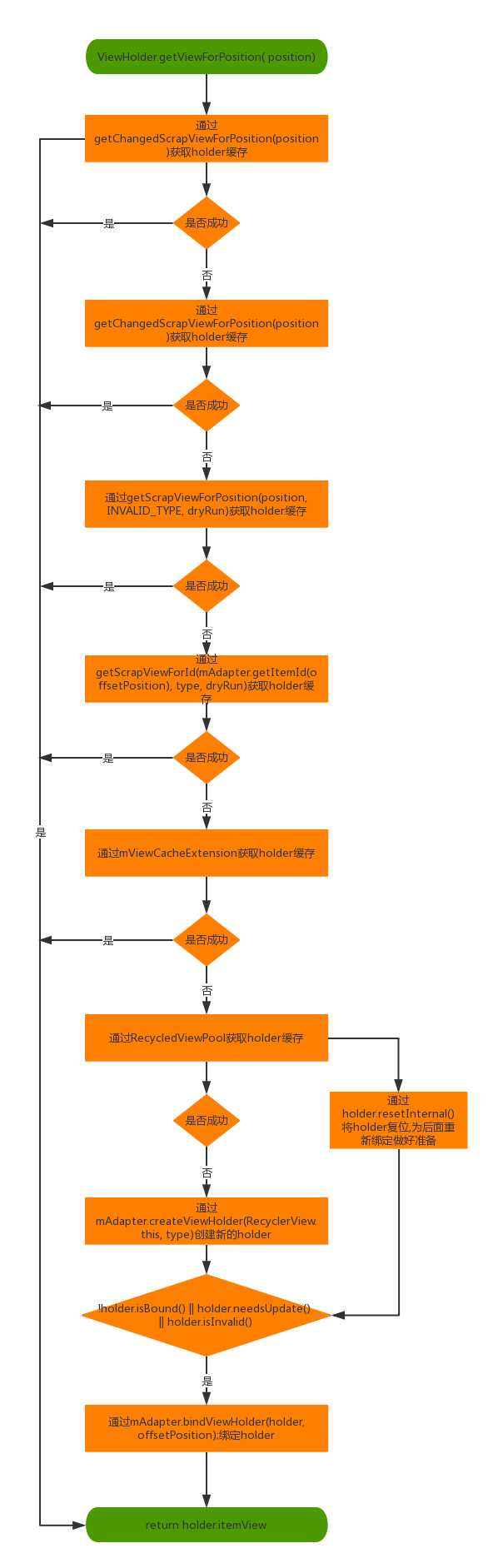
贴上源码,如下。我们根据流程图和源码来分析RecyclerView的缓存机制。
        public View getViewForPosition(int position) {

            return getViewForPosition(position, false);

        }

        View getViewForPosition(int position, boolean dryRun) {

            if (position < 0 || position >= mState.getItemCount()) {

                throw new IndexOutOfBoundsException("Invalid item position " + position

                        + "(" + position + "). Item count:" + mState.getItemCount());

            }

            boolean fromScrap = false;

            ViewHolder holder = null;

            // 0) If there is a changed scrap, try to find from there

            if (mState.isPreLayout()) {

                holder = getChangedScrapViewForPosition(position);

                fromScrap = holder != null;

            }

            // 1) Find from scrap by position

            if (holder == null) {

                holder = getScrapViewForPosition(position, INVALID_TYPE, dryRun);

                if (holder != null) {

                    if (!validateViewHolderForOffsetPosition(holder)) {

                        // recycle this scrap

                        if (!dryRun) {

                            // we would like to recycle this but need to make sure it is not used by

                            // animation logic etc.

                            holder.addFlags(ViewHolder.FLAG_INVALID);

                            if (holder.isScrap()) {

                                removeDetachedView(holder.itemView, false);

                                holder.unScrap();

                            } else if (holder.wasReturnedFromScrap()) {

                                holder.clearReturnedFromScrapFlag();

                            }

                            recycleViewHolderInternal(holder);

                        }

                        holder = null;

                    } else {

                        fromScrap = true;

                    }

                }

            }

            if (holder == null) {

                final int offsetPosition = mAdapterHelper.findPositionOffset(position);

                if (offsetPosition < 0 || offsetPosition >= mAdapter.getItemCount()) {

                    throw new IndexOutOfBoundsException("Inconsistency detected. Invalid item "

                            + "position " + position + "(offset:" + offsetPosition + ")."

                            + "state:" + mState.getItemCount());

                }

                final int type = mAdapter.getItemViewType(offsetPosition);

                // 2) Find from scrap via stable ids, if exists

                if (mAdapter.hasStableIds()) {

                    holder = getScrapViewForId(mAdapter.getItemId(offsetPosition), type, dryRun);

                    if (holder != null) {

                        // update position

                        holder.mPosition = offsetPosition;

                        fromScrap = true;

                    }

                }

                if (holder == null && mViewCacheExtension != null) {

                    // We are NOT sending the offsetPosition because LayoutManager does not

                    // know it.

                    final View view = mViewCacheExtension

                            .getViewForPositionAndType(this, position, type);

                    if (view != null) {

                        holder = getChildViewHolder(view);

                        if (holder == null) {

                            throw new IllegalArgumentException("getViewForPositionAndType returned"

                                    + " a view which does not have a ViewHolder");

                        } else if (holder.shouldIgnore()) {

                            throw new IllegalArgumentException("getViewForPositionAndType returned"

                                    + " a view that is ignored. You must call stopIgnoring before"

                                    + " returning this view.");

                        }

                    }

                }

                if (holder == null) { // fallback to recycler

                    // try recycler.

                    // Head to the shared pool.

                    if (DEBUG) {

                        Log.d(TAG, "getViewForPosition(" + position + ") fetching from shared "

                                + "pool");

                    }

                    holder = getRecycledViewPool().getRecycledView(type);

                    if (holder != null) {

                        holder.resetInternal();

                        if (FORCE_INVALIDATE_DISPLAY_LIST) {

                            invalidateDisplayListInt(holder);

                        }

                    }

                }

                if (holder == null) {

                    holder = mAdapter.createViewHolder(RecyclerView.this, type);

                    if (DEBUG) {

                        Log.d(TAG, "getViewForPosition created new ViewHolder");

                    }

                }

            }

            // This is very ugly but the only place we can grab this information

            // before the View is rebound and returned to the LayoutManager for post layout ops.

            // We don't need this in pre-layout since the VH is not updated by the LM.

            if (fromScrap && !mState.isPreLayout() && holder

                    .hasAnyOfTheFlags(ViewHolder.FLAG_BOUNCED_FROM_HIDDEN_LIST)) {

                holder.setFlags(0, ViewHolder.FLAG_BOUNCED_FROM_HIDDEN_LIST);

                if (mState.mRunSimpleAnimations) {

                    int changeFlags = ItemAnimator

                            .buildAdapterChangeFlagsForAnimations(holder);

                    changeFlags |= ItemAnimator.FLAG_APPEARED_IN_PRE_LAYOUT;

                    final ItemHolderInfo info = mItemAnimator.recordPreLayoutInformation(mState,

                            holder, changeFlags, holder.getUnmodifiedPayloads());

                    recordAnimationInfoIfBouncedHiddenView(holder, info);

                }

            }

            boolean bound = false;

            if (mState.isPreLayout() && holder.isBound()) {

                // do not update unless we absolutely have to.

                holder.mPreLayoutPosition = position;

            } else if (!holder.isBound() || holder.needsUpdate() || holder.isInvalid()) {

                if (DEBUG && holder.isRemoved()) {

                    throw new IllegalStateException("Removed holder should be bound and it should"

                            + " come here only in pre-layout. Holder: " + holder);

                }

                final int offsetPosition = mAdapterHelper.findPositionOffset(position);

                holder.mOwnerRecyclerView = RecyclerView.this;

                mAdapter.bindViewHolder(holder, offsetPosition);

                attachAccessibilityDelegate(holder.itemView);

                bound = true;

                if (mState.isPreLayout()) {

                    holder.mPreLayoutPosition = position;

                }

            }

            final ViewGroup.LayoutParams lp = holder.itemView.getLayoutParams();

            final LayoutParams rvLayoutParams;

            if (lp == null) {

                rvLayoutParams = (LayoutParams) generateDefaultLayoutParams();

                holder.itemView.setLayoutParams(rvLayoutParams);

            } else if (!checkLayoutParams(lp)) {

                rvLayoutParams = (LayoutParams) generateLayoutParams(lp);

                holder.itemView.setLayoutParams(rvLayoutParams);

            } else {

                rvLayoutParams = (LayoutParams) lp;

            }

            rvLayoutParams.mViewHolder = holder;

            rvLayoutParams.mPendingInvalidate = fromScrap && bound;

            return holder.itemView;

        }
主流程 1
我们来看主流程源码的第14行
holder = getChangedScrapViewForPosition(position);
我们通过position匹配 mChangedScrap 获取holder缓存。
getChangedScrapViewForPosition(position)方法内部通过2种方法获取holder缓存。第一种通过mChangedScrap匹配
position获取holder缓存。第二种通过mChangedScrap匹配id获取holder缓存。源码如下。
        ViewHolder getChangedScrapViewForPosition(int position) {

            // If pre-layout, check the changed scrap for an exact match.

            final int changedScrapSize;

            if (mChangedScrap == null || (changedScrapSize = mChangedScrap.size()) == 0) {

                return null;

            }

            // 第一种 通过 position来查找

            for (int i = 0; i < changedScrapSize; i++) {

                final ViewHolder holder = mChangedScrap.get(i);

                if (!holder.wasReturnedFromScrap() && holder.getLayoutPosition() == position) {

                    holder.addFlags(ViewHolder.FLAG_RETURNED_FROM_SCRAP);

                    return holder;

                }

            }

            //第二种 通过 id来查找

            if (mAdapter.hasStableIds()) {

                final int offsetPosition = mAdapterHelper.findPositionOffset(position);

                if (offsetPosition > 0 && offsetPosition < mAdapter.getItemCount()) {

                    final long id = mAdapter.getItemId(offsetPosition);

                    for (int i = 0; i < changedScrapSize; i++) {

                        final ViewHolder holder = mChangedScrap.get(i);

                        if (!holder.wasReturnedFromScrap() && holder.getItemId() == id) {

                            holder.addFlags(ViewHolder.FLAG_RETURNED_FROM_SCRAP);

                            return holder;

                        }

                    }

                }

            }

            return null;

        }
主流程 2
我们看一下主流程第19行代码。
holder = getScrapViewForPosition(position, INVALID_TYPE, dryRun);
通过position查找废弃的holder,我们来看一下getScrapViewForPosition方法内部实现,主要通过3种方法获取holder缓存。
第一种从mAttachedScrap中通过匹配position获取holder缓存。
第二种通过ChildHelper找到隐藏但是没有被移除的View,通过getChildViewHolderInt(view)方法获取holder缓存。
第三种从mCachedViews中通过匹配position获取holder缓存。
getScrapViewForPosition源码如下
  ViewHolder getScrapViewForPosition(int position, int type, boolean dryRun) {

            final int scrapCount = mAttachedScrap.size();

            // 第一种从mAttachedScrap中通过匹配position获取holder缓存。

            for (int i = 0; i < scrapCount; i++) {

                final ViewHolder holder = mAttachedScrap.get(i);

                if (!holder.wasReturnedFromScrap() && holder.getLayoutPosition() == position

                        && !holder.isInvalid() && (mState.mInPreLayout || !holder.isRemoved())) {

                    if (type != INVALID_TYPE && holder.getItemViewType() != type) {

                        Log.e(TAG, "Scrap view for position " + position + " isn't dirty but has" +

                                " wrong view type! (found " + holder.getItemViewType() +

                                " but expected " + type + ")");

                        break;

                    }

                    holder.addFlags(ViewHolder.FLAG_RETURNED_FROM_SCRAP);

                    return holder;

                }

            }

            //通过ChildHelper找到隐藏但是没有被移除的View,通过getChildViewHolderInt(view)方法获取holder缓存。

            if (!dryRun) {

                View view = mChildHelper.findHiddenNonRemovedView(position, type);

                if (view != null) {

                    // This View is good to be used. We just need to unhide, detach and move to the

                    // scrap list.

                    final ViewHolder vh = getChildViewHolderInt(view);

                    mChildHelper.unhide(view);

                    int layoutIndex = mChildHelper.indexOfChild(view);

                    if (layoutIndex == RecyclerView.NO_POSITION) {

                        throw new IllegalStateException("layout index should not be -1 after "

                                + "unhiding a view:" + vh);

                    }

                    mChildHelper.detachViewFromParent(layoutIndex);

                    scrapView(view);

                    vh.addFlags(ViewHolder.FLAG_RETURNED_FROM_SCRAP

                            | ViewHolder.FLAG_BOUNCED_FROM_HIDDEN_LIST);

                    return vh;

                }

            }

            // Search in our first-level recycled view cache.

            //第三种从mCachedViews中通过匹配position获取holder缓存。

            final int cacheSize = mCachedViews.size();

            for (int i = 0; i < cacheSize; i++) {

                final ViewHolder holder = mCachedViews.get(i);

                // invalid view holders may be in cache if adapter has stable ids as they can be

                // retrieved via getScrapViewForId

                if (!holder.isInvalid() && holder.getLayoutPosition() == position) {

                    if (!dryRun) {

                        mCachedViews.remove(i);

                    }

                    if (DEBUG) {

                        Log.d(TAG, "getScrapViewForPosition(" + position + ", " + type +

                                ") found match in cache: " + holder);

                    }

                    return holder;

                }

            }

            return null;

        }
主流程 3
我们看一下主流程第52行代码。
holder = getScrapViewForId(mAdapter.getItemId(offsetPosition), type, dryRun);
通过id获取holder缓存,getScrapViewForId方法内部主要通过2种方法获取holder缓存。
第一种从mAttachedScrap中通过匹配id获取holder缓存。
第二种从mCachedViews中通过匹配id获取holder缓存。
getScrapViewForId方法源码如下。
        ViewHolder getScrapViewForId(long id, int type, boolean dryRun) {

            //第一种从mAttachedScrap中通过匹配id获取holder缓存。

            // Look in our attached views first

            final int count = mAttachedScrap.size();

            for (int i = count - 1; i >= 0; i--) {

                final ViewHolder holder = mAttachedScrap.get(i);

                if (holder.getItemId() == id && !holder.wasReturnedFromScrap()) {

                    if (type == holder.getItemViewType()) {

                        holder.addFlags(ViewHolder.FLAG_RETURNED_FROM_SCRAP);

                        if (holder.isRemoved()) {

                            // this might be valid in two cases:

                            // > item is removed but we are in pre-layout pass

                            // >> do nothing. return as is. make sure we don't rebind

                            // > item is removed then added to another position and we are in

                            // post layout.

                            // >> remove removed and invalid flags, add update flag to rebind

                            // because item was invisible to us and we don't know what happened in

                            // between.

                            if (!mState.isPreLayout()) {

                                holder.setFlags(ViewHolder.FLAG_UPDATE, ViewHolder.FLAG_UPDATE |

                                        ViewHolder.FLAG_INVALID | ViewHolder.FLAG_REMOVED);

                            }

                        }

                        return holder;

                    } else if (!dryRun) {

                        // if we are running animations, it is actually better to keep it in scrap

                        // but this would force layout manager to lay it out which would be bad.

                        // Recycle this scrap. Type mismatch.

                        mAttachedScrap.remove(i);

                        removeDetachedView(holder.itemView, false);

                        quickRecycleScrapView(holder.itemView);

                    }

                }

            }

            //第二种从mCachedViews中通过匹配id获取holder缓存。

            // Search the first-level cache

            final int cacheSize = mCachedViews.size();

            for (int i = cacheSize - 1; i >= 0; i--) {

                final ViewHolder holder = mCachedViews.get(i);

                if (holder.getItemId() == id) {

                    if (type == holder.getItemViewType()) {

                        if (!dryRun) {

                            mCachedViews.remove(i);

                        }

                        return holder;

                    } else if (!dryRun) {

                        recycleCachedViewAt(i);

                    }

                }

            }

            return null;

        }
主流程 4
我们看一下主流程第62行代码。
通过mViewCacheExtension.getViewForPositionAndType获取view,通过getChildViewHolder(view)获取holder缓存。源码如下
                final View view = mViewCacheExtension

                        .getViewForPositionAndType(this, position, type);

                if (view != null) {

                    holder = getChildViewHolder(view);

                    if (holder == null) {

                        throw new IllegalArgumentException("getViewForPositionAndType returned"

                                + " a view which does not have a ViewHolder");

                    } else if (holder.shouldIgnore()) {

                        throw new IllegalArgumentException("getViewForPositionAndType returned"

                                + " a view that is ignored. You must call stopIgnoring before"

                                + " returning this view.");

                    }

                }
主流程 5
我们看一下主流程第83行代码。
holder = getRecycledViewPool().getRecycledView(type);
通过RecyclerView 的ViewHolder缓存池获取holder。
通过holder.resetInternal();方法将holder复位,为后续重新绑定做好准备。
主流程 6
我们看一下主流程第92行代码。
holder = mAdapter.createViewHolder(RecyclerView.this, type);创建新的holder
主流程 7
我们看一下主流程第119行代码。
if (!holder.isBound() || holder.needsUpdate() || holder.isInvalid())
判断是否要重新绑定ViewHolder。
主流程就是这样了。
三 总结
经过上面的分析,我们可以看出RecyclerView 缓存机制(Recycler)大致可以分为5级。
第一级 通过mChangedScrap匹配 position或者id获取holder缓存。
第二级 从mAttachedScrap中通过匹配position获取holder缓存,或者通过ChildHelper找到隐藏但是没有被移除的View,通过getChildViewHolderInt(view)方法获取holder缓存,或者
从mCachedViews中通过匹配position获取holder缓存。
第三级 从mAttachedScrap中通过匹配id获取holder缓存,或者
从mCachedViews中通过匹配id获取holder缓存。
第四级 从ViewCacheExtension获取holder缓存。
第五级 通过RecyclerView 的ViewHolder缓存池获取holder。
最后有什么理解不对的地方请大家多多指教。谢谢。
RecyclerView 缓存机制详解的更多相关文章
- 浏览器 HTTP 协议缓存机制详解
最近在准备优化日志请求时遇到了一些令人疑惑的问题,比如为什么响应头里出现了两个 cache control.为什么明明设置了 no cache 却还是发请求,为什么多次访问时有时请求里带了 etag, ...
- nginx平台初识(二) 浏览器 HTTP 协议缓存机制详解
1.缓存的分类 缓存分为服务端侧(server side,比如 Nginx.Apache)和客户端侧(client side,比如 web browser). 服务端缓存又分为 代理服务器缓存 和 反 ...
- PHP缓存机制详解
一,PHP缓存机制详解 我们可以使用PHP自带的缓存机制来完成页面静态化,但是仅靠PHP自身的缓存机制并不能完美的解决页面静态化,往往需要和其他静态化技术(通常是伪静态技术)结合使用. output ...
- 二,PHP缓存机制详解
一,PHP缓存机制详解 我们可以使用PHP自带的缓存机制来完成页面静态化,但是仅靠PHP自身的缓存机制并不能完美的解决页面静态化,往往需要和其他静态化技术(通常是伪静态技术)结合使用. output ...
- hibernate缓存机制详解
hiberante面试题—hibernate缓存机制详解 这是面试中经常问到的一个问题,可以按照我的思路回答,准你回答得很完美.首先说下Hibernate缓存的作用(即为什么要用缓存机制),然后再 ...
- 浏览器 HTTP 协议缓存机制详解--网络缓存决策机制流程图
1.缓存的分类 2.浏览器缓存机制详解 2.1 HTML Meta标签控制缓存 2.2 HTTP头信息控制缓存 2.2.1 浏览器请求流程 2.2.2 几个重要概念解释 3.用户行为与缓存 4.Ref ...
- IOS缓存机制详解
资料均来自互联网,转载时请务必以超链接形式标明文章 原始出处 .作者信息和本声明.否则将追究法律责任. 人魔七七:http://www.cnblogs.com/qiqibo/ 为什么要有缓存 应用需要 ...
- 【转】IOS缓存机制详解
人魔七七:http://www.cnblogs.com/qiqibo/ 为什么要有缓存 应用需要离线工作的主要原因就是改善应用所表现出的性能.将应用内容缓存起来就可以支持离线.我们可以用两种不同的缓存 ...
- MySQL缓存机制详解(一)
本文章拿来学习用||参考资料:http://www.2cto.com/database/201308/236361.html 对MySql查询缓存及SQL Server过程缓存的理解及总结 一.M ...
随机推荐
- inotify 与 rsync文件同步实现与问题
首先分别介绍inotify 与 rsync的使用,然后用两者实现实时文件同步,最后说一下这样的系统存在什么样的问题. 1. inotify 这个具体使用网上很多,参考 inotify-tools 命令 ...
- LoadRunner参数化时的中文乱码问题
http://blog.sina.com.cn/s/blog_6cf205160100mdxi.html
- 用 Java 实现一个冒泡排序算法
冒泡排序(BubbleSort)的基本概念是:依次比较相邻的两个数,将小数放在前面,大数放在后面.即首先比较第1个和第2个数,将小数放前,大数放后.然后比较第2个数和第3个数,将小数放前,大数放后,如 ...
- vim选中多行复制粘贴
1.按v进入可视模式,移动光标选中需要复制的行: 2.使用y复制选中块到缓冲区(剪切选中块使用d): 3.将光标移动到粘贴的位置,按p即可. 复制多行并粘贴到指定位置后,可能需要进行多行缩进.多行缩进 ...
- iOS Sprite Kit教程之真机测试以及场景的添加与展示
iOS Sprite Kit教程之真机测试以及场景的添加与展示 IOS实现真机测试 在进行真机测试之前,首先需要确保设备已经连在了Mac(或者Mac虚拟机)上,在第1.9.1小节开始,设备就一直连接在 ...
- session过期情况下ajax请求不会触发重新登录的问题
在拦截器中添加以下逻辑 String requestType = request.getHeader("X-Requested-With"); if (!StringUtils.i ...
- luoguP3359 改造异或树 线段树合并
删边转化为加边 然后每次用线段树合并就行..... 确确实实很简单 然而为什么线段树合并跑不过$splay$的启发式合并,常数稍大了点... 复杂度$O(n \log n)$ #include < ...
- BZOJ.3489.A simple rmq problem(主席树 Heap)
题目链接 当时没用markdown写,可能看起来比较难受...可以复制到别的地方看比如DevC++. \(Description\) 给定一个长为n的序列,多次询问[l,r]中最大的只出现一次的数.强 ...
- Loj10153 二叉苹果树
题目描述 有一棵二叉苹果树,如果数字有分叉,一定是分两叉,即没有只有一个儿子的节点.这棵树共 NN 个节点,标号 11 至 NN,树根编号一定为 11. 我们用一根树枝两端连接的节点编号描述一根树枝的 ...
- VC/MFC分割字符串(SplitString)返回CStringArray
引自:http://bbs.csdn.net/topics/60321228 原版: CStringArray* SplitString(CString string, char pattern) { ...