
WPF获取相对位置、坐标的方法
1.获取鼠标在控件中的坐标:
 private void item_MouseDown(object sender, MouseButtonEventArgs e)

 {

         Point point = e.GetPosition(lbl);

  }

 //或者直接使用Mouse类的静态方法GetPosition(),

 //需要注意的是参数为IInputElement类型,也就是说要是能输入的控件

 Point point2 = Mouse.GetPosition(lbl2);

 lbl2.Content = "(" + point2.X + ", " + point2.Y + ")";
完整例子代码:
XAML代码
 <Window x:Class="WpfGetPointDemo.MainWindow"

         xmlns="http://schemas.microsoft.com/winfx/2006/xaml/presentation"

         xmlns:x="http://schemas.microsoft.com/winfx/2006/xaml"

         Title="MainWindow" Height="350" Width="525">

     <Grid x:Name="grid" MouseDown="item_MouseDown">

         <Label Background="Red" x:Name="lbl" Margin="293.855,59.398,66.145,77.319"/>

         <Label Background="GreenYellow" x:Name="lbl2" Margin="29.488,59.398,327.512,69.969"/>

         <Label Background="blue" x:Name="lbl3" HorizontalAlignment="Left" Margin="133.048,268.187,0,0" VerticalAlignment="Top" Width="250.952" Height="51.813"/>

         <Button x:Name="btn" HorizontalAlignment="Left" Margin="177.325,10,0,0" VerticalAlignment="Top" Width="135.09" RenderTransformOrigin="0.012,0.547" Height="43.252"/>

     </Grid>

 </Window>
后台C#代码
 using System;

 using System.Collections.Generic;

 using System.Linq;

 using System.Text;

 using System.Windows;

 using System.Windows.Controls;

 using System.Windows.Data;

 using System.Windows.Documents;

 using System.Windows.Input;

 using System.Windows.Media;

 using System.Windows.Media.Imaging;

 using System.Windows.Navigation;

 using System.Windows.Shapes;

 namespace WpfGetPointDemo

 {

     /// <summary>

     /// Interaction logic for MainWindow.xaml

     /// </summary>

     public partial class MainWindow : Window

     {

         public MainWindow()

         {

             InitializeComponent();

         }

         private void item_MouseDown(object sender, MouseButtonEventArgs e)

         {

             Point point = e.GetPosition(lbl);

             lbl.Content = "("+point.X+", "+point.Y+")";

             Point point2 = Mouse.GetPosition(lbl2);

             lbl2.Content = "(" + point2.X + ", " + point2.Y + ")";

             Point point3 = Mouse.GetPosition(grid);

             lbl3.Content = "(" + point3.X + ", " + point3.Y + ")";

             Point point4 = Mouse.GetPosition(btn);

             btn.Content = "(" + point4.X + ", " + point4.Y + ")";

         }

     }

 }
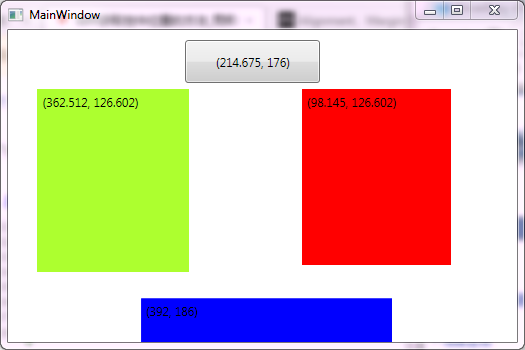
运行结果:

2.获取控件相对于两一个控件的坐标:
2.1. 直接使用 control1.TranslatePoint(new Point(), control2)
Point point = rectangle.TranslatePoint(new Point(),canvas);
2.2.获取控件在Window中的坐标
 Window window =  Window.GetWindow(canvas);

 Point  point  =  canvas.TransformToAncestor(window).Transform(new Point(, ));
引用:http://www.fengfly.com/plus/view-210427-1.html
WPF获取相对位置、坐标的方法的更多相关文章
- WPF 获取程序路径的一些方法,根据程序路径获取程序集信息
一.WPF 获取程序路径的一些方法方式一 应用程序域 //获取基目录即当前工作目录 string str_1 = System.AppDomain.CurrentDomain.BaseDirector ...
- WPF 获取系统 DPI 的多种方法
原文:WPF 获取系统 DPI 的多种方法 WPF 获取系统 DPI 的多种方法 由于 WPF 的尺寸单位和系统的 DPI 相关,我们有时需要获取 DPI 值来进行一些界面布局的调整,本文汇总了一些 ...
- js获取鼠标位置的各种方法
在一些DOM操作中我们经常会跟元素的位置打交道,鼠标交互式一个经常用到的方面,令人失望的是不同的浏览器下会有不同的结果甚至是有的浏览器下没结果,这篇文章就上鼠标点击位置坐标获取做一些简单的总结,没特殊 ...
- CGRectGet *** 获取控件坐标的方法
CGRectGetHeight返回label本身的高度 CGRectGetMinY返回label顶部的坐标 CGRectGetMaxY 返回label底部的坐标 CGRectGetMinX 返回lab ...
- WPF获取程序版本号(Version)的方法
1.第一种:通过System来获取 public static Version GetEdition() { return System.Reflection.Assembly.GetExecutin ...
- wpf获取webbroswer的两个方法
//跳转前的地址 private void WebBrowser_BeforeNavigate2(object pDisp, ref object URL, ref object Flags, ref ...
- WPF备忘录(2)WPF获取和设置鼠标位置与progressbar的使用方法
一.WPF 中获取和设置鼠标位置 方法一:WPF方法 Point p = Mouse.GetPosition(e.Source as FrameworkElement); Point p = (e.S ...
- WPF获取和设置鼠标位置与progressbar的使用方法
一.WPF 中获取和设置鼠标位置 方法一:WPF方法 Point p = Mouse.GetPosition(e.Source as FrameworkElement); Point p = (e.S ...
- WPF中获取TreeView以及ListView获取其本身滚动条的方法,可实现自行调节scoll滚动的位置(可相应获取任何控件中的内部滚动条)
原文:WPF中获取TreeView以及ListView获取其本身滚动条的方法,可实现自行调节scoll滚动的位置(可相应获取任何控件中的内部滚动条) 对于TreeView而言: TreeViewAut ...
随机推荐
- The Activities of September
- Windows Server 2008 R2远程桌面服务配置和授权激活
远程桌面服务安装好之后使用的是120天临时授权,所以会跳出以下提示,我们介绍远程桌面授权的激活. 现在我们使用命令 mstsc /admin 强制登录服务器 需要在“远程桌面服务”--安装“远程桌面授 ...
- [微信开发] 微信网页授权Java实现
功能:主要用于在用户通过手机端微信访问第三方H5页面时获取用户的身份信息(openId,昵称,头像,所在地等..)可用来实现微信登录.微信账号绑定.用户身份鉴权等功能. 开发前的准备: 1.需 ...
- 初识powershell、nuget powershell 调试
初识powershell.nuget powershell 调试 补充 此文仅当做powershell的初步认识体验,关于nuget包里此脚本的使用官方已在vs2017停止支持,请看此文文末 前言 老 ...
- 文本比较算法Ⅱ——Needleman/Wunsch算法的C++实现【求最长公共子串(不需要连续)】
算法见:http://www.cnblogs.com/grenet/archive/2010/06/03/1750454.html 求最长公共子串(不需要连续) #include <stdio. ...
- Nigix配置
- Flask系列02--Flask中的request
一.Flask中的request方法 1.数据相关 #flask中request,render_template等方法要通过引包的方式引入 from flask import request re ...
- Python3.5 学习十
多进程: 多线程和多进程的区别: Python多线程不适合CPU操作密集型的任务,适合IO操作密集型的任务(IO操作不占用CPU) Python折中解决多线程不能真正同步运算的方案是:起多个进程,每个 ...
- 670. Maximum Swap
Given a non-negative integer, you could swap two digits at most once to get the maximum valued numbe ...
- 《Python黑帽子:黑客与渗透测试编程之道》 Scapy:网络的掌控者
窃取email认证: 测试代码: #!/usr/bin/python #coding=utf-8 from scapy.all import * #数据包回调函数 def packet_callbac ...