
使用python实现用微信远程控制电脑
首先,我们要先看看微信远程控制电脑的原理是什么呢?
我们可以利用Python的标准库控制本机电脑,然后要实现远程的话,我们可以把电子邮件作为远程控制的渠道,我们用Python自动登录邮箱检测邮件,当我们发送关机指令给这个邮箱的时候,若Python检测到相关的指令,那么Python直接发送本机的相关命令。
下面来分析一下该项目:
1.需求分析
1.范围:用Python开发一个远程操控电脑的项目。
2.总体要求:
2.1 总体功能要求:能够通过该软件远程控制该软件所在的电脑的重启或关机操作。
2.2 系统要求:开发语言使用Python,并且开发出来的程序能在Windows运行。
2.设计
首先,我们可以利用Python的标准库控制本机电脑,然后要实现远程的话,我们可以把电子邮件作为远程控制的渠道,我们用Python自动登录邮箱检测邮件,当我们发送关机指令给这个邮箱的时候,若Python检测到关机的指令,那么Python直接发送本机的关闭。
3.编写
本项目的流程图如下 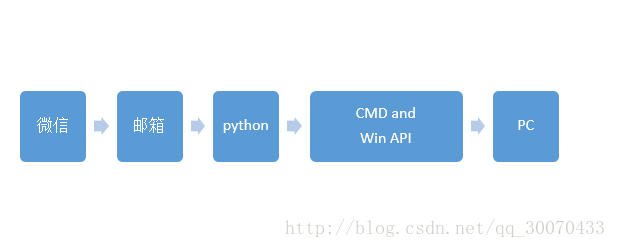
第一步,需要注册一个新浪邮箱。然后点击新浪邮箱点击右上角设置如图 
选择“客户端pop/imap/smtp” 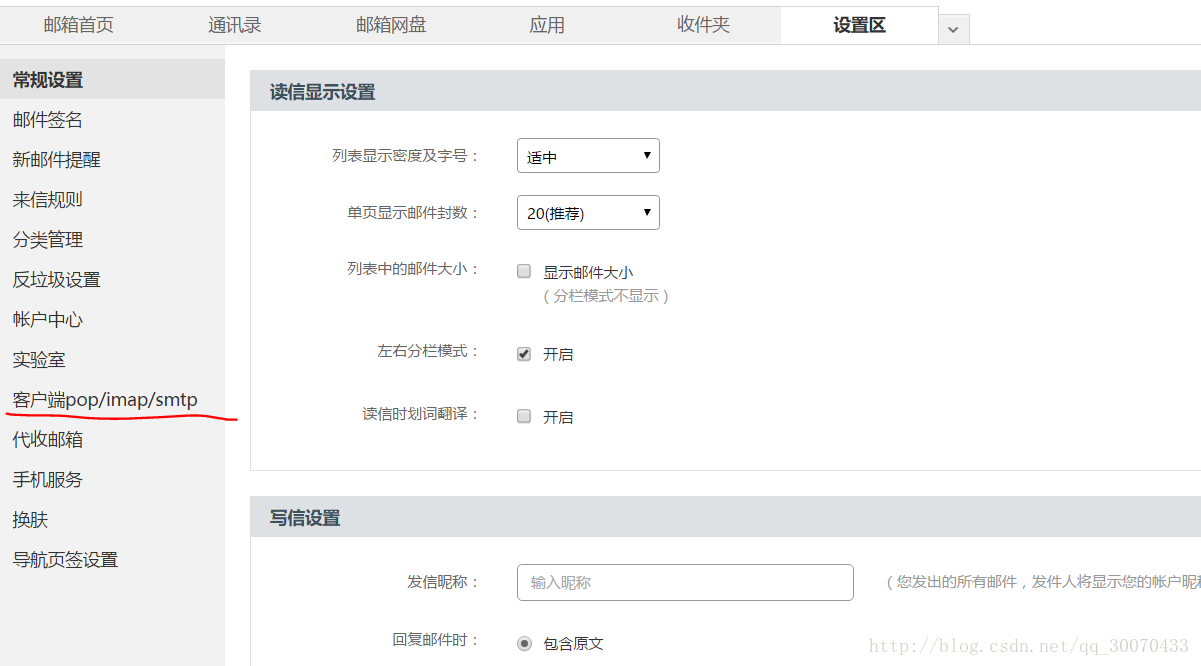
打开新浪邮箱的SMTP与POP3功能 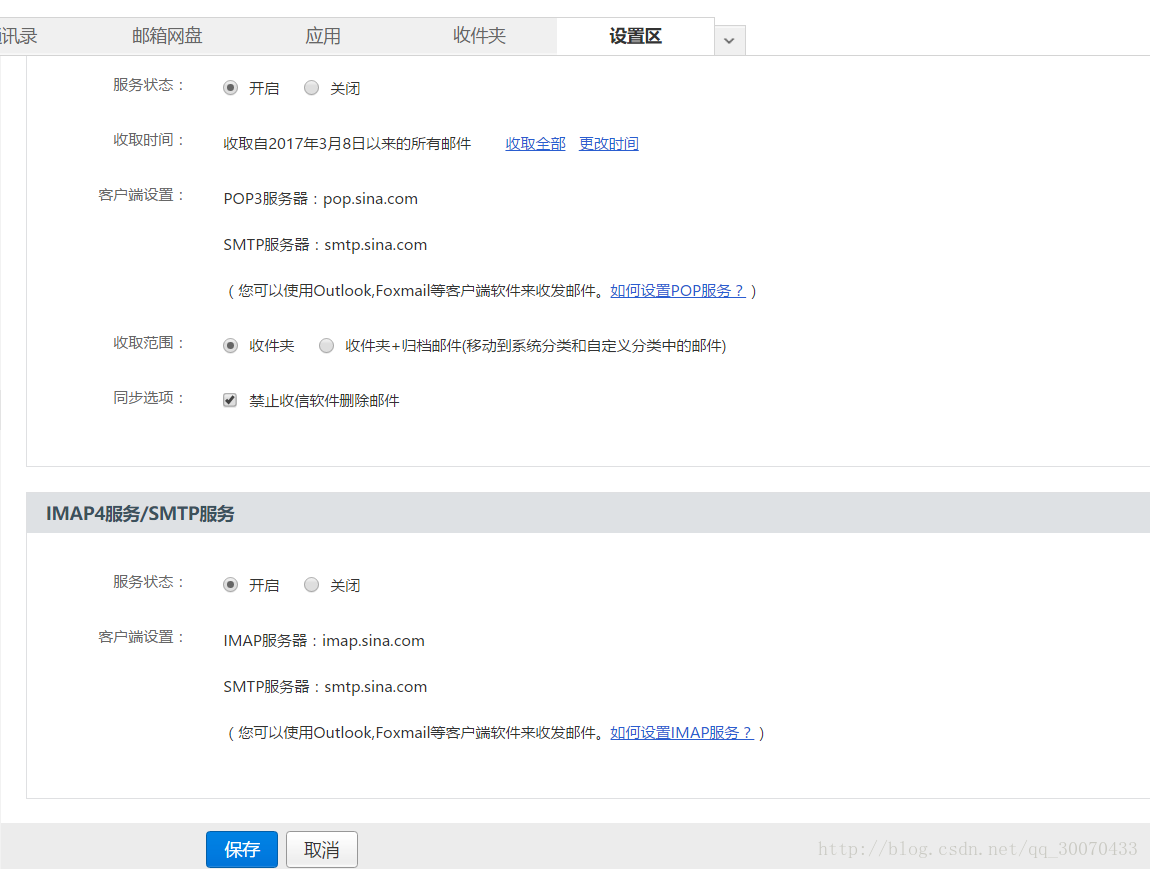
具体实现代码:
配置文件config.ini
[Slave]

pophost = pop.sina.com

smtphost = smtp.sina.com

port = 25

username = XXX@sina.com

password = XXX

[Boss]

mail = XXX@qq.com

timelimit = 2

[Command]

shutdown=shutdown -f -s -t 100 -c closing...

dir=dir

[Open]

music = F:Masetti - Our Own Heaven.mp3

video = F:Jai Waetford - Shy.mp4

notepad = notepad
excutor.py
#coding:utf-8

import sys

reload(sys)

sys.setdefaultencoding("utf-8")

import os

import win32api

from mccLog import mccLog

class executor(object):

    def __init__(self,commandDict,openDict):

        '''

        创建方法

        :param commandDict:

        :param openDict:

        '''

        self.mccLog = mccLog()

        self.commandDict = commandDict

        self.openDict = openDict

    def execute(self,exe,mailHelper):

        self.mailHelper = mailHelper

        subject = exe['subject']

        # self.mccLog.mccWriteLog(u'开始处理命令')

        print u'start to process'

        if subject !='pass':

            self.mailHelper.sendMail('pass','Slave')

            if subject in self.commandDict:

                # self.mccLog.mccWriteLog(u'执行命令!')

                print u'start command'

                try:

                    command = self.commandDict[subject]

                    os.system(command)

                    self.mailHelper.sendMail('Success','Boss')

                    # self.mccLog.mccWriteLog(u'执行命令成功!')

                    print u'command success'

                except Exception,e:

                    # self.mccLog.mccError(u'执行命令失败'+ str(e))

                    print 'command error'

                    self.mailHelper.sendMail('error','boss',e)

            elif subject in self.openDict:

                # self.mccLog.mccWriteLog(u'此时打开文件')

                print u'open the file now'

                try:

                    openFile = self.openDict[subject]

                    win32api.ShellExecute(0,'open',openFile,'','',1)

                    self.mailHelper.sendMail('Success','Boss')

                    # self.mccLog.mccWriteLog(u'打开文件成功!')

                    print u'open file success'

                except Exception,e:

                    # self.mccLog.mccError(u'打开文件失败!' + str(e))

                    print u'open file error'

                    self.mailHelper.sendMail('error','Boss',e)

            elif subject[:7].lower() =='sandbox':

                self.sandBox(subject[8:])

            else:

                self.mailHelper.sendMail('error','Boss','no such command!')

    def sandBox(self,code):

        name = code.split('$n$')[0]

        code = code.split('$n$')[1]

        codestr = '\n'.join(code.split('$c$'))

        codestr = codestr.replace('$',' ')

        with open(name,'a') as f:

            f.write(codestr)

        os.system('python' + name)
configReader.py
#-*-coding:utf-8-*-

import ConfigParser

import os,sys

class configReader(object):

    def __init__(self,configPath):

        configFile = os.path.join(sys.path[0],configPath)

        self.cReader = ConfigParser.ConfigParser()

        self.cReader.read(configFile)

    def readConfig(self,section,item):

        return self.cReader.get(section,item)

    def getDict(self,section):

        commandDict = {}#字典

        items = self.cReader.items(section)

        for key,value in items:

            commandDict[key] = value

        return commandDict
日志文件mccLog.py
#-*-coding:utf-8-*-

import logging

from datetime import datetime

class mccLog(object):

    def __init__(self):

        logging.basicConfig(

            level=logging.DEBUG,

            format='%(asctime)s %(levelname)s %(message)s',

            datefmt='%Y-%m-%d %H:%M:%S',

            filename=datetime. now().strftime('%Y%m%d%H%M%S') + '.log',

            filemode='a'

        )

    def mccWriteLog(self,logContent):

            logging.info(logContent)

    def mccError(self,errorContent):

            logging.error(errorContent)
mailHelper.py
#-*-coding:utf-8-*-

import sys

reload(sys)

sys.setdefaultencoding("utf-8")

from email.mime.text import MIMEText

from configReader import configReader

from mccLog import mccLog

import poplib

import smtplib

import re

class mailHelper(object):

    CONFIGPATH = 'config.ini'

    def __init__(self):

        '''

        初始化邮件

        '''

        self.mccLog = mccLog()

        cfReader = configReader(self.CONFIGPATH)

        self.pophost = cfReader.readConfig('Slave','pophost')

        self.smtphost = cfReader.readConfig('Slave','smtphost')

        self.port = cfReader.readConfig('Slave','port')

        self.username = cfReader.readConfig('Slave','username')

        self.password = cfReader.readConfig('Slave','password')

        self.bossMail = cfReader.readConfig('Boss','mail')

        self.loginMail()

        self.configSlaveMail()

    def loginMail(self):

        '''

        验证登陆

        :return:

        '''

        self.mccLog.mccWriteLog('start to login the E-mail')

        print 'start to login e-mail'

        try:

            self.pp = poplib.POP3_SSL(self.pophost)

            self.pp.set_debuglevel(0)#可以为0也可以为1,为1时会显示出来

            self.pp.user(self.username)#复制

            self.pp.pass_(self.password)

            self.pp.list()#列出赋值

            print 'login successful!'

            self.mccLog.mccWriteLog('login the email successful!')

            print 'login the email successful!'

        except Exception,e:

            print 'Login failed!'

            self.mccLog.mccWriteLog('Login the email failed!')

            exit()

    def acceptMail(self):

        '''

        接收邮件

        :return:

        '''

        self.mccLog.mccWriteLog('Start crawling mail!')

        print 'Start crawling mail'

        try:

            ret = self.pp.list()

            mailBody = self.pp.retr(len(ret[1]))

            self.mccLog.mccWriteLog('Catch the message successfully')

            print 'Catch the message successfully'

            return mailBody

        except Exception,e:

            self.mccLog.mccError('Catch the message failed' + e)

            print 'Catch the message failed'

            return None

    def analysisMail(self,mailBody):

        '''

        正则分析邮件

        :param mailBody:

        :return:

        '''

        self.mccLog.mccWriteLog('Start crawling subject and sender')

        print 'Start crawling subject and sender'

        try:

            subject = re.search("Subject: (.*?)',",str(mailBody[1]).decode('utf-8'),re.S).group(1)

            print subject

            sender = re.search("'X-Sender: (.*?)',",str(mailBody[1]).decode('utf-8'),re.S).group(1)

            command = {'subject':subject,'sender':sender}

            self.mccLog.mccWriteLog("crawling subject and sender successful!")

            print 'crawling subject and sender successful'

            return command

        except Exception,e:

            self.mccLog.mccError("crawling subject and sender failed!" + e)

            print 'crawling subject and sender failed!'

            return None

    def sendMail(self,subject,receiver,body='Success'):

        '''

        发送邮件

        :param subject:

        :param receiver:

        :param body:

        :return:

        '''

        msg = MIMEText(body,'plain','utf-8')

        #中文需要参数utf-8,单字节字符不需要

        msg['Subject'] = subject

        msg['from'] = self.username

        self.mccLog.mccWriteLog('Start sending mail' + 'to' +receiver)

        print 'Start sending mail'

        if receiver == 'Slave':

            try:

                self.handle.sendmail(self.username,self.username,msg.as_string())

                self.mccLog.mccWriteLog('Send the message successfully')

                print 'Send the message successfully'

            except Exception,e:

                self.mccLog.mccError('Send the message failed' + e)

                print 'Send the message failed'

                return False

        elif receiver == 'Boss':

            try:

                self.handle.sendmail(self.username,self.bossMail,msg.as_string())

                self.mccLog.mccWriteLog('Send the message successfully')

                print 'Send the message successfully'

            except Exception,e:

                self.mccLog.mccError('Send the message failed!' + e)

                print 'Send the message failed!'

                return False

    def configSlaveMail(self):

        '''

        配置邮件

        :return:

        '''

        self.mccLog.mccWriteLog('Start configuring the mailbox')

        print 'Start configuring the mailbox'

        try:

            self.handle = smtplib.SMTP(self.smtphost, self.port)

            self.handle.login(self.username, self.password)

            self.mccLog.mccWriteLog('The mailbox configuration is successful')

            print 'The mailbox configuration is successful'

        except Exception, e:

            self.mccLog.mccError('The mailbox configuration is failed' + e)

            print 'The mailbox configuration is failed'

            exit()

#

# if __name__=='__main__':

#     mail = mailHelper()

#     body = mail.acceptMail()

#     print body

#     print mail.analysisMail(body)

#     mail.sendMail('OK','Slave')
weiChatControlComputer.py
#-*-coding:utf-8-*-

import sys

reload(sys)

sys.setdefaultencoding("utf-8")

import time

import sys

from mailHelper import mailHelper

from excutor import executor

from configReader import configReader

__Author__ = 'william'

__Verson__ = 0.5

reload(sys)

sys.setdefaultencoding('utf-8')

class MCC(object):

    CONFIGPATH = 'config.ini'

    KEY_COMMAND = 'Command'

    KEY_OPEN = 'Open'

    KEY_BOSS = 'Boss'

    KEY_TIMELIMIT = 'timelimit'#扫描时间的频率

    def __init__(self):

        self.mailHelper = mailHelper()

        self.configReader = configReader(self.CONFIGPATH)

        commandDict = self.configReader.getDict(self.KEY_COMMAND)

        openDict = self.configReader.getDict(self.KEY_OPEN)

        self.timeLimit = int(self.configReader.readConfig(self.KEY_BOSS,self.KEY_TIMELIMIT))

        self.excutor = executor(commandDict,openDict)

        self.toRun()

    def toRun(self):

        '''

        实现轮训操作

        :return:

        '''

        while True:

            self.mailHelper = mailHelper()

            self.run()

            time.sleep(self.timeLimit)

    def run(self):

        mailBody = self.mailHelper.acceptMail()

        if mailBody:

            exe = self.mailHelper.analysisMail(mailBody)

            if exe:

                self.excutor.execute(exe,self.mailHelper)

if __name__ == '__main__':

    mcc = MCC()
运行截图: 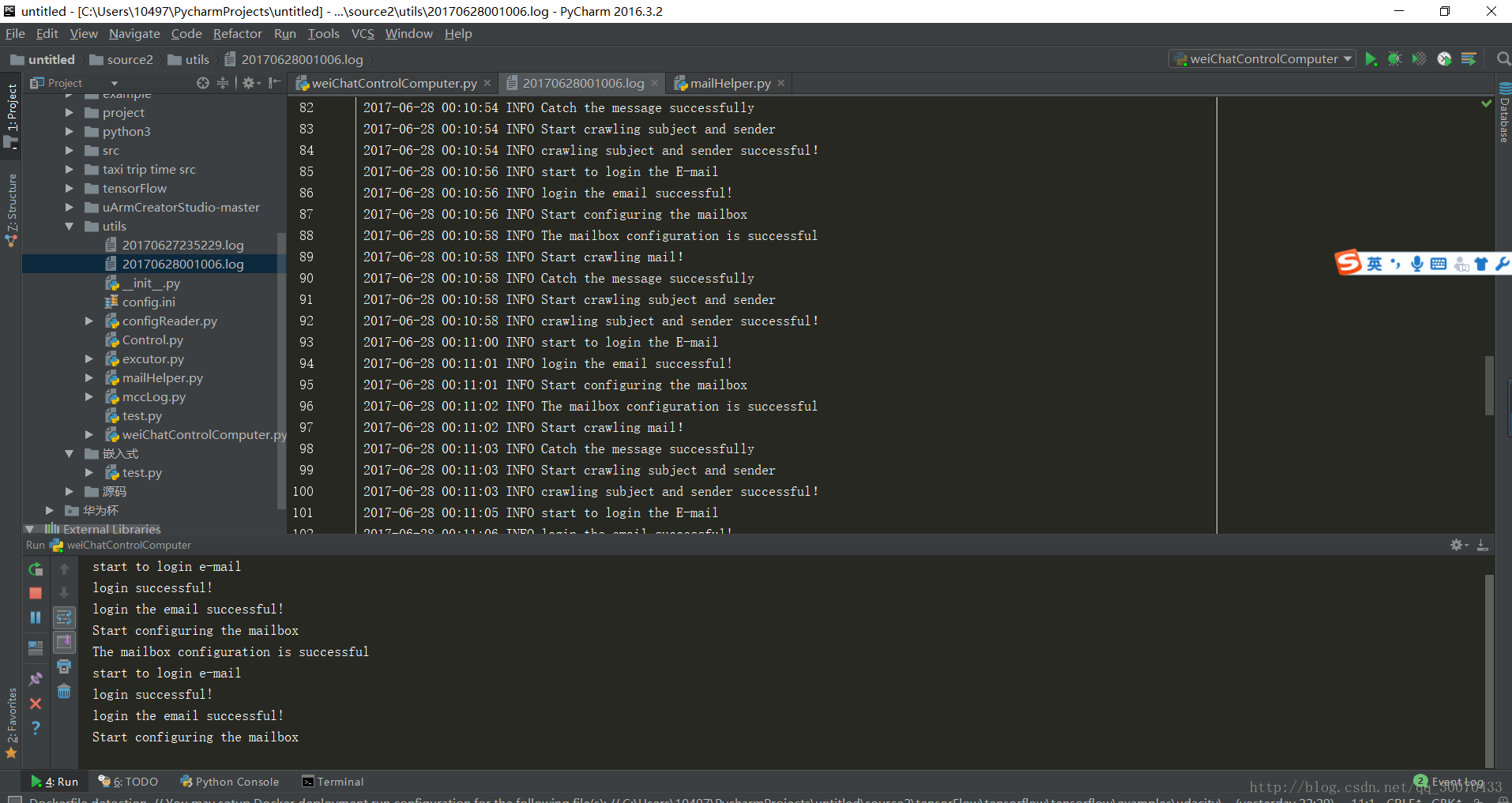
4.总结
在这个小项目的编写过程中,知道了项目开发的基本流程并且走了一遍,通过项目管理的方式去开发项目,并且在这个小项目开发的过程中,复习了Python一些初级阶段的基础知识,并且更深刻体会到从项目的设计到项目的实施,以及项目的测试运维等步骤需要程序员深刻的理解,这样才能在项目中逐渐完善自我。
待续。。。厦门叉车租赁服务公司
使用python实现用微信远程控制电脑的更多相关文章
- python 使用微信远程控制电脑
今天来分享一个"高大上"的技术--使用python编写一个能够用微信远程控制电脑的程序! 先来分析一下控制的详细流程: 我们使用微信给特定的邮箱发送一封邮件,当中包括了我们想要电脑 ...
- python小项目之微信远程控制
前两天接触了一个有趣的python模块--itchat,这个模块可以非常方便的操作微信,今天就来使用这个模块来实现微信远程控制. 环境准备 itchat模块不是python标准模块(内置模块),是一个 ...
- python远程控制电脑
python拥有大量的第三方库,且语法简单.今天老杨就用python实现远程控制电脑 所谓,谋定而后动,在实现任何一个需求之前,我们需要先分析,捋清楚一个思路,远程控制电脑,无非就是接收远程的命令 ...
- 用Python代码实现微信跳一跳作弊器
最近随着微信版本的更新,在进入界面有个跳一跳的小游戏,在网上看到技术篇教你用Python来玩微信跳一跳 ( 转载自 " 工科给事中的技术博客 " ) 本文旨在总结,技术全靠大神完成 ...
- Python爬取微信小程序(Charles)
Python爬取微信小程序(Charles) 本文链接:https://blog.csdn.net/HeyShHeyou/article/details/90045204 一.前言 最近需要获取微信小 ...
- 微信网页版APP - 网页微信客户端电脑版体验
微信网页版很早就出来了,解决了很多人上班不能玩手机的问题.微信电脑版-网页微信客户端,直接安装在桌面的微信网页版,免去了开浏览器的麻烦.双击就启动了,和其他的应用程序一样:运行过程中可以隐藏在桌面右下 ...
- 用Python玩转微信(一)
欢迎大家访问我的个人网站<刘江的博客和教程>:www.liujiangblog.com 主要分享Python 及Django教程以及相关的博客 交流QQ群:453131687 今天偶然看见 ...
- Python 开发个人微信号在运维开发中的使用
一.主题:Python 开发个人微信号在运维开发中的使用 二.内容: 企业公众号 介绍开发微信公众号的后台逻辑,包括服务器验证逻辑.用户认证逻辑 个人微信号 面对企业微信的种种限制,可以使用 Itch ...
- phantomjs + python 打造一个微信机器人
phantomjs + python 打造一个微信机器人 1.前奏 媳妇公司不能上网,但经常需要在公众号上找一些文章做一些参考,需要的时候就把文章链接分享给我,然后我在浏览器打开网页,一点点复制过 ...
随机推荐
- mongodb的学习-6-命令简单使用
1.创建数据库 use DATABASE_NAME 举例说明: > use another //创建了数据库another switched to db another > db anot ...
- SQLserver中取众位数的写法
取众位数:先按个数倒排序,再取第一条SELECT * FROM ( select a.billid,a.DemandVoltage,count(1) as RecordCount, Row_NUMBE ...
- 企业案例 【故障修复】mysql主从故障解决过程
由于配置有zabbix监控,某日收到zabbix监控主从报警,,查看mysql状态, showslave status \G; slave复制状态有误,SLAVE_SQL_RUNNING为NO, 接着 ...
- 基于VUE.JS的移动端框架Mint UI
Mint UI GitHub:github.com/ElemeFE/mint 项目主页:mint-ui.github.io/# Demo:elemefe.github.io/mint- 文档:mint ...
- C. Phone Numbers
http://codeforces.com/problemset/problem/940/C And where the are the phone numbers? You are given a ...
- block本质探寻三之block类型
一.oc代码 提示:看本文章之前,最好按顺序来看: //代码 void test1() { ; void(^block1)(void) = ^{ NSLog(@"block1----&quo ...
- CATransform3D 使用
struct CATransform3D { CGFloat m11(x轴缩放), m12(y轴切变), m13, m14(x轴拉伸); CGFloat m21(x轴切变), m22(y轴缩编), m ...
- MySQL 基础回顾
mysql 回顾 数据库的设计必须满足三范式 1NF: 强调列的原子性,列不可拆分 eg: 一张表(联系人) 有(姓名,性别,电话)三列,但是现实中电话又可分为家庭电话和公司电话,这种表结构设计就不符 ...
- mysql/mariadb学习记录——创建删除数据库、表的基本命令
查看已有的数据库: mysql> show databases; +--------------------+ | Database | +--------------------+ | inf ...
- Linux学习笔记(第五章)
第五章-常用指令 下达指令: 1.[Tab] 2.man + (指令):显示操作说明 开头代号 man page 常用按键