
LVS-NAT:搭建HTTP及HTTPS负载均衡集群
LVS-NAT:搭建HTTP及HTTPS负载均衡集群
环境说明:
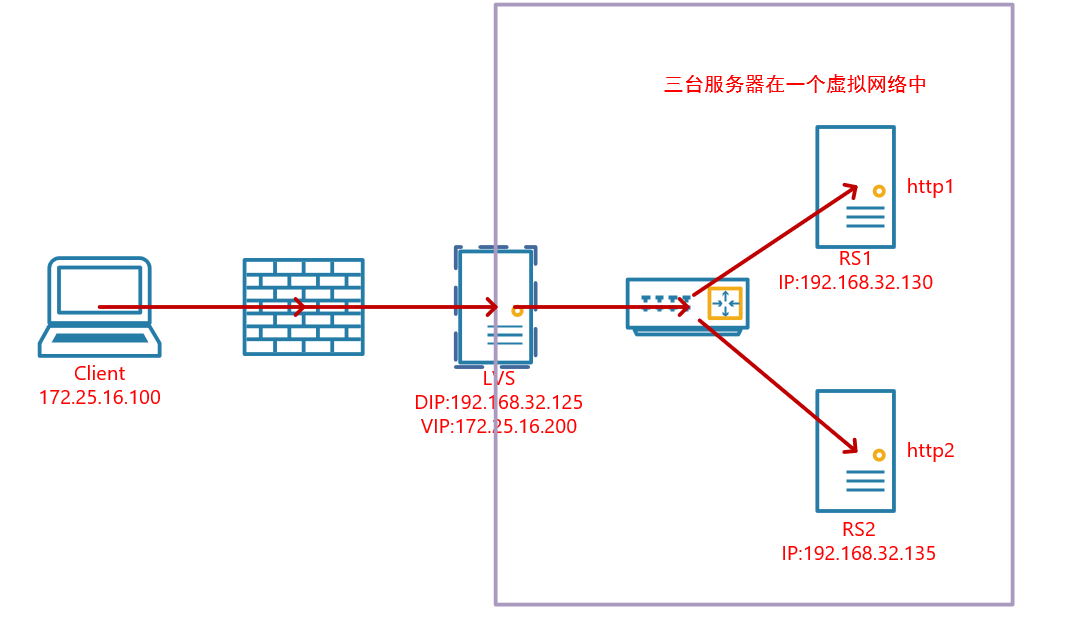
服务器的系统均为centos7,三台服务器分别配置了对应的本地静态地址DIP和RIP,且在一个内网中。
LVS有两块网卡,一块IP是内网的DIP,另一块IP是公网IP的VIP
客户端的IP和VIP都是公网IP
RS的网关指向DIP
搭建NAT模式的HTTP负载集群
1. 配置好IP地址信息
[root@DR ~]# ip a

1: lo: <LOOPBACK,UP,LOWER_UP> mtu 65536 qdisc noqueue state UNKNOWN group default qlen 1000

    link/loopback 00:00:00:00:00:00 brd 00:00:00:00:00:00

    inet 127.0.0.1/8 scope host lo

       valid_lft forever preferred_lft forever

    inet6 ::1/128 scope host

       valid_lft forever preferred_lft forever

2: eth0: <BROADCAST,MULTICAST,UP,LOWER_UP> mtu 1500 qdisc pfifo_fast state UP group default qlen 1000

    link/ether 00:0c:29:39:18:a9 brd ff:ff:ff:ff:ff:ff

    inet 192.168.32.125/24 brd 192.168.32.255 scope global noprefixroute eth0

       valid_lft forever preferred_lft forever

    inet6 fe80::20c:29ff:fe39:18a9/64 scope link

       valid_lft forever preferred_lft forever

3: eth1: <BROADCAST,MULTICAST,UP,LOWER_UP> mtu 1500 qdisc pfifo_fast state UP group default qlen 1000

    link/ether 00:0c:29:39:18:b3 brd ff:ff:ff:ff:ff:ff

    inet 172.25.16.200/24 brd 172.25.16.255 scope global noprefixroute eth1

       valid_lft forever preferred_lft forever

    inet6 fe80::20c:29ff:fe39:18b3/64 scope link

       valid_lft forever preferred_lft forever

[root@RS-1 ~]# ip a

1: lo: <LOOPBACK,UP,LOWER_UP> mtu 65536 qdisc noqueue state UNKNOWN group default qlen 1000

    link/loopback 00:00:00:00:00:00 brd 00:00:00:00:00:00

    inet 127.0.0.1/8 scope host lo

       valid_lft forever preferred_lft forever

    inet6 ::1/128 scope host

       valid_lft forever preferred_lft forever

2: ens33: <BROADCAST,MULTICAST,UP,LOWER_UP> mtu 1500 qdisc pfifo_fast state UP group default qlen 1000

    link/ether 00:0c:29:d7:d9:41 brd ff:ff:ff:ff:ff:ff

    inet 192.168.32.130/24 brd 192.168.32.255 scope global noprefixroute ens33

       valid_lft forever preferred_lft forever

    inet6 fe80::20c:29ff:fed7:d941/64 scope link

       valid_lft forever preferred_lft forever

[root@RS-2 ~]# ip a

1: lo: <LOOPBACK,UP,LOWER_UP> mtu 65536 qdisc noqueue state UNKNOWN group default qlen 1000

    link/loopback 00:00:00:00:00:00 brd 00:00:00:00:00:00

    inet 127.0.0.1/8 scope host lo

       valid_lft forever preferred_lft forever

    inet6 ::1/128 scope host

       valid_lft forever preferred_lft forever

2: ens33: <BROADCAST,MULTICAST,UP,LOWER_UP> mtu 1500 qdisc pfifo_fast state UP group default qlen 1000

    link/ether 00:0c:29:26:1e:fc brd ff:ff:ff:ff:ff:ff

    inet 192.168.32.135/24 brd 192.168.32.255 scope global noprefixroute ens33

       valid_lft forever preferred_lft forever

    inet6 fe80::20c:29ff:fe26:1efc/64 scope link

       valid_lft forever preferred_lft forever
2. DR上开启IP转发
配置NAT模式下的ip转发,让通过Load Balancer的ip包能够转发到真正提供服务的Real Server之上进行处理:
[root@DR ~]# echo 'net.ipv4.ip_forward = 1' >> /etc/sysctl.conf

[root@DR ~]# sysctl -p

net.ipv4.ip_forward = 1
3.DR上配置lvs-nat的转发机制
#LVS依赖于ipvsadm来进行配置,所以我们首先先安装ipvsadm

[root@DR ~]# yum -y install ipvsadm

[root@DR ~]# ipvsadm -A -t 172.25.16.200:80 -s rr

[root@DR ~]# ipvsadm -a -t 172.25.16.200:80 -r 192.168.32.130:80 -m

[root@DR ~]# ipvsadm -a -t 172.25.16.200:80 -r 192.168.32.135:80 -m

#保存配置信息

[root@DR ~]# ipvsadm -Sn > /etc/sysconfig/ipvsadm

#查看配置的规则

[root@DR ~]# ipvsadm -Ln

IP Virtual Server version 1.2.1 (size=4096)

Prot LocalAddress:Port Scheduler Flags

  -> RemoteAddress:Port           Forward Weight ActiveConn InActConn

TCP  192.168.32.100:80 rr

  -> 192.168.32.130:80            Masq    1      0          0

  -> 192.168.32.135:80            Masq    1      0          0
4. RS上安装httpd并启动
#RS1安装apache

[root@RS-1 ~]# yum -y install httpd

[root@RS-1 ~]# echo 'this is RS1' > /var/www/html/index.html

[root@RS-1 ~]# systemctl start httpd

#RS2安装apache

[root@RS-2 ~]# yum -y install httpd

[root@RS-2 ~]# echo 'this is RS2' > /var/www/html/index.html

[root@RS-2 ~]# systemctl start httpd
5. 客户端访问测试
[root@client ~]# ip a

1: lo: <LOOPBACK,UP,LOWER_UP> mtu 65536 qdisc noqueue state UNKNOWN group default qlen 1000

    link/loopback 00:00:00:00:00:00 brd 00:00:00:00:00:00

    inet 127.0.0.1/8 scope host lo

       valid_lft forever preferred_lft forever

    inet6 ::1/128 scope host

       valid_lft forever preferred_lft forever

2: ens33: <BROADCAST,MULTICAST,UP,LOWER_UP> mtu 1500 qdisc pfifo_fast state UP group default qlen 1000

    link/ether 00:0c:29:89:35:d0 brd ff:ff:ff:ff:ff:ff

    inet 172.25.16.100/24 brd 172.25.16.255 scope global noprefixroute ens33

       valid_lft forever preferred_lft forever

    inet6 fe80::20c:29ff:fe89:35d0/64 scope link

       valid_lft forever preferred_lft forever

[root@client ~]# for i in $(seq 10);do curl 172.25.16.200;done

this is RS2

this is RS1

this is RS2

this is RS1

this is RS2

this is RS1

this is RS2

this is RS1

this is RS2

this is RS1
搭建NAT模式的HTTPS负载集群
在以上配置基础下搭建https
1. LVS服务器搭建CA服务端
1.生成一对密钥
#生成一对密钥

[root@DR ~]# cd /etc/pki/CA/

[root@DR CA]# (umask 077;openssl genrsa -out private/cakey.pem 2048)

Generating RSA private key, 2048 bit long modulus

.........+++

....................................+++

e is 65537 (0x10001)

[root@DR CA]# openssl rsa -in private/cakey.pem -pubout

writing RSA key

-----BEGIN PUBLIC KEY-----

MIIBIjANBgkqhkiG9w0BAQEFAAOCAQ8AMIIBCgKCAQEA1dMt1vGcp1EJaHG/QVaA

+izqDmC4M4gbqiGkQbEm8/T3a6gcsHdFKszQGIwigQoL273Wbq7QAzXmAd9FU8Zp

fm01a+wJ8ie+ZM4NDSCOveyXbg4EWxalB03vLmoDXpw+uzMyMuMYHDPWYBdCscYn

H7w/91oYRV/dxc1qSMr8zZi584Rg9hbwWHPVdobnVMid9QfXh0CJdZEANsEyrGnF

cF+GP6xU4VBAFfEduuif/geL4lbDGJKB1ibDIMlTqpmdAh7+5fvK2eD/c9E1k55w

9QN8fOMi0YHyJ+2aPjfEicgJyh+kmkN7LPkEiC5H3ZsXnjVEN3PkbTnYyrSp5rWW

6wIDAQAB

-----END PUBLIC KEY-----
2.生成自签署证书
 #生成自签署证书

[root@DR CA]#  openssl req -new -x509 -key private/cakey.pem -out cacert.pem -days 1024

You are about to be asked to enter information that will be incorporated

into your certificate request.

What you are about to enter is what is called a Distinguished Name or a DN.

There are quite a few fields but you can leave some blank

For some fields there will be a default value,

If you enter '.', the field will be left blank.

-----

Country Name (2 letter code) [XX]:CN

State or Province Name (full name) []:HB

Locality Name (eg, city) [Default City]:WH

Organization Name (eg, company) [Default Company Ltd]:runtime

Organizational Unit Name (eg, section) []:runtime

Common Name (eg, your name or your server's hostname) []:runtime

Email Address []:

[root@DR CA]# touch index.txt && echo 01 > serial
3.RS生成证书签署请求,并发送给CA
#RS-1(httpd服务器)生成密钥

#创建了/etc/httpd/ssl目录,用来存放证书

[root@RS-1 ssl]# (umask 077;openssl genrsa -out httpd.key 2048)

Generating RSA private key, 2048 bit long modulus

...................................................................................................................................................................................................................................................+++

................+++

e is 65537 (0x10001)

#RS-1(httpd服务器)生成证书签署请求

[root@RS-1 ssl]# openssl req -new -key httpd.key -days 1024 -out httpd.csr

You are about to be asked to enter information that will be incorporated

into your certificate request.

What you are about to enter is what is called a Distinguished Name or a DN.

There are quite a few fields but you can leave some blank

For some fields there will be a default value,

If you enter '.', the field will be left blank.

-----

Country Name (2 letter code) [XX]:CN

State or Province Name (full name) []:HB

Locality Name (eg, city) [Default City]:WH

Organization Name (eg, company) [Default Company Ltd]:runtime

Organizational Unit Name (eg, section) []:runtime

Common Name (eg, your name or your server's hostname) []:runtime

Email Address []:

Please enter the following 'extra' attributes

to be sent with your certificate request

A challenge password []:

An optional company name []:

[root@RS-1 ssl]#

[root@RS-1 ssl]# ls

httpd.csr  httpd.key

#把证书签署请求文件发送给CA

[root@RS-1 ssl]# scp httpd.csr root@192.168.32.125:/root
4.CA签署证书并发给客户端
[root@DR ~]# ls

anaconda-ks.cfg  httpd.csr

[root@DR ~]# openssl ca -in /root/httpd.csr -out httpd.crt -days 1024

Using configuration from /etc/pki/tls/openssl.cnf

Check that the request matches the signature

Signature ok

Certificate Details:

        Serial Number: 1 (0x1)

        Validity

            Not Before: Jul 24 15:27:28 2020 GMT

            Not After : May 14 15:27:28 2023 GMT

        Subject:

            countryName               = CN

            stateOrProvinceName       = HB

            organizationName          = runtime

            organizationalUnitName    = runtime

            commonName                = runtime

        X509v3 extensions:

            X509v3 Basic Constraints:

                CA:FALSE

            Netscape Comment:

                OpenSSL Generated Certificate

            X509v3 Subject Key Identifier:

                51:C2:11:E1:0D:86:FB:40:79:0B:F3:DD:5E:49:71:C6:D3:88:41:B1

            X509v3 Authority Key Identifier:

                keyid:31:D2:0A:8F:D2:DD:B9:3E:EE:05:B5:1B:58:C4:AF:8C:45:3B:C8:A0

Certificate is to be certified until May 14 15:27:28 2023 GMT (1024 days)

Sign the certificate? [y/n]:y

1 out of 1 certificate requests certified, commit? [y/n]y

Write out database with 1 new entries

Data Base Updated

[root@DR ~]# ls

anaconda-ks.cfg  httpd.crt  httpd.csr

#CA把签署好的证书httpd.crt和服务端的证书cacert.pem发给客户端

[root@DR ~]# scp httpd.crt root@192.168.32.130:/etc/httpd/ssl

[root@DR ~]# scp cacert.pem root@192.168.32.130:/etc/httpd/ssl
2.配置https
1.将RS-1的证书和密钥发给RS-2
[root@RS-2 ~]# yum -y install mod_ssl

[root@RS-2 ~]# mkdir /etc/httpd/ssl

[root@RS-1 ~]# yum -y install mod_ssl

[root@RS-1 ssl]# scp cacert.pem httpd.crt httpd.key root@192.168.32.135:/etc/httpd/ssl

root@192.168.32.135's password:

cacert.pem                                                       100% 1294     1.4MB/s   00:00

httpd.crt                                                        100% 4416     5.4MB/s   00:00

httpd.key

#RS-2上查看

[root@RS-2 ~]# ls /etc/httpd/ssl/

cacert.pem  httpd.crt  httpd.key
2.修改https配置文件
[root@RS-1 ~]# vim /etc/httpd/conf.d/ssl.conf

//修改后如下所示

#   Server Certificate:

# Point SSLCertificateFile at a PEM encoded certificate.  If

# the certificate is encrypted, then you will be prompted for a

# pass phrase.  Note that a kill -HUP will prompt again.  A new

# certificate can be generated using the genkey(1) command.

SSLCertificateFile /etc/httpd/ssl/httpd.crt

#   Server Private Key:

#   If the key is not combined with the certificate, use this

#   directive to point at the key file.  Keep in mind that if

#   you've both a RSA and a DSA private key you can configure

#   both in parallel (to also allow the use of DSA ciphers, etc.)

SSLCertificateKeyFile /etc/httpd/ssl/httpd.key

#   Server Certificate Chain:

#   Point SSLCertificateChainFile at a file containing the

#   concatenation of PEM encoded CA certificates which form the

#   certificate chain for the server certificate. Alternatively

#   the referenced file can be the same as SSLCertificateFile

#   when the CA certificates are directly appended to the server

#   certificate for convinience.

#SSLCertificateChainFile /etc/pki/tls/certs/server-chain.crt

#   Certificate Authority (CA):

#   Set the CA certificate verification path where to find CA

#   certificates for client authentication or alternatively one

#   huge file containing all of them (file must be PEM encoded)

SSLCACertificateFile /etc/httpd/ssl/cacert.pem

#重启服务

[root@RS-1 ~]# systemctl restart httpd

[root@RS-1 ~]# ss -tanl

State       Recv-Q Send-Q    Local Address:Port                   Peer Address:Port

LISTEN      0      100           127.0.0.1:25                                *:*

LISTEN      0      128                   *:22                                *:*

LISTEN      0      100               [::1]:25                             [::]:*

LISTEN      0      128                [::]:443                            [::]:*

LISTEN      0      128                [::]:80                             [::]:*

LISTEN      0      128                [::]:22                             [::]:*
RS-2上也要做如上配置
3. LVS上配置规则
[root@DR ~]# ipvsadm -Ln

IP Virtual Server version 1.2.1 (size=4096)

Prot LocalAddress:Port Scheduler Flags

  -> RemoteAddress:Port           Forward Weight ActiveConn InActConn

TCP  172.25.16.200:80 rr

  -> 192.168.32.130:80            Masq    1      0          0

  -> 192.168.32.135:80            Masq    1      0          0

[root@DR ~]#

[root@DR ~]#

[root@DR ~]#

[root@DR ~]#

[root@DR ~]#

[root@DR ~]# ipvsadm -A -t 172.25.16.200:443 -s rr

[root@DR ~]# ipvsadm -a -t 172.25.16.200:443 -r 192.168.32.130 -m

[root@DR ~]# ipvsadm -a -t 172.25.16.200:443 -r 192.168.32.135 -m

[root@DR ~]#

[root@DR ~]#

[root@DR ~]#

[root@DR ~]#

[root@DR ~]# ipvsadm -Ln

IP Virtual Server version 1.2.1 (size=4096)

Prot LocalAddress:Port Scheduler Flags

  -> RemoteAddress:Port           Forward Weight ActiveConn InActConn

TCP  172.25.16.200:80 rr

  -> 192.168.32.130:80            Masq    1      0          0

  -> 192.168.32.135:80            Masq    1      0          0

TCP  172.25.16.200:443 rr

  -> 192.168.32.130:443           Masq    1      0          0

  -> 192.168.32.135:443           Masq    1      0          0
4. 客户端访问测试
curl 可以使用-k参数不验证证书的合法性
[root@client ~]# ip a

1: lo: <LOOPBACK,UP,LOWER_UP> mtu 65536 qdisc noqueue state UNKNOWN group default qlen 1000

    link/loopback 00:00:00:00:00:00 brd 00:00:00:00:00:00

    inet 127.0.0.1/8 scope host lo

       valid_lft forever preferred_lft forever

    inet6 ::1/128 scope host

       valid_lft forever preferred_lft forever

2: ens33: <BROADCAST,MULTICAST,UP,LOWER_UP> mtu 1500 qdisc pfifo_fast state UP group default qlen 1000

    link/ether 00:0c:29:89:35:d0 brd ff:ff:ff:ff:ff:ff

    inet 172.25.16.100/24 brd 172.25.16.255 scope global noprefixroute ens33

       valid_lft forever preferred_lft forever

    inet6 fe80::20c:29ff:fe89:35d0/64 scope link

       valid_lft forever preferred_lft forever

[root@client ~]# for i in $(seq 10);do curl http://172.25.16.200;done

this is RS2

this is RS1

this is RS2

this is RS1

this is RS2

this is RS1

this is RS2

this is RS1

this is RS2

this is RS1

[root@client ~]# for i in $(seq 10);do curl -k https://172.25.16.200;done

this is RS2

this is RS1

this is RS2

this is RS1

this is RS2

this is RS1

this is RS2

this is RS1

this is RS2

this is RS1
LVS-NAT:搭建HTTP及HTTPS负载均衡集群的更多相关文章
- LVS-DR:搭建HTTP和HTTPS负载均衡集群
目录 LVS-DR实战:搭建HTTP和HTTPS负载均衡集群 1. 搭建lvs-dr模式的http负载集群 1.1 LVS上配置IP 1.2 RS上配置arp内核参数 1.3 RS上配置VIP 1.4 ...
- LVS+Keepalived搭建MyCAT高可用负载均衡集群
LVS+Keepalived 介绍 LVS LVS是Linux Virtual Server的简写,意即Linux虚拟服务器,是一个虚拟的服务器集群系统.本项目在1998年5月由章文嵩博士成立,是中国 ...
- 通过LVS+Keepalived搭建高可用的负载均衡集群系统
1. 安装LVS软件 (1)安装前准备操作系统:统一采用Centos6.5版本,地址规划如下: 服务器名 IP地址 网关 虚拟设备名 虚拟ip Director Server 192.168 ...
- Haproxy+Keepalived搭建Weblogic高可用负载均衡集群
配置环境说明: KVM虚拟机配置 用途 数量 IP地址 机器名 虚拟IP地址 硬件 内存3G 系统盘20G cpu 4核 Haproxy keepalived 2台 192.168.1.10 192 ...
- 搭建MySQL高可用负载均衡集群
1.简介 使用MySQL时随着时间的增长,用户量以及数据量的逐渐增加,访问量更是剧增,最终将会使MySQL达到某个瓶颈,那么MySQL的性能将会大大降低.这一结果也不利于软件的推广. 那么如何跨过这个 ...
- 搭建MySQL高可用负载均衡集群(转)
阅读目录 1.简介 2.基本环境 3.配置MySQL主主复制 4.中间件简述 4.1.Haproxy介绍 4.2.keepalived介绍 5.中间件的安装与配置(haproxy.keepalived ...
- [转]搭建MySQL高可用负载均衡集群
转自:http://www.cnblogs.com/phpstudy2015-6/p/6706465.html 阅读目录 1.简介 2.基本环境 3.配置MySQL主主复制 4.中间件简述 4.1.H ...
- LVS+Keepalived+Nginx+Tomcat高可用负载均衡集群配置(DR模式,一个VIP,多个端口)
一.概述 LVS作用:实现负载均衡 Keepalived作用:监控集群系统中各个服务节点的状态,HA cluster. 配置LVS有两种方式: 1. 通过ipvsadm命令行方式配置 2. 通过Red ...
- 搭建MySQL高可用负载均衡集群(收藏)
https://www.cnblogs.com/phpstudy2015-6/p/6706465.html
随机推荐
- 隐写术工具之binwalk
0x00Binwalk介绍 Binwalk是用于搜索给定二进制镜像文件以获取嵌入的文件和代码的工具. 具体来说,它被设计用于识别嵌入固件镜像内的文件和代码. Binwalk使用libmagic库,因此 ...
- Hexo学习
01.安装 Node.js 打开官方网站 https://nodejs.org 267b6d6d335cf62907c70321a1cbd3b 安装步骤非常简单,一直next,下一步就可以了,默认安装 ...
- EntityFrameworkCore 开发实践问题及规范
严重问题 客户端求值 如where条件包含的GetValueOrDefault()不能被翻译成sql语句 不规范代码段例子 public async Task<List<Person> ...
- python面试题:redis数据库
来源链接: https://www.cnblogs.com/jasontec/p/9699242.html https://www.cnblogs.com/Java3y/p/10266306.html ...
- 数据可视化之powerBI基础(九)Power BI中的“新表”,你会用吗?
https://zhuanlan.zhihu.com/p/64413703 通常情况下,在PowerBI进行分析的各种数据表都是从外部的各种数据源导入进来的,但并不总是如此,某些情况下在PowerBI ...
- bzoj1787[Ahoi2008]Meet 紧急集合&bzoj1832[AHOI2008]聚会
bzoj1787[Ahoi2008]Meet 紧急集合 bzoj1832[AHOI2008]聚会 题意: 给个树,每次给三个点,求与这三个点距离最小的点. 题解: 倍增求出两两之间的LCA后,比较容易 ...
- Tableau如何嵌入HTML
原文地址:https://blog.csdn.net/read_you2011/article/details/81476108 作者:read_you2011 说明 作为领先的数据可视化工具,Tab ...
- linux目录结构 主流Linux发行版的目录结构
目录 目录结构 一般教学的目录 CentOS7 openSUSE15.1 Ubuntu18.04 详细说明: /dev目录 /etc目录 /proc目录 /usr目录 /var目录 比较重要的目录 文 ...
- 简单实用的办公软件导航网站,IT经理必备工具
最近非常忙,因为公司上线了业财一体化系统.今天分享一个非常实用的办公软件导航网站,节省了我很多百度的时间. 快氪导航,让软件服务更简单. 一.办公软件导航 站长已经按照功能进行了分类:协同办公,流程审 ...
- 使用Azure DevOps Pipeline实现.Net Core程序的CI
上次介绍了Azure Application Insights,实现了.net core程序的监控功能.这次让我们来看看Azure DevOps Pipeline功能.Azure DevOps Pip ...