
根据窗体自动调整控件及文本框记住上次填写内容Demo
第一次写文章,组词难免没有不通之处。。。
最近常用到Winform根据窗体大小自动调整空间大小及字体、文本框记住上次填写内容待下次输入某一段时候自动跳出上次输入内容。于是就随便把两个问题放到同一个demo上。
一、运行效果如下:
1、 启动时:

2、改变窗体大小时:

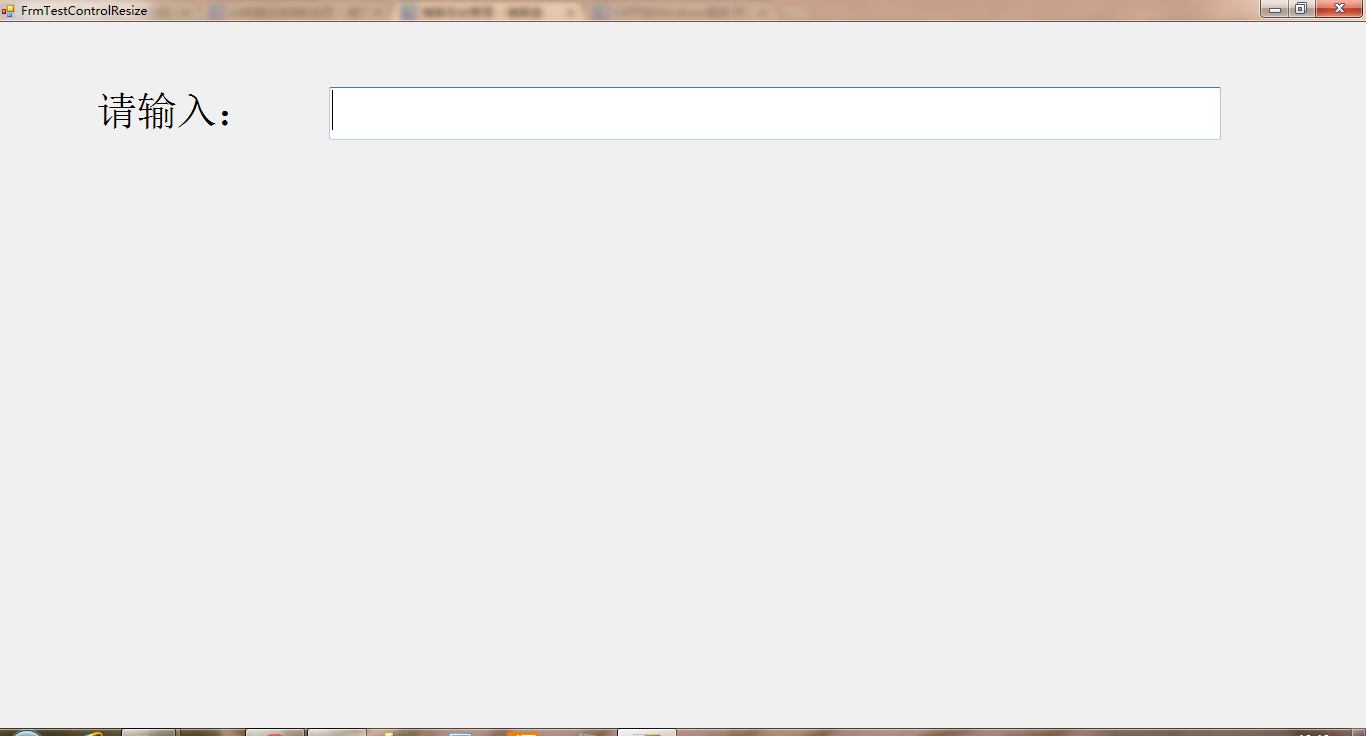
3、输入文本时:


二、代码:
1、缩放代码:
using System;

using System.Collections.Generic;

using System.ComponentModel;

using System.Drawing;

using System.Data;

using System.Linq;

using System.Text;

using System.Windows.Forms;

using System.IO;

namespace myListSelect

{

    public partial class ListSelect : UserControl

    {

        TextBox tbx;

        public ListSelect()

        {

            InitializeComponent();

            this.tbxInputBox.TextChanged += new EventHandler(tbxInputBox_TextChanged);

            this.tbxInputBox.KeyUp += new KeyEventHandler(tbxInputBox_KeyUp);

            this.tbxInputBox.DoubleClick += new EventHandler(tbxInputBox_DoubleClick);

            this.tbxInputBox.KeyDown += new KeyEventHandler(tbxInputBox_KeyDown);

            this.lbxListSelect.MouseClick += new MouseEventHandler(lbxListSelect_MouseClick);

            this.lbxListSelect.MouseMove += new MouseEventHandler(lbxListSelect_MouseMove);

        }

        void lbxListSelect_MouseMove(object sender, MouseEventArgs e)

        {

            lbxListSelect.SelectedIndex = lbxListSelect.IndexFromPoint(new Point(e.X, e.Y));

        }

        void lbxListSelect_MouseClick(object sender, MouseEventArgs e)

        {

            try

            {

                if (tbx != null)

                {

                    tbxInputBox.Text = lbxListSelect.Text.ToString();

                    lbxListSelect.Visible = false;

                }

            }

            catch (Exception)

            {

                return;

            }

        }

        void tbxInputBox_KeyDown(object sender, KeyEventArgs e)

        {

            if (e.KeyCode == Keys.Enter)

            {

                //记录本次所写内容

                if (!File.Exists("listSelectSetup.ini"))

                {

                    File.WriteAllText("listSelectSetup.ini", tbxInputBox.Text + "\r\n");

                }

                else

                {

                    //读出所有行

                    string[] fileTextStr = File.ReadAllLines("listSelectSetup.ini");

                    if (!fileTextStr.Contains(tbxInputBox.Text))

                    {

                        File.AppendAllText("listSelectSetup.ini", tbxInputBox.Text + "\r\n");

                    }

                }

            }

        }

        void tbxInputBox_DoubleClick(object sender, EventArgs e)

        {

            if (!string.IsNullOrEmpty(tbxInputBox.Text))

            {

                DisplayOldInput(tbxInputBox.Text, tbxInputBox);

            }

        }

        void tbxInputBox_KeyUp(object sender, KeyEventArgs e)

        {

            if (lbxListSelect.Items.Count < )

            {

                return;

            }

            if (e.KeyCode == Keys.Up)

            {

                int idx = lbxListSelect.SelectedIndex;

                if (idx == -)

                {

                    lbxListSelect.SelectedItem = lbxListSelect.Items[lbxListSelect.Items.Count - ];

                }

                else

                {

                    if (idx == )

                    {

                        lbxListSelect.SelectedItem = lbxListSelect.Items[lbxListSelect.Items.Count - ];

                        idx = lbxListSelect.Items.Count;

                    }

                    lbxListSelect.SelectedItem = lbxListSelect.Items[idx - ];

                }

            }

            else if (e.KeyCode == Keys.Down)

            {

                int idx = lbxListSelect.SelectedIndex;

                if (idx == -)

                {

                    lbxListSelect.SelectedItem = lbxListSelect.Items[];

                }

                else

                {

                    if (idx == lbxListSelect.Items.Count - )

                    {

                        lbxListSelect.SelectedItem = lbxListSelect.Items[];

                    }

                    else

                    {

                        lbxListSelect.SelectedItem = lbxListSelect.Items[idx + ];

                    }

                }

                idx = lbxListSelect.SelectedIndex;

            }

            else if (e.KeyCode == Keys.Enter)

            {

                try

                {

                    if (tbx != null)

                    {

                        tbxInputBox.Text = lbxListSelect.Text.ToString();

                        lbxListSelect.Visible = false;

                    }

                }

                catch (Exception)

                {

                    return;

                }

            }

        }

        void tbxInputBox_TextChanged(object sender, EventArgs e)

        {

            if (!string.IsNullOrEmpty(tbxInputBox.Text))

            {

                DisplayOldInput(tbxInputBox.Text, tbxInputBox);

            }

        }

        private void DisplayOldInput(string str, TextBox tb)

        {

            List<string> list = new List<string>();

            List<string> listSource = new List<string>();

            if (File.Exists("listSelectSetup.ini"))

            {

                list.AddRange(File.ReadAllLines("listSelectSetup.ini"));

                listSource=list.FindAll((line) => { return line.IndexOf(str) == ; });

            }

            Point p = lbxListSelect.Location;

            p.X = tb.Location.X;

            lbxListSelect.Location = p;

            tbx = tb;

            lbxListSelect.DataSource = listSource;

            if (listSource != null && listSource.Count != )

            {

                lbxListSelect.Visible = true;

            }

        }

    }

}
2、显示上次输入文本代码:
using System;

using System.Collections.Generic;

using System.ComponentModel;

using System.Drawing;

using System.Data;

using System.Linq;

using System.Text;

using System.Windows.Forms;

using System.IO;

namespace myListSelect

{

    public partial class ListSelect : UserControl

    {

        TextBox tbx;

        public ListSelect()

        {

            InitializeComponent();

            this.tbxInputBox.TextChanged += new EventHandler(tbxInputBox_TextChanged);

            this.tbxInputBox.KeyUp += new KeyEventHandler(tbxInputBox_KeyUp);

            this.tbxInputBox.DoubleClick += new EventHandler(tbxInputBox_DoubleClick);

            this.tbxInputBox.KeyDown += new KeyEventHandler(tbxInputBox_KeyDown);

            this.lbxListSelect.MouseClick += new MouseEventHandler(lbxListSelect_MouseClick);

            this.lbxListSelect.MouseMove += new MouseEventHandler(lbxListSelect_MouseMove);

        }

        void lbxListSelect_MouseMove(object sender, MouseEventArgs e)

        {

            lbxListSelect.SelectedIndex = lbxListSelect.IndexFromPoint(new Point(e.X, e.Y));

        }

        void lbxListSelect_MouseClick(object sender, MouseEventArgs e)

        {

            try

            {

                if (tbx != null)

                {

                    tbxInputBox.Text = lbxListSelect.Text.ToString();

                    lbxListSelect.Visible = false;

                }

            }

            catch (Exception)

            {

                return;

            }

        }

        void tbxInputBox_KeyDown(object sender, KeyEventArgs e)

        {

            if (e.KeyCode == Keys.Enter)

            {

                //记录本次所写内容

                if (!File.Exists("listSelectSetup.ini"))

                {

                    File.WriteAllText("listSelectSetup.ini", tbxInputBox.Text + "\r\n");

                }

                else

                {

                    //读出所有行

                    string[] fileTextStr = File.ReadAllLines("listSelectSetup.ini");

                    if (!fileTextStr.Contains(tbxInputBox.Text))

                    {

                        File.AppendAllText("listSelectSetup.ini", tbxInputBox.Text + "\r\n");

                    }

                }

            }

        }

        void tbxInputBox_DoubleClick(object sender, EventArgs e)

        {

            if (!string.IsNullOrEmpty(tbxInputBox.Text))

            {

                DisplayOldInput(tbxInputBox.Text, tbxInputBox);

            }

        }

        void tbxInputBox_KeyUp(object sender, KeyEventArgs e)

        {

            if (lbxListSelect.Items.Count < )

            {

                return;

            }

            if (e.KeyCode == Keys.Up)

            {

                int idx = lbxListSelect.SelectedIndex;

                if (idx == -)

                {

                    lbxListSelect.SelectedItem = lbxListSelect.Items[lbxListSelect.Items.Count - ];

                }

                else

                {

                    if (idx == )

                    {

                        lbxListSelect.SelectedItem = lbxListSelect.Items[lbxListSelect.Items.Count - ];

                        idx = lbxListSelect.Items.Count;

                    }

                    lbxListSelect.SelectedItem = lbxListSelect.Items[idx - ];

                }

            }

            else if (e.KeyCode == Keys.Down)

            {

                int idx = lbxListSelect.SelectedIndex;

                if (idx == -)

                {

                    lbxListSelect.SelectedItem = lbxListSelect.Items[];

                }

                else

                {

                    if (idx == lbxListSelect.Items.Count - )

                    {

                        lbxListSelect.SelectedItem = lbxListSelect.Items[];

                    }

                    else

                    {

                        lbxListSelect.SelectedItem = lbxListSelect.Items[idx + ];

                    }

                }

                idx = lbxListSelect.SelectedIndex;

            }

            else if (e.KeyCode == Keys.Enter)

            {

                try

                {

                    if (tbx != null)

                    {

                        tbxInputBox.Text = lbxListSelect.Text.ToString();

                        lbxListSelect.Visible = false;

                    }

                }

                catch (Exception)

                {

                    return;

                }

            }

        }

        void tbxInputBox_TextChanged(object sender, EventArgs e)

        {

            if (!string.IsNullOrEmpty(tbxInputBox.Text))

            {

                DisplayOldInput(tbxInputBox.Text, tbxInputBox);

            }

        }

        private void DisplayOldInput(string str, TextBox tb)

        {

            List<string> list = new List<string>();

            List<string> listSource = new List<string>();

            if (File.Exists("listSelectSetup.ini"))

            {

                list.AddRange(File.ReadAllLines("listSelectSetup.ini"));

                listSource=list.FindAll((line) => { return line.IndexOf(str) == ; });

            }

            Point p = lbxListSelect.Location;

            p.X = tb.Location.X;

            lbxListSelect.Location = p;

            tbx = tb;

            lbxListSelect.DataSource = listSource;

            if (listSource != null && listSource.Count != )

            {

                lbxListSelect.Visible = true;

            }

        }

    }

}
三、源码下载:
根据窗体自动调整控件及文本框记住上次填写内容Demo的更多相关文章
- 用MVC的辅助方法自定义了两个控件:“可编辑的下拉框控件”和“文本框日历控件”
接触MVC也没多长时间,一开始学的时候绝得MVC结构比较清晰.后来入了门具体操作下来感觉MVC控件怎么这么少还不可以像ASP.net form那样拖拽.这样设计界面来,想我种以前没学过JS,Jquer ...
- 在GridView控件内文本框实现TextChanged事件
本篇是教你实现GridView控件内的TextBox文本框实现自身的TextChanged事件.由于某些功能的需求,GridView控件内嵌TextBox,当TextBox值发生变化时,触发TextC ...
- 转:zTree树控件扩展篇:巧用zTree控件实现文本框输入关键词自动模糊查找zTree树节点实现模糊匹配下拉选择效果
是否可以借助于zTree实现文本框输入关键词自动模糊匹配zTree下拉树,然后选择下拉树内节点显示在文本框内且隐藏下拉树. 看到这个需求脑子里头大致已经想到了要如何实现这样一个需求,当时是限于时间问题 ...
- c# winform 根据窗体自动调整控件
一.概述 本文要实现的功能是:当窗体最大化时,控件的大小可以随窗体一起变化.开发环境,vs2010 c# winform,窗体名称采用默认的Form1. 2.把调整控件大小的方法放到一个类中:Form ...
- jquery easyui 日历控件和文本框结合使用生成日期
html部分---等待接收所选日期的文本框 <td> <input name='input_date' required class='easyui-textbox' id='xiw ...
- EasyUI 的日期控件单击文本框显示日历
注意:可 用 ctrl+f 搜索 "_outerWidth():0" 1. jQuery.easyui.min.js1.3.2 版本 function _745(_746,_7 ...
- 在C#中子线程如何操作主线程中窗体上控件
在C#中,直接在子线程中对窗体上的控件操作是会出现异常,这是由于子线程和运行窗体的线程是不同的空间,因此想要在子线程来操作窗体上的控件,是不可能 简单的通过控件对象名来操作,但不是说不能进行操作,微软 ...
- 最佳实践扩展Windows窗体DataGridView控件 .net 4.5 附示例代码
Windows窗体DataGridView控件的性能调优.net 4.5 在处理大量数据时, DataGridView 控制可以消耗大量的内存开销,除非你仔细地使用它. 在客户有限的内存,你可以避 ...
- 背水一战 Windows 10 (30) - 控件(文本类): AutoSuggestBox
[源码下载] 背水一战 Windows 10 (30) - 控件(文本类): AutoSuggestBox 作者:webabcd 介绍背水一战 Windows 10 之 控件(文本类) AutoSug ...
随机推荐
- openfire升级指南
原文:http://www.liuhaihua.cn/archives/355.html 升级Openfire是和从头开始安装Openfire几乎一样简单.作为升级过程的一部分,它强烈建议您先备份当前 ...
- D3.js 布局
布局,可以理解成 “制作常见图形的函数”,有了它制作各种相对复杂的图表就方便多了. 一.布局是什么 布局,英文是 Layout.从字面看,可以想到有“决定什么元素绘制在哪里”的意思.布局是 D3 中一 ...
- JavaScript 返回值
Window.Open()返回值: 利用window.open(‘NewWindow.html’):打开新的窗口NewWindow.html后,如果有返回值需要处理,应通过window.opener. ...
- python剑指网络篇一
#coding:utf-8 __author__ = 'similarface' #!/usr/bin/env python import socket #二进制和ASCII互转及其它进制转换 fro ...
- C# 中的弱引用 WeakReference
C#中的弱引用(WeakReference) 我们平常用的都是对象的强引用,如果有强引用存在,GC是不会回收对象的.我们能不能同时保持对对象的引用,而又可以让GC需要的时候回收这个对象呢?.NET ...
- SwitchCompat 修改颜色
Ok, so I'm sorry but most of these answers are incomplete or have some minor bug in them. The very c ...
- java 多线程4(死锁)
死锁现象: 死锁原因: 1.存在两个或两个以上的线程. 2.存在两个或两个或两个以上的共享资源. 死锁现象解决的方案: 没有方案只能尽量避免.
- Spring注释与简化配置
在Spring 2.5及以后的版本中,提供了注释和命名空间来简化Spring的配置.下面是一些常用配置分享. 1.@Autowired注释 以前给一个Bean配置属性时,Bean必须配置< ...
- HDUOJ----2571(命运)(简单动态规划)
命运 Time Limit: 2000/1000 MS (Java/Others) Memory Limit: 32768/32768 K (Java/Others) Total Submiss ...
- Subscribe的第四个参数用法
看别人的代码真的是很好的学习过程啊 之前用Subscribe订阅的时候都是简单的用法形如: ros::Subscriber sub = node.subscribe<uhf_rfid_api:: ...