
根据窗体自动调整控件及文本框记住上次填写内容Demo
第一次写文章,组词难免没有不通之处。。。
最近常用到Winform根据窗体大小自动调整空间大小及字体、文本框记住上次填写内容待下次输入某一段时候自动跳出上次输入内容。于是就随便把两个问题放到同一个demo上。
一、运行效果如下:
1、 启动时:

2、改变窗体大小时:

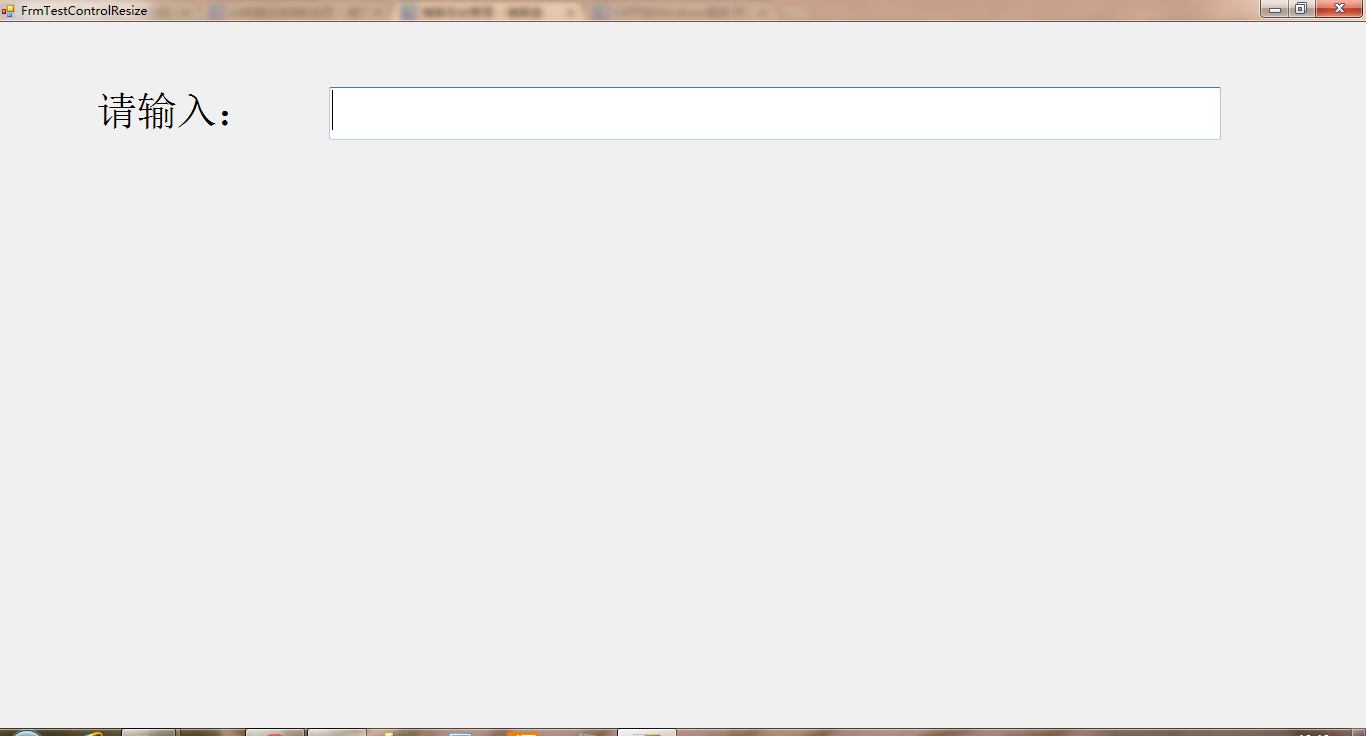
3、输入文本时:


二、代码:
1、缩放代码:
using System;

using System.Collections.Generic;

using System.ComponentModel;

using System.Drawing;

using System.Data;

using System.Linq;

using System.Text;

using System.Windows.Forms;

using System.IO;

namespace myListSelect

{

    public partial class ListSelect : UserControl

    {

        TextBox tbx;

        public ListSelect()

        {

            InitializeComponent();

            this.tbxInputBox.TextChanged += new EventHandler(tbxInputBox_TextChanged);

            this.tbxInputBox.KeyUp += new KeyEventHandler(tbxInputBox_KeyUp);

            this.tbxInputBox.DoubleClick += new EventHandler(tbxInputBox_DoubleClick);

            this.tbxInputBox.KeyDown += new KeyEventHandler(tbxInputBox_KeyDown);

            this.lbxListSelect.MouseClick += new MouseEventHandler(lbxListSelect_MouseClick);

            this.lbxListSelect.MouseMove += new MouseEventHandler(lbxListSelect_MouseMove);

        }

        void lbxListSelect_MouseMove(object sender, MouseEventArgs e)

        {

            lbxListSelect.SelectedIndex = lbxListSelect.IndexFromPoint(new Point(e.X, e.Y));

        }

        void lbxListSelect_MouseClick(object sender, MouseEventArgs e)

        {

            try

            {

                if (tbx != null)

                {

                    tbxInputBox.Text = lbxListSelect.Text.ToString();

                    lbxListSelect.Visible = false;

                }

            }

            catch (Exception)

            {

                return;

            }

        }

        void tbxInputBox_KeyDown(object sender, KeyEventArgs e)

        {

            if (e.KeyCode == Keys.Enter)

            {

                //记录本次所写内容

                if (!File.Exists("listSelectSetup.ini"))

                {

                    File.WriteAllText("listSelectSetup.ini", tbxInputBox.Text + "\r\n");

                }

                else

                {

                    //读出所有行

                    string[] fileTextStr = File.ReadAllLines("listSelectSetup.ini");

                    if (!fileTextStr.Contains(tbxInputBox.Text))

                    {

                        File.AppendAllText("listSelectSetup.ini", tbxInputBox.Text + "\r\n");

                    }

                }

            }

        }

        void tbxInputBox_DoubleClick(object sender, EventArgs e)

        {

            if (!string.IsNullOrEmpty(tbxInputBox.Text))

            {

                DisplayOldInput(tbxInputBox.Text, tbxInputBox);

            }

        }

        void tbxInputBox_KeyUp(object sender, KeyEventArgs e)

        {

            if (lbxListSelect.Items.Count < )

            {

                return;

            }

            if (e.KeyCode == Keys.Up)

            {

                int idx = lbxListSelect.SelectedIndex;

                if (idx == -)

                {

                    lbxListSelect.SelectedItem = lbxListSelect.Items[lbxListSelect.Items.Count - ];

                }

                else

                {

                    if (idx == )

                    {

                        lbxListSelect.SelectedItem = lbxListSelect.Items[lbxListSelect.Items.Count - ];

                        idx = lbxListSelect.Items.Count;

                    }

                    lbxListSelect.SelectedItem = lbxListSelect.Items[idx - ];

                }

            }

            else if (e.KeyCode == Keys.Down)

            {

                int idx = lbxListSelect.SelectedIndex;

                if (idx == -)

                {

                    lbxListSelect.SelectedItem = lbxListSelect.Items[];

                }

                else

                {

                    if (idx == lbxListSelect.Items.Count - )

                    {

                        lbxListSelect.SelectedItem = lbxListSelect.Items[];

                    }

                    else

                    {

                        lbxListSelect.SelectedItem = lbxListSelect.Items[idx + ];

                    }

                }

                idx = lbxListSelect.SelectedIndex;

            }

            else if (e.KeyCode == Keys.Enter)

            {

                try

                {

                    if (tbx != null)

                    {

                        tbxInputBox.Text = lbxListSelect.Text.ToString();

                        lbxListSelect.Visible = false;

                    }

                }

                catch (Exception)

                {

                    return;

                }

            }

        }

        void tbxInputBox_TextChanged(object sender, EventArgs e)

        {

            if (!string.IsNullOrEmpty(tbxInputBox.Text))

            {

                DisplayOldInput(tbxInputBox.Text, tbxInputBox);

            }

        }

        private void DisplayOldInput(string str, TextBox tb)

        {

            List<string> list = new List<string>();

            List<string> listSource = new List<string>();

            if (File.Exists("listSelectSetup.ini"))

            {

                list.AddRange(File.ReadAllLines("listSelectSetup.ini"));

                listSource=list.FindAll((line) => { return line.IndexOf(str) == ; });

            }

            Point p = lbxListSelect.Location;

            p.X = tb.Location.X;

            lbxListSelect.Location = p;

            tbx = tb;

            lbxListSelect.DataSource = listSource;

            if (listSource != null && listSource.Count != )

            {

                lbxListSelect.Visible = true;

            }

        }

    }

}
2、显示上次输入文本代码:
using System;

using System.Collections.Generic;

using System.ComponentModel;

using System.Drawing;

using System.Data;

using System.Linq;

using System.Text;

using System.Windows.Forms;

using System.IO;

namespace myListSelect

{

    public partial class ListSelect : UserControl

    {

        TextBox tbx;

        public ListSelect()

        {

            InitializeComponent();

            this.tbxInputBox.TextChanged += new EventHandler(tbxInputBox_TextChanged);

            this.tbxInputBox.KeyUp += new KeyEventHandler(tbxInputBox_KeyUp);

            this.tbxInputBox.DoubleClick += new EventHandler(tbxInputBox_DoubleClick);

            this.tbxInputBox.KeyDown += new KeyEventHandler(tbxInputBox_KeyDown);

            this.lbxListSelect.MouseClick += new MouseEventHandler(lbxListSelect_MouseClick);

            this.lbxListSelect.MouseMove += new MouseEventHandler(lbxListSelect_MouseMove);

        }

        void lbxListSelect_MouseMove(object sender, MouseEventArgs e)

        {

            lbxListSelect.SelectedIndex = lbxListSelect.IndexFromPoint(new Point(e.X, e.Y));

        }

        void lbxListSelect_MouseClick(object sender, MouseEventArgs e)

        {

            try

            {

                if (tbx != null)

                {

                    tbxInputBox.Text = lbxListSelect.Text.ToString();

                    lbxListSelect.Visible = false;

                }

            }

            catch (Exception)

            {

                return;

            }

        }

        void tbxInputBox_KeyDown(object sender, KeyEventArgs e)

        {

            if (e.KeyCode == Keys.Enter)

            {

                //记录本次所写内容

                if (!File.Exists("listSelectSetup.ini"))

                {

                    File.WriteAllText("listSelectSetup.ini", tbxInputBox.Text + "\r\n");

                }

                else

                {

                    //读出所有行

                    string[] fileTextStr = File.ReadAllLines("listSelectSetup.ini");

                    if (!fileTextStr.Contains(tbxInputBox.Text))

                    {

                        File.AppendAllText("listSelectSetup.ini", tbxInputBox.Text + "\r\n");

                    }

                }

            }

        }

        void tbxInputBox_DoubleClick(object sender, EventArgs e)

        {

            if (!string.IsNullOrEmpty(tbxInputBox.Text))

            {

                DisplayOldInput(tbxInputBox.Text, tbxInputBox);

            }

        }

        void tbxInputBox_KeyUp(object sender, KeyEventArgs e)

        {

            if (lbxListSelect.Items.Count < )

            {

                return;

            }

            if (e.KeyCode == Keys.Up)

            {

                int idx = lbxListSelect.SelectedIndex;

                if (idx == -)

                {

                    lbxListSelect.SelectedItem = lbxListSelect.Items[lbxListSelect.Items.Count - ];

                }

                else

                {

                    if (idx == )

                    {

                        lbxListSelect.SelectedItem = lbxListSelect.Items[lbxListSelect.Items.Count - ];

                        idx = lbxListSelect.Items.Count;

                    }

                    lbxListSelect.SelectedItem = lbxListSelect.Items[idx - ];

                }

            }

            else if (e.KeyCode == Keys.Down)

            {

                int idx = lbxListSelect.SelectedIndex;

                if (idx == -)

                {

                    lbxListSelect.SelectedItem = lbxListSelect.Items[];

                }

                else

                {

                    if (idx == lbxListSelect.Items.Count - )

                    {

                        lbxListSelect.SelectedItem = lbxListSelect.Items[];

                    }

                    else

                    {

                        lbxListSelect.SelectedItem = lbxListSelect.Items[idx + ];

                    }

                }

                idx = lbxListSelect.SelectedIndex;

            }

            else if (e.KeyCode == Keys.Enter)

            {

                try

                {

                    if (tbx != null)

                    {

                        tbxInputBox.Text = lbxListSelect.Text.ToString();

                        lbxListSelect.Visible = false;

                    }

                }

                catch (Exception)

                {

                    return;

                }

            }

        }

        void tbxInputBox_TextChanged(object sender, EventArgs e)

        {

            if (!string.IsNullOrEmpty(tbxInputBox.Text))

            {

                DisplayOldInput(tbxInputBox.Text, tbxInputBox);

            }

        }

        private void DisplayOldInput(string str, TextBox tb)

        {

            List<string> list = new List<string>();

            List<string> listSource = new List<string>();

            if (File.Exists("listSelectSetup.ini"))

            {

                list.AddRange(File.ReadAllLines("listSelectSetup.ini"));

                listSource=list.FindAll((line) => { return line.IndexOf(str) == ; });

            }

            Point p = lbxListSelect.Location;

            p.X = tb.Location.X;

            lbxListSelect.Location = p;

            tbx = tb;

            lbxListSelect.DataSource = listSource;

            if (listSource != null && listSource.Count != )

            {

                lbxListSelect.Visible = true;

            }

        }

    }

}
三、源码下载:
根据窗体自动调整控件及文本框记住上次填写内容Demo的更多相关文章
- 用MVC的辅助方法自定义了两个控件:“可编辑的下拉框控件”和“文本框日历控件”
接触MVC也没多长时间,一开始学的时候绝得MVC结构比较清晰.后来入了门具体操作下来感觉MVC控件怎么这么少还不可以像ASP.net form那样拖拽.这样设计界面来,想我种以前没学过JS,Jquer ...
- 在GridView控件内文本框实现TextChanged事件
本篇是教你实现GridView控件内的TextBox文本框实现自身的TextChanged事件.由于某些功能的需求,GridView控件内嵌TextBox,当TextBox值发生变化时,触发TextC ...
- 转:zTree树控件扩展篇:巧用zTree控件实现文本框输入关键词自动模糊查找zTree树节点实现模糊匹配下拉选择效果
是否可以借助于zTree实现文本框输入关键词自动模糊匹配zTree下拉树,然后选择下拉树内节点显示在文本框内且隐藏下拉树. 看到这个需求脑子里头大致已经想到了要如何实现这样一个需求,当时是限于时间问题 ...
- c# winform 根据窗体自动调整控件
一.概述 本文要实现的功能是:当窗体最大化时,控件的大小可以随窗体一起变化.开发环境,vs2010 c# winform,窗体名称采用默认的Form1. 2.把调整控件大小的方法放到一个类中:Form ...
- jquery easyui 日历控件和文本框结合使用生成日期
html部分---等待接收所选日期的文本框 <td> <input name='input_date' required class='easyui-textbox' id='xiw ...
- EasyUI 的日期控件单击文本框显示日历
注意:可 用 ctrl+f 搜索 "_outerWidth():0" 1. jQuery.easyui.min.js1.3.2 版本 function _745(_746,_7 ...
- 在C#中子线程如何操作主线程中窗体上控件
在C#中,直接在子线程中对窗体上的控件操作是会出现异常,这是由于子线程和运行窗体的线程是不同的空间,因此想要在子线程来操作窗体上的控件,是不可能 简单的通过控件对象名来操作,但不是说不能进行操作,微软 ...
- 最佳实践扩展Windows窗体DataGridView控件 .net 4.5 附示例代码
Windows窗体DataGridView控件的性能调优.net 4.5 在处理大量数据时, DataGridView 控制可以消耗大量的内存开销,除非你仔细地使用它. 在客户有限的内存,你可以避 ...
- 背水一战 Windows 10 (30) - 控件(文本类): AutoSuggestBox
[源码下载] 背水一战 Windows 10 (30) - 控件(文本类): AutoSuggestBox 作者:webabcd 介绍背水一战 Windows 10 之 控件(文本类) AutoSug ...
随机推荐
- libevent源码安装及Linux自动编译功能总结
这个..那个..后来发现..直接用jumbo就可以安装libevent.不过,学习一些automake的知识还是有好处的. 03机器也安装了. 这几天在阅读libevent源码,发现参考资料是基于li ...
- hdu 1005 简单题
今早水出的第一道题,带着情绪做的,竟然1Y了,确实惊奇.这道简单的线性递推取模,直接递推是不行的,因为n的规模达到了100,000,000,要么超时要么超内存.可以用矩阵快速幂来搞,根据题意构建出对应 ...
- Android自动检测版本及自动升级
步骤: 1.检测当前版本的信息AndroidManifest.xml-->manifest-->android:versionName. 2.从服务器获取版本号(版本号存在于xml文件中) ...
- JavaScript数学揭密之函数与勾股定理
一.函数 function show(n){ return n*2; } alert( show(2) ); alert( show(3) ); alert( show(4) ); 二.勾股定理 1. ...
- Linux chmod命令修改文件与文件夹权限的命令附实例
Linux chmod命令修改文件与文件夹权限的命令附实例 作者:佚名 字体:[增加 减小] 来源:互联网 时间:05-01 20:46:07我要评论 在linux中要修改一个文件夹或文件的权限我们需 ...
- (转)ConcurrentHashMap解析
原文地址:http://www.ibm.com/developerworks/cn/java/java-lo-concurrenthashmap/ ConcurrentHashMap 的结构分析 为了 ...
- PC上安装多个操作系统
目 录 第1章 绪论 1 1.1 目标 1 1.2 适宜的读者 1 第2章 制作启动U盘 2 2.1 初级安装 2 2.2 启动分析 3 2.3 高级安装 1 ...
- Unity 5 中的全局光照技术详解(建议收藏)
本文整理自Unity全球官方网站,原文:UNITY 5 - LIGHTING AND RENDERING (文章较长,请耐心阅读)简介全局光照,简称GI,是一个用来模拟光的互动和反弹等复杂行为的算法, ...
- eclipse 删除 tomcat8 重新添加的问题
今天手贱,把Eclipse里的tomcat删掉了,然后发现后面就不能重建了,很蛋疼啊...而且今天也发现eclipse里的tomcat启动时会把本地原来conf目录下的配置比如:tomcat-user ...
- 浅谈线程池(中):独立线程池的作用及IO线程池
原文地址:http://blog.zhaojie.me/2009/07/thread-pool-2-dedicate-pool-and-io-pool.html 在上一篇文章中,我们简单讨论了线程池的 ...