
自绘CListCtrl类,重载虚函数DrawItem
- //自绘CListCtrl类,重载虚函数DrawItem
- void CNewListCtrl::DrawItem(LPDRAWITEMSTRUCT lpDrawItemStruct)
- {
- // TODO: Add your code to draw the specified item
- ASSERT(lpDrawItemStruct->CtlType == ODT_LISTVIEW);
- CDC dc;
- dc.Attach(lpDrawItemStruct->hDC);
- ASSERT(NULL != dc.GetSafeHdc());
- // Save these value to restore them when done drawing.
- COLORREF crOldTextColor = dc.GetTextColor();
- COLORREF crOldBkColor = dc.GetBkColor();
- // If this item is selected, set the background color
- // and the text color to appropriate values. Also, erase
- // rect by filling it with the background color.
- if ((lpDrawItemStruct->itemAction | ODA_SELECT) &&
- (lpDrawItemStruct->itemState & ODS_SELECTED))
- {
- dc.SetTextColor(::GetSysColor(COLOR_HIGHLIGHTTEXT));
- dc.SetBkColor(::GetSysColor(COLOR_HIGHLIGHT));
- dc.FillSolidRect(&lpDrawItemStruct->rcItem,
- ::GetSysColor(COLOR_HIGHLIGHT));
- }
- else
- {
- if(lpDrawItemStruct->itemID%2)
- dc.FillSolidRect(&lpDrawItemStruct->rcItem, RGB(128,128,128));
- else
- dc.FillSolidRect(&lpDrawItemStruct->rcItem, RGB(255,128,255));
- }
- // If this item has the focus, draw a red frame around the
- // item's rect.
- if ((lpDrawItemStruct->itemAction | ODA_FOCUS) &&
- (lpDrawItemStruct->itemState & ODS_FOCUS))
- {
- CBrush br(RGB(0, 0, 128));
- dc.FrameRect(&lpDrawItemStruct->rcItem, &br);
- }
- // Draw the text.
- CString strText(_T(""));
- CRect rcItem;
- for(int i=0; i<GetHeaderCtrl()->GetItemCount(); i++)
- {
- strText = GetItemText(lpDrawItemStruct->itemID, i);
- GetSubItemRect(lpDrawItemStruct->itemID, i, LVIR_LABEL, rcItem);
- rcItem.left += 5;
- dc.DrawText(
- strText,
- strText.GetLength(),
- &rcItem,
- DT_LEFT|DT_SINGLELINE|DT_VCENTER);
- }
- // Reset the background color and the text color back to their
- // original values.
- dc.SetTextColor(crOldTextColor);
- dc.SetBkColor(crOldBkColor);
- dc.Detach();
- }
- // 调用
- CNewListCtrl m_list; // 类的成员变量
- #define IDC_LIST 0x1101
- m_list.Create(WS_CHILD|WS_VISIBLE|WS_BORDER|WS_VSCROLL|WS_HSCROLL|LVS_OWNERDRAWFIXED, CRect(0, 0, 280, 280), this, IDC_LIST);
- m_list.ModifyStyle(0, LVS_REPORT|LVS_SINGLESEL);
- m_list.SetExtendedStyle(LVS_EX_FULLROWSELECT | LVS_EX_GRIDLINES);
- m_list.InsertColumn(0, _T("AAA"), LVCFMT_LEFT, 100);
- m_list.InsertColumn(1, _T("BBB"), LVCFMT_LEFT, 100);
- CString strText(_T(""));
- for(int i=0; i<20; i++)
- {
- m_list.InsertItem(i, _T(""));
- strText.Format(_T("%d - Hello, World!"), i+1);
- m_list.SetItemText(i, 0, strText);
- strText.Format(_T("%d - ABCDEFG"), i+1);
- m_list.SetItemText(i, 1, strText);
- }
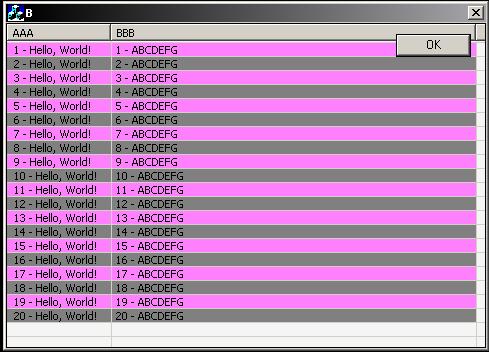
显示效果如下图所示:
http://blog.csdn.net/visualeleven/article/details/5948057
自绘CListCtrl类,重载虚函数DrawItem的更多相关文章
- C++ //多态 //静态多态:函数重载 和 运算符重载 属于静态多态 ,复用函数名 //动态多态:派生类和虚函数实现运行时多态
1 //多态 2 //静态多态:函数重载 和 运算符重载 属于静态多态 ,复用函数名 3 //动态多态:派生类和虚函数实现运行时多态 4 5 //静态多态和动态多态的区别 6 //静态多态的函数地址早 ...
- C++ 类中有虚函数(虚函数表)时 内存分布
虚函数表 对C++ 了解的人都应该知道虚函数(Virtual Function)是通过一张虚函数表(Virtual Table)来实现的.简称为V-Table.在这个表中,主是要一个类的虚函数的地址表 ...
- C++基类、派生类、虚函数的几个知识点
1.尽管派生类中含有基类继承来的成员,但派生类初始化这部分变量需要调用基类的构造函数. class A { private: int x; virtual void f(){cout<<& ...
- Unity3D中可重载虚函数的总结
重载虚函数:Unity3D中所有控制脚本的基类MonoBehaviour有一些虚函数用于绘制中事件的回调,也可以直接理解为事件函数,例如大家都很清楚的Start,Update等函数,以下做个总结. A ...
- C++ - 类的虚函数\虚继承所占的空间
类的虚函数\虚继承所占的空间 本文地址: http://blog.csdn.net/caroline_wendy/article/details/24236469 char占用一个字节, 但不满足4的 ...
- 简单的自绘CListBox,重载虚MeasureItem和DrawItem这两个虚函数
[cpp] view plain copy //例如CNewListBox继承自CListBox,重载虚MeasureItem和DrawItem这两个虚函数,代码如下: void CNewListBo ...
- C++ - 虚基类、虚函数与纯虚函数
虚基类 在说明其作用前先看一段代码 class A{public: int iValue;}; class B:public A{public: void bPrintf(){ ...
- C++学习笔记第三天:类、虚函数、双冒号
类 class Box { public: double length; // 盒子的长度 double breadth; // 盒子的宽度 double height; // 盒子的高度 }; 类成 ...
- 获取C++类成员虚函数地址
1.GCC平台 GCC平台获取C++成员虚函数地址可使用如下方法[1]: class Base{ int i; public: virtual void f1(){ cout<<" ...
随机推荐
- 利用FormsAuthentication.RedirectFromLoginPage进行身份验证
web.config中: <authentication>节 格式: <authentication mode="Forms"> //I.Window ...
- Windows Phone 8 实现列表触底加载
[背景] 很多时候在做WP开发的过程中会遇到数据需要分页获取,根据微软官方的推荐方式,建议实现为Market中类似的体验,即滑动到列表的底部的时候加载更多的数据. 这一需求在早起WP7.1时代实现起来 ...
- Struts2原码分析系列之一
struts2概述 在struts2的官网上有这么一句话,翻译为:Apache Struts2是一个为企业级应用打造的优秀的.可扩展的WEB框架,该框架旨在充分精简应用程序的开发周期,从而减少创建.发 ...
- Excel下用SQL语句实现AVEDEV函数功能
Excel下AVEDEV函数返回一组数据点到其算术平均值的绝对偏差的平均值. AVEDEV 是对一组数据中变化性的度量.最常见的应用就是统计平均分差. 但是如果在Excel中写SQL进行一些复杂的统计 ...
- union与union all的区别
首先说下union与join的区别 1.union是以行增加的方式,进行连接:join是以列增加的方式进行连接: 2.union连接查询的两个表的字段必须要一一对应,数目相等:join则没有要求,但是 ...
- Dijkstra--POJ 2502 Subway(求出所有路径再求最短路径)
题意: 你从家往学校赶,可以用步行和乘坐地铁这两种方式,步行速度为10km/h,乘坐地铁的速度为40KM/h.输入数据的第一行数据会给你起点和终点的x和y的坐标.然后会给你数目不超过200的双向地铁线 ...
- map初始化定时器
init_timer(); //各种定时器的初始化 void Map::init_timer() { //auto tf = GetPlug(TimerFactory); auto tf = m_sp ...
- ubuntu搭建lnmp
http://wiki.ubuntu.org.cn/Nginx#.E5.AE.89.E8.A3.85Php.E5.92.8Cmysql
- DevExpress12.2.4 GridControl相关技巧
1.DevExpress12.2.4中,设置GridControl的GridView为可编辑方法如下: gvMainControl.OptionsBehavior.Editable = true; 2 ...
- Java Api与HBase交互实例
import java.io.IOException; import org.apache.hadoop.conf.Configuration; import org.apache.hadoop.hb ...