
fdisk添加分区引起的Linux Error: 22: Invalid argument
在Linux服务器(虚拟机)上使用fdisk添加分区、格式化分区后,遇到了Linux Error: 22: Invalid argument错误,操作步骤如下所示
[root@oracle-server ~]# echo "- - -" > /sys/class/scsi_host/host0/scan
[root@oracle-server ~]# fdisk -l
Disk /dev/sda: 584.6 GB, 584646328320 bytes
255 heads, 63 sectors/track, 71079 cylinders
Units = cylinders of 16065 * 512 = 8225280 bytes
Device Boot Start End Blocks Id System
/dev/sda1 * 1 19441 156151808 83 Linux
Partition 1 does not end on cylinder boundary.
/dev/sda2 19441 44937 204796672 83 Linux
Partition 2 does not end on cylinder boundary.
/dev/sda3 44937 57685 102398336 83 Linux
Partition 3 does not end on cylinder boundary.
/dev/sda4 57685 71080 107595584 5 Extended
Partition 4 does not end on cylinder boundary.
/dev/sda5 57685 70433 102398336 83 Linux
/dev/sda6 70433 70949 4144768 82 Linux swap
/dev/sda7 70949 71080 1052288 83 Linux
Disk /dev/sdb: 146.1 GB, 146156158976 bytes
2 heads, 24 sectors/track, 5947109 cylinders
Units = cylinders of 48 * 512 = 24576 bytes
Device Boot Start End Blocks Id System
/dev/sdb1 3 5947064 142729472 83 Linux
Disk /dev/sdc: 107.3 GB, 107374182400 bytes
255 heads, 63 sectors/track, 13054 cylinders
Units = cylinders of 16065 * 512 = 8225280 bytes
Device Boot Start End Blocks Id System
/dev/sdc1 1 13054 104856223+ 83 Linux
Disk /dev/sdd: 85.8 GB, 85899345920 bytes
255 heads, 63 sectors/track, 10443 cylinders
Units = cylinders of 16065 * 512 = 8225280 bytes
Disk /dev/sdd doesn't contain a valid partition table
[root@oracle-server ~]# fdisk /dev/sdd
Device contains neither a valid DOS partition table, nor Sun, SGI or OSF disklabel
Building a new DOS disklabel. Changes will remain in memory only,
until you decide to write them. After that, of course, the previous
content won't be recoverable.
The number of cylinders for this disk is set to 10443.
There is nothing wrong with that, but this is larger than 1024,
and could in certain setups cause problems with:
1) software that runs at boot time (e.g., old versions of LILO)
2) booting and partitioning software from other OSs
(e.g., DOS FDISK, OS/2 FDISK)
Warning: invalid flag 0x0000 of partition table 4 will be corrected by w(rite)
Command (m for help): m
Command action
a toggle a bootable flag
b edit bsd disklabel
c toggle the dos compatibility flag
d delete a partition
l list known partition types
m print this menu
n add a new partition
o create a new empty DOS partition table
p print the partition table
q quit without saving changes
s create a new empty Sun disklabel
t change a partition's system id
u change display/entry units
v verify the partition table
w write table to disk and exit
x extra functionality (experts only)
Command (m for help): p
Disk /dev/sdd: 85.8 GB, 85899345920 bytes
255 heads, 63 sectors/track, 10443 cylinders
Units = cylinders of 16065 * 512 = 8225280 bytes
Device Boot Start End Blocks Id System
Command (m for help): n
Command action
e extended
p primary partition (1-4)
p
Partition number (1-4): 1
First cylinder (1-10443, default 1):
Using default value 1
Last cylinder or +size or +sizeM or +sizeK (1-10443, default 10443):
Using default value 10443
Command (m for help): w
The partition table has been altered!
Calling ioctl() to re-read partition table.
Syncing disks.
[root@oracle-server ~]# mkfs.ext3 /dev/sdd1
mke2fs 1.35 (28-Feb-2004)
Filesystem label=
OS type: Linux
Block size=4096 (log=2)
Fragment size=4096 (log=2)
10485760 inodes, 20970841 blocks
1048542 blocks (5.00%) reserved for the super user
First data block=0
Maximum filesystem blocks=20971520
640 block groups
32768 blocks per group, 32768 fragments per group
16384 inodes per group
Superblock backups stored on blocks:
32768, 98304, 163840, 229376, 294912, 819200, 884736, 1605632, 2654208,
4096000, 7962624, 11239424, 20480000
Writing inode tables: done
Creating journal (8192 blocks): done
Writing superblocks and filesystem accounting information: done
This filesystem will be automatically checked every 30 mounts or
180 days, whichever comes first. Use tune2fs -c or -i to override.
[root@oracle-server ~]# more /etc/fstab
# This file is edited by fstab-sync - see 'man fstab-sync' for details
LABEL=/1 / ext3 defaults 1 1
none /dev/pts devpts gid=5,mode=620 0 0
none /dev/shm tmpfs defaults 0 0
none /proc proc defaults 0 0
none /sys sysfs defaults 0 0
LABEL=/tmp /tmp ext3 defaults 1 2
LABEL=/u01 /u01 ext3 defaults 1 2
LABEL=/u02 /u02 ext3 defaults 1 2
LABEL=/u03 /u03 ext3 defaults 1 2
LABEL=SWAP-sda6 swap swap defaults 0 0
/dev/sdb1 /u03/flash_recovery_area ext3 defaults 1 2
/dev/sdc1 /u04 ext3 defaults 1 2
192.168.4.21:/volume1/NFSforLinux/7222 /mnt/nfsbak nfs defaults 0 0
/dev/hda /media/cdrecorder auto pamconsole,exec,noauto,managed 0 0
/dev/fd0 /media/floppy auto pamconsole,exec,noauto,managed 0 0
[root@oracle-server ~]# vi /etc/fstab
# This file is edited by fstab-sync - see 'man fstab-sync' for details
LABEL=/1 / ext3 defaults 1 1
none /dev/pts devpts gid=5,mode=620 0 0
none /dev/shm tmpfs defaults 0 0
none /proc proc defaults 0 0
none /sys sysfs defaults 0 0
LABEL=/tmp /tmp ext3 defaults 1 2
LABEL=/u01 /u01 ext3 defaults 1 2
LABEL=/u02 /u02 ext3 defaults 1 2
LABEL=/u03 /u03 ext3 defaults 1 2
LABEL=SWAP-sda6 swap swap defaults 0 0
/dev/sdb1 /u03/flash_recovery_area ext3 defaults 1 2
/dev/sdc1 /u04 ext3 defaults 1 2
/dev/sdd1 /u05 ext3 defaults 1 2
192.168.7.63:/volume1/NFSforLinux/7222 /mnt/nfsbak nfs defaults 0 0
/dev/hda /media/cdrecorder auto pamconsole,exec,noauto,managed 0 0
/dev/fd0 /media/floppy auto pamconsole,exec,noauto,managed 0 0
"/etc/fstab" 17L, 1285C written
[root@oracle-server ~]# mkdir /u05
[root@oracle-server ~]# mount -a
[root@oracle-server ~]# df -h
Filesystem Size Used Avail Use% Mounted on
/dev/sda1 147G 90G 51G 65% /
/dev/sda7 1012M 34M 927M 4% /tmp
/dev/sda5 97G 78G 14G 86% /u01
/dev/sda3 97G 77G 15G 85% /u02
/dev/sda2 193G 165G 18G 91% /u03
/dev/sdb1 134G 95G 33G 75% /u03/flash_recovery_area
/dev/sdc1 99G 66G 28G 71% /u04
192.168.7.63:/volume1/NFSforLinux/7222
2.7T 1.9T 839G 70% /mnt/nfsbak
/dev/sdd1 79G 89M 75G 1% /u05
[root@oracle-server ~]# chown -R oracle:oinstall /u05
[root@oracle-server ~]# chmod -R 775 /u05
[root@oracle-server ~]#
处理完成后,登录ORACLE数据库出现错误,检查告警日志,发现如下错误信息:
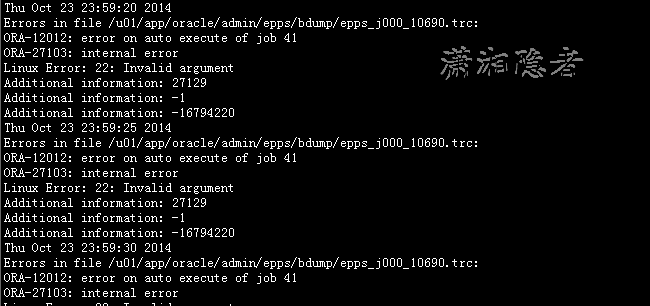
检查/var/log/messages ,没有发现什么错误信息

网上搜索到一篇资料(请见参考资料) 介绍了使用fdisk出现Linux Error: 22: Invalid argument的原因.
Run "kpartx -a" after FDISK is completed to add all partition mappings on the newly-created multipath device
当时没有使用这个命令去操作,因为不敢确认这个命令能否解决问题,于是重启Server来解决问题。下次遇到这种情况也可以使用kpartx命令试试。
kpartx -a /dev/sdd1
参考资料:
http://homyzh.blog.163.com/blog/static/31055124200982493216612/
fdisk添加分区引起的Linux Error: 22: Invalid argument的更多相关文章
- WARNING: Re-reading the partition table failed with error 22: Invalid argument
在划分磁盘分区时,遇到错误"WARNING: Re-reading the partition table failed with error 22: Invalid argument&qu ...
- RAC数据库的ORA-27123: Unable To Attach To Shared Memory Segment Linux-x86_64 Error: 22: Invalid argument
RAC数据库的 ORA-27123: Unable To Attach To Shared Memory Segment Linux-x86_64 Error: 22: Invalid argumen ...
- 【Selenium】【BugList9】windows环境,fp = open("./"+ time.strftime("%Y-%m-%d %H:%M:%S") + " result.html",'wb'),报错:OSError: [Errno 22] Invalid argument: './2018-09-05 10:29:32 result.html'
[代码] if __name__=="__main__": suite = unittest.TestSuite() suite.addTest(Baidu("test_ ...
- python使用open的OSError: [Errno 22] Invalid argument错误
这两天在写一个新闻类的spider时,遇到了OSError: [Errno 22] Invalid argument这个错误,苦恼的两天,无果.后来通过请教学长,发现原来是打开的文件名中含有一些系统的 ...
- Python创建文件报错OSError:[Errno 22] Invalid argument处理
问题: windows平台下使用python open函数w模式打开文件报错“OSError: [Errno 22] Invalid argument: '../news/“消费升维”成零售业新风口? ...
- 在使用python语言的open函数时,提示错误OSError: [Errno 22] Invalid argument: ‘文件路径’
如题,在使用python语言的open函数时,提示错误OSError: [Errno 22] Invalid argument: '文件路径',在查阅了大量资料后也得到了一些解决方案,但是这些解决方案 ...
- 启动docker容器时的Error response from daemon: devmapper: Error mounting: invalid argument. 错误解决
错误出现 在一台物理机重启后,以前创建的容器无法启动了.一启动,则会报出错误. [root@217TN1V ~]# docker start e7e Error response from daemo ...
- python OSError: [Errno 22] Invalid argument: 'D:\\crawle\x01.html1'
import urllib.request file = urllib.request.open("http://www.baidu.com") data = file.read( ...
- tensorboard OSError:[Errno 22] Invalid argument
哈哈 问题解决了.感谢大佬 Bill.Z 附上原文链接:https://blog.csdn.net/u013244846/article/details/88380860 解决方法:更改manager ...
随机推荐
- DOM 节点的克隆与删除
无奈的开头 关于DOM节点操作,如果仅仅是根据标准API来操作,那是最简单不过的了.但是现实中却哪有这么容易的问题让我们解决,其实不仅仅是节点的克隆与删除,节点的添加也是如此,而且添加节点需要考虑的情 ...
- ORA-00257 archiver error 处理思路
1.首先查下oerr给出的简要说明 2.查询V$RECOVERY_AREA_USAGE信息 3.根据实际空间剩余情况先适当增加归档目录的大小,保证先恢复业务 4.查看备份是否存在问题 1.首先查下oe ...
- String源码中的"avoid getfield opcode"
引言: 之前一篇文章梳理了String的不变性原则,还提到了一段源码中注释"avoid getfield opcode",当时通过查阅资料发现,这是为了防止 getfield(获取 ...
- 浅析String不可变性
在所有编程语言领域,我想字符串应该是地球上最常用的表达手段了吧. 在java的世界里,String是作为类出现的,核心的一个域就是一个char数组,内部就是通过维护一个不可变的char数组,来向外部输 ...
- 分享一个UI与业务逻辑分层的框架(二)
序言 第一篇讲解了UI与业务逻辑分层的框架(UIMediator)的使用.本篇将说明该框架的原理及代码实现. 整体结构 UI与后台类绑定主要分为UI输入->后台属性,后台属性-UI更新两部分,为 ...
- 使用css3新属性clip-path制作小图标
一般一个网页上面,或多或少都会用到一些小图标,展示这些小图标的方法有很多种.最简单的做法就是将UI图上面的每个小图标都保存为图片,一个小图标就一张图片.但这也是比较笨的方法,因为浏览器同一时间最多加载 ...
- 在C#中,Json的序列化和反序列化的几种方式总结
在这篇文章中,我们将会学到如何使用C#,来序列化对象成为Json格式的数据,以及如何反序列化Json数据到对象. 什么是JSON? JSON (JavaScript Object Notation) ...
- 设计模式(五)建造者模式(Builder Pattern)
一.引言 在软件系统中,有时需要创建一个复杂对象,并且这个复杂对象由其各部分子对象通过一定的步骤组合而成.例如一个采购系统中,如果需要采购员去采购一批电脑时,在这个实际需求中,电脑就是一个复杂的对象, ...
- 高效的SQLSERVER分页查询的几种示例分析
Sqlserver数据库分页查询一直是Sqlserver的短板,闲来无事,想出几种方法,假设有表ARTICLE,字段ID.YEAR...(其他省略),数据53210条(客户真实数据,量不大),分页查询 ...
- ASP.NET MVC 解析模板生成静态页一(RazorEngine)
简述 Razor是ASP.NET MVC 3中新加入的技术,以作为ASPX引擎的一个新的替代项.在早期的MVC版本中默认使用的是ASPX模板引擎,Razor在语法上的确不错,用起来非常方便,简洁的语法 ...