
Android音频录制MediaRecorder之简易的录音软件实现代码(转)
原文:http://www.jb51.net/article/46182.htm
Android音频录制MediaRecorder之简易的录音软件实现代码
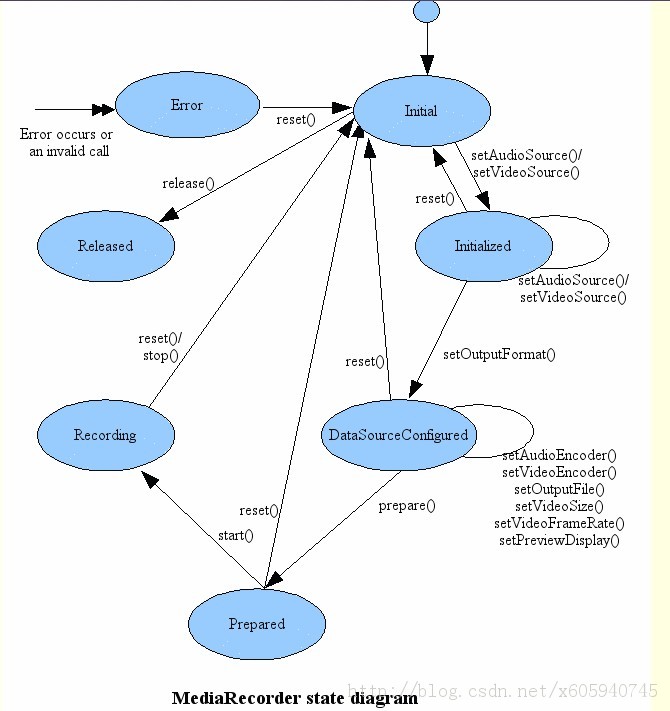
使用MediaRecorder的步骤:
1、创建MediaRecorder对象
2、调用MediRecorder对象的setAudioSource()方法设置声音的来源,一般传入MediaRecorder.MIC
3、调用MediaRecorder对象的setOutputFormat()设置所录制的音频文件的格式
4、调用MediaRecorder对象的setAudioRncoder()、setAudioEncodingBitRate(int bitRate)、setAudioSamlingRate(int SamplingRate)设置所录音的编码格式、编码位率、采样率等,
5、调用MediaRecorder对象的setOutputFile(String path)方法设置录制的音频文件的保存位置
6、调用MediaRecoder对象的Prepare()方法准备录制
7、调用MediaRecoder对象的start()方法开始录制
8、调用MediaRecoder对象的stop()方法停止录制,并调用release()方法释放资源
实例:

<uses-permission android:name="android.permission.WRITE_EXTERNAL_STORAGE"/>
<uses-permission android:name="android.permission.RECORD_AUDIO"/>
xmlns:tools="http://schemas.android.com/tools"
android:layout_width="match_parent"
android:layout_height="match_parent"
tools:context=".MainActivity" >
<LinearLayout
android:id="@+id/li1"
android:orientation="horizontal"
android:layout_width="match_parent"
android:layout_height="wrap_content">
<Button android:id="@+id/start"
android:layout_width="wrap_content"
android:layout_height="wrap_content"
android:layout_weight="1"
android:text="@string/start"/>
<Button android:id="@+id/stop"
android:layout_width="wrap_content"
android:layout_height="wrap_content"
android:layout_weight="1"
android:text="@string/stop"/>
</LinearLayout>
<ListView
android:id="@+id/list"
android:layout_below="@id/li1"
android:layout_width="match_parent"
android:layout_height="wrap_content"></ListView>
</RelativeLayout>
<LinearLayout xmlns:android="http://schemas.android.com/apk/res/android"
android:layout_width="match_parent"
android:layout_height="match_parent"
android:orientation="horizontal" >
<TextView
android:layout_width="wrap_content"
android:layout_height="wrap_content"
android:id="@+id/show_file_name" />
<Button
android:id="@+id/bt_list_play"
android:layout_width="wrap_content"
android:layout_height="wrap_content"
android:text="@string/play"/>
<Button android:id="@+id/bt_list_stop"
android:layout_width="wrap_content"
android:layout_height="wrap_content"
android:text="@string/list_stop"/>
</LinearLayout>
import java.io.File;
import java.io.IOException;
import java.text.SimpleDateFormat;
import android.app.Activity;
import android.app.AlertDialog;
import android.app.AlertDialog.Builder;
import android.app.Dialog;
import android.content.DialogInterface;
import android.media.MediaPlayer;
import android.media.MediaRecorder;
import android.os.Bundle;
import android.os.Environment;
import android.view.LayoutInflater;
import android.view.Menu;
import android.view.View;
import android.view.View.OnClickListener;
import android.view.ViewGroup;
import android.widget.BaseAdapter;
import android.widget.Button;
import android.widget.EditText;
import android.widget.ListView;
import android.widget.TextView;
public class MainActivity extends Activity implements OnClickListener {
private Button start;
private Button stop;
private ListView listView;
// 录音文件播放
private MediaPlayer myPlayer;
// 录音
private MediaRecorder myRecorder;
// 音频文件保存地址
private String path;
private String paths = path;
private File saveFilePath;
// 所录音的文件
String[] listFile = null;
ShowRecorderAdpter showRecord;
AlertDialog aler = null;
@Override
protected void onCreate(Bundle savedInstanceState) {
super.onCreate(savedInstanceState);
setContentView(R.layout.activity_main);
start = (Button) findViewById(R.id.start);
stop = (Button) findViewById(R.id.stop);
listView = (ListView) findViewById(R.id.list);
myPlayer = new MediaPlayer();
myRecorder = new MediaRecorder();
// 从麦克风源进行录音
myRecorder.setAudioSource(MediaRecorder.AudioSource.DEFAULT);
// 设置输出格式
myRecorder.setOutputFormat(MediaRecorder.OutputFormat.DEFAULT);
// 设置编码格式
myRecorder.setAudioEncoder(MediaRecorder.AudioEncoder.DEFAULT);
showRecord = new ShowRecorderAdpter();
if (Environment.getExternalStorageState().equals(
Environment.MEDIA_MOUNTED)) {
try {
path = Environment.getExternalStorageDirectory()
.getCanonicalPath().toString()
+ "/XIONGRECORDERS";
File files = new File(path);
if (!files.exists()) {
files.mkdir();
}
listFile = files.list();
} catch (IOException e) {
e.printStackTrace();
}
}
start.setOnClickListener(this);
stop.setOnClickListener(this);
if (listFile != null) {
listView.setAdapter(showRecord);
}
}
@Override
public boolean onCreateOptionsMenu(Menu menu) {
getMenuInflater().inflate(R.menu.main, menu);
return true;
}
class ShowRecorderAdpter extends BaseAdapter {
@Override
public int getCount() {
return listFile.length;
}
@Override
public Object getItem(int arg0) {
return arg0;
}
@Override
public long getItemId(int arg0) {
return arg0;
}
@Override
public View getView(final int postion, View arg1, ViewGroup arg2) {
View views = LayoutInflater.from(MainActivity.this).inflate(
R.layout.list_show_filerecorder, null);
TextView filename = (TextView) views
.findViewById(R.id.show_file_name);
Button plays = (Button) views.findViewById(R.id.bt_list_play);
Button stop = (Button) views.findViewById(R.id.bt_list_stop);
filename.setText(listFile[postion]);
// 播放录音
plays.setOnClickListener(new OnClickListener() {
@Override
public void onClick(View arg0) {
try {
myPlayer.reset();
myPlayer.setDataSource(path + "/" + listFile[postion]);
if (!myPlayer.isPlaying()) {
myPlayer.prepare();
myPlayer.start();
} else {
myPlayer.pause();
}
} catch (IOException e) {
e.printStackTrace();
}
}
});
// 停止播放
stop.setOnClickListener(new OnClickListener() {
@Override
public void onClick(View arg0) {
if (myPlayer.isPlaying()) {
myPlayer.stop();
}
}
});
return views;
}
}
@Override
public void onClick(View v) {
switch (v.getId()) {
case R.id.start:
final EditText filename = new EditText(this);
Builder alerBuidler = new Builder(this);
alerBuidler
.setTitle("请输入要保存的文件名")
.setView(filename)
.setPositiveButton("确定",
new DialogInterface.OnClickListener() {
@Override
public void onClick(DialogInterface dialog,
int which) {
String text = filename.getText().toString();
try {
paths = path
+ "/"
+ text
+ new SimpleDateFormat(
"yyyyMMddHHmmss").format(System
.currentTimeMillis())
+ ".amr";
saveFilePath = new File(paths);
myRecorder.setOutputFile(saveFilePath
.getAbsolutePath());
saveFilePath.createNewFile();
myRecorder.prepare();
// 开始录音
myRecorder.start();
start.setText("正在录音中。。");
start.setEnabled(false);
aler.dismiss();
// 重新读取 文件
File files = new File(path);
listFile = files.list();
// 刷新ListView
showRecord.notifyDataSetChanged();
} catch (Exception e) {
e.printStackTrace();
}
}
});
aler = alerBuidler.create();
aler.setCanceledOnTouchOutside(false);
aler.show();
break;
case R.id.stop:
if (saveFilePath.exists() && saveFilePath != null) {
myRecorder.stop();
myRecorder.release();
// 判断是否保存 如果不保存则删除
new AlertDialog.Builder(this)
.setTitle("是否保存该录音")
.setPositiveButton("确定", null)
.setNegativeButton("取消",
new DialogInterface.OnClickListener() {
@Override
public void onClick(DialogInterface dialog,
int which) {
saveFilePath.delete();
// 重新读取 文件
File files = new File(path);
listFile = files.list();
// 刷新ListView
showRecord.notifyDataSetChanged();
}
}).show();
}
start.setText("录音");
start.setEnabled(true);
default:
break;
}
}
@Override
protected void onDestroy() {
// 释放资源
if (myPlayer.isPlaying()) {
myPlayer.stop();
myPlayer.release();
}
myPlayer.release();
myRecorder.release();
super.onDestroy();
}
}
源码下载:http://xiazai.jb51.net/201401/yuanma/MediaRecorderTest(jb51.net).rar
Android音频录制MediaRecorder之简易的录音软件实现代码(转)的更多相关文章
- Android多媒体录制--MediaRecorder视频录制
Android使用MediaRecorder类进行视频的录制. 需要注意,使用MediaRecorder 录音录像 的设置代码步骤一定要按照API指定的顺序来设置,否则报错 步骤为: 1.设置视频源, ...
- Android音频输入通道的底层硬件和软件开发分析
Android潜在的发展音频输入通道的软硬件分析 我们都知道耳机Mic集成在一直的那种四段耳机Mic插头是Android设备上比較经常使用.可是也会有分开的情况,比較假设在普通的PC机中装Androi ...
- Android 开发 MediaRecorder音频录制
前言 MediaRecorder类是Android sdk提供的一个专门用于音视频录制,一般利用手机麦克风采集音频和摄像头采集图像.这个类是属于简单的音频录制类,录制音频简单容易但是对音频流的控制也比 ...
- Android音频处理——通过AudioRecord去保存PCM文件进行录制,播放,停止,删除功能
Android音频处理--通过AudioRecord去保存PCM文件进行录制,播放,停止,删除功能 音频这方面很博大精深,我这里肯定讲不了什么高级的东西,最多也只是一些基础类知识,首先,我们要介绍一下 ...
- Android 开发 AudioRecord音频录制
前言 Android SDK 提供了两套音频采集的API,分别是:MediaRecorder 和 AudioRecord,前者是一个更加上层一点的API,它可以直接把手机麦克风录入的音频数据进行编码压 ...
- Android OpenSL ES 开发:Android OpenSL 录制 PCM 音频数据
一.实现说明 OpenSL ES的录音要比播放简单一些,在创建好引擎后,再创建好录音接口基本就可以录音了.在这里我们做的是流式录音,所以需要用至少2个buffer来缓存录制好的PCM数据,这里我们可以 ...
- Android 中使用MediaRecorder进行录像详解(视频录制)
在这里给出自己的一个测试DEMO,里面注释很详细.简单的视频录制功能. package com.video; import java.io.IOException; import android.ap ...
- Android音频系统之音频框架
1.1 音频框架 转载请注明,From LXS, http://blog.csdn.net/uiop78uiop78/article/details/8796492 Android的音频系统在很长一段 ...
- Android || IOS录制mp3语音文件方法
Android Android Supported Media Formats : http://developer.android.com/guide/appendix/media-formats. ...
随机推荐
- Python实现将图片以二进制格式保存到MySQL数据库中,以及取出:
创建数据库表格式: CREATE TABLE photo ( photo_no int(6) unsigned NOT NULL auto_increment, image MEDIUMBLOB, P ...
- java8下 枚举 通用方法
在项目中经常用到枚举作为数据字典值和描述的相互转化. 用法如下: public enum CommunicationParamsCom { COM_1(1, "COM1"), CO ...
- CRT中国剩余定理 & Lucas卢卡斯定理
数论_CRT(中国剩余定理)& Lucas (卢卡斯定理) 前言 又是一脸懵逼的一天. 正文 按照道理来说,我们应该先做一个介绍. 中国剩余定理 中国剩余定理,Chinese Remainde ...
- 2、介绍在TensorFlow当中使用不同的方式创建张量tensor
import tensorflow as tf from tensorflow.python.framework import ops ops.reset_default_graph() #开始一个计 ...
- cent os 7.3修改mac地址方法
一.修改MAC地址方法 linux环境下: 需要用 #ifconfig eth0 down 先把网卡禁用 再用ifconfig eth0 hw ether 1234567890ab ...
- wordpress 上传图片出现权限或者http错误
首先上传图片的时候出现了 5.jpg 无法建立目录“wp-content/uploads”/2018/07.有没有上级目录的写权限? 然后啊,找方法啊 1.把var/www/wp-content/up ...
- scala安装此时不应有 \scala\bin\scala.bat
scala安装目录有空格导致的,不应该有空格
- 如何在CentOS 7上安装Apache
使用systemctl管理Apache服务 我们可以像任何其他系统单元一样管理Apache服务. 要停止Apache服务,请运行: sudo systemctl stop httpd 要再次启动,请键 ...
- 正则表达式regex回溯分析
正则表达式的回溯 现在我们来正式认识一下回溯.以字符串“abbc”为例,正则表达式为“ab{1,3}c”,再匹配的时候,a.b.b,匹配完成,这时候,正则表达式会继续用c和b进行比较,发现不符合,这时 ...
- 【代码学习】PYTHON 函数
一.定义函数 def 函数名(): 代码 二.函数调用 #定义函数 def printme(str): print str return #调用函数 printme("SQYY1" ...