
pypdf2:下载Americanlife网页生成pdf合并pdf并添加书签
初步熟悉
安装
##还需要安装 wkhtmltopdf

https://wkhtmltopdf.org/downloads.html

pip install  pypdf2
合并并添加书签
#!/usr/bin/env python3.5

# -*- coding: utf-8 -*-

# @Time    : 2019/12/1 下午3:42

# @Author  : yon

# @Email   : xxx@qq.com

# @File    : tt.py

import os , os.path

from PyPDF2 import PdfFileReader, PdfFileWriter

import time

# import glob

#

# def getFileName(filepath):

#     filelist = glob.glob(filepath + "*.pdf")

#     # print(filelist)

#     # return filelist

#     list_a = []

#     for i in filelist:

#         print(i[22:-1])

#         list_a.append(i[22:])

#     for ii in  sorted(list_a):

#         print(ii)

#

#

#

# getFileName("/home/yon/Desktop/pdf/")

pdffile = "/home/yon/Desktop/pdf/688:TheOutCrowd.pdf"

pdffile1 = "/home/yon/Desktop/pdf/652:ICECapades.pdf"

pdfreader = PdfFileReader(pdffile)

pdfreader1 = PdfFileReader(pdffile1)

numbber = pdfreader.getNumPages()

print(numbber)

bookmark = PdfFileWriter()

bookmark.appendPagesFromReader(pdfreader)

bookmark.appendPagesFromReader(pdfreader1)

bookmark.addBookmark("00test", 0)

bookmark.addBookmark("11test", 1)

bookmark.addBookmark("22test", 2)

bookmark.addBookmark("44test", 4)

bookmark.addBookmark("77test", 7)

bookmark.addBookmark("652:ICECapades", numbber)

bookmark.write(open("/home/yon/Desktop/1tttt.pdf", 'wb'))
注意:
在指定的页面添加书签时候要注意,PyPDF2中pdf的页面是从0开始的,即在序列0添加书签时会跳到首页,在n处添加书签时会跳转至n+1页。
PyPDF2使用说明
官网:
https://pythonhosted.org/PyPDF2/PdfFileWriter.html
The PdfFileReader Class
class PyPDF2.PdfFileReader(stream, strict=True, warndest=None, overwriteWarnings=True)
Initializes a PdfFileReader object. This operation can take some time, as the PDF stream’s cross-reference tables are read into memory.
参数说明:
Parameters:

        stream – A File object or an object that supports the standard read and seek methods similar to a File object. Could also be a string representing a path to a PDF file.

        流,一个文件对象或是类似文件对象的支持标准的读和搜索方法的一个对象,也可以是一个代表了pdf文件路径的字符串

        strict (bool) – Determines whether user should be warned of all problems and also causes some correctable problems to be fatal. Defaults to True.

        严格(bool类型)确定是否应警告用户所有问题,并会导致一些可纠正的问题致命

        warndest – Destination for logging warnings (defaults to sys.stderr).

        警告目的    警告日志的记录目的,默认为sys.stderr

        overwriteWarnings (bool) – Determines whether to override Python’s warnings.py module with a custom implementation (defaults to True).
一些方法:
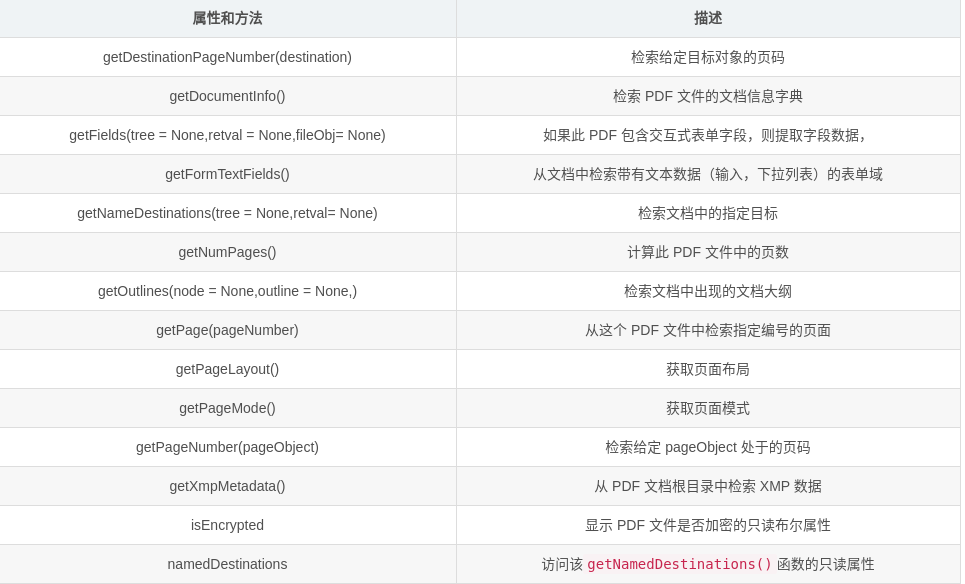
##decrypt(password)

When using an encrypted / secured PDF file with the PDF Standard encryption handler, this function will allow the file to be decrypted. It checks the given password against the document’s user password and owner password, and then stores the resulting decryption key if either password is correct.

It does not matter which password was matched. Both passwords provide the correct decryption key that will allow the document to be used with this library.

Parameters:	password (str) – The password to match.

Returns:	0 if the password failed, 1 if the password matched the user password, and 2 if the password matched the owner password.

Return type:	int

Raises NotImplementedError:

 	if document uses an unsupported encryption method.

##documentInfo

Read-only property that accesses the getDocumentInfo() function.

##getDestinationPageNumber(destination)

Retrieve page number of a given Destination object

Parameters:	destination (Destination) – The destination to get page number. Should be an instance of Destination

Returns:	the page number or -1 if page not found

Return type:	int

##getDocumentInfo()

Retrieves the PDF file’s document information dictionary, if it exists. Note that some PDF files use metadata streams instead of docinfo dictionaries, and these metadata streams will not be accessed by this function.

Returns:	the document information of this PDF file

Return type:	DocumentInformation or None if none exists.

##getFields(tree=None, retval=None, fileobj=None)

Extracts field data if this PDF contains interactive form fields. The tree and retval parameters are for recursive use.

Parameters:	fileobj – A file object (usually a text file) to write a report to on all interactive form fields found.

Returns:	A dictionary where each key is a field name, and each value is a Field object. By default, the mapping name is used for keys.

Return type:	dict, or None if form data could not be located.

##getFormTextFields()

Retrieves form fields from the document with textual data (inputs, dropdowns)

##getNamedDestinations(tree=None, retval=None)

Retrieves the named destinations present in the document.

Returns:	a dictionary which maps names to Destinations.

Return type:	dict

##getNumPages()

Calculates the number of pages in this PDF file.

Returns:	number of pages

Return type:	int

Raises PdfReadError:

 	if file is encrypted and restrictions prevent this action.

##getOutlines(node=None, outlines=None)

Retrieves the document outline present in the document.

Returns:	a nested list of Destinations.

##getPage(pageNumber)

Retrieves a page by number from this PDF file.

Parameters:	pageNumber (int) – The page number to retrieve (pages begin at zero)

Returns:	a PageObject instance.

Return type:	PageObject

##getPageLayout()

Get the page layout. See setPageLayout() for a description of valid layouts.

Returns:	Page layout currently being used.

Return type:	str, None if not specified

##getPageMode()

Get the page mode. See setPageMode() for a description of valid modes.

Returns:	Page mode currently being used.

Return type:	str, None if not specified

##getPageNumber(page)

Retrieve page number of a given PageObject

Parameters:	page (PageObject) – The page to get page number. Should be an instance of PageObject

Returns:	the page number or -1 if page not found

Return type:	int

##getXmpMetadata()

Retrieves XMP (Extensible Metadata Platform) data from the PDF document root.

Returns:	a XmpInformation instance that can be used to access XMP metadata from the document.

Return type:	XmpInformation or None if no metadata was found on the document root.

##isEncrypted

Read-only boolean property showing whether this PDF file is encrypted. Note that this property, if true, will remain true even after the decrypt() method is called.

##namedDestinations

Read-only property that accesses the getNamedDestinations() function.

##numPages

Read-only property that accesses the getNumPages() function.

##outlines

Read-only property that accesses the

getOutlines() function.

##pageLayout

Read-only property accessing the getPageLayout() method.

##pageMode

Read-only property accessing the getPageMode() method.

##pages

Read-only property that emulates a list based upon the getNumPages() and getPage() methods.

##xmpMetadata

Read-only property that accesses the getXmpMetadata() function
The PdfFileMerger Class
class PyPDF2.PdfFileMerger(strict=True)
参数说明
Initializes a PdfFileMerger object. PdfFileMerger merges multiple PDFs into a single PDF. It can concatenate, slice, insert, or any combination of the above.

See the functions merge() (or append()) and write() for usage information.

Parameters:	strict (bool) – Determines whether user should be warned of all problems and also causes some correctable problems to be fatal. Defaults to True.
方法和属性
##addBookmark(title, pagenum, parent=None)

Add a bookmark to this PDF file.

Parameters:

title (str) – Title to use for this bookmark.

pagenum (int) – Page number this bookmark will point to.

parent – A reference to a parent bookmark to create nested bookmarks.

##addMetadata(infos)

Add custom metadata to the output.

Parameters:	infos (dict) – a Python dictionary where each key is a field and each value is your new metadata. Example: {u'/Title': u'My title'}

##addNamedDestination(title, pagenum)

Add a destination to the output.

Parameters:

title (str) – Title to use

pagenum (int) – Page number this destination points at.

##append(fileobj, bookmark=None, pages=None, import_bookmarks=True)

Identical to the merge() method, but assumes you want to concatenate all pages onto the end of the file instead of specifying a position.

Parameters:

fileobj – A File Object or an object that supports the standard read and seek methods similar to a File Object. Could also be a string representing a path to a PDF file.

bookmark (str) – Optionally, you may specify a bookmark to be applied at the beginning of the included file by supplying the text of the bookmark.

pages – can be a Page Range or a (start, stop[, step]) tuple to merge only the specified range of pages from the source document into the output document.

import_bookmarks (bool) – You may prevent the source document’s bookmarks from being imported by specifying this as False.

##close()

Shuts all file descriptors (input and output) and clears all memory usage.

##merge(position, fileobj, bookmark=None, pages=None, import_bookmarks=True)

Merges the pages from the given file into the output file at the specified page number.

Parameters:

position (int) – The page number to insert this file. File will be inserted after the given number.

fileobj – A File Object or an object that supports the standard read and seek methods similar to a File Object. Could also be a string representing a path to a PDF file.

bookmark (str) – Optionally, you may specify a bookmark to be applied at the beginning of the included file by supplying the text of the bookmark.

pages – can be a Page Range or a (start, stop[, step]) tuple to merge only the specified range of pages from the source document into the output document.

import_bookmarks (bool) – You may prevent the source document’s bookmarks from being imported by specifying this as False.

##setPageLayout(layout)

Set the page layout

Parameters:	layout (str) – The page layout to be used

Valid layouts are:

/NoLayout	Layout explicitly not specified

/SinglePage	Show one page at a time

/OneColumn	Show one column at a time

/TwoColumnLeft	Show pages in two columns, odd-numbered pages on the left

/TwoColumnRight

 	Show pages in two columns, odd-numbered pages on the right

/TwoPageLeft	Show two pages at a time, odd-numbered pages on the left

/TwoPageRight	Show two pages at a time, odd-numbered pages on the right

##setPageMode(mode)

Set the page mode.

Parameters:	mode (str) – The page mode to use.

Valid modes are:

/UseNone	Do not show outlines or thumbnails panels

/UseOutlines	Show outlines (aka bookmarks) panel

/UseThumbs	Show page thumbnails panel

/FullScreen	Fullscreen view

/UseOC	Show Optional Content Group (OCG) panel

/UseAttachments

 	Show attachments panel

##write(fileobj)

Writes all data that has been merged to the given output file.

Parameters:	fileobj – Output file. Can be a filename or any kind of file-like object.
The PdfFileWriter Class
class PyPDF2.PdfFileWriter
This class supports writing PDF files out, given pages produced by another class (typically PdfFileReader)
类的属性和方法
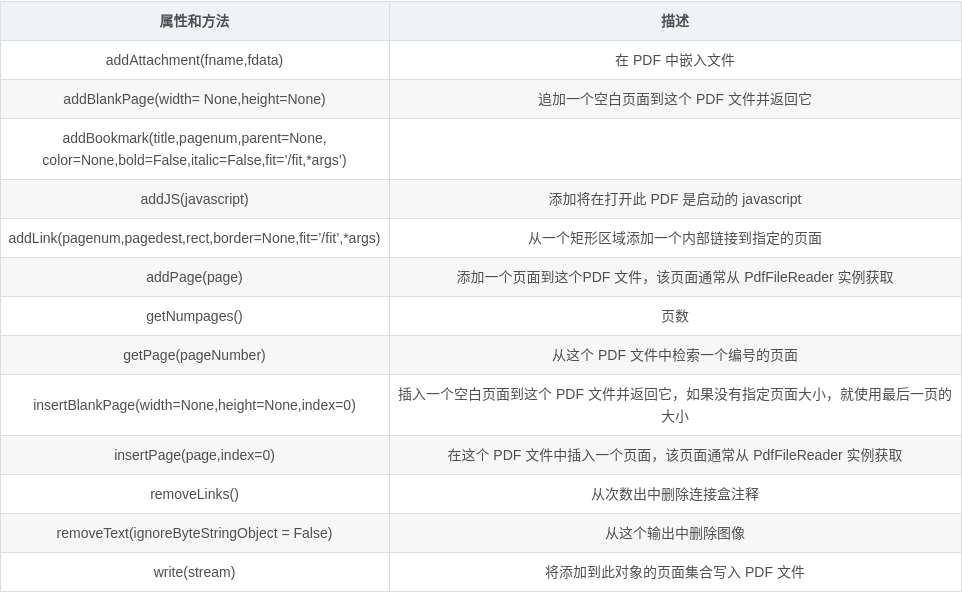
##addAttachment(fname, fdata)

	Embed a file inside the PDF.

	Parameters:

	fname (str) – The filename to display.

	fdata (str) – The data in the file.

	Reference: https://www.adobe.com/content/dam/Adobe/en/devnet/acrobat/pdfs/PDF32000_2008.pdf Section 7.11.3

##addBlankPage(width=None, height=None)

	Appends a blank page to this PDF file and returns it. If no page size is specified, use the size of the last page.

	Parameters:

	width (float) – The width of the new page expressed in default user space units.

	height (float) – The height of the new page expressed in default user space units.

	Returns:

	the newly appended page

	Return type:

	PageObject

	Raises PageSizeNotDefinedError:

	if width and height are not defined and previous page does not exist.

##addBookmark(title, pagenum, parent=None, color=None, bold=False, italic=False, fit='/Fit', *args)

	Add a bookmark to this PDF file.

	Parameters:

	title (str) – Title to use for this bookmark.

	pagenum (int) – Page number this bookmark will point to.

	parent – A reference to a parent bookmark to create nested bookmarks.

	color (tuple) – Color of the bookmark as a red, green, blue tuple from 0.0 to 1.0

	bold (bool) – Bookmark is bold

	italic (bool) – Bookmark is italic

	fit (str) – The fit of the destination page. See addLink() for details.

##addJS(javascript)

	Add Javascript which will launch upon opening this PDF.

	Parameters:	javascript (str) – Your Javascript.

	>>> output.addJS("this.print({bUI:true,bSilent:false,bShrinkToFit:true});")

	# Example: This will launch the print window when the PDF is opened.

##addLink(pagenum, pagedest, rect, border=None, fit='/Fit', *args)

	Add an internal link from a rectangular area to the specified page.

	Parameters:

	pagenum (int) – index of the page on which to place the link.

	pagedest (int) – index of the page to which the link should go.

	rect – RectangleObject or array of four integers specifying the clickable rectangular area [xLL, yLL, xUR, yUR], or string in the form "[ xLL yLL xUR yUR ]".

	border – if provided, an array describing border-drawing properties. See the PDF spec for details. No border will be drawn if this argument is omitted.

	fit (str) – Page fit or ‘zoom’ option (see below). Additional arguments may need to be supplied. Passing None will be read as a null value for that coordinate.

	Valid zoom arguments (see Table 8.2 of the PDF 1.7 reference for details):

	/Fit	No additional arguments

	/XYZ	[left] [top] [zoomFactor]

	/FitH	[top]

	/FitV	[left]

	/FitR	[left] [bottom] [right] [top]

	/FitB	No additional arguments

	/FitBH	[top]

	/FitBV	[left]

##addMetadata(infos)

	Add custom metadata to the output.

	Parameters:	infos (dict) – a Python dictionary where each key is a field and each value is your new metadata.

##addPage(page)

	Adds a page to this PDF file. The page is usually acquired from a PdfFileReader instance.

	Parameters:	page (PageObject) – The page to add to the document. Should be an instance of PageObject

##appendPagesFromReader(reader, after_page_append=None)

	Copy pages from reader to writer. Includes an optional callback parameter which is invoked after pages are appended to the writer.

	Parameters:	reader – a PdfFileReader object from which to copy page annotations to this writer object. The writer’s annots

	will then be updated :callback after_page_append (function): Callback function that is invoked after

	each page is appended to the writer. Callback signature:

	param writer_pageref (PDF page reference):

	 	Reference to the page appended to the writer.

##cloneDocumentFromReader(reader, after_page_append=None)

	Create a copy (clone) of a document from a PDF file reader

	Parameters:

	reader – PDF file reader instance from which the clone should be created.

	Callback after_page_append (function):

	Callback function that is invoked after each page is appended to the writer. Signature includes a reference to the appended page (delegates to appendPagesFromReader). Callback signature:

	param writer_pageref (PDF page reference):

	 	Reference to the page just appended to the document.

##cloneReaderDocumentRoot(reader)

	Copy the reader document root to the writer.

	Parameters:	reader – PdfFileReader from the document root should be copied.

	:callback after_page_append

##encrypt(user_pwd, owner_pwd=None, use_128bit=True)

	Encrypt this PDF file with the PDF Standard encryption handler.

	Parameters:

	user_pwd (str) – The “user password”, which allows for opening and reading the PDF file with the restrictions provided.

	owner_pwd (str) – The “owner password”, which allows for opening the PDF files without any restrictions. By default, the owner password is the same as the user password.

	use_128bit (bool) – flag as to whether to use 128bit encryption. When false, 40bit encryption will be used. By default, this flag is on.

##getNumPages()

	Returns:	the number of pages.

	Return type:	int

##getPage(pageNumber)

	Retrieves a page by number from this PDF file.

	Parameters:	pageNumber (int) – The page number to retrieve (pages begin at zero)

	Returns:	the page at the index given by pageNumber

	Return type:	PageObject

##getPageLayout()

	Get the page layout. See setPageLayout() for a description of valid layouts.

	Returns:	Page layout currently being used.

	Return type:	str, None if not specified

##getPageMode()

	Get the page mode. See setPageMode() for a description of valid modes.

	Returns:	Page mode currently being used.

	Return type:	str, None if not specified

##insertBlankPage(width=None, height=None, index=0)

	Inserts a blank page to this PDF file and returns it. If no page size is specified, use the size of the last page.

	Parameters:

	width (float) – The width of the new page expressed in default user space units.

	height (float) – The height of the new page expressed in default user space units.

	index (int) – Position to add the page.

	Returns:

	the newly appended page

	Return type:

	PageObject

	Raises PageSizeNotDefinedError:

	if width and height are not defined and previous page does not exist.

##insertPage(page, index=0)

	Insert a page in this PDF file. The page is usually acquired from a PdfFileReader instance.

Parameters:

	page (PageObject) – The page to add to the document. This argument should be an instance of PageObject.

	index (int) – Position at which the page will be inserted.

##pageLayout

	Read and write property accessing the getPageLayout() and setPageLayout() methods.

##pageMode

	Read and write property accessing the getPageMode() and setPageMode() methods.

##removeImages(ignoreByteStringObject=False)

	Removes images from this output.

	Parameters:	ignoreByteStringObject (bool) – optional parameter to ignore ByteString Objects.

##removeLinks()

	Removes links and annotations from this output.

##removeText(ignoreByteStringObject=False)

	Removes images from this output.

	Parameters:	ignoreByteStringObject (bool) – optional parameter to ignore ByteString Objects.

##setPageLayout(layout)

	Set the page layout

	Parameters:	layout (str) – The page layout to be used

	Valid layouts are:

	/NoLayout	Layout explicitly not specified

	/SinglePage	Show one page at a time

	/OneColumn	Show one column at a time

	/TwoColumnLeft	Show pages in two columns, odd-numbered pages on the left

	/TwoColumnRight

	 	Show pages in two columns, odd-numbered pages on the right

	/TwoPageLeft	Show two pages at a time, odd-numbered pages on the left

	/TwoPageRight	Show two pages at a time, odd-numbered pages on the right

##setPageMode(mode)

	Set the page mode.

	Parameters:	mode (str) – The page mode to use.

	Valid modes are:

	/UseNone	Do not show outlines or thumbnails panels

	/UseOutlines	Show outlines (aka bookmarks) panel

	/UseThumbs	Show page thumbnails panel

	/FullScreen	Fullscreen view

	/UseOC	Show Optional Content Group (OCG) panel

	/UseAttachments

	 	Show attachments panel

##updatePageFormFieldValues(page, fields)

	Update the form field values for a given page from a fields dictionary. Copy field texts and values from fields to page.

	Parameters:

	page – Page reference from PDF writer where the annotations and field data will be updated.

	fields – a Python dictionary of field names (/T) and text values (/V)

##write(stream)

	Writes the collection of pages added to this object out as a PDF file.

	Parameters:	stream – An object to write the file to. The object must support the write method and the tell method, similar to a file object.
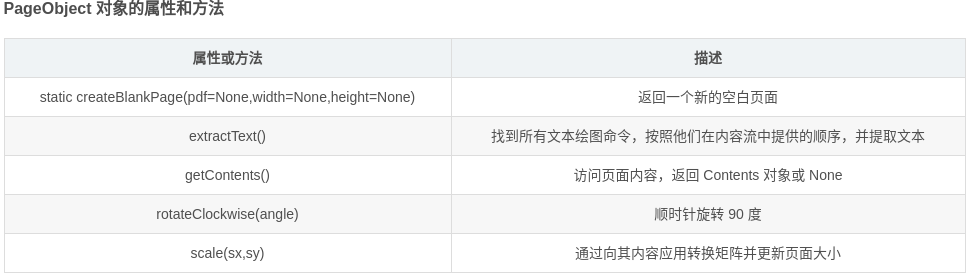
PageObject
PageObject(pdf=None,indirectRef=None)
此类表示 PDF 文件中的单个页面,通常这个对象是通过访问 PdfFileReader 对象的 getPage() 方法来得到的,也可以使用 createBlankPage() 静态方法创建一个空的页面。
参数:
pdf : 页面所属的 PDF 文件。
indirectRef:将源对象的原始间接引用存储在其源 PDF 中
def getPdfContent(filename):

    pdf = PdfFileReader(open(filename, "rb"))

    content = ""

    for i in range(0, pdf.getNumPages()):

        pageObj = pdf.getPage(i)

        extractedText = pageObj.extractText()

        content += extractedText + "\n"

        # return content.encode("ascii", "ignore")

    return content
实例
通过网页生成PDF
#!/usr/bin/env python3.5

# -*- coding: utf-8 -*-

# @Time    : 2019/11/18 下午10:48

# @Author  : yon

# @Email   : 2012@qq.com

# @File    : day1.py

import os

import re

import time

import logging

import pdfkit

from bs4 import BeautifulSoup

import requests

def gethtml(url):

    targeturl = url

    filepath = '/home/yon/Desktop/pdf/'

    headers = {

        # 'Accept': 'application/json, text/javascript, */*; q=0.01',

        'Accept': '*/*',

        'Accept-Language': 'zh-CN,zh;q=0.9,en;q=0.8,en-US;q=0.7',

        'Cache-Control': 'no-cache',

        'accept-encoding': 'gzip, deflate, br',

        'User-Agent': 'Mozilla/5.0 (X11; Linux x86_64) AppleWebKit/537.36 (KHTML, like Gecko) Chrome/78.0.3904.97 Safari/537.36',

        'Referer': 'https://www.google.com/'

    }

    resp = requests.get(targeturl, headers=headers)

    soup = BeautifulSoup(resp.content, "html.parser")

    txt = soup.find("article")

    title = filepath + txt.h1.text.replace(" ", "") + ".pdf"

    # print(title)

    pdfkit.from_string(str(txt), title)

if __name__  == '__main__':

    # gethtml("https://www.thisamericanlife.org/664/transcript")

    for number in range(665, 687):

        urltoget = "https://www.thisamericanlife.org/" + str(number) + "/transcript"

        gethtml(urltoget)

        time.sleep(10)
合并pdf并添加书签
import os , os.path

from PyPDF2 import PdfFileReader, PdfFileWriter

import time

import glob

def getFileName(filepath):

    filelist = glob.glob(filepath + "*.pdf")

    return sorted(filelist)

    # for i in sorted(filelist):

    #     print(i)

getFileName("/home/yon/Desktop/pdf/")

def meragePDF(filepath, outfile):

    output = PdfFileWriter()

    outpages = 0

    n = len(filepath)

    pdflist = getFileName(filepath)

    for earchfile in pdflist:

        print("adding  %s" %earchfile )

        try:

            inputpdf = PdfFileReader(earchfile)

            pageCount = inputpdf.getNumPages()

            outpages += pageCount

            print("%s has %d" % (earchfile, pageCount))

            output.appendPagesFromReader(inputpdf)

            output.addBookmark(title=earchfile[n:-1], pagenum=outpages - pageCount)

        except:

            print("error  %s" %earchfile)

    print("All  pages number is: " + str(outpages))

    outfile = filepath + outfile

    output.write(open(outfile, 'wb'))

if __name__ == "__main__":

    startime = time.time()

    filedir = "/home/yon/Desktop/pdf/"

    outfile = u'ttttttt.pdf'

    meragePDF(filedir, outfile)

    endtime = time.time()

    print("总用时: %.4f s" % (endtime - startime))
pypdf2:下载Americanlife网页生成pdf合并pdf并添加书签的更多相关文章
- Aspose.Pdf合并PDF文件
使用Aspose.Pdf类库,有很多种方法可以合并PDF文件,这里简单介绍小生见到的几种: Doucment.Pages.Add PdfFileEditor.Append PdfFileEditor. ...
- 网页批量打印成PDF,并按条件合并成大PDF、生成页码
题记:因为老板要求将过去一年内系统中的订单合同内容进行打印,并按月进行整理成纸质文件.合同在系统(web系统)中以html形式显示,打印单份都是在网页中右键打印,订单量上千份,每笔订单有两份合同,如果 ...
- 实践指南-网页生成PDF
一.背景 开发工作中,需要实现网页生成 PDF 的功能,生成的 PDF 需上传至服务端,将 PDF 地址作为参数请求外部接口,这个转换过程及转换后的 PDF 不需要在前端展示给用户. 二.技术选型 该 ...
- netcore3.1 + vue (前后端分离)生成PDF(多pdf合并)返回前端打印
1.使用Adobe Acrobat XI Pro编辑pdf模板 2.公共类代码 3.service层调用 4.Controller层 5.前端(Vue) 因为print.js不支持宋体,所以打算用后台 ...
- 使用PyPdf2合并PDF文件(没有空白、报错)
使用PyPdf2合并PDF文件(没有空白.报错) 对于合并之后pdf空白,或者出现 'latin-1' codec can't encode characters in position 8-11: ...
- java合并pdf
一.开发准备 下载pdfbox-app-1.7.1.jar包;下载地址:http://download.csdn.net/detail/yanning1314/4852276 二.简单小例子 在开发中 ...
- PHP使用FPDF pdf添加水印中文乱码问题 pdf合并版本问题
---恢复内容开始--- require_once('../fpdf/fpdf.php');require_once('../fpdi/fpdi.php'); 使用此插件 pdf 合并 并添加水印 期 ...
- Linux下分割、合并PDF(pdftk),用于Linux系统的6款最佳PDF页面裁剪工具
Linux下分割.合并PDF(pdftk),用于Linux系统的6款最佳PDF页面裁剪工具 Linux下分割.合并PDF(pdftk) pdftk http://www.pdflabs.com/doc ...
- 使用Python批量合并PDF文件(带书签功能)
网上找了几个合并pdf的软件,发现不是很好用,一般都没有添加书签的功能. 又去找了下python合并pdf的脚本,发现也没有添加书签的功能的. 于是自己动手编写了一个小工具,使用了PyPDF2. 下面 ...
随机推荐
- Win7 Eclipse 搭建spark java1.8编译环境,JavaRDD的helloworld例子
[学习笔记] Win7 Eclipse 搭建spark java1.8编译环境,JavaRDD的helloworld例子: 在eclipse oxygen上创建一个普通的java项目,然后把spark ...
- springboot问题
1.导入数据库jar包后,配置好,发现报错 数据库连接不成功 加上@SpringBootApplication(exclude = DataSourceAutoConfiguration.class ...
- Ural 1298 Knight 题解
目录 Ural 1298 Knight 题解 题意 题解 程序 Ural 1298 Knight 题解 题意 给定一个\(n\times n(1\le n\le8)\)的国际象棋棋盘和一个骑士(基本上 ...
- Pots(POJ-3414)【BFS】
题意:有两个有着固定容量的茶壶,初始时都为空,要求用FILL,POUR,DROP三种操作来准确地得到C值,输出最少次数及操作方案. 思路:比赛的时候真是脑子不好使,根本没想到是搜索,看了别人的题解用搜 ...
- POJ 1015 Jury Compromise (记录路径的背包问题)
(点击此处查看原题) 题意 为了审判某一个人,需要在n个人当中选出m个人组成陪审团,n个人中每个人都有作为起诉方的价值p和作为辩护方的价值d,为了保证公平性,要求m个人作为起诉方的价值之和P和作为辩护 ...
- # 滚动Hash
滚动Hash 假设字符串\(C=c_1*c_2*...c_m\),定义Hash函数\(H(C)=(C_1*b^{m-1}+C_2*b^{m-2}+...C_m*b^{0})mod\; h\) 从k开始 ...
- Java手写简单HashMap一(包括增加,查找,toString,泛型)
@Java 300 学习总结 HashMap底层采用实现采用了哈希表,结合了"数组和链表". 原理如图 一.定义HashMap类. 首先需要定义一个节点来存储数据,构成链表结构. ...
- RSA加密,以及证书加密
简单的加密:https://blog.csdn.net/qq_32523587/article/details/79092364 生成证书:https://blog.csdn.net/u0121916 ...
- 牛客 197E 01串
大意: 给定01串, 单点修改, 询问给定区间$[l,r]$, 假设$[l,r]$从左往右得到的二进制数为$x$, 每次操作增加或减少2的幂, 求最少操作数使得$x$为0. 线段树维护2*2矩阵表示低 ...
- MySQL 聚合函数(二)Group By的修饰符——ROLLUP
原文为MySQL 5.7 官方手册:12.20.2 GROUP BY Modifiers 一.ROLLUP 修饰符的意义 GROUP BY子句允许添加WITH ROLLUP修饰符,该修饰符可以对分组后 ...