
jQuery toggleClass 源码解读
    toggleClass: function( value, stateVal ) {

        var type = typeof value;//值类型

        if ( typeof stateVal === "boolean" && type === "string" ) {//如果第二个参数为bool值

            return stateVal ? this.addClass( value ) : this.removeClass( value );//如果第二个参为true,添加class,否则移除class

        }

        if ( jQuery.isFunction( value ) ) {//如果第一个参数是函数

            return this.each(function( i ) {

                jQuery( this ).toggleClass( value.call(this, i, this.className, stateVal), stateVal );

            });

        }

        return this.each(function() {

            if ( type === "string" ) {

                // toggle individual class names

                var className,

                    i = 0,

                    self = jQuery( this ),

                    classNames = value.match( rnotwhite ) || [];//将按空格分隔的className分割成数组

                while ( (className = classNames[ i++ ]) ) {//遍历数组

                    // check each className given, space separated list

                    if ( self.hasClass( className ) ) {

                        self.removeClass( className );

                    } else {

                        self.addClass( className );

                    }

                }

            // Toggle whole class name 如果没有传入第一个参数或者第一个参数是undefined或者第一个参数是bool值

            } else if ( type === strundefined || type === "boolean" ) {

                if ( this.className ) {

                    // store className if set

                    data_priv.set( this, "__className__", this.className );

                }

                // If the element has a class name or if we're passed "false",

                // then remove the whole classname (if there was one, the above saved it).

                // Otherwise bring back whatever was previously saved (if anything),

                // falling back to the empty string if nothing was stored.

                this.className = this.className || value === false ? "" : data_priv.get( this, "__className__" ) || "";

            }

        });

    }
前面几种情况都很好理解,最后一种$("#xxx").toggleClass()则用到了data_priv对象,因为它需要将移除的className缓存起来。
data_priv是jQuery内部的缓存对象,在初始化时,它会生成一个空的cache对象用于缓存数据,还有根据jQuery.expando生成它自身的expando,此外,它还有一些方法
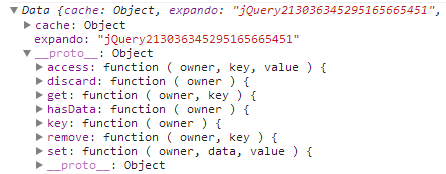
在调用data_priv.set()时,会首先调用data_priv.key(),因为它会在elem上通过defineProperties()为elem添加一个expano的值
比如: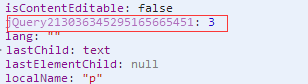
之后data_priv.set中就可以在data_priv.cache中存储值:
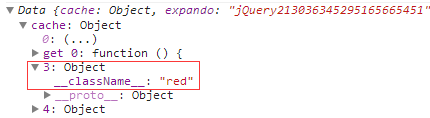
在调用data_priv.get()时,首先也是调用data_priv.key()方法,用它来返回elem中expando的值,也就是cache中对应的键,然后就能找到存储的值了。
data_priv的源码如下:
function Data() {

    // Support: Android<4,

    // Old WebKit does not have Object.preventExtensions/freeze method,

    // return new empty object instead with no [[set]] accessor

    Object.defineProperty( this.cache = {}, 0, {//初始化定义this.cache为{}

        get: function() {

            return {};

        }

    });

    this.expando = jQuery.expando + Data.uid++;//jQuery21301509336824528871

}

Data.uid = 1;

Data.accepts = jQuery.acceptData;

Data.prototype = {

    key: function( owner ) {

        // We can accept data for non-element nodes in modern browsers,

        // but we should not, see #8335.

        // Always return the key for a frozen object.

        if ( !Data.accepts( owner ) ) {

            return 0;

        }

        var descriptor = {},

            // Check if the owner object already has a cache key

             unlock = owner[ this.expando ];

        // If not, create one

        if ( !unlock ) {

            unlock = Data.uid++;//3

            // Secure it in a non-enumerable, non-writable property

            try {

                descriptor[ this.expando ] = { value: unlock };

                Object.defineProperties( owner, descriptor );

                //console.log(owner[this.expando]);//3

            // Support: Android<4

            // Fallback to a less secure definition

            } catch ( e ) {

                descriptor[ this.expando ] = unlock;

                jQuery.extend( owner, descriptor );

            }

        }

        // Ensure the cache object

        if ( !this.cache[ unlock ] ) {//undefined

            this.cache[ unlock ] = {};

        }

        return unlock;//

    },

    set: function( owner, data, value ) {

        var prop,

            // There may be an unlock assigned to this node,

            // if there is no entry for this "owner", create one inline

            // and set the unlock as though an owner entry had always existed

            unlock = this.key( owner ),//3

            cache = this.cache[ unlock ];//{}

        // Handle: [ owner, key, value ] args

        if ( typeof data === "string" ) {

            cache[ data ] = value;

        // Handle: [ owner, { properties } ] args

        } else {

            // Fresh assignments by object are shallow copied

            if ( jQuery.isEmptyObject( cache ) ) {

                jQuery.extend( this.cache[ unlock ], data );

            // Otherwise, copy the properties one-by-one to the cache object

            } else {

                for ( prop in data ) {

                    cache[ prop ] = data[ prop ];

                }

            }

        }

        return cache;

    },

    get: function( owner, key ) {

        // Either a valid cache is found, or will be created.

        // New caches will be created and the unlock returned,

        // allowing direct access to the newly created

        // empty data object. A valid owner object must be provided.

        var cache = this.cache[ this.key( owner ) ];

        return key === undefined ?

            cache : cache[ key ];

    },

    access: function( owner, key, value ) {

        var stored;

        // In cases where either:

        //

        //   1. No key was specified

        //   2. A string key was specified, but no value provided

        //

        // Take the "read" path and allow the get method to determine

        // which value to return, respectively either:

        //

        //   1. The entire cache object

        //   2. The data stored at the key

        //

        if ( key === undefined ||

                ((key && typeof key === "string") && value === undefined) ) {

            stored = this.get( owner, key );

            return stored !== undefined ?

                stored : this.get( owner, jQuery.camelCase(key) );

        }

        // [*]When the key is not a string, or both a key and value

        // are specified, set or extend (existing objects) with either:

        //

        //   1. An object of properties

        //   2. A key and value

        //

        this.set( owner, key, value );

        // Since the "set" path can have two possible entry points

        // return the expected data based on which path was taken[*]

        return value !== undefined ? value : key;

    },

    remove: function( owner, key ) {

        var i, name, camel,

            unlock = this.key( owner ),

            cache = this.cache[ unlock ];

        if ( key === undefined ) {

            this.cache[ unlock ] = {};

        } else {

            // Support array or space separated string of keys

            if ( jQuery.isArray( key ) ) {

                // If "name" is an array of keys...

                // When data is initially created, via ("key", "val") signature,

                // keys will be converted to camelCase.

                // Since there is no way to tell _how_ a key was added, remove

                // both plain key and camelCase key. #12786

                // This will only penalize the array argument path.

                name = key.concat( key.map( jQuery.camelCase ) );

            } else {

                camel = jQuery.camelCase( key );

                // Try the string as a key before any manipulation

                if ( key in cache ) {

                    name = [ key, camel ];

                } else {

                    // If a key with the spaces exists, use it.

                    // Otherwise, create an array by matching non-whitespace

                    name = camel;

                    name = name in cache ?

                        [ name ] : ( name.match( rnotwhite ) || [] );

                }

            }

            i = name.length;

            while ( i-- ) {

                delete cache[ name[ i ] ];

            }

        }

    },

    hasData: function( owner ) {

        return !jQuery.isEmptyObject(

            this.cache[ owner[ this.expando ] ] || {}

        );

    },

    discard: function( owner ) {

        if ( owner[ this.expando ] ) {

            delete this.cache[ owner[ this.expando ] ];

        }

    }

};

var data_priv = new Data();

var data_user = new Data();
jQuery toggleClass 源码解读的更多相关文章
- jQuery.Callbacks 源码解读二
一.参数标记 /* * once: 确保回调列表仅只fire一次 * unique: 在执行add操作中,确保回调列表中不存在重复的回调 * stopOnFalse: 当执行回调返回值为false,则 ...
- jQuery attr() 源码解读
我们知道,$().attr()实质上是内部调用了jQuery.access方法,在调用时jQuery.attr作为回调传入.在通过种种判断(参看jQuery.access()方法)之后,取值和赋值最后 ...
- jquery.fileupload源码解读笔记
基础编程风格 新建 test.html 和 test.js和 main.js和 无论哪种顺序 <body> <script src="/Sandeep/js/jquery ...
- jQuery.extend()源码解读
// extend方法为jQuery对象和init对象的prototype扩展方法// 同时具有独立的扩展普通对象的功能jQuery.extend = jQuery.fn.extend = funct ...
- jQuery框架源码解读
1.jQuery 1.9.1 parseJSON: function( data ) { // Attempt to parse using the native JSON parser first ...
- jQuery position() 源码解读
position的代码比较简单... position: function() { if ( !this[ 0 ] ) { return; } var offsetParent, offset, el ...
- jquery offsetParent()源码解读
offsetParent: function() { return this.map(function() { var offsetParent = this.offsetParent || docE ...
- jQuery addClass() 源码解读
addClass: function( value ) { var classes, elem, cur, clazz, j, i = 0, len = this.length, proceed = ...
- jQuery removeAttr() 源码解读
removeAttr比attr的代码要简单很多~~~ removeAttr: function( name ) { return this.each(function() { jQuery.remov ...
随机推荐
- Java 出现“Illegal key size”错误的解决方案
用AES加密时出现"java.security.InvalidKeyException: Illegal key size"异常. 如果密钥大于128, 会抛出上述异常.因为密钥长 ...
- Linux常用命令之scp
目录 1.拷贝远程文件到本地 2.拷贝远程文件夹到本地 3.拷贝本地文件到远程 4.拷贝本地文件夹到远程 1.拷贝远程文件到本地 scp root@101.132.169.194:/home/wwwr ...
- Telnet连接远程服务器
使用Telnet远程连接服务器端 现在大多数人使用win7系统.在win7系统中默认已经安装好了telnet服务,我们只需要从服务中将其打开即可, 步骤在首先打开控制面板-->卸载程序--> ...
- 更改Windows的“视频”“图片”“”下载“文档”“音乐”“桌面”的默认路径
右键-->属性
- 如何查看智能手机的IP地址
1. 外网IP IP地址可简单分为两类.外网IP或称公网IP是用来在Internet上唯一标识你的设备的.如果你通过GPRS或者3G技术接入互联网的话(通过运营商网络),那么你也可以通过下面的方 ...
- python 基础之第十天(闭包,装饰器,生成器,tarfile与hashlib模块使用)
局部变量与全局变量 局部变量:在函数里面定义的,只有当函数活动时才生效 全局变量:不在函数里面的 In [1]: x=10 In [2]: def bar(): ...: x=20 ...: prin ...
- Java的Fork/Join任务,你写对了吗?
当我们需要执行大量的小任务时,有经验的Java开发人员都会采用线程池来高效执行这些小任务.然而,有一种任务,例如,对超过1000万个元素的数组进行排序,这种任务本身可以并发执行,但如何拆解成小任务需要 ...
- Json 不同语言的使用
Javascript: 1.使用eval var parse_json_by_eval = function(str){ return eval('('+str+')'); } var value = ...
- JavaScript-Tool-导向:wizard-un
ylbtech-JavaScript-Tooll-导向:wizard 1.返回顶部 2.返回顶部 3.返回顶部 4.返回顶部 5.返回顶部 6.返回顶部 作者:ylbtec ...
- 【旧文章搬运】关于NtUserBuildHwndList的一点记录~
原文发表于百度空间,2011-04-07========================================================================== 该函数与r ...