
Latex algorithm
方式一
需要包含的
|
\usepackage[noend]{algpseudocode} \usepackage{algorithmicx,algorithm} |
源码
| \begin{algorithm}[t] \caption{algorithm caption} %算法的名字 \hspace*{0.02in} {\bf Input:} %算法的输入, \hspace*{0.02in}用来控制位置,同时利用 \\ 进行换行 input parameters A, B, C\\ \hspace*{0.02in} {\bf Output:} %算法的结果输出 output result \begin{algorithmic}[1] \State some description % \State 后写一般语句 \For{condition} % For 语句,需要和EndFor对应 \State ... \If{condition} % If 语句,需要和EndIf对应 \State ... \Else \State ... \EndIf \EndFor \While{condition} % While语句,需要和EndWhile对应 \State ... \EndWhile \State \Return result \end{algorithmic} \end{algorithm} |
结果截图
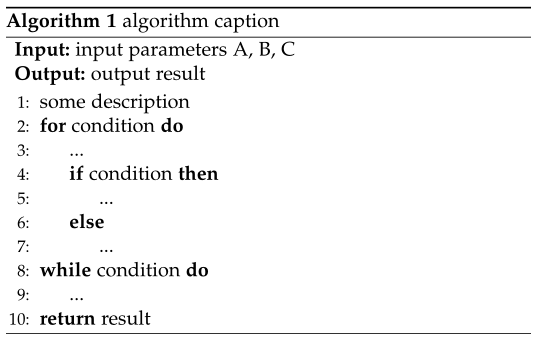
注意
1. 关键字的大小写问题,否则会出现 Undefined control sequence.
2. 控制流要前后对应。如果有 While,但没有 EndWhile,否则会出现 Some blocks are not closed。
方式二
需要包含的
|
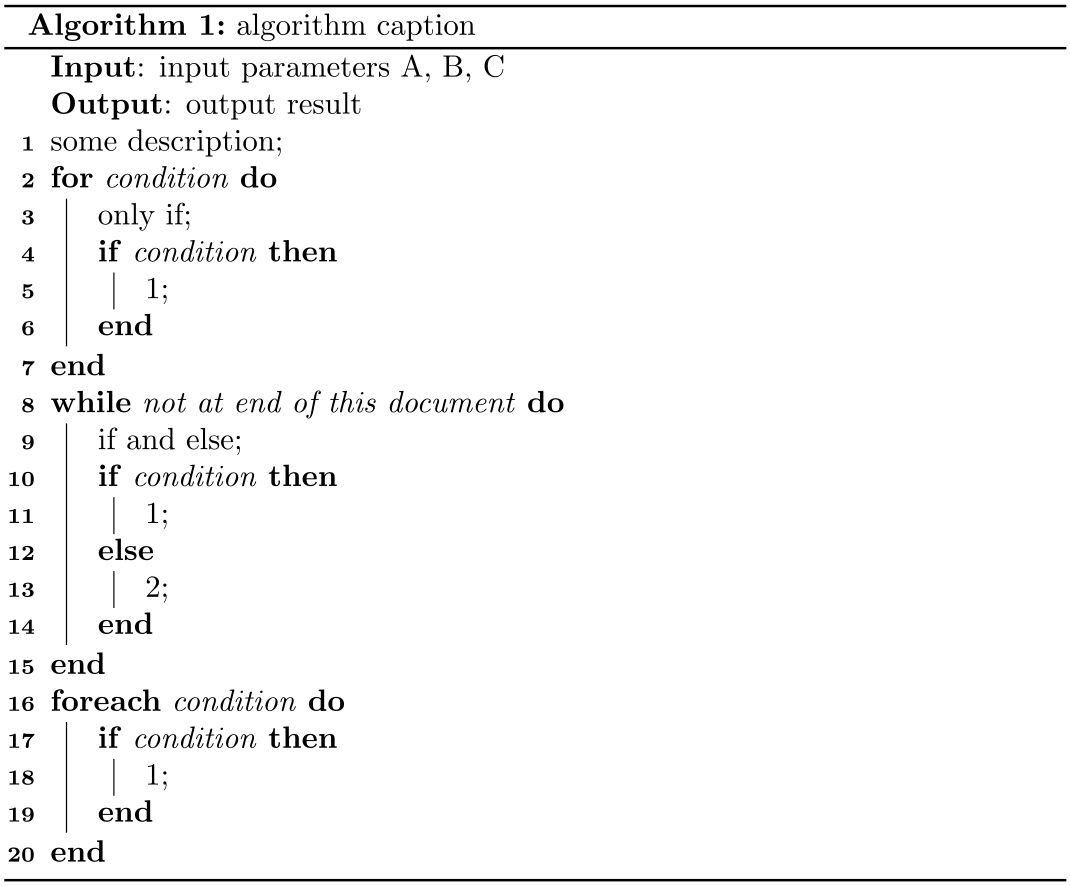
\usepackage[ruled]{algorithm2e} |
源码
|
\begin{algorithm}[H] |
结果截图
方式三
需要包含的
|
\usepackage[ruled,vlined]{algorithm2e} |
源码
同方式二
结果截图

如果有帮助,顺手点个赞哦!我会好好努力的!!
Latex algorithm的更多相关文章
- algorithm.sty not found error in LaTeX 解决方法
参考: algorithm.sty not found error in LaTeX algorithm.sty not found error in LaTeX 解决方法 错误日志: LaTeX E ...
- Latex使用:在latex中添加算法模块
在Miktex下有三个latex algorithm包,分别为:algorithm,algorithmic,algorithm2e三个,其中algorithm,algorithmic经常成套使用: l ...
- [LaTeX] box algorithm adjustbox subfigures, textwidth
algorithm \begin{figure}[!t] \vspace*{\dimexpr\fboxsep+\fboxrule} \fbox{% \parbox{\dimexpr\linewidth ...
- Latex 算法Algorithm
在计算机科学当中,论文当中经常需要排版算法.相信大家在读论文中也看见了很多排版精美的算法.本文就通过示例来简要介绍一下 algorithms 束的用法.该束主要提供了两个宏包,包含两种进行算法排版的环 ...
- TeXstudio 编写Latex论文的若干问题
TeXstudio 编写Latex论文的若干问题解决方案总结 问题1: 如何安装TeXstudio 以及 Texstudio当中的中文字体使用问题. 一.如何安装TeXstudio 很 ...
- 我的LaTeX中文文档模板
中文LaTeX处理模板 环境MiTex内核 编辑环境WinEdit 源码如下: \documentclass[a4paper,12pt]{article} \usepackage{CJK} %设定字号 ...
- LaTeX简单使用方法
Content LaTeX的用途 LaTeX文件布局 LaTeX的文档格式 公式环境 图的排版 表格的排版 有序列表和无序列表 引用 伪代码 参考文献 LaTeX的用途 LaTeX是一种基于TeX的排 ...
- Latex 建立带有竖线和编号的算法环境
Latex 建立带有竖线和编号的算法环境 Latex源码: \documentclass{article} \usepackage{amssymb} \usepackage{amsmath} \use ...
- latex使用问题总结1
文献引用问题 若使用了\usepackage[super, square, number, sort&compress]{natbib},\cite的文献并不与文本平行,反而位于右上角 文献引 ...
随机推荐
- Linux入门学习笔记1:VI常用命令
常用命令 yy 复制 p 黏贴 shift+v 多行选中 shift+ctrl+< 左移 shift+ctrl+> 右移 ndd 删除光标所在行及其后n-1行 i 进入编辑状态 esc 退 ...
- LeetCode(279)Perfect Squares
题目 Given a positive integer n, find the least number of perfect square numbers (for example, 1, 4, 9 ...
- AreYouBusy HDU - 3535 (dp)
AreYouBusy Time Limit: 2000/1000 MS (Java/Others) Memory Limit: 32768/32768 K (Java/Others)Total ...
- poj2195 bfs+最小权匹配
题意:给个矩阵,矩阵里有一些人和房子(人数和房子数相等),一个人只进一个房子(可以路过房子而不进),每走一步花费1美金,求所有人都进入房子的最小花费,这是典型的二分图带权匹配问题. 这题就是建图有点麻 ...
- 使用spyder3调试python程序
Ctrl+F5 以Debug模式运行文件 在debug之前记得用%reset 指令清空一下ipython工作空间中的变量,以免影响debug中变量值的查看 无论你是否打断点,都会在第一行语句执行之前中 ...
- 创建sql作业(JOB)
在SQL Server日常需求处理中,会遇到定时执行或统计数据的需求,这时我们可以通过作业(JOB)来处理,从而通过代理的方式来实现数据的自动处理.一下为SQL Server中创建作业的脚本,供大家参 ...
- Policy-Based Reinforcement Learning
Policy-based Approach policy-based 强化学习通常是要学习一个actor, actor可以用\(\pi_\theta (S)\) 来确定.如果我们用actor来玩游戏, ...
- TOJ3031: Multiple bfs
3031: Multiple Time Limit(Common/Java):2000MS/6000MS Memory Limit:65536KByte Total Submit: 60 ...
- HDU - 1705 Count the grid
昨天吉老师讲了皮克定理 皮克定理用于计算点阵中顶点在格点上的多边形面积.对于一个顶点全部在格点上的多边形来说,它的面积计算有如下特点: 如果用a表示位于多边形内部的格点数,b表示位于多边形边界上的格点 ...
- Lyft Level 5 Challenge 2018 - Final Round (Open Div. 2) A. The King's Race
http://codeforces.com/contest/1075/problem/A On a chessboard with a width of nn and a height of nn, ...