
iOS 容联离线消息推送
容联 SDK 是包含离线消息推送的。首先我们要在控制台上传P12证书,(生产证书和开发证书),(证书的配置这里就不多说了)只能有一个证书是生效中的
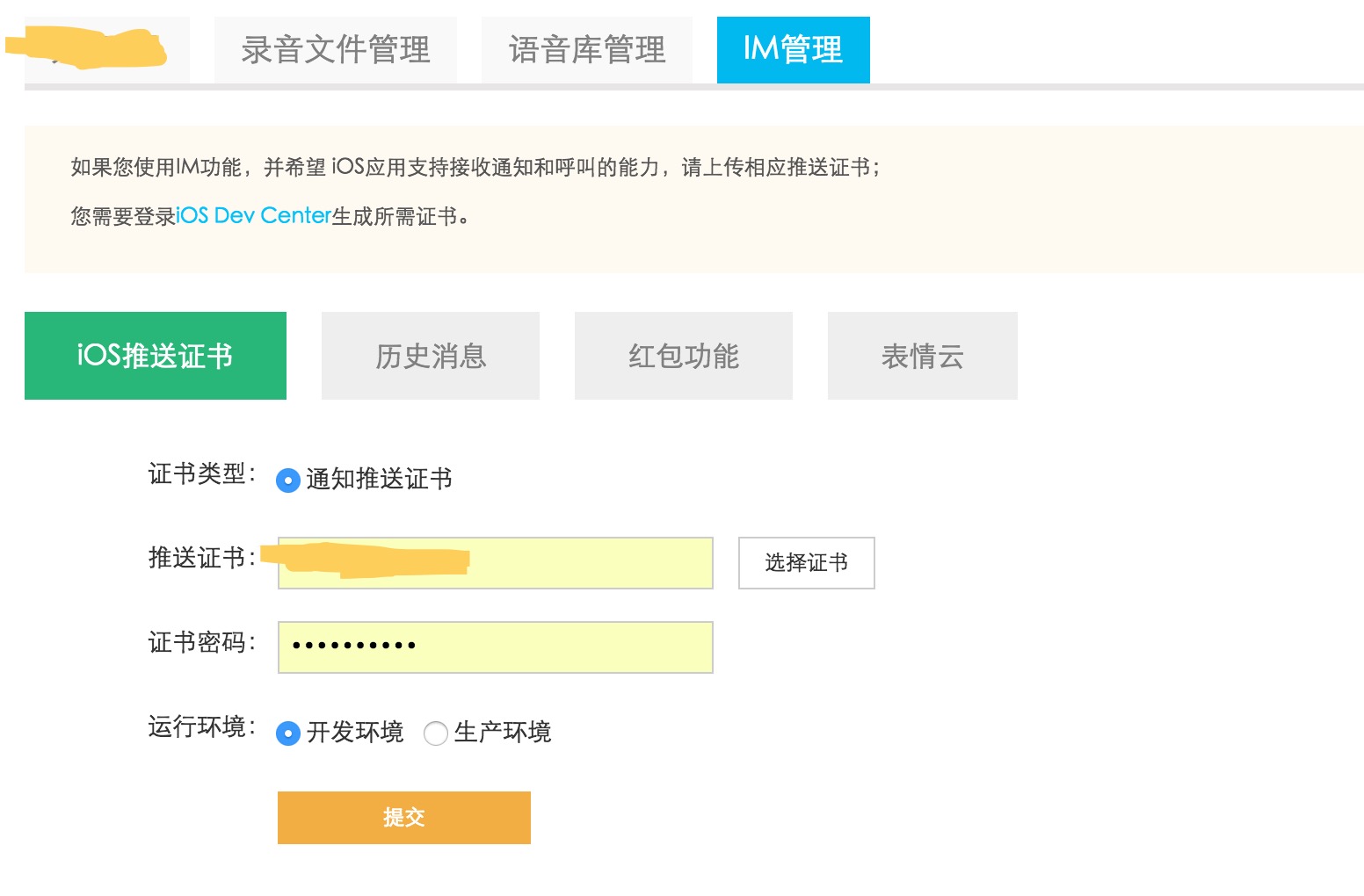
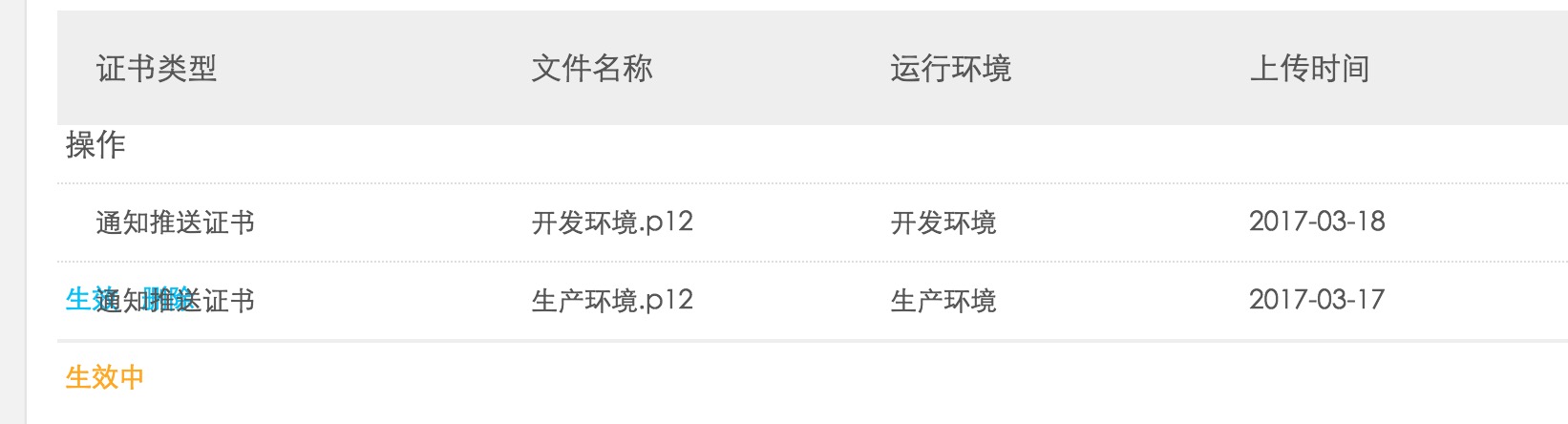
生产证书需要打包成 ipa 包才能测试离线推送
然后在看下代码中的配置
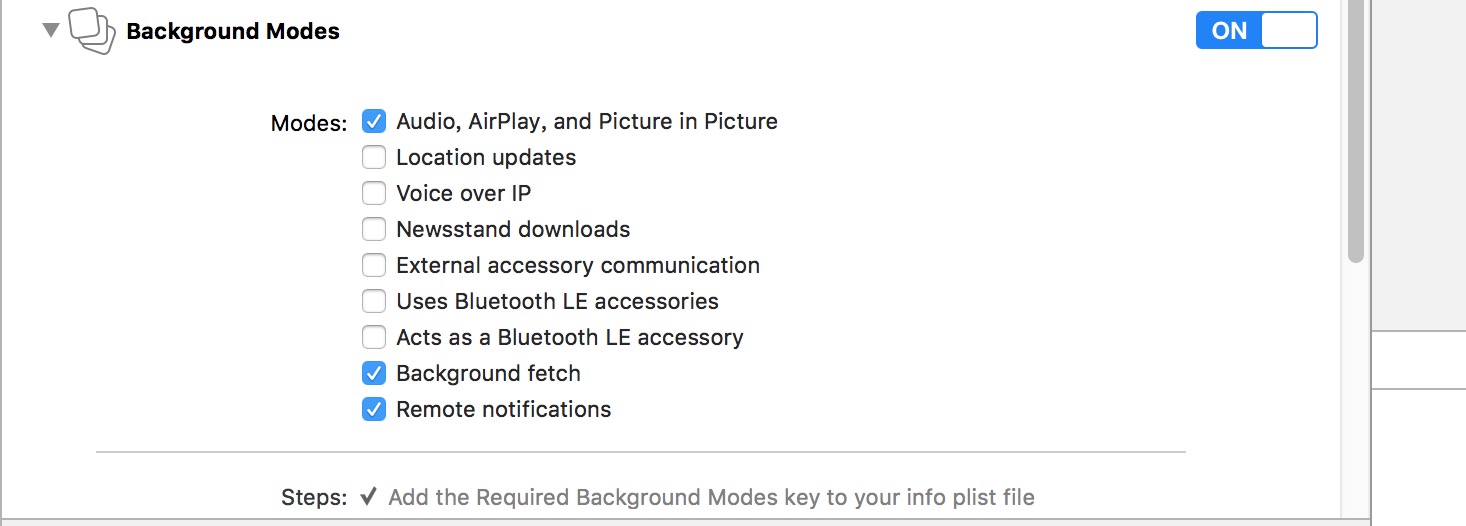
注册 APNS
/** 注册远程通知 */

- (void)registerRemoteNotification {

    if ([[UIDevice currentDevice].systemVersion floatValue] >= 10.0) {

#if __IPHONE_OS_VERSION_MAX_ALLOWED >= __IPHONE_10_0 // Xcode 8编译会调用

        UNUserNotificationCenter *center = [UNUserNotificationCenter currentNotificationCenter];

        [center requestAuthorizationWithOptions:(UNAuthorizationOptionBadge | UNAuthorizationOptionSound | UNAuthorizationOptionAlert | UNAuthorizationOptionCarPlay) completionHandler:^(BOOL granted, NSError *_Nullable error) {

            if (!error) {

                NSLog(@"request authorization succeeded!");

            }

        }];

        [[UIApplication sharedApplication] registerForRemoteNotifications];

#else // Xcode 7编译会调用

        UIUserNotificationType types = (UIUserNotificationTypeAlert | UIUserNotificationTypeSound | UIUserNotificationTypeBadge);

        UIUserNotificationSettings *settings = [UIUserNotificationSettings settingsForTypes:types categories:nil];

        [[UIApplication sharedApplication] registerUserNotificationSettings:settings];

        [[UIApplication sharedApplication] registerForRemoteNotifications];

#endif

    } else if ([[[UIDevice currentDevice] systemVersion] floatValue] >= 8.0) {

        UIUserNotificationType types = (UIUserNotificationTypeAlert | UIUserNotificationTypeSound | UIUserNotificationTypeBadge);

        UIUserNotificationSettings *settings = [UIUserNotificationSettings settingsForTypes:types categories:nil];

        [[UIApplication sharedApplication] registerUserNotificationSettings:settings];

        [[UIApplication sharedApplication] registerForRemoteNotifications];

    } else {

        UIRemoteNotificationType apn_type = (UIRemoteNotificationType)(UIRemoteNotificationTypeAlert |

                                                                       UIRemoteNotificationTypeSound |

                                                                       UIRemoteNotificationTypeBadge);

        [[UIApplication sharedApplication] registerForRemoteNotificationTypes:apn_type];

    }

}
#pragma mark - APP运行中接收到通知(推送)处理

/** APP已经接收到“远程”通知(推送) - (App运行在后台/App运行在前台)  */

- (void)application:(UIApplication *)application didReceiveRemoteNotification:(NSDictionary *)userInfo fetchCompletionHandler:(void (^)(UIBackgroundFetchResult result))completionHandler

{

    /////////下面是 IM

    self.callid = nil;

    NSString *userdata = [userInfo objectForKey:@"c"];

    NSLog(@"远程推送userdata:%@",userdata);

    if (userdata) {

        NSDictionary*callidobj = [NSJSONSerialization JSONObjectWithData:[userdata dataUsingEncoding:NSUTF8StringEncoding] options:NSJSONReadingMutableLeaves error:nil];

        NSLog(@"远程推送callidobj:%@",callidobj);

        if ([callidobj isKindOfClass:[NSDictionary class]]) {

            self.callid = [callidobj objectForKey:@"callid"];

        }

    }

    NSLog(@"远程推送 callid=%@",self.callid);

}
角标的显示
- (void)applicationWillResignActive:(UIApplication *)application {

    NSInteger count = ;

    UINavigationController * rootView = (UINavigationController*)self.window.rootViewController;

    if ([rootView.viewControllers[] isKindOfClass:[MainViewController class]]) {

        count = [[IMMsgDBAccess sharedInstance] getUnreadMessageCountFromSession];

    }

    application.applicationIconBadgeNumber = count;

    //离线消息的角标数显示

    [[ECDevice sharedInstance] setAppleBadgeNumber:count completion:^(ECError *error) {

    }];

    usleep();

}
注意,在容联登录的地方要设置对应的环境.不设置默认代表是生产环境要对应生产环境的证书
-(void)resetResourceServer {
[self setAppKey:DefaultAppKey AndAppToken:DefaultAppToke];
//Caches文件路径
NSArray *paths = NSSearchPathForDirectoriesInDomains(NSCachesDirectory, NSUserDomainMask, YES);
//服务器配置文件夹
NSString * config = [[paths objectAtIndex:0] stringByAppendingPathComponent:@"config.data"];
if ([[NSFileManager defaultManager] fileExistsAtPath:config]) {
[[NSFileManager defaultManager] removeItemAtPath:config error:nil];
}
#ifdef DEBUG
[[ECDevice sharedInstance] SwitchServerEvn:YES];
#else
[[ECDevice sharedInstance] SwitchServerEvn:NO];
#endif
}
iOS 容联离线消息推送的更多相关文章
- Push:iOS基于APNS的消息推送
1. Push的三个步骤,如下图所示: (1)Push服务应用程序把要发送的消息.目的iPhone的标识打包,发给APNS: (2)APNS在自身的已注册Push服务的iPhone列表中,查找有相应标 ...
- 使用PushSharp进行IOS发布应用的消息推送
在做.NET向IOS设备的App进行消息推送时候,采用的是PushSharp开源类库进行消息的推送,而在开发过程中,采用的是测试版本的app,使用的是测试的p12证书采用的是ApnsConfigura ...
- iOS开发如何实现消息推送机制
一.关于推送通知 推送通知,也被叫做远程通知,是在iOS 3.0以后被引入的功能.是当程序没有启动或不在前台运行时,告诉用户有新消息的一种途径,是从外部服务器发送到应用程序上的.一般说来,当要显示消息 ...
- ios 消息推送流程 转载
iOS开发:推送通知简述及开发实践热度 1已有 706 次阅读 2013-10-15 09:23 |个人分类:经验之谈|系统分类:ios| IOS, 推送一.关于推送通知 推送通知,也被叫做远程通知, ...
- 基于APNs最新HTTP/2接口实现iOS的高性能消息推送(服务端篇)
1.前言 本文要分享的消息推送指的是当iOS端APP被关闭或者处于后台时,还能收到消息/信息/指令的能力. 这种在APP处于后台或关闭情况下的消息推送能力,通常在以下场景下非常有用: 1)IM即时通讯 ...
- iOS 之消息推送(个推)---个人小结
前言:自从上个星期开始整这个推送,弄了差不多一个星期,今天终于给整好了,因此现在来记录这段"奇妙"的旅程. 我们公司使用的消息推送是用的第三方--个推,这里不得不说一下,个推的技术 ...
- 了解iOS消息推送一文就够:史上最全iOS Push技术详解
本文作者:陈裕发, 腾讯系统测试工程师,由腾讯WeTest整理发表. 1.引言 开发iOS系统中的Push推送,通常有以下3种情况: 1)在线Push:比如QQ.微信等IM界面处于前台时,聊天消息和指 ...
- ios手机app消息推送
h5+app项目,推送平台 " 个推 " 首先在manifest.json配置文件中点击模块权限配置,勾选push消息推送配置如图1-1 第二部在manifest.json配置文件 ...
- 分分钟搞定IOS远程消息推送
一.引言 IOS中消息的推送有两种方式,分别是本地推送和远程推送,本地推送在http://my.oschina.net/u/2340880/blog/405491这篇博客中有详细的介绍,这里主要讨论远 ...
随机推荐
- poj1637 Sightseeing tour[最大流+欧拉回路]
混合图的欧拉回路定向问题. 顺便瞎说几句,有向图定欧拉回路的充要条件是每个点入度等于出度,并且图联通.无向图的话只要联通无奇点即可. 欧拉路径的确定应该是无向图联通且奇点数0个或2个,有向图忘了,好像 ...
- 洛谷 P2919 [USACO08NOV]守护农场Guarding the Farm
题目描述 The farm has many hills upon which Farmer John would like to place guards to ensure the safety ...
- java性能调优的11个建议
1.在必要之前,先不要优化 2.使用分析器来找到真正的瓶颈 3 .为整个应用程序创建性能测试套件 4.首先解决最大的瓶颈问题 5.使用StringBuilder以编程方式连接字符串 Str ...
- __setup宏简介
内核组件用__setup宏来注册关键字及相关联的处理函数,__setup宏在include/linux/init.h中定义,其原型如下: __setup(string, fun ...
- MVC 模式介绍(1)
MVC 模式 MVC 模式代表 Model-View-Controller(模型-视图-控制器) 模式.这种模式用于应用程序的分层开发. Model(模型) - 模型代表一个存取数据的对象或 JAVA ...
- 项目清理和删除svn信息(转)
svn信息是根据文件夹里面的 .svn 文件夹保存相关配置的,删除此文件夹即可去掉svn信息: linux下: find . -type d -name ".svn"|xargs ...
- 【248】◀▶IEW-Unit13
Unit 13 Technology 流程图讲解 1.model1对应图片讲解 2.Model1范文分析 Model 1 The ice cream making process has five k ...
- Robot FrameWork基础学习(二)
在Robot Framework中,测试套件(Test Suite)主要是存放测试案例,而资源文件(Resource)就是用来存放用户关键字. 内部资源:Resource 外部资源: External ...
- openstack介绍(二)
OpenStack services 本节将详细描述OpenStack服务. Compute service overview(计算服务概述) 使用OpenStack云计算计算主机和管理系统.Open ...
- Linux下磁盘加密luks使用
使用luks加密磁盘,磁盘需要映射才可以挂载,映射的时候需要输入密码验证.luks相对于是对硬盘上了一把锁,要想打开就得有相应的钥匙,如果打开了就可以随意操作了,和普通硬盘一样. 使用方法如下: 0. ...