
spring mvc DispatcherServlet详解之三---request通过ModelAndView中获取View实例的过程
整个spring mvc的架构如下图所示:
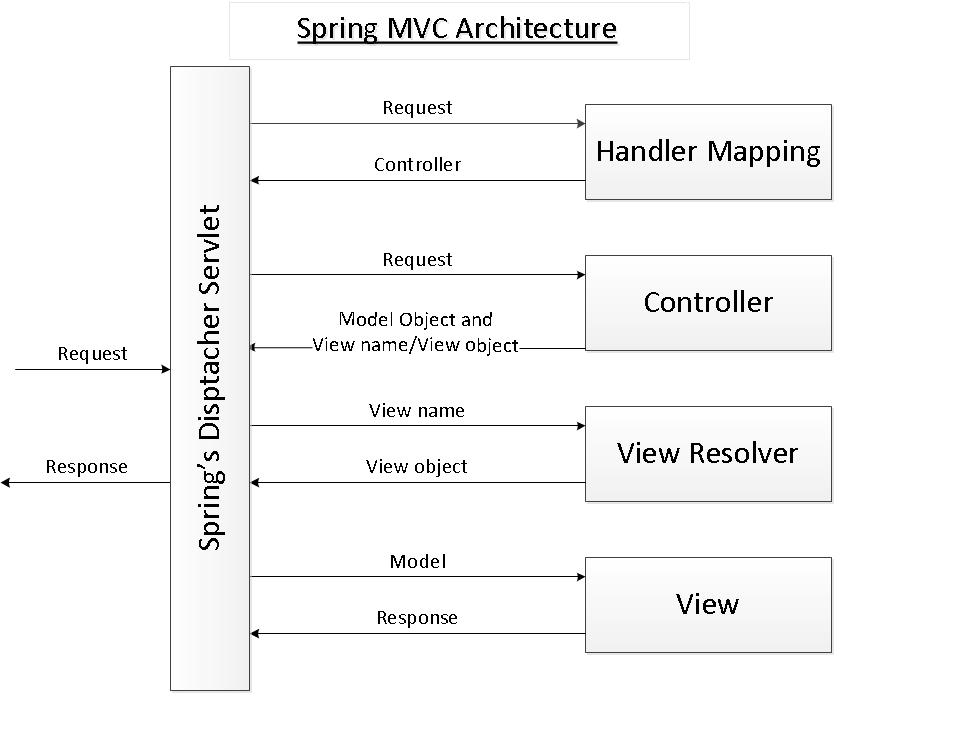
上篇文件讲解了DispatcherServlet第二步:通过request从Controller获取ModelAndView。现在来讲解第三步:request 从ModelAndView中获取view对象。
获取view对象一般是通过viewResolver来解析view name来完成的。若ModelAndView中view 不存在或者ModelAndView本身为null则填充默认值。代码如下:
ModelAndView中view 不存在或者ModelAndView本身为null
DispatcherServlet doService--->doDispatcher-->applyDefaultViewName(request, mv);
    /**

     * Do we need view name translation?

     */

    private void applyDefaultViewName(HttpServletRequest request, ModelAndView mv) throws Exception {

        if (mv != null && !mv.hasView()) {

            mv.setViewName(getDefaultViewName(request));

        }

    }
从request中解析出默认view name
    /**

     * Translate the supplied request into a default view name.

     * @param request current HTTP servlet request

     * @return the view name (or {@code null} if no default found)

     * @throws Exception if view name translation failed

     */

    protected String getDefaultViewName(HttpServletRequest request) throws Exception {

        return this.viewNameTranslator.getViewName(request);

    }
我们先了解一下这个viewNameTranslator是怎么得到的吧?从容器中获取bean,bean 名称为:DefaultRequestToViewNameTranslator
    /**

     * Initialize the strategy objects that this servlet uses.

     * <p>May be overridden in subclasses in order to initialize further strategy objects.

     */

    protected void initStrategies(ApplicationContext context) {

        initMultipartResolver(context);

        initLocaleResolver(context);

        initThemeResolver(context);

        initHandlerMappings(context);

        initHandlerAdapters(context);

        initHandlerExceptionResolvers(context);

        initRequestToViewNameTranslator(context);

        initViewResolvers(context);

        initFlashMapManager(context);

    }

     * Initialize the RequestToViewNameTranslator used by this servlet instance.

     * <p>If no implementation is configured then we default to DefaultRequestToViewNameTranslator.

     */

    private void initRequestToViewNameTranslator(ApplicationContext context) {

        try {

            this.viewNameTranslator =

                    context.getBean(REQUEST_TO_VIEW_NAME_TRANSLATOR_BEAN_NAME, RequestToViewNameTranslator.class);

            if (logger.isDebugEnabled()) {

                logger.debug("Using RequestToViewNameTranslator [" + this.viewNameTranslator + "]");

            }

        }

        catch (NoSuchBeanDefinitionException ex) {

            // We need to use the default.

            this.viewNameTranslator = getDefaultStrategy(context, RequestToViewNameTranslator.class);

            if (logger.isDebugEnabled()) {

                logger.debug("Unable to locate RequestToViewNameTranslator with name '" +

                        REQUEST_TO_VIEW_NAME_TRANSLATOR_BEAN_NAME + "': using default [" + this.viewNameTranslator +

                        "]");

            }

        }

    }
获取默认view name的真正实现方法如下:
/**

     * Translates the request URI of the incoming {@link HttpServletRequest}

     * into the view name based on the configured parameters.

     * @see org.springframework.web.util.UrlPathHelper#getLookupPathForRequest

     * @see #transformPath

     */

    @Override

    public String getViewName(HttpServletRequest request) {

        String lookupPath = this.urlPathHelper.getLookupPathForRequest(request);

        return (this.prefix + transformPath(lookupPath) + this.suffix);

    }

    /**

     * Transform the request URI (in the context of the webapp) stripping

     * slashes and extensions, and replacing the separator as required.

     * @param lookupPath the lookup path for the current request,

     * as determined by the UrlPathHelper

     * @return the transformed path, with slashes and extensions stripped

     * if desired

     */

    protected String transformPath(String lookupPath) {

        String path = lookupPath;

        if (this.stripLeadingSlash && path.startsWith(SLASH)) {

            path = path.substring(1);

        }

        if (this.stripTrailingSlash && path.endsWith(SLASH)) {

            path = path.substring(0, path.length() - 1);

        }

        if (this.stripExtension) {

            path = StringUtils.stripFilenameExtension(path);

        }

        if (!SLASH.equals(this.separator)) {

            path = StringUtils.replace(path, SLASH, this.separator);

        }

        return path;

    }
完整实现如下:
/**

     * Return the mapping lookup path for the given request, within the current

     * servlet mapping if applicable, else within the web application.

     * <p>Detects include request URL if called within a RequestDispatcher include.

     * @param request current HTTP request

     * @return the lookup path

     * @see #getPathWithinApplication

     * @see #getPathWithinServletMapping

     */

    public String getLookupPathForRequest(HttpServletRequest request) {

        // Always use full path within current servlet context?

        if (this.alwaysUseFullPath) {

            return getPathWithinApplication(request);

        }

        // Else, use path within current servlet mapping if applicable

        String rest = getPathWithinServletMapping(request);

        if (!"".equals(rest)) {

            return rest;

        }

        else {

            return getPathWithinApplication(request);

        }

    }

    /**

     * Return the path within the servlet mapping for the given request,

     * i.e. the part of the request's URL beyond the part that called the servlet,

     * or "" if the whole URL has been used to identify the servlet.

     * <p>Detects include request URL if called within a RequestDispatcher include.

     * <p>E.g.: servlet mapping = "/test/*"; request URI = "/test/a" -> "/a".

     * <p>E.g.: servlet mapping = "/test"; request URI = "/test" -> "".

     * <p>E.g.: servlet mapping = "/*.test"; request URI = "/a.test" -> "".

     * @param request current HTTP request

     * @return the path within the servlet mapping, or ""

     */

    public String getPathWithinServletMapping(HttpServletRequest request) {

        String pathWithinApp = getPathWithinApplication(request);

        String servletPath = getServletPath(request);

        String path = getRemainingPath(pathWithinApp, servletPath, false);

        if (path != null) {

            // Normal case: URI contains servlet path.

            return path;

        }

        else {

            // Special case: URI is different from servlet path.

            String pathInfo = request.getPathInfo();

            if (pathInfo != null) {

                // Use path info if available. Indicates index page within a servlet mapping?

                // e.g. with index page: URI="/", servletPath="/index.html"

                return pathInfo;

            }

            if (!this.urlDecode) {

                // No path info... (not mapped by prefix, nor by extension, nor "/*")

                // For the default servlet mapping (i.e. "/"), urlDecode=false can

                // cause issues since getServletPath() returns a decoded path.

                // If decoding pathWithinApp yields a match just use pathWithinApp.

                path = getRemainingPath(decodeInternal(request, pathWithinApp), servletPath, false);

                if (path != null) {

                    return pathWithinApp;

                }

            }

            // Otherwise, use the full servlet path.

            return servletPath;

        }

    }

    /**

     * Return the path within the web application for the given request.

     * <p>Detects include request URL if called within a RequestDispatcher include.

     * @param request current HTTP request

     * @return the path within the web application

     */

    public String getPathWithinApplication(HttpServletRequest request) {

        String contextPath = getContextPath(request);

        String requestUri = getRequestUri(request);

        String path = getRemainingPath(requestUri, contextPath, true);

        if (path != null) {

            // Normal case: URI contains context path.

            return (StringUtils.hasText(path) ? path : "/");

        }

        else {

            return requestUri;

        }

    }

    /**

     * Match the given "mapping" to the start of the "requestUri" and if there

     * is a match return the extra part. This method is needed because the

     * context path and the servlet path returned by the HttpServletRequest are

     * stripped of semicolon content unlike the requesUri.

     */

    private String getRemainingPath(String requestUri, String mapping, boolean ignoreCase) {

        int index1 = 0;

        int index2 = 0;

        for (; (index1 < requestUri.length()) && (index2 < mapping.length()); index1++, index2++) {

            char c1 = requestUri.charAt(index1);

            char c2 = mapping.charAt(index2);

            if (c1 == ';') {

                index1 = requestUri.indexOf('/', index1);

                if (index1 == -1) {

                    return null;

                }

                c1 = requestUri.charAt(index1);

            }

            if (c1 == c2) {

                continue;

            }

            if (ignoreCase && (Character.toLowerCase(c1) == Character.toLowerCase(c2))) {

                continue;

            }

            return null;

        }

        if (index2 != mapping.length()) {

            return null;

        }

        if (index1 == requestUri.length()) {

            return "";

        }

        else if (requestUri.charAt(index1) == ';') {

            index1 = requestUri.indexOf('/', index1);

        }

        return (index1 != -1 ? requestUri.substring(index1) : "");

    }
ModelAndView中view 定义为view name,解析为view实例。
DispatcherServlet doService--->doDispatcher-->processDispatchResult--->render--->resolveViewName
    /**

     * Resolve the given view name into a View object (to be rendered).

     * <p>The default implementations asks all ViewResolvers of this dispatcher.

     * Can be overridden for custom resolution strategies, potentially based on

     * specific model attributes or request parameters.

     * @param viewName the name of the view to resolve

     * @param model the model to be passed to the view

     * @param locale the current locale

     * @param request current HTTP servlet request

     * @return the View object, or {@code null} if none found

     * @throws Exception if the view cannot be resolved

     * (typically in case of problems creating an actual View object)

     * @see ViewResolver#resolveViewName

     */

    protected View resolveViewName(String viewName, Map<String, Object> model, Locale locale,

            HttpServletRequest request) throws Exception {

        for (ViewResolver viewResolver : this.viewResolvers) {

            View view = viewResolver.resolveViewName(viewName, locale);

            if (view != null) {

                return view;

            }

        }

        return null;

    }
InternalResourceViewResolver是具体实现:
    @Override

    protected AbstractUrlBasedView buildView(String viewName) throws Exception {

        InternalResourceView view = (InternalResourceView) super.buildView(viewName);

        if (this.alwaysInclude != null) {

            view.setAlwaysInclude(this.alwaysInclude);

        }

        if (this.exposeContextBeansAsAttributes != null) {

            view.setExposeContextBeansAsAttributes(this.exposeContextBeansAsAttributes);

        }

        if (this.exposedContextBeanNames != null) {

            view.setExposedContextBeanNames(this.exposedContextBeanNames);

        }

        view.setPreventDispatchLoop(true);

        return view;

    }
/**
* Creates a new View instance of the specified view class and configures it.
* Does <i>not</i> perform any lookup for pre-defined View instances.
* <p>Spring lifecycle methods as defined by the bean container do not have to
* be called here; those will be applied by the {@code loadView} method
* after this method returns.
* <p>Subclasses will typically call {@code super.buildView(viewName)}
* first, before setting further properties themselves. {@code loadView}
* will then apply Spring lifecycle methods at the end of this process.
* @param viewName the name of the view to build
* @return the View instance
* @throws Exception if the view couldn't be resolved
* @see #loadView(String, java.util.Locale)
*/
protected AbstractUrlBasedView buildView(String viewName) throws Exception {
AbstractUrlBasedView view = (AbstractUrlBasedView) BeanUtils.instantiateClass(getViewClass());
view.setUrl(getPrefix() + viewName + getSuffix());
String contentType = getContentType();
if (contentType != null) {
view.setContentType(contentType);
}
view.setRequestContextAttribute(getRequestContextAttribute());
view.setAttributesMap(getAttributesMap());
Boolean exposePathVariables = getExposePathVariables();
if (exposePathVariables != null) {
view.setExposePathVariables(exposePathVariables);
}
return view;
}
ModelAndView 本身存在view实例
            // No need to lookup: the ModelAndView object contains the actual View object.

            view = mv.getView();
不需要查询,使用getView方法即可获取到。
小结:
本文主要讲解request怎么从ModelAndView中获取view实例的,分三种情况:mv本身为空或者mv中view为空时,使用默认的view name;mv本身中view 为string 表示viewname而非view实例,那么根据view name使用viewResolver转换成view实例;mv本身有view实例则使用getview方法获取。
spring mvc DispatcherServlet详解之三---request通过ModelAndView中获取View实例的过程的更多相关文章
- spring mvc DispatcherServlet详解之一--request通过HandlerMaping获取控制器Controller过程
整个spring mvc的架构如下图所示: 现在来讲解DispatcherServletDispatcherServlet的第一步:获取控制器. HandlerMapping HandlerMappi ...
- spring mvc DispatcherServlet详解之二---request通过Controller获取ModelAndView过程
整个spring mvc的架构如下图所示: 上篇文件讲解了DispatcherServlet通过request获取控制器Controller的过程,现在来讲解DispatcherServletDisp ...
- spring mvc DispatcherServlet详解之前传---FrameworkServlet
做项目时碰到Controller不能使用aop进行拦截,从网上搜索得知:使用spring mvc 启动了两个context:applicationContext 和WebapplicationCont ...
- (转载)spring mvc DispatcherServlet详解之一---处理请求深入解析
要深入理解spring mvc的工作流程,就需要先了解spring mvc的架构: 从上图可以看到 前端控制器DispatcherServlet在其中起着主导作用,理解了DispatcherServl ...
- spring mvc DispatcherServlet详解之四---视图渲染过程
整个spring mvc的架构如下图所示: 现在来讲解DispatcherServletDispatcherServlet的最后一步:视图渲染.视图渲染的过程是在获取到ModelAndView后的过程 ...
- spring mvc DispatcherServlet详解之interceptor和filter的区别
首先我们看一下spring mvc Interceptor的功能及实现: http://wenku.baidu.com/link?url=Mw3GaUhCRMhUFjU8iIDhObQpDcbmmRy ...
- spring mvc DispatcherServlet详解之一---处理请求深入解析
要深入理解spring mvc的工作流程,就需要先了解spring mvc的架构: 从上图可以看到 前端控制器DispatcherServlet在其中起着主导作用,理解了DispatcherServl ...
- spring mvc DispatcherServlet详解之前传---前端控制器架构
前端控制器是整个MVC框架中最为核心的一块,它主要用来拦截符合要求的外部请求,并把请求分发到不同的控制器去处理,根据控制器处理后的结果,生成相应的响应发送到客户端.前端控制器既可以使用Filter实现 ...
- spring mvc DispatcherServlet详解前传---HttpServletBean类
从上章里我们已经看到: DispatcherServlet extends FrameworkServlet FrameworkServlet extends HttpServletBean impl ...
随机推荐
- 安装linux系统后要做的事情
基本安装0 http://www.kali.org.cn/thread-20517-1-1.html 基本安装1 http://defcon.cn/1618.html 基本安装2 http://www ...
- Application(全局对象,ViewState
Application对象生存期和Web应用程序生存期一样长,生存期从Web应用程序网页被访问开始,HttpApplication类对象Application被自动创建,直到没有一个网页被访问时结束, ...
- Quartz1.8.5例子(四)
/* * Copyright 2005 - 2009 Terracotta, Inc. * * Licensed under the Apache License, Version 2.0 (the ...
- Java-反射再学习
反射之中包含了一个“反”的概念,所以要想解释反射就必须先从“正”开始解释,一般而言,当用户使用一个类的时候,应该先知道这个类,而后通过这个类产生实例化对象,但是“反”指的是通过对象找到类. packa ...
- matlab函数之diag
diag(A) 这个看似简单的函数确认让我头疼了几个小时 该函数其实有两个作用 ① 如果A是一个矩阵,那么diag(A)的作用便是提取A的对角线元素 ② 如果A是一个向量,那么diag(A)的作用便是 ...
- [BZOJ 1901] Dynamic Rankings 【树状数组套线段树 || 线段树套线段树】
题目链接:BZOJ - 1901 题目分析 树状数组套线段树或线段树套线段树都可以解决这道题. 第一层是区间,第二层是权值. 空间复杂度和时间复杂度均为 O(n log^2 n). 线段树比树状数组麻 ...
- wcf纯代码创建控制台应用
https://svn.apache.org/repos/asf/incubator/stonehenge/contrib/stocktrader/dotnet/ stocktrader项目的dotn ...
- Invitation Cards(邻接表+逆向建图+SPFA)
Time Limit: 8000MS Memory Limit: 262144K Total Submissions: 17538 Accepted: 5721 Description In ...
- 【转】SVN服务器端安装、配置与管理--不错
原文网址:http://blog.csdn.net/qq505810824/article/details/7824929 搭建svn服务的方法步骤问题,主要有七个部分 .下面是具体的步骤介绍. ...
- Delphi Webservice 杂谈
用WebService来实现B2B集成的最大好处在于可以轻易实现互操作性 WebService可用基于XML的SOAP来表示数据和调用请求,并且通过HTTP协议来传输这些XML格式的数据,因为此时的调 ...