
TypeScript 之 Class
class
private 和 # 的区别
class Bag { private item: any }
class Bag { #item: any }
类型和值(Type and Value)
class Bag { }

const a: Bag = new Bag()

class C implements Bag { }
常用语法(common Syntax)
class User {

  name: string // 必须声明才能在 constructor 赋值

  constructor(name: string) {

    this.name = name

  }

}
以下是上面简写,public 可换成 private ,public readonly,protected, 等等......,但不能是 js 语法 static 和 # 修饰符
class User {

  constructor(public name:string){}

}
其它常用语法
interface Updatable { }

type Serializzable = {}

class Account { }

// 继承 Account 类,实现 Updatable 接口 和 Serializzable 类型

class User extends Account implements Updatable, Serializzable {

  id: string;

  displayName?: boolean; //  可选

  name!: string; // 告诉类型检查器 name 有值

  #attributes: Map<any, any>; // 私有属性,js语法

  roles = ["user"]; // 默认值

  readonly createdAt = new Date(); //只读属性

  constructor(id: string) {

    super()

    this.id = id

    this.#attributes = new Map()

  }

  setName(name: string) { this.name = name } // 原型方法

  verifyName = (name: string) => { this.name = name } // 实例方法

  // 函数重载

  sync(): Promise<{}>

  sync(cb: (result: string)=>void): void

  // 方法类型声明完成,后要接着方法实现

  sync(cb?: (result: string)=>void): void | Promise<{}>{}

  // Getters and Setters

  get accountID(){return 123}

  set accountID(value: number){ /** ... */ }

  // protected 只能在类和继承类的后代类中使用,不可以在实例中使用

  protected handleReques(){}

  // 静态类型,js语法

  static #userCount = 0 // 只能在静态方法里使用

  static registerUser(user: number){this.#userCount = user}

}
泛型(Generics)
class Box<Type>{

  constructor(public content:Type){}

}

const stringBox = new Box("a package")

// stringBox: Box<string>
抽象类(Abstract Classes)
abstract class Base {

  abstract getName(): string;

  printName() {

    console.log("Hello, " + this.getName());

  }

}

const b = new Base(); // 错误,无法创建抽象类的实例。

class Derived extends Base {

  // 必须实现该抽象函数

  getName() {

    return "world";

  }

}

const d = new Derived();

d.printName();
抽象构造签名(Abstract Construct Signatures)
function greet(ctor: typeof Base) {

  const instance = new ctor(); // 无法创建抽象类的实例。

  instance.printName();

}

greet(Base);
function greet2(ctor: new () => Base) {

  const instance = new ctor();

  instance.printName();

}

greet2(Derived);

greet2(Base);
抽象类继承抽象类
abstract class Base {

  abstract getName(): string;

  abstract asd: string

  printName() {

    console.log("Hello, " + this.getName());

  }

}

abstract class Bag extends Base {

  abstract getName(): any;  // 相同抽象方法,返回值改为any,不报错

  abstract asd: '456' // 相同抽象字段,返回值改为 string 子类型,不报错

}

class Derived extends Bag {

  constructor(public asd: '456') {

    super()

  }

  getName() {

    return 123;

  }

}

const d = new Derived('456');

d.printName();
class Derived extends Bag, Base {} // 错误
修饰器和属性(Decorators and Attributes)
import { Syncable, triggerSync, preferCache, required } from "mylib"

@Syncable

class User {

  @triggerSync() // 方法

  save() { }

  @preferCache(false) // 访问器

  get displayName() { }

  update(@required info: Partial<User>) { } // 方法参数

}
function first(target: any, propertyKey: string, descriptor: PropertyDescriptor) {

  console.log("first(): called");

};

function second(target: any, propertyKey: string, descriptor: PropertyDescriptor) {

  console.log("second(): called");

};

class ExampleClass {

  // 单行,多行,两种写法

  @first @second method() { }

  // @first

  // @second

  // method() { }

}

const exampleClass = new ExampleClass();

exampleClass.method()

// second(): called

// first(): called
function first() {

  console.log("first(): factory evaluated");

  return function (target: any, propertyKey: string, descriptor: PropertyDescriptor) {

    console.log("first(): called");

  };

}

function second() {

  console.log("second(): factory evaluated");

  return function (target: any, propertyKey: string, descriptor: PropertyDescriptor) {

    console.log("second(): called");

  };

}

class ExampleClass {

  @first()

  @second()

  method() { }

}

const exampleClass = new ExampleClass();

exampleClass.method()

// first(): factory evaluated

// second(): factory evaluated

// second(): called

// first(): called
Decorator Evaluation
- 实例成员,(参数装饰器,其次是方法),(访问器),(属性装饰器), 这三者按照声明顺序调用
- 静态成员,(参数装饰器,其次是方法),(访问器),(属性装饰器), 这三者按照声明顺序调用
- 构造函数参数修饰器
- 类修饰器
function classDecorator(constructor: Function) {

  console.log("classDecorator");

};

function propertyDecorator(name: string) {

  return function (target: any, propertyKey: string) {

    console.log(name);

  }

}

function parameterDecorator(name: string) {

  return function (target: any, functionName: string, index: number) {

    console.log(name);

  }

}

function methodDecorator(name: string) {

  return function (target: any, propertyKey: string, descriptor: PropertyDescriptor) {

    console.log(name);

  };

}

function accessorDecorator(name: string) {

  return function (target: any, propertyKey: string, descriptor: PropertyDescriptor) {

    console.log(name);

  }

}

@classDecorator

class ExampleClass {

  constructor(@parameterDecorator("constructorParameter") greeting: string, @parameterDecorator("constructorParameter2") public appService: string) {

    this.greeting = greeting

  }

  @accessorDecorator("staticAccessor") static get x() {return 123}

  @propertyDecorator("staticProperty") static id: number

  @methodDecorator("staticMethod")

  static smethod(@parameterDecorator('staticParmeter') value: string) { }

  @propertyDecorator("instanceProperty") greeting: string

  @methodDecorator("instanceMethod")

  method(value: string, @parameterDecorator('instanceParmeter') value2: string) { }

  @accessorDecorator("instanceAccessor") get x() {return 123}

}

const exampleClass = new ExampleClass('asd', 'wew');

exampleClass.method('a', 'b')

// [LOG]: "instanceProperty"

// [LOG]: "instanceParmeter"

// [LOG]: "instanceMethod"

// [LOG]: "instanceAccessor"

// [LOG]: "staticAccessor"

// [LOG]: "staticProperty"

// [LOG]: "staticParmeter"

// [LOG]: "staticMethod"

// [LOG]: "constructorParameter2"

// [LOG]: "constructorParameter"

// [LOG]: "classDecorator"
感谢观看,欢迎互相讨论与指导,以下是参考资料链接
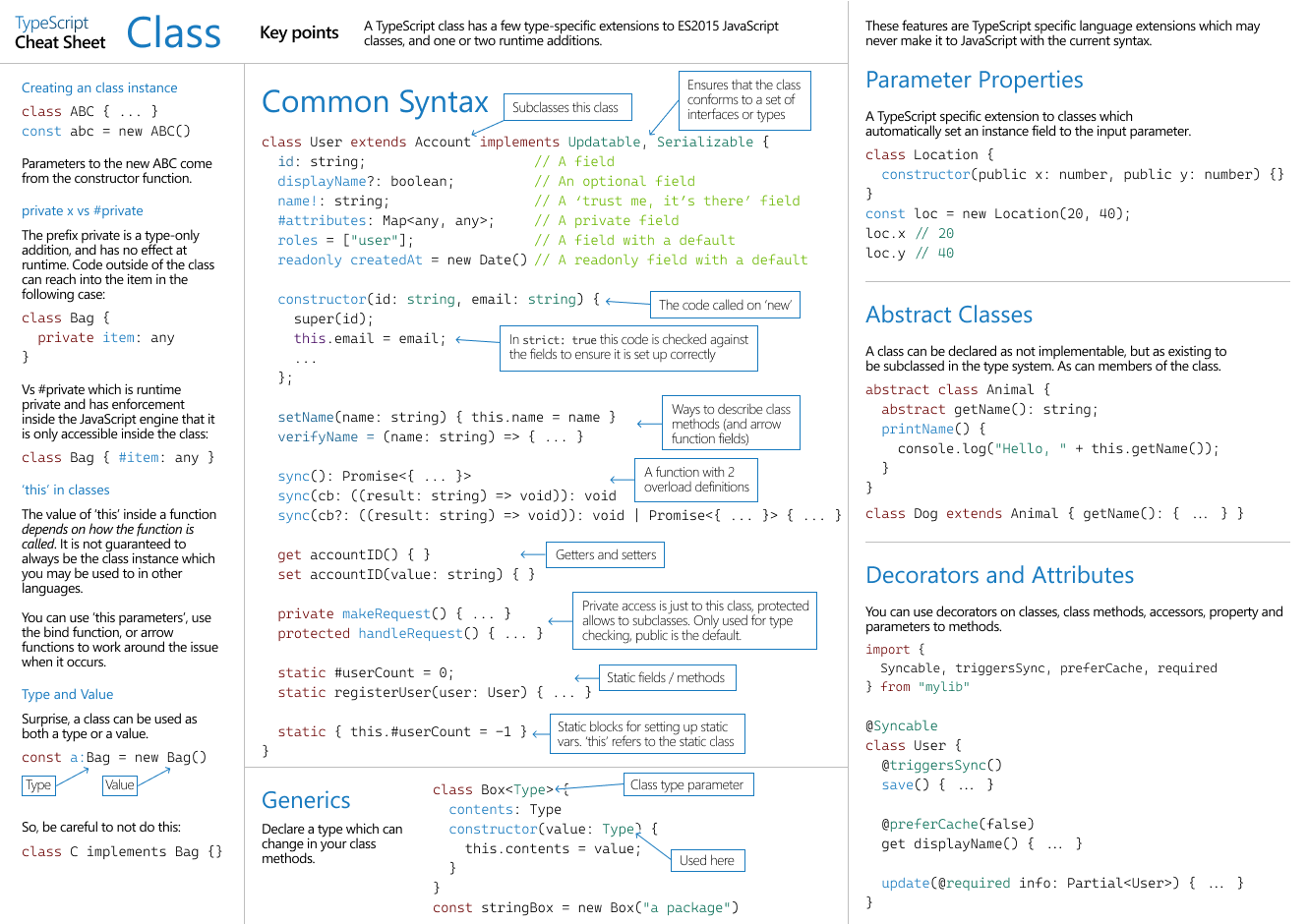
https://www.typescriptlang.org/static/TypeScript%20Classes-83cc6f8e42ba2002d5e2c04221fa78f9.png
TypeScript 之 Class的更多相关文章
- TypeScript: Angular 2 的秘密武器(译)
本文整理自Dan Wahlin在ng-conf上的talk.原视频地址: https://www.youtube.com/watch?v=e3djIqAGqZo 开场白 开场白主要分为三部分: 感谢了 ...
- TypeScript为Zepto编写LazyLoad插件
平时项目中使用的全部是jQuery框架,但是对于做webapp来说jQuery太过于庞大,当然你可以选择jQuery 2.*针对移动端的版本. 这里我采用移动端使用率比较多的zepto框架,他跟jqu ...
- TypeScript Vs2013 下提示Can not compile modules unless '--module' flag is provided
VS在开发TypeScript程序时候,如果import了模块有的时候会有如下提示: 这种情况下,只需要对当前TypeScript项目生成设置为AMD规范即可!
- TypeScript
TypeScript: Angular 2 的秘密武器(译) 本文整理自Dan Wahlin在ng-conf上的talk.原视频地址: https://www.youtube.com/watch? ...
- 打造TypeScript的Visual Studio Code开发环境
打造TypeScript的Visual Studio Code开发环境 本文转自:https://zhuanlan.zhihu.com/p/21611724 作者: 2gua TypeScript是由 ...
- 转职成为TypeScript程序员的参考手册
写在前面 作者并没有任何可以作为背书的履历来证明自己写作这份手册的分量. 其内容大都来自于TypeScript官方资料或者搜索引擎获得,期间掺杂少量作者的私见,并会标明. 大部分内容来自于http:/ ...
- Webstorm编译TypeScript
下载webstorm 下载node.js编译器npm Webstorm的安装很简单.但如果没有Java For Mac 环境打开Webstorm时会有提示,点击提示会跳转下载链接,下载安装就好. ...
- CSS3与页面布局学习总结(七)——前端预处理技术(Less、Sass、CoffeeScript、TypeScript)
CSS不像其它高级语言一样支持算术运算.变量.流程控制与面向对象特性,所以CSS样式较多时会引起一些问题,如修改复杂,冗余,某些别的语言很简单的功能实现不了等.而javascript则是一种半面向对象 ...
- 使用TypeScript拓展你自己的VS Code!
0x00 前言 在前几天的美国纽约,微软举行了Connect(); //2015大会.通过这次大会,我们可以很高兴的看到微软的确变得更加开放也更加务实了.当然,会上放出了不少新产品和新功能,其中就包括 ...
- 产品前端重构(TypeScript、MVC框架设计)
最近两周完成了对公司某一产品的前端重构,本文记录重构的主要思路及相关的设计内容. 公司期望把某一管理类信息系统从项目代码中抽取.重构为一个可复用的产品.该系统的前端是基于 ExtJs 5 进行构造的, ...
随机推荐
- k8s更换网络插件:从flannel更换成calico
卸载flannel 查看已安装的flannel的信息 # 查看CNI插件,可以得知使用的是flannel # cat /etc/cni/net.d/10-flannel.conflist { &quo ...
- Fluentd直接传输日志给kafka
官方文档地址:https://docs.fluentd.org/output/kafka td-agent版本自带包含out_kafka2插件,不用再安装了,可以直接使用. 若是使用的是Fluentd ...
- typescript-void-object-unknown-never-Function类型
viod object类型 unknown类型 never类型 function类型 {{uploading-image-89562.png(uploading...)}}
- C++实现双向RRT算法
C++实现双向RRT算法 背景介绍 RRT(Rapidly-exploring Random Trees)是Steven M. LaValle和James J. Kuffner Jr.提出的一种通过所 ...
- HBase1.4.6安装搭建及shell命令使用
HBase1.4.6安装搭建 目录 HBase1.4.6安装搭建 一.前期准备(Hadoop,zookeeper,jdk) 搭建Hbase 1.上传解压 2.配置环境变量 3.修改hbase-env. ...
- PHP全栈开发(七):PHP与MySQL存储交互(1.连接、创建数据库;创建数据表)
在Linux服务器中可以使用命令 mysqladmin -u root password beijing2007; 来修改MySQL的root用户的密码. 但是在我们自己安装了wampserver的电 ...
- Java代码审计之实战某博客
对某博客的代码审计 在gitee上面找了一个个人博客项目,来进行实战代码审计,主要还是学习为主 技术菜菜,哪里错误希望师傅们指正 1.SQL注入 先了解Java Web中的数据传输流程 graph T ...
- SpringBoot(二) - 核心配置文件
1.application.properties 和 application.yml 配置文件格式区别 1.1 文件格式 application.properties # 端口号 server.por ...
- vulnhub靶场|NAPPING: 1.0.1
准备: 攻击机:虚拟机kali.本机win10. 靶机:NAPPING: 1.0.1,地址我这里设置的桥接,,下载地址:https://download.vulnhub.com/napping/nap ...
- [Mysql] 两段提交
事务提交 Mysql 默认开启自动提交事务 两段提交 把一个事务分成两个阶段来提交,就是把redolog拆分成了prepare和commit两段 MySQL想要准备事务的时候会先写redolog.bi ...