
解决:pytesseract.pytesseract.TesseractNotFoundError: tesseract is not installed or it‘s not in your PATH. See README file for more information.
问题:使用pytesseract库识别图片中文字时出现报错

代码:
import pytesseract

from PIL import Image,ImageEnhance

img=Image.open(r'F:\Test\venv\vfi_code.png')

#修改图片的灰度,提高识别准确性

img=img.convert('RGB')

enhancer=ImageEnhance.Color(img)

enhancer=enhancer.enhance(0)

enhancer=ImageEnhance.Brightness(enhancer)

enhancer=enhancer.enhance(2)

enhancer=ImageEnhance.Contrast(enhancer)

enhancer=enhancer.enhance(8)

enhancer=ImageEnhance.Sharpness(enhancer)

img=enhancer.enhance(20)

code=pytesseract.image_to_string(img,lang='chi_sim')

print(code)
原因:在安装pytesseract库后还需要安装Tesseract-OCR才能正常使用
解决办法:
1)先下载对应版本的Tesseract-OCR并安装,安装时记得把语言包都勾上。下载链接:Index of /tesseract
没有勾选语言包会有这个报错:
pytesseract.pytesseract.TesseractError: (1, 'Error opening data file C:\\Program Files\\Tesseract-OCR/tessdata/chi_sim.traineddata Please make sure the TESSDATA_PREFIX environment variable is set to your "tessdata" directory. Failed loading language \'chi_sim\' Tesseract couldn\'t load any languages! Could not initialize tesseract.')
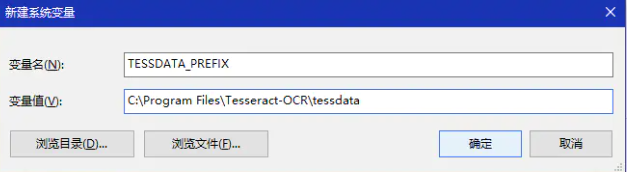
2)将安装路径C:\Program Files\Tesseract-OCR 添加到系统环境变量Path里;再增加一个TESSDATA_PREFIX变量名,变量值还是我的安装路径C:\Program Files\Tesseract-OCR\tessdata这是将语言字库文件夹添加到变量中;
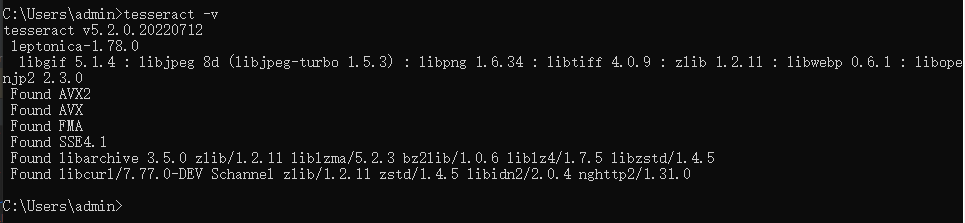
3)打开终端,输入:tesseract -v,可以看到版本信息
解决:pytesseract.pytesseract.TesseractNotFoundError: tesseract is not installed or it‘s not in your PATH. See README file for more information.的更多相关文章
- pytesseract.pytesseract.TesseractNotFoundError: tesseract is not installed or it's not in your path && FileNotFoundError: [WinError 2] 系统找不到指定的文件。
C:\Users\k\Desktop\test>python test.py Traceback (most recent call last): File , in run_tesseract ...
- pytesseract.pytesseract.TesseractNotFoundError: tesseract is not installed or it's not in your path
使用pytesseract识别验证码中遇到异常如下: pytesseract.pytesseract.TesseractNotFoundError: tesseract is not installe ...
- 解决pytesseract.pytesseract.TesseractNotFoundError: tesseract is not installed or it's not in your path问题
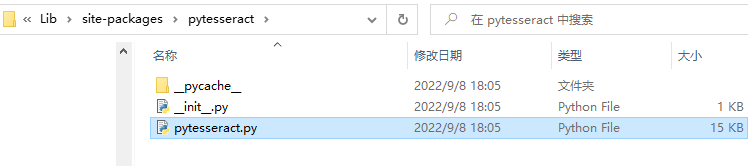
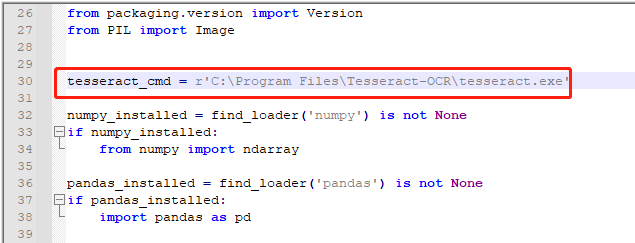
解决方案: 找到python的安装路径下的pytesseract: 例如我的是 C:\develop\Python\Lib\site-packages\pytesseract .用文本编辑器打开 ...
- pytesseract.pytesseract.TesseractError: (1, 'Error opening data file /usr/local/share/tessdata/chi_sim.traineddata Please make sure the TESSDATA_PREFIX environment variable is set to your "tessdata"
pytesseract.pytesseract.TesseractError: (1, 'Error opening data file /usr/local/share/tessdata/chi_s ...
- 报错解决——pytesseract.pytesseract.TesseractError: (1,’Error opening data file /usr/local/share/tessdata/eng.traineddata’)
解决方法:(原文地址http://stackoverflow.com/questions/14800730/tesseract-running-error) $ wget https://tesser ...
- tesseract-ocr和tesseract.exe is not installed or it's not in your path问题解决
一.解决方案: 1.http://www.ddooo.com/softdown/94968.htm 打开下载的压缩包,找到"tesseract-ocr-setup-3.02.02.exe ...
- 解决: org.iq80.leveldb.DBException: IO error: C:\data\trie\000945.sst: Could not create random access file.
以太坊MPT树的持久化层是采用了leveldb数据库,然而在抽取MPT树代码运行过程中,进行get和write操作时却发生了错误: Caused by: org.fusesource.leveldbj ...
- 解决tomcat开始出现in production environments was not found on the java.library.path:xxx
如图所看到的,Eclipse中启动tomcat时出现not found on the java.library.path等信息.能够通过下载tomcat-native-1.1.32-win32-bin ...
- 如何解决"The superclass "javax.servlet.http.HttpServlet" was not found on the Java Build Path"
今天我在eclipse上搭建新项目时,莫名其妙的出现这个错误,如下: The superclass "javax.servlet.http.HttpServlet" was not ...
- 解决spark运行中failed to locate the winutils binary in the hadoop binary path的问题
1.下载hadoop-common-2.2.0-bin并解压到某个目录 https://github.com/srccodes/hadoop-common-2.2.0-bin 2.设置hadoop.h ...
随机推荐
- python APScheduler用法
参考: https://blog.csdn.net/weixin_44799217/article/details/127353134 https://blog.csdn.net/weixin_428 ...
- vue 添加代理
1.跟目录下新建vue.config.js文件,添加内容: module.exports = { assetsDir: 'static', parallel: false, publicP ...
- MTK平台总结
1. 通过cmdline参数不对printk打印速率进行限制:mt_boot.c kcmdline_append(" ignore_loglevel=1 printk.devkmsg=on ...
- Springboot开发微信支付API-V3
前段时间因为项目需要对接微信支付,原本打算拿之前开发好的代码用就行了,后面发现微信支付升级API-V3了,和V2相比安全措施多了很多.最麻烦的就是各种证书的管理.加载. 作者自己也对接过N多支付系统了 ...
- 浪潮QQ群成员提取器 V2022
浪潮QQ群成员提取软件 V2021 最新升级版 使用扫描安全登录QQ,批量获取群列表,然后在读取指定群的群成员列表支持过滤群主.群管理员 支持按最后发言时间提取活跃用户 支持识别僵尸粉和过滤可以导出文 ...
- 计算机科学导论-第三版-学习笔记-chapter1-绪论
小测验的网站找不到,小程序也找不到,这两个部分的习题就不做了. Cengage Learning - Foundations of Computer Science这上面有部分答案.这里用斜体标出.我 ...
- win11恢复完整右键菜单
使用注册表修改 首先,通过修改注册表,我们就可以将 Win11 的右键菜单改为老样式.下面是具体的方法. 运行"regedit",开启注册表编辑器,定位到"HKEY_CU ...
- GuiLite 学习笔记(一) Mainloop与ViewTree
以GuiLiteSamples中的HelloSlide 为例,剖析一下GuiLite的设计思路和刷新机制: 首先是main.cpp; 可以分成3部分: 1.根据fb mode拿到对应的phy_fb, ...
- drush use dev.mentor.com | expecting statement
在多站点的环境中, 不清楚在哪个目录下运行drush cc all, 这时可以运行 drush use dev.mentor.com然后还发现一个很搞笑的事情, 在一个文件的末尾一直现实红色报错符号, ...
- chklist
1. 重复检查的必要性.一段代码如果在测试期间没问题,也要间隔几天再去观察是否有问题.2. 如果是集群式的服务,使用定时任务要采用分布式锁,或使用工具随机发送一台都可以.3. 如果任务跑失败,需要支持 ...