
producer内存管理分析
1 概述
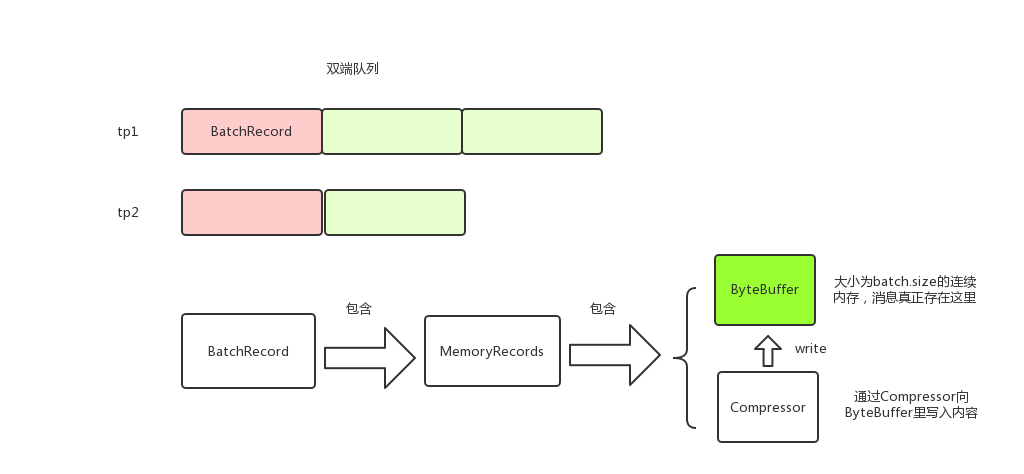
kafka producer调用RecordAccumulator#append来将消息存到本地内存。消息以TopicPartition为key分组存放,每个TopicPartition对应一个Deque;RcordBatch的消息实际存储在MemoryRecords中;MemoryRecords有Compressor和ByteBuffer两个主要的属性,消息就是存储在ByteBuffer中,Compressor用来将消息写进到ByteBuffer中。消息在生产内存中的模型大致如下:
2 RecordAccumulator#append
producer调用send方法的时候,调用RecordAccumulator#append将消息存放到内存中。这里需要注意的是,append获取了两次锁,这样做是为了减少锁的范围。
public RecordAppendResult append(TopicPartition tp,

                                     long timestamp,

                                     byte[] key,

                                     byte[] value,

                                     Callback callback,

                                     long maxTimeToBlock) throws InterruptedException {

        appendsInProgress.incrementAndGet();

        try {

            Deque<RecordBatch> dq = getOrCreateDeque(tp); // 获取tp对应的Deque<RecordBatch>

            synchronized (dq) { // 关键, 获取Deque<RecordBatch>的锁才操作

                if (closed)

                    throw new IllegalStateException("Cannot send after the producer is closed.");

            Deque<RecordBatch> dq = getOrCreateDeque(tp); // 获取tp对应的Deque<RecordBatch>

                RecordBatch last = dq.peekLast(); // 往最后一个RecordBatch添加

                if (last != null) { // 尝试添加,后面会详细讲

                    FutureRecordMetadata future = last.tryAppend(timestamp, key, value, callback, time.milliseconds());

                    if (future != null) //添加成功就返回了

                        return new RecordAppendResult(future, dq.size() > 1 || last.records.isFull(), false);

                }

            }

            // 没有添加成功,说明最后一个RecordBatch空间不足或者last == null

            // 关键, 如果消息体大于batchsize,那么会创建消息体大小的RecordBatch,即RecordBatch不一定和batchsize相等

            int size = Math.max(this.batchSize, Records.LOG_OVERHEAD + Record.recordSize(key, value));

            // 从BufferPool中分配内存,后面会详细讲

            ByteBuffer buffer = free.allocate(size, maxTimeToBlock);

            synchronized (dq) { // 重新获取锁,因为allocate的时候不需要锁dq,这里也是尽量减少锁粒度的一种思想

                if (closed)

                    throw new IllegalStateException("Cannot send after the producer is closed.");

                RecordBatch last = dq.peekLast();

                if (last != null) { // 可能在重新获取锁之前其他线程释放了内存,所以这里重新获取下

                    FutureRecordMetadata future = last.tryAppend(timestamp, key, value, callback, time.milliseconds());

                    if (future != null) {

                        free.deallocate(buffer);

                        return new RecordAppendResult(future, dq.size() > 1 || last.records.isFull(), false);

                    }

                }

                // 还没有获取到RecordBatch则申请内存创建新的RecordBatch

                MemoryRecords records = MemoryRecords.emptyRecords(buffer, compression, this.batchSize);

                RecordBatch batch = new RecordBatch(tp, records, time.milliseconds());

                FutureRecordMetadata future = Utils.notNull(batch.tryAppend(timestamp, key, value, callback, time.milliseconds()));

                dq.addLast(batch);

                incomplete.add(batch);

                return new RecordAppendResult(future, dq.size() > 1 || batch.records.isFull(), true);

            }

        } finally {

            appendsInProgress.decrementAndGet();

        }

    }
3 Compressor
上述代码调用RecordBatch#tryAppend尝试将消息放到RecordBatch,而RecordBatch#tryAppend又调用MemoryRecords#append。
public long append(long offset, long timestamp, byte[] key, byte[] value) {

        if (!writable)

            throw new IllegalStateException("Memory records is not writable");

        int size = Record.recordSize(key, value);

        compressor.putLong(offset);

        compressor.putInt(size);

        long crc = compressor.putRecord(timestamp, key, value);

        compressor.recordWritten(size + Records.LOG_OVERHEAD);

        return crc;

}
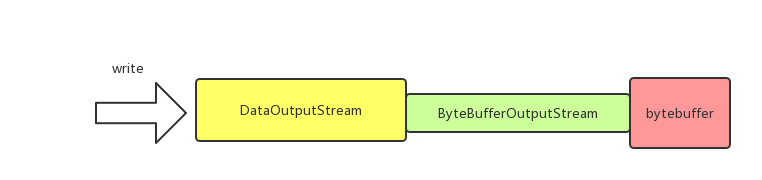
这里的关键是compressor,来分析下Compressor,以putInt为例,实际上是调用了DataOutputStream#writeInt方法
public void putInt(final int value) {

        try {

            appendStream.writeInt(value); // appendStream是DataOutputStream类型

        } catch (IOException e) {

            throw new KafkaException("I/O exception when writing to the append stream, closing", e);

        }

    }
看下Compressor是如何初始化的:
public Compressor(ByteBuffer buffer, CompressionType type) {

        // ...

        // create the stream

        bufferStream = new ByteBufferOutputStream(buffer);

        appendStream = wrapForOutput(bufferStream, type, COMPRESSION_DEFAULT_BUFFER_SIZE);

}

static public DataOutputStream wrapForOutput(ByteBufferOutputStream buffer, CompressionType type, int bufferSize) {

        try {

            switch (type) {

                case NONE:

                    return new DataOutputStream(buffer); // 封装了ByteBufferOutputStream

                case GZIP:

                    return new DataOutputStream(new GZIPOutputStream(buffer, bufferSize));

                case SNAPPY:

                    try {

                        OutputStream stream = (OutputStream) snappyOutputStreamSupplier.get().newInstance(buffer, bufferSize);

                        return new DataOutputStream(stream);

                    } catch (Exception e) {

                        throw new KafkaException(e);

                    }

                case LZ4:

                    try {

                        OutputStream stream = (OutputStream) lz4OutputStreamSupplier.get().newInstance(buffer);

                        return new DataOutputStream(stream);

                    } catch (Exception e) {

                        throw new KafkaException(e);

                    }

                default:

                    throw new IllegalArgumentException("Unknown compression type: " + type);

            }

        } catch (IOException e) {

            throw new KafkaException(e);

        }

    }
从上面代码可以看到,和ByteBuffer直接关联的是ByteBufferOutputStream;而DataOutputStream封装了ByteBufferOutputStream,负责处理压缩数据,直观上来看如下图:
4 BufferPool
BufferPool用于管理producer缓存池,使用配置项buffer.memory来指定缓存池的大小,默认是32M。
4.1 allocate
BufferPool#allocate用于从缓存池中申请内存。BufferPool维护了一个ByteBuffer的双端队列free,表示空闲的ByteBuffer,只有大小为batch.size的内存申请才会从free中去拿去,也就是说free中维护的ByteBuffer都是batch.size大小。
BufferPool几个关键属性
private final long totalMemory;

    private final int poolableSize; // 一块连续内存的大小,等于batch.size

    private final ReentrantLock lock;

    private final Deque<ByteBuffer> free; // 空闲的ByteBuffer列表,每个ByteBuffer都是batch.size大小,只有申请的内存等于batch.size大小才会从free中获取

    private final Deque<Condition> waiters;

    private long availableMemory; // 还有多少内存可以用,即buffer.memory-已用内存

    // ...

}
public ByteBuffer allocate(int size, long maxTimeToBlockMs) throws InterruptedException {

        if (size > this.totalMemory)

            throw new IllegalArgumentException("Attempt to allocate " + size

                                               + " bytes, but there is a hard limit of "

                                               + this.totalMemory

                                               + " on memory allocations.");

        this.lock.lock();

        try {

            if (size == poolableSize && !this.free.isEmpty()) // 关键,只有大小等于batch.size的时候才会从free中获取

                return this.free.pollFirst();

            int freeListSize = this.free.size() * this.poolableSize;

            // 剩余总内存够用,但是不能从free中获取,则将free释放一些,然后申请对应大小的内存

            if (this.availableMemory + freeListSize >= size) {

                freeUp(size); // 释放

                this.availableMemory -= size;

                lock.unlock();

                return ByteBuffer.allocate(size);

            } else {

                // 关键,剩余总内存不够了,则会阻塞,直到有足够的内存

                int accumulated = 0;

                ByteBuffer buffer = null;

                Condition moreMemory = this.lock.newCondition();

                long remainingTimeToBlockNs = TimeUnit.MILLISECONDS.toNanos(maxTimeToBlockMs);

                this.waiters.addLast(moreMemory); // 添加到等待队列尾

                while (accumulated < size) {

                    long startWaitNs = time.nanoseconds();

                    long timeNs;

                    boolean waitingTimeElapsed;

                    try {

                        waitingTimeElapsed = !moreMemory.await(remainingTimeToBlockNs, TimeUnit.NANOSECONDS); // 阻塞

                    } catch (InterruptedException e) {

                        this.waiters.remove(moreMemory);

                        throw e;

                    } finally {

                        long endWaitNs = time.nanoseconds();

                        timeNs = Math.max(0L, endWaitNs - startWaitNs);

                        this.waitTime.record(timeNs, time.milliseconds());

                    }

                    if (waitingTimeElapsed) {

                        this.waiters.remove(moreMemory);

                        throw new TimeoutException("Failed to allocate memory within the configured max blocking time " + maxTimeToBlockMs + " ms.");

                    }

                    remainingTimeToBlockNs -= timeNs;

                    // check if we can satisfy this request from the free list,

                    // otherwise allocate memory

                    if (accumulated == 0 && size == this.poolableSize && !this.free.isEmpty()) {

                        // just grab a buffer from the free list

                        buffer = this.free.pollFirst();

                        accumulated = size;

                    } else {

                        freeUp(size - accumulated);

                        int got = (int) Math.min(size - accumulated, this.availableMemory);

                        this.availableMemory -= got;

                        accumulated += got;

                    }

                }

                Condition removed = this.waiters.removeFirst(); // 从头部获取,后面详细讲

                if (removed != moreMemory)

                    throw new IllegalStateException("Wrong condition: this shouldn't happen.");

                // 如果分配后还有剩余空间,即唤醒后续的等待线程

                if (this.availableMemory > 0 || !this.free.isEmpty()) {

                    if (!this.waiters.isEmpty())

                        this.waiters.peekFirst().signal(); // 唤醒头部

                }

                // unlock and return the buffer

                lock.unlock();

                if (buffer == null)

                    return ByteBuffer.allocate(size);

                else

                    return buffer;

            }

        } finally {

            if (lock.isHeldByCurrentThread())

                lock.unlock();

        }

    }
对于allocate有几点需要注意
- 只有大小为batch.size的内存申请才会从free中获取,所以消息大小尽量不要大于batch.size,这样才能充分利用缓存池。为什么申请的内存会不等于batch.size呢,原因是在RecordAccumulator#append中有一句 int size = Math.max(this.batchSize, Records.LOG_OVERHEAD + Record.recordSize(key, value)), 即如果消息大小大于batch.size则会使用消息的大小申请内存。
- 下面代码可能有点疑惑, moreMemory是添加到waiters的尾部的,为什么获取的时候是从头部获取呢?这个原因是,线程唤醒只会唤醒waiters头部的线程,所以当线程被唤醒后,他肯定是已经在waiters头部了,也就是说排在他前面的线程都已经在他之前被唤醒并移除waiters了。
Condition removed = this.waiters.removeFirst(); // 从头部获取,后面详细讲

             if (removed != moreMemory)

                 throw new IllegalStateException("Wrong condition: this shouldn't happen.");
- 申请的总内存查过buffer.memory的时候会阻塞或者抛出异常
4.2 deallocate
BufferPool#deallocate用于将内存释放并放回到缓存池。同allocate一样,只有大小等于batch.size的内存块才会放到free中。
public void deallocate(ByteBuffer buffer) {

        deallocate(buffer, buffer.capacity());

}

public void deallocate(ByteBuffer buffer, int size) {

        lock.lock();

        try {

            if (size == this.poolableSize && size == buffer.capacity()) {

                buffer.clear();

                this.free.add(buffer);// 只有大小等于batch.size的内存块才会放到free中

            } else { // 否则的话只是availableMemory改变,无用的ByteBuffer会被GC清理掉

                this.availableMemory += size;

            }

            Condition moreMem = this.waiters.peekFirst(); // 唤醒waiters的头结点

            if (moreMem != null)

                moreMem.signal();

        } finally {

            lock.unlock();

        }

}
producer内存管理分析的更多相关文章
- Android 内存管理分析(四)
尊重原创作者,转载请注明出处: http://blog.csdn.net/gemmem/article/details/8920039 最近在网上看了不少Android内存管理方面的博文,但是文章大多 ...
- memcached 内存管理 分析(转)
Memcached是一个高效的分布式内存cache,了解memcached的内存管理机制,便于我们理解memcached,让我们可以针对我们数据特点进行调优,让其更好的为我所用.这里简单谈一下我对me ...
- Android进程的内存管理分析
尊重原创作者,转载请注明出处: http://blog.csdn.net/gemmem/article/details/8920039 最近在网上看了不少Android内存管理方面的博文,但是文章大多 ...
- iOS 内存管理分析
内存分析 静态分析(Analyze) 不运行程序, 直接检测代码中是否有潜在的内存问题(不一定百分百准确, 仅仅是提供建议) 结合实际情况来分析, 是否真的有内存问题 动态分析(Profile == ...
- cocos 自动内存管理分析
#include "CCAutoreleasePool.h" #include "ccMacros.h" NS_CC_BEGIN static CCPoolMa ...
- spark内存管理分析
前言 下面的分析基于对spark2.1.0版本的分析,对于1.x的版本可以有区别. 内存配置 key 默认 解释 spark.memory.fraction 0.6 spark可以直接使用的内存大小系 ...
- 【转】cocos2d-x与ios内存管理分析(在游戏中减少内存压力)
猴子原创,欢迎转载.转载请注明: 转载自Cocos2D开发网–Cocos2Dev.com,谢谢! 原文地址: http://www.cocos2dev.com/?p=281 注:自己以前也写过coco ...
- cocos2d-x与ios内存管理分析(在游戏中减少内存压力)
转自:http://www.cocos2dev.com/?p=281 注:自己以前也写过cocos2d-x如何优化内存的使用,以及内存不足的情况下怎么处理游戏.今天在微博中看到有朋友介绍了下内存,挺详 ...
- Android内存泄漏分析及调试
尊重原创作者,转载请注明出处: http://blog.csdn.net/gemmem/article/details/13017999 此文承接我的另一篇文章:Android进程的内存管理分析 首先 ...
随机推荐
- 面试题(造火箭必备技能):请举例一个最有成就感的性能bug
当前,绝大部分招聘都有性能要求或者把其作为加分项(会性能优先),哪怕你不是面试的性能,面试的时候可能会问性能,所以大家才会有"面试造火箭,进去拧螺丝"的共鸣.至于企业为什么重视性能 ...
- 【C#】AssemblyLoadContext 加载程序集
使用 .NET Core 3.0 的 AssemblyLoadContext 实现插件热加载 一般情况下,一个 .NET 程序集加载到程序中以后,它的类型信息以及原生代码等数据会一直保留在内存中,.N ...
- 【C#基础概念】程序集清单
.NET Core 程序集(模块)还包含描述程序集本身的元数据,我们称之为清单.清单记录了当前程序集正常运行所需的所有外部程序集.程序集的版本号.版权信息.模块 .资源(图片 xml等)等.与类型元数 ...
- 磁盘管理及shell脚本编程练习
转至:http://www.178linux.com/88405 1.创建一个10G分区,并格式为ext4文件系统 a) 要求其block大小为2048,预留空间百分比为2,卷标为MYDATA,默认挂 ...
- Jenkins——为什么使用持续集成?
一.开发模型 1.瀑布开发模型:过程线性不可逆的开发模型 优势: 1)简单易懂 2)当前阶段完成后只需要关注后续阶段 3)为项目提供了按阶段划分的检查节点 劣势: 1)各个阶段的划分完全固定,阶段之间 ...
- elementUI日期选择器 el-date-picker根据所选日期选择禁用
我遇到这样一个场景,需要动态渲染时间表单,但是后端传过来的数据, 这个时候就不能预先找到想要限制的date了,因为连date本身,也是根据后端传来的数据生成的. 如图: 代码如下: //templat ...
- WARN node unsupported "node@v6.11.2" is ......(windows系统更新node版本)
问题: 使用npm下载文件时报错:WARN node unsupported "node@v6.11.2" is incompatible with electron@^7.1.9 ...
- JZ-006-旋转数组的最小数字
旋转数组的最小数字 题目描述 把一个数组最开始的若干个元素搬到数组的末尾,我们称之为数组的旋转. 输入一个非递减排序的数组的一个旋转,输出旋转数组的最小元素. NOTE:给出的所有元素都大于0,若数组 ...
- 在SpringBoot项目中添加SpringMVC拦截器
1.认识拦截器 SpringMVC的拦截器(Interceptor)不是Filer,同样可以实现请求的预处理.后处理.使用拦截器仅需要两个步骤 实现拦截器 注册拦截器 1.1实现拦截器 实现拦截器可以 ...
- Laravel 8 图片上传七牛云
1.利用 composer 下载依赖包 composer require itbdw/laravel-storage-qiniu 2.打开 config 文件夹下的 app.php 文件,在 prov ...