
Bootstarp5第四弹
六、颜色
<div class="container mt-3">最基本的文本

	<p class="text-muted">柔和的文本</p>

	<p class="text-primary">重要的文本</p>

	<p class="text-success">执行成功的文本</p>

	<p class="text-info">带有提示信息的文本</p>

	<p class="text-warning">警告文本</p>

	<p class="text-danger">危险性文本</p>

	<p class="text-secondary">深灰色文本</p>

	<p class="text-dark">黑色文本</p>

	<p class="text-light">浅灰色文本</p>

	<p class="text-white">白色文本</p>

</div>

设置颜色透明度和背景颜色()
<div class="container mt-3">最基本的文本

	<p class="text-muted">柔和的文本</p>

	<p class="text-primary">重要的文本</p>

	<p class="text-success">执行成功的文本</p>

	<p class="text-info-50 bg-primary">带有提示信息的文本</p>

	<p class="text-warning">警告文本</p>

	<p class="text-danger">危险性文本</p>

	<p class="text-secondary">深灰色文本</p>

	<p class="text-dark bg-danger">黑色文本</p>

	<p class="text-light bg-dark">浅灰色文本</p>

	<p class="text-white bg-dark">白色文本</p>

</div>
在链接中使用()
<a href="#" class="text-muted">柔和链接</a>

	<a href="#" class="text-primary">重要的文本</a>

	<a href="https://www.runoob.com/bootstrap5/bootstrap5-colors.html" class="text-success">Bootstarp5教程</a>

	<!--在href中放置网页链接,点击即可跳转-->
背景颜色与文本颜色应用除了text和bg不同,其余相同
七、表格
Bootstrap5 通过 .table 类来设置基础表格的样式
基础表格
<div class="container mt-3">

	<table class="table">

	<thead>

		<tr>

			<th>FirstName</th>

			<th>LastName</th>

			<th>Email</th>

		</tr>

	</thead>

		<tbody>

			<tr>

				<td>John</td>

				<td>Smith</td>

				<td>John.com</td>

			</tr>

		</tbody>

	</table>

</div>
条纹表格(便于区分相邻的信息)
<div class="container mt-3">

	<table class="table table-striped">

	<thead>

		<tr>

			<th>FirstName</th>

			<th>LastName</th>

			<th>Email</th>

		</tr>

	</thead>

		<tbody>

			<tr>

				<td>John</td>

				<td>Smith</td>

				<td>John.com</td>

			</tr>

		</tbody>

	</table>

</div>

<!--table-striped-->
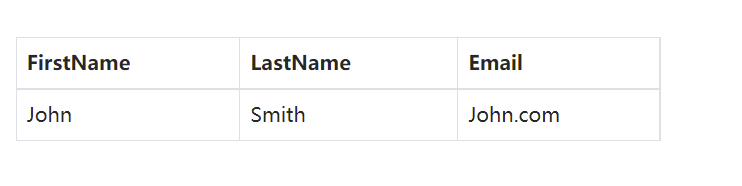
边框表格
<div class="container mt-3">

	<table class="table table-bordered">

	<thead>

		<tr>

			<th>FirstName</th>

			<th>LastName</th>

			<th>Email</th>

		</tr>

	</thead>

		<tbody>

			<tr>

				<td>John</td>

				<td>Smith</td>

				<td>John.com</td>

			</tr>

		</tbody>

	</table>

</div>

<!--table-bordered-->
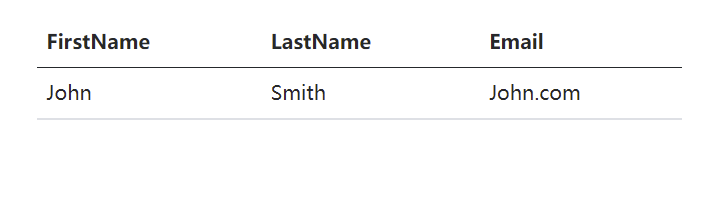
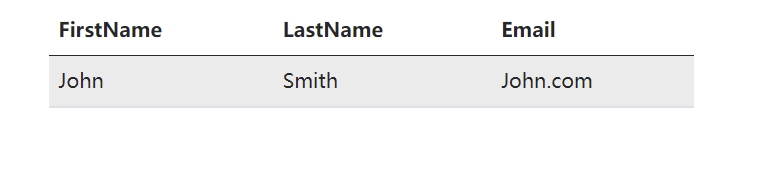
鼠标悬停效果
<div class="container mt-3">

	<table class="table table-hover">

	<thead>

		<tr>

			<th>FirstName</th>

			<th>LastName</th>

			<th>Email</th>

		</tr>

	</thead>

		<tbody>

			<tr>

				<td>John</td>

				<td>Smith</td>

				<td>John.com</td>

			</tr>

		</tbody>

	</table>

</div>

<!--table-hover-->
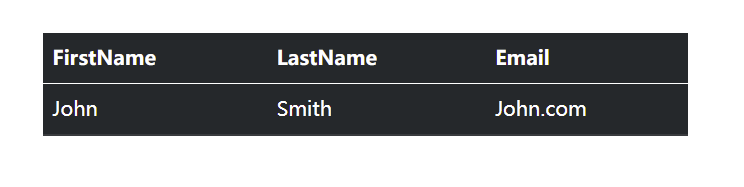
黑色背景表格
<div class="container mt-3">

	<table class="table table-dark">

	<thead>

		<tr>

			<th>FirstName</th>

			<th>LastName</th>

			<th>Email</th>

		</tr>

	</thead>

		<tbody>

			<tr>

				<td>John</td>

				<td>Smith</td>

				<td>John.com</td>

			</tr>

		</tbody>

	</table>

</div>

<!--table-dark-->
以上效果可以共同使用:例如,黑色背景+条纹效果
无边框表格
<div class="container mt-3">

	<table class="table table-borderless">

	<thead>

		<tr>

			<th>FirstName</th>

			<th>LastName</th>

			<th>Email</th>

		</tr>

	</thead>

		<tbody>

			<tr>

				<td>John</td>

				<td>Smith</td>

				<td>John.com</td>

			</tr>

		</tbody>

	</table>

</div>

<!--table-borderless-->
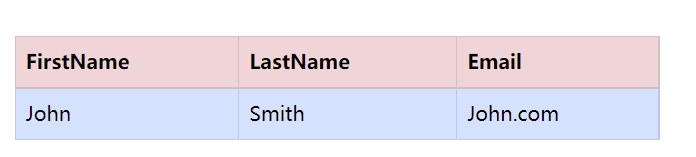
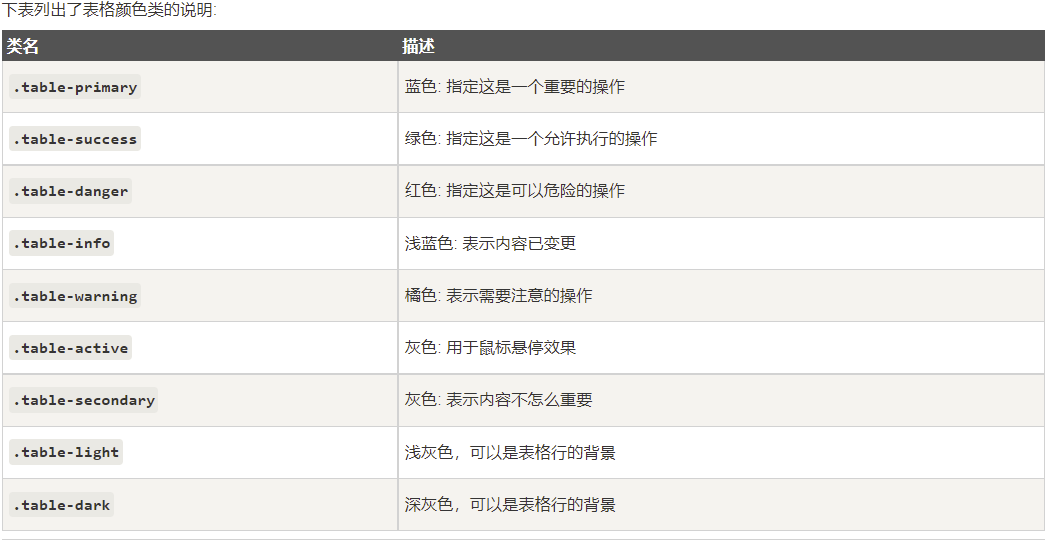
指定颜色到表格中
<div class="container mt-3">

	<table class="table table-borderless">

	<thead>

		<tr class="table-danger">

			<th>FirstName</th>

			<th>LastName</th>

			<th>Email</th>

		</tr>

	</thead>

		<tbody class="table-primary">

			<tr>

				<td>John</td>

				<td>Smith</td>

				<td>John.com</td>

			</tr>

		</tbody>

	</table>

</div>
表头颜色
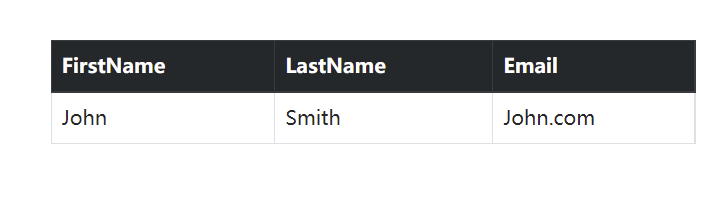
<div class="container mt-3">

	<table class="table table-dark">

	<thead class="table-dark">

		<tr>

			<th>FirstName</th>

			<th>LastName</th>

			<th>Email</th>

		</tr>

	</thead>

		<tbody>

			<tr>

				<td>John</td>

				<td>Smith</td>

				<td>John.com</td>

			</tr>

		</tbody>

	</table>

</div>
较小的表格
<div class="container mt-3">

	<table class="table table-dark table-sm">

	<thead class="table-dark">

		<tr>

			<th>FirstName</th>

			<th>LastName</th>

			<th>Email</th>

		</tr>

	</thead>

		<tbody>

			<tr>

				<td>John</td>

				<td>Smith</td>

				<td>John.com</td>

			</tr>

		</tbody>

	</table>

</div>
响应式表格
<div class="table-responsive">

  <table class="table">

    <thead>

      <tr>

        <th>#</th>

        <th>Firstname</th>

        <th>Lastname</th>

        <th>Age</th>

        <th>City</th>

        <th>Country</th>

        <th>Sex</th>

        <th>Example</th>

        <th>Example</th>

        <th>Example</th>

        <th>Example</th>

      </tr>

      </thead>

		<tbody>

			<tr>

				<td>John</td>

				<td>Smith</td>

				<td>John.com</td>

			</tr>

		</tbody>

	</table>

</div>
屏幕较小时,会显示出滚动条
Bootstarp5第四弹的更多相关文章
- 前端学习 第四弹: HTML(一)
前端学习 第四弹: HTML(一) 元素分类:块元素 内联元素 块级元素在浏览器显示时,通常会以新行来开始(和结束). 例子:<h1>, <p>, <ul>, &l ...
- 『PyTorch』第四弹_通过LeNet初识pytorch神经网络_下
『PyTorch』第四弹_通过LeNet初识pytorch神经网络_上 # Author : Hellcat # Time : 2018/2/11 import torch as t import t ...
- jQuery 关于IE9上传文件无法进入后台问题的原因及解决办法(ajaxfileupload.js第四弹)
第四弹的诞生完全不在自己最初的计划之中,是有个网友看了先前关于<ajaxfileupload.js系列>的文章后提出的问题,由于自己一直是用chrome浏览器去测试demo,完全忽略IE浏 ...
- 模式匹配第四弹:if case,guard case,for case
2016-06-06 7388 作者:Olivier Halligon,原文链接,原文日期:2016-05-16 译者:walkingway:校对:Cee:定稿:numbbbbb 现在我们来重新回顾下 ...
- 好玩的WPF第四弹:用Viewport2DVisual3D实现3D旋转效果
原文:好玩的WPF第四弹:用Viewport2DVisual3D实现3D旋转效果 版权声明:转载请联系本人,感谢配合!本站地址:http://blog.csdn.net/nomasp https:// ...
- 关于『进击的Markdown』:第四弹
关于『进击的Markdown』:第四弹 建议缩放90%食用 美人鱼(Mermaid)悄悄的来,又悄悄的走,挥一挥匕首,不留一个活口 又是漫漫画图路... 女士们先生们,大家好! 我们要接受Markd ...
- ActiveMQ第四弹:在HermesJMS中创建ActiveMQ Session
Hermes JMS是一个开源免费的跨平台的JMS消息监听工具.它可以很方便和各种JMS框架集成和交互,可以用来监听.发送.接收.修改.存储消息等.这篇文章将讲解HermesJMS如何集成Active ...
- Python3 学习第四弹:编码问题(转载)
关于python的编码问题一直以来不得解,终于在今天从这篇博文中明白了. 原文地址: http://nedbatchelder.com/text/unipain.html 译文地址:http://py ...
- 暑假集训(4)第四弹 -----排列,计数(hdu1465)
题意概括:嗯,纵使你数次帮助小A脱离困境,但上一次,小A终于还是失败了.那数年的奔波与心血,抵不过轻轻一指,便彻底 湮灭,多年的友谊终归走向末路.这一切重击把小A彻底击溃! 不为什么,你到底还是要继续 ...
- 第四弹:overfeat
overfeat是在AlexNet出现后,推出来的模型,其不仅用于物体分类,来用于定位,检测等,可以说是一个涉及很多应用场景的通用模型,值得看看. 本文将从两个方面来讲解,第一部分从论文角度来说一说, ...
随机推荐
- python 发送 application/x-www-form-urlencoded 类型的数据包
在网上百度了很多,坑的要死,基本不咋好用,自己多尝试了几遍,成功实现了. data 的构建方式 data = f"page={page}&sign={sign}&t={t}& ...
- 第六章 mysql日志
第六章 mysql日志 一 错误日志 错误日志的默认存放路径是 mysql 存放数据的地方 hostname.err 1. 修改错误日志存放路径 [mysqld] log-error=/data/m ...
- 「SOL」数树 (LOJ/WC2019)
WC 果然还是 WC # 题面 有一张 \(n\) 个点的图,图上有红蓝两种边(可能重叠),且两种边各自形成一个 \(n\) 个点的树. 用 \(m\) 种颜色给图上的所有点染色.若 \(u,v\) ...
- CCF 202009-2 风险人群筛查
#include <iostream> #include <bits/stdc++.h> #include <string> using namespace std ...
- 使用python脚本批量造数据
本篇将采用 Python 脚本的方式进行批量给mysql造数据. 为了使 Python 可以连上数据库(MySQL),并且可以与数据库交互(增删改查等操作),则需要安装 MySQL 客户端操作库. ...
- 浙大版《C语言程序设计(第3版)》题目集 习题3-1 比较大小(10 分)
本题要求将输入的任意3个整数从小到大输出. 输入格式: 输入在一行中给出3个整数,其间以空格分隔. 输出格式: 在一行中将3个整数从小到大输出,其间以"->"相连. 输入样例 ...
- element table合计行自定义及单元格合并
问题:项目需求要求table下面加合计一行 图片展示: 代码示例: TEMPLATE: span-method是自定义table单元 show-summary是展示合并行 summary-meth ...
- 20200925--矩阵加法(奥赛一本通P93 6 多维数组)
输入两个n行m列的矩阵A和B,输出它们的和A+B 输入: 第1行包含两个整数n和m(1<=n<=100,1<=m<=100),表示矩阵的行数和列数. 接下来n行,每行m个整数, ...
- core程序实现文件下载
已知本地文件名,返回给前台流 string filepath = path +"/" + filename +".txt"; if(System.IO.File ...
- springboot项目 报错No mapping for GET /css/bootstrap.css,前端无法展示样式
说来也奇怪,前几天刚写完的项目 写的好好的 现在打开他就加载不了前端的静态资源了 报错No mapping for GET /css/bootstrap.css 解决方法: 新建一个配置类 ,将静态资 ...