
使用Serializable接口进行JAVA的序列化和反序列化
OBJECT STREAMS – SERIALIZATION AND DESERIALIZATION IN JAVA EXAMPLE USING SERIALIZABLE INTERFACE
In the previous java tutorials I have discussed about basic of java streams, byte streams, then a modified version of them character streams which were specially for character data, then data streams to solve the problem of reading and writing java primitives directly but
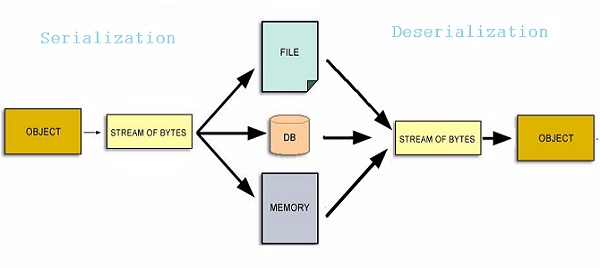
Object Streamsare used to save the state to an object by converting it into a stream and storing into a file, database or some other location(known as Serialization) and to use it at a later point of time for retrieving the stored values and restoring the objects old state( known as Deserialization).序列化:基于对象流,将对象状态(实例变量)转换为流,并存储到文件、数据库或其他地方。
反序列化;将对象流还原,获取存储对象实例和对象状态。
TABLE OF CONTENTS –
REAL LIFE CASES
MARKER INTERFACE
MAIN INTERFACES FOR OBJECT STREAMS
MAIN CLASSES FOR OBJECT STREAMS
TRANSIENT KEYWORD
EXAMPLE OF SERIALIZABLE INTERFACE
This serialization and deserialization helps us in many scenarios like gaming, session state management etc.
序列化和反序列化的一些应用场景:游戏、Session状态管理等。
Have you ever wondered how a game starts from the same point where we have left it? Then this is your answer. All this is done by saving the current state of the object(or game) and reloading the state so that the player could continue from the old state only. Also the checkpoint system in games follow this method by permanently saving the progress up to that state for later use.
MARKER INTERFACE(四大常用的标记接口)
An interface in Java without any field and method is a Marker interface. It is used to inform compiler that the class implementing it has some special behavior or meaning. Some of the Marker interfaces are-
- java.io.Serializable
- java.rmi.Remote
- java.util.RandomAccess
- java.lang.Cloneable
Although since Java 5 marker interfaces are replaced by annotations and they serve the same purpose as marker interfaces did before but for serializability we still use the interfaces and the transient keyword.
特别指出,标记接口中的RandomAccess的重要应用,可以参考【RandomAccess接口理解】https://blog.csdn.net/stick2it/article/details/53469910。该文章介绍了RandomAccess在Collections类的 public static <T> int binarySearch(List<? extends Comparable<? super T>> list, T key) 方法中应用。
INTERFACES
Every Object Stream class implements either of the two interfaces-
OBJECTINPUT – SUBINTERFACE OF DATAINPUT
OBJECTOUTPUT – SUBINTERFACE OF DATAOUTPUT
Note:- Since both the interfaces above are sub interface of interfaces Data streams interfaces, That means that all the primitive data I/O methods covered in Data Streams are also implemented in object streams.
CLASSES FOR OBJECT STREAMS
Two classes that are used for Object Streams are –
OBJECTINPUTSTREAM (用于反序列化)
- This Java class is responsible for deserializing the previously serialized objects and the primitive data. 可反序列化之前已被序列化的对象、原始类型数据。
- It reads the object from the graph of objects stored while using FileInputStream.
- Method
readObject()is the main method used to deserialize the object.The class of the object, the signature of the class, and the values of the non-transient and non-static fields of the class and all of its super types are read. 注意非transient和非static字段才可反序列化,另外可以读取对象、类以及超类信息。 public final Object readObject() throws IOException,ClassNotFoundException
OBJECTOUTPUTSTREAM
- This Java class is used to store primitives and a graph of Java object which are available to ObjectInputStream to read data from.
- This does not care about saving the super class and sub class data but it could be achieved by using the writeObject method or by using the methods for primitive data types supported by DataOutput.
- Method
writeObject()is a main method of this Java class which serializes the object directly.public final void writeObject(Object obj) throws IOException
TRANSIENT KEYWORD
There are scenarios in which we want to store only a part of the object i.e. we want to omit some specific fields from the stored object just like password field from any user class or an Employee or you can think of any other sensitive information.
In these cases we mark these fields as transient and this keyword protects the field from being saved during the process of serialization.
Example – transient private String password;
transient关键词用于屏蔽那些不想被序列化的字段。
SERIALIZATION AND DESERIALIZATION EXAMPLE
Now lets take an example and see how to do this using actual Java coding and have a look at some key points that should be remembered while using Serializable interface.
USER.JAVA
|
1
2
3
4
5
6
7
8
9
10
11
12
13
14
15
16
17
18
19
20
21
22
23
24
25
26
27
28
29
30
31
32
33
34
35
36
37
38
39
40
41
42
43
44
45
46
47
48
49
50
51
|
package com.codingeek.serialization;import java.io.Serializable;public class User implements Serializable { /** * Generated Serial version Id */ private static final long serialVersionUID = -55857686305273843L; private String name; private String username; transient private String password; @Override public String toString() { // TODO Auto-generated method stub String value = "name : " + name + "\nUserName : " + username + "\nPassword : " + password; return value; } /** * Setters and getters methods. */ public String getName() { return name; } public void setName(String name) { this.name = name; } public String getUsername() { return username; } public void setUsername(String username) { this.username = username; } public String getPassword() { return password; } public void setPassword(String password) { this.password = password; }} |
- Make sure that the Java class you need to store must implement
Serializable interface. - Notice that password field in the above class is made transient because it is a sensitive information and we don’t want to store it or you can chose any other field.
- Also there is another field named
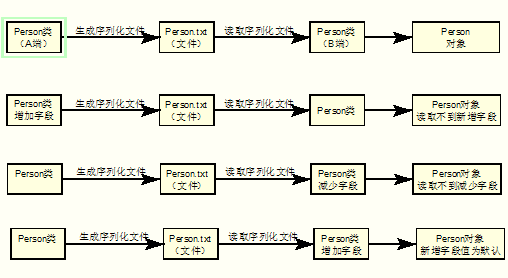
serialVersionUIDwhich is a Long variable and it should be defined for all the Java classes because if it is not and if in future we need to perform any changes in the class like variables, methods etc then we would never be able to deserialize an already serialized object.
You can try it yourself by first serializing the object and then do some changes in your java class before deserializing it. You will get an error stating the change in SerialVersionUID which is generated automatically by the compiler. - Java的序列化机制是通过判断类的serialVersionUID来验证版本一致性的。在进行反序列化时,JVM会把传来的字节流中的serialVersionUID与本地相应实体类的serialVersionUID进行比较,如果相同就认为是一致的,可以进行反序列化,否则就会出现序列化版本不一致的异常。参考资料【3】java类中serialversionuid 作用 是什么?举个例子说明 https://www.cnblogs.com/duanxz/p/3511695.html 中有详细说明,示意图如下:
SERIALIZATIONUTIL.JAVA
|
1
2
3
4
5
6
7
8
9
10
11
12
13
14
15
16
17
18
19
20
21
22
23
24
25
26
27
28
29
30
31
32
33
34
35
36
37
38
39
40
41
42
43
44
|
package com.codingeek.serialization;import java.io.BufferedInputStream;import java.io.BufferedOutputStream;import java.io.FileInputStream;import java.io.FileOutputStream;import java.io.IOException;import java.io.ObjectInputStream;import java.io.ObjectOutputStream;/** * This class is a utility class for performing the serialization and * deserialization operations provided the required information. * * @author hiteshgarg */public class SerializationUtil { /** * deserialize to Object from given file. We use the general Object so as * that it can work for any Java Class. */ public static Object deserialize(String fileName) throws IOException, ClassNotFoundException { FileInputStream fis = new FileInputStream(fileName); BufferedInputStream bis = new BufferedInputStream(fis); ObjectInputStream ois = new ObjectInputStream(bis); Object obj = ois.readObject(); ois.close(); return obj; } /** * serialize the given object and save it to given file */ public static void serialize(Object obj, String fileName) throws IOException { FileOutputStream fos = new FileOutputStream(fileName); BufferedOutputStream bos = new BufferedOutputStream(fos); ObjectOutputStream oos = new ObjectOutputStream(bos); oos.writeObject(obj); oos.close(); }} |
In the above Java utility class we have used
- File Streams(For file related operations) which are wrapped in
- Buffered Streams(for Speeding up the operations) which are finally wrapped into
- Object Streams(for serialization and deserialization operations).
SERIALIZATIONTEST.JAVA
|
1
2
3
4
5
6
7
8
9
10
11
12
13
14
15
16
17
18
19
20
21
22
23
24
25
26
27
28
|
package com.codingeek.serialization;import java.io.IOException;public class SerializationTest { public static void main(String[] args) { User user = new User(); user.setName("Hitesh"); user.setUsername("Codingeek"); user.setPassword("Garg"); try { /** * Serializing the object */ SerializationUtil.serialize(user, "serialization.txt"); /** * Deserializing the object */ User newUser = (User) SerializationUtil.deserialize("serialization.txt"); System.out.println(newUser.toString()); } catch (IOException | ClassNotFoundException e) { e.printStackTrace(); } }} |
Output:-

name : Hitesh

UserName : Codingeek

Password : null
Notice that the password value is null and it is because we have made it a transient field and hence it was not stored and at the time of deserialization a default value is assigned to this variable( which is obviously null).
Please comment to share your views, suggestions and to report any modification if required.
KEEP LEARNING. HAPPY LEARNING 
使用Serializable接口进行JAVA的序列化和反序列化的更多相关文章
- java 对象序列化与反序列化
Java序列化与反序列化是什么? 为什么需要序列化与反序列化? 如何实现Java序列化与反序列化? 本文围绕这些问题进行了探讨. 1.Java序列化与反序列化 Java序列化是指把Java对象转换为 ...
- java对象序列化、反序列化
平时我们在Java内存中的对象,是无法进行IO操作或者网络通信的,因为在进行IO操作或者网络通信的时候,人家根本不知道内存中的对象是个什么东西,因此必须将对象以某种方式表示出来,即存储对象中的状态.一 ...
- Java之序列化和反序列化
序列化的对象: package test_demo.SerializableOper; import java.io.Serializable; /* * 序列化对象需要实现序列号接口 * */ pu ...
- Java基础—序列化与反序列化(转载)
转载自: Java序列化与反序列化 1.Java序列化与反序列化 Java序列化是指把Java对象转换为字节序列的过程:而Java反序列化是指把字节序列恢复为Java对象的过程. 2.为什么需要序列化 ...
- Java 中序列化与反序列化
一. 序列化和反序列化概念 Serialization(序列化)是一种将对象以一连串的字节描述的过程:反序列化deserialization是一种将这些字节重建成一个对象的过程.将程序中的对象,放入文 ...
- Java对象序列化和反序列化的工具方法
import java.io.File; import java.io.FileInputStream; import java.io.FileNotFoundException; import ja ...
- java之序列化与反序列化
1.这里主要是介绍Protobuf提供的序列化与反序列化的高效性.相对于传统的java提供的序列化来说,Protobuf的效率提高了很多倍.但是也有不足的地方,就是proto在对象序列化的时候抛弃了很 ...
- Java 自定义序列化、反序列化
1.如果某个成员变量是敏感信息,不希望序列化到文件/网络节点中,比如说银行密码,或者该成员变量所属的类是不可序列化的, 可以用 transient 关键字修饰此成员变量,序列化时会忽略此成员变量. c ...
- Java对象序列化与反序列化一 JSON
Java对象序列化与反序列化一 JSON 1. 依赖库 jackson-all-1.6.1.jar 2. 代码 public class Student { private String nam ...
随机推荐
- hdu 4632 回文子序列计数
水题 #include<iostream> #include<stdio.h> #include<cstring> #include<algorithm> ...
- Linux命令学习(19):ping命令
版权声明 更新:2017-06-13博主:LuckyAlan联系:liuwenvip163@163.com声明:吃水不忘挖井人,转载请注明出处! 1 文章介绍 本文介绍了Linux下面的ping命令. ...
- lower_bound()函数与quicksort()函数的简单掌握
lower_bound 这个序列中可能会有很多重复的元素,也可能所有的元素都相同,为了充分考虑这种边界条件,STL中的lower_bound算法总体上是才用了二分查找的方法,但是由于是查找序列中的第一 ...
- DP 问题
什么时候使用DP: 最优化原理:如果问题的最优解所包含的子问题的解也是最优的,就称该问题具有最优子结构,即满足最优化原理.(这句话可理解为先将复杂的问题简单化, 达到最简后的解题公式同样可以解复杂情况 ...
- FastAdmin 中的 formatter flag 分析
FastAdmin 中的 formatter flag 分析 效果 首先看看效果,这里的文字和颜色可以根据数据改变. 这是系统自带的分类管理. 代码 功能在 \public\assets\js\bac ...
- /etc/ntp.conf
摘录一: System:ubuntu10.04 配置文件路径:/etc/ntp.conf 配置格式:关键字(如server) 参数(如prefer) 以换行为结束,所以一个配置不能占多行. ...
- markdown的学习
开始 语法 编辑器 sublime配置 图床 体验 开始 昨天晚上加上今天上午,折腾了算是一天的markdown编辑器. 原因是,为了写博客.在博客园写的东西,想法不到简书里,结果发现有部分乱码,以及 ...
- [转]java 中的序列化是什么意思?有什么好处?
1.序列化是干什么的? 简单说就是为了保存在内存中的各种对象的状态,并且可以把保存的对象状态再读出来.虽然你可以用你自己的各种各样的方法来保存Object States,但是Java给你提供一种应该比 ...
- Linux查看物理CPU个数、核数,逻辑CPU个数
学习swoole的时候,建议开启的worker进程数为cpu核数的1-4倍.于是就学习怎么查看CPU核数 # 查看物理CPU个数 cat /proc/cpuinfo| grep "physi ...
- @property_@synthesize 配套使用
@property 类默认实现变量的get set方法 @synthesize 是指定那个变量的 get和set方法 eg: .h文件中定义 类Student中含有两个 int age,和int _a ...