
Ubuntu14.04 x86_64 install Xen
Recommended reference:
https://help.ubuntu.com/community/Xen
Step One: Install Ubuntu14.04 on your computer
Step Two: Install Xen using “sudo apt-get install xen-hypervisor” which will automatically choose suitable version of Xen. If you do this on a 32-bits Ubuntu OS, it can only get amd64-version too. So it is recommended to install a 64-bits Ubuntu. Also you need to install some tool:”sudo apt-get install virtinst virt-viewer virt-manager ”
Step Three: Since version 3 or so, Linux kernel supports Xen, and it can configure boot menu when installing Xen. So what we do next is to reboot our operating system. After that, you can verify Xen is actually installed using “sudo xl list”. If you can see “Domain-0”, it means everything goes well.
Step Four: Network Configuration. It is easily neglected.
sudo stop network-manager
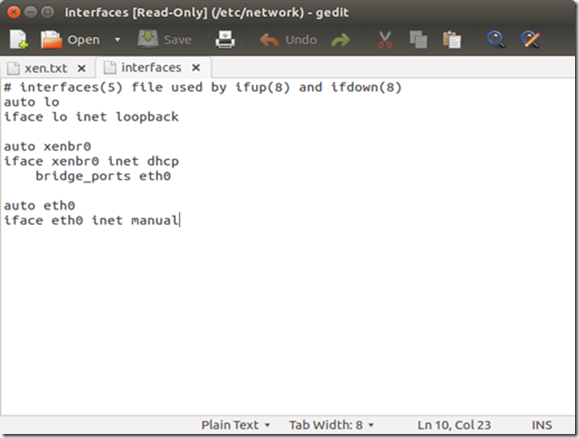
sudo gedit /etc/network/interfaces
Edit /etc/network/interfaces, and make it look like this:
sudo start network-manager
sudo ifdown eth0 && sudo ifup xenbr0 && sudo ifup eth0
Step Five: To skip the installation of guest, I get an image of Ubuntu 10.04 OS from http://jailtime.org/, unzip it and modify the file path in the configuration file.

Then we can create a guest virtual machine

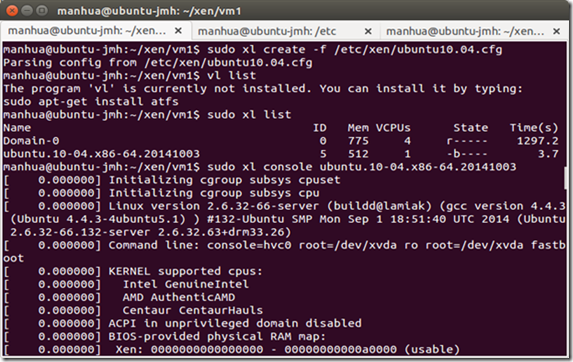
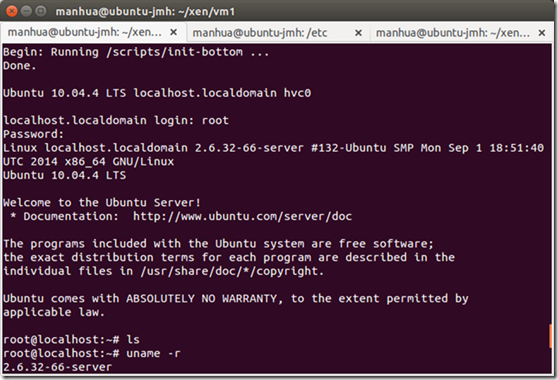
and we can log in
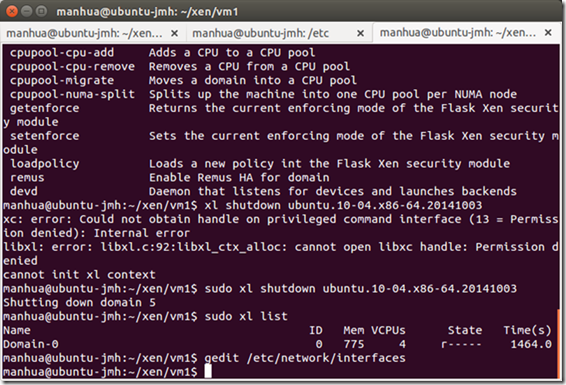
check it over in Domain-0

ask the guest to shutdown
Ubuntu14.04 x86_64 install Xen的更多相关文章
- ubuntu14.04 apt-get install找不到软件,更换源解决
安装14.04后,有时使用apt-get命令安装程序,会提示找不到程序,这是因为软件源不正确,网上说的换163的.中科大的.阿里的等等,我在更新源的时候都会出错,一般是报404错误,网上也没找到好的办 ...
- [译]How to Install Node.js on Ubuntu 14.04 如何在ubuntu14.04上安装node.js
原文链接为 http://www.hostingadvice.com/how-to/install-nodejs-ubuntu-14-04/ 由作者Jacob Nicholson 发表于October ...
- Install Sogou IM 2.0 in Ubuntu14.04+/Xfce
Ubuntu14.04+ 安装搜狗输入法 搜狗输入法是一款非常友好的输入法产品,从Ubuntu14.04开始对Linux支持,不过只是Debian系的,是Ubuntu优麒麟组引入的.优麒麟是针对国人设 ...
- ubuntu14.04 and ros indigo install kinect driver--16
摘要: 原创博客:转载请表明出处:http://www.cnblogs.com/zxouxuewei/ 今日多次测设ros indigo install kinect driver ,提示各种失败,然 ...
- Install rapyuta client on Ubuntu14.04
# -Rapyuta-installation-in-Ubuntu14.04-LTS-Trusty-This gzip folder is a tested version which can ins ...
- Install rapyuta Robot Cloud Engine on Ubuntu14.04
# -Rapyuta-installation-in-Ubuntu14.04-LTS-Trusty-This gzip folder is a tested version which can ins ...
- install chrome on ubuntu14.04
summary chrome broswer can't found in ubuntu14.04 default source list.To install chrome ,you must ad ...
- ubuntu14.04 install flow.
打开虚拟机,点击菜单上的“文件”,选择新建虚拟机,如下图所示: 注释:这里选择自定义安装,点击下一步. 这里我的虚拟机版本最新是10的,就选最新的,然后点击下一步,如下图: 这里选择要安装的Ubunt ...
- ubuntu14.04 desktop 32-bit kvm装windows xp
经过这几天来的折腾,总算是在ubuntu14.04用kvm装上了xp, 看不少的的贴,也绕了不少的圈,总的来说,非常感谢CSDN上的"上善若水75",看着他写的一个分类" ...
随机推荐
- 【距离GDOI:141天】 滚入数位DP的坑
作为博客园的第一篇...我都不知道要写什么了 ... 其实今天很没状态,就当吐槽吧... 嗯,被黄神带去写treap+可持久化线段树,然后在可持久化的删除上面跪了两天,真的是一跪不起.我已经连续多久没 ...
- [SCOI2011][bzoj2331] 地板 [插头dp]
题面: 传送门 思路: 插头dp基础教程 这个L形......第一眼看上去真的是丧病啊 但是仔细想想,实际上也就是拿一堆路径铺满一个棋盘,这个路径还是有限制的 那还有什么好说的,插头dp上啊[雾] 首 ...
- 图片抓取器web + winform
原文发布时间为:2009-11-21 -- 来源于本人的百度文章 [由搬家工具导入] 请先学习:http://hi.baidu.com/handboy/blog/item/bfef61000a67ea ...
- poj 3261 Milk Patterns 后缀数组 + 二分
题目链接 题目描述 给定一个字符串,求至少出现 \(k\) 次的最长重复子串,这 \(k\) 个子串可以重叠. 思路 二分 子串长度,据其将 \(h\) 数组 分组,判断是否存在一组其大小 \(\ge ...
- android基本控件学习-----SeekBar&RatingBar
SeekBar(拖动条)和RatingBar(星级评分条)讲解 一.SeekBar(拖动条) (1)拖动条简单理解就是可以拖动的线,这个对我们来讲很常见,比如视频播放或者音乐播放我们拖动播放的进度,下 ...
- linux device tree源代码解析【转】
转自:http://blog.csdn.net/Tommy_wxie/article/details/42806457 //Basedon Linux v3.14 source code Linux设 ...
- 从零开始学习OpenCL开发(一)架构【转】
转自:http://blog.csdn.net/leonwei/article/details/8880012 多谢大家关注 转载本文请注明:http://blog.csdn.net/leonwei/ ...
- python 锁 多进程
参考: http://www.cnblogs.com/huxi/archive/2010/06/26/1765808.html http://linhs.blog.51cto.com/370259/1 ...
- LeetCode OJ-- Generate Parentheses *
https://oj.leetcode.com/problems/generate-parentheses/ 输入n产生n个( ,n个 )组成的所有合法的括号组合. 现在纸上画画,找到规律: 1.每一 ...
- 使用UICollectionView遇到的各种坑
1)头视图和尾部视图的添加 UICollectionReusableView *headerView = [collectionView dequeueReusableSupplementaryVie ...