
iview实战 : 树形组件自定义
Tree树形组件是 iview 中相对复杂的一个组件。
自定义节点内容
使用强大的 Render 函数可以自定义节点显示内容和交互,比如添加图标,按钮等。
——官方文档
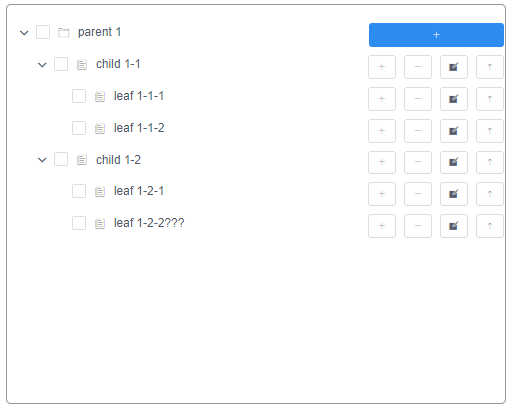
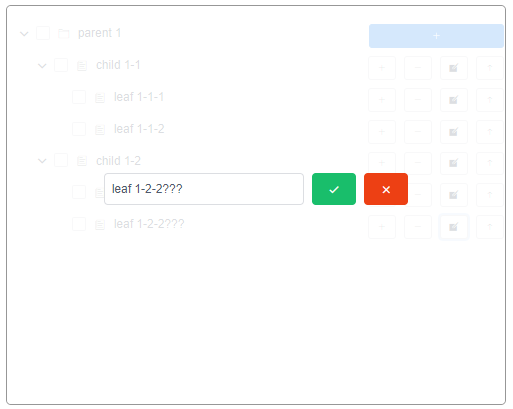
但官方的 example 只有增和删的功能,而我想加置顶和修改名字的功能。
上代码:
Helloworld.vue
<template>
<div class="hello">
<div class="core">
<div class="abs-zone" v-if="editZoneDisplayBoolean">
<div class="box">
<Input placeholder="Enter something..." style="width:200px" v-model="beforeSubmitNodeTitleString" />
<Button type="success" :style="{marginLeft:'5px'}" @click="submitNameEditFunc(1)">
<Icon type="md-checkmark" />
</Button>
<Button type="error" :style="{marginLeft:'5px'}" @click="submitNameEditFunc(0)">
<Icon type="md-close" />
</Button>
</div>
</div>
<Tree :data="data5" :render="renderContent" show-checkbox multiple></Tree>
</div>
</div>
</template> <script>
export default {
data () {
return {
root:null,
editZoneDisplayBoolean:false,
beforeSubmitNodeTitleString:'',
edit_root:null,
edit_node:null,
edit_data:null,
data5: [
{
title: 'parent 1',
expand: true,
render: (h, { root, node, data }) => {
return h('span', {
style: {
display: 'inline-block',
width: '100%'
}
}, [
h('span', [
h('Icon', {
props: {
type: 'ios-folder-outline'
},
style: {
marginRight: '8px'
}
}),
h('span', data.title)
]),
h('span', {
style: {
display: 'inline-block',
float: 'right',
marginRight: '32px'
}
}, [
h('Button', {
props: Object.assign({}, this.buttonProps, {
icon: 'ios-add',
type: 'primary'
}),
style: {
width: '135px'
},
on: {
click: () => { this.append(data) }
}
})
])
]);
},
children: [
{
title: 'child 1-1',
expand: true,
children: [
{
title: 'leaf 1-1-1',
expand: true
},
{
title: 'leaf 1-1-2',
expand: true
}
]
},
{
title: 'child 1-2',
expand: true,
children: [
{
title: 'leaf 1-2-1',
expand: true
},
{
title: 'leaf 1-2-2',
expand: true
}
]
}
]
}
],
buttonProps: {
type: 'default',
size: 'small',
}
}
},
methods: {
renderContent (h, { root, node, data }) {
return h('span', {
style: {
display: 'inline-block',
width: '100%'
}
}, [
h('span', [
h('Icon', {
props: {
type: 'ios-paper-outline'
},
style: {
marginRight: '8px'
}
}),
h('span', data.title)
]),
h('span', {
style: {
display: 'inline-block',
float: 'right',
marginRight: '32px'
}
}, [
h('Button', {
props: Object.assign({}, this.buttonProps, {
icon: 'ios-add'
}),
style: {
marginRight: '8px'
},
on: {
click: () => { this.append(data) }
}
}),
h('Button', {
props: Object.assign({}, this.buttonProps, {
icon: 'ios-remove'
}),
style: {
marginRight: '8px'
},
on: {
click: () => { this.remove(root, node, data) }
}
}),
h('Button', {
props: Object.assign({}, this.buttonProps, {
icon: 'ios-create'
}),
style: {
marginRight: '8px'
},
on: {
click: () => { this.openEditName(root, node, data) }
}
}),
h('Button', {
props: Object.assign({}, this.buttonProps, {
icon: 'ios-arrow-round-up'
}),
on: {
click: () => { this.toUp(root, node, data) }
}
})
])
]);
},
append (data) {
const children = data.children || [];
children.push({
title: 'appended node',
expand: true
});
this.$set(data, 'children', children);
},
remove (root, node, data) {
const parentKey = root.find(el => el === node).parent;
const parent = root.find(el => el.nodeKey === parentKey).node;
const index = parent.children.indexOf(data);
parent.children.splice(index, 1);
},
toUp (root, node, data) {
const parentKey = root.find(el => el === node).parent;
const parent = root.find(el => el.nodeKey === parentKey).node;
const index = parent.children.indexOf(data);
const children = parent.children
children.unshift({
...data
});
children.pop()
this.$set(parent, 'children', children);
},
openEditName (root, node, data) {
this.editZoneDisplayBoolean = true
this.edit_root = root
this.edit_node = node
this.edit_data = data
this.beforeSubmitNodeTitleString = this.edit_node.node.title
},
submitNameEditFunc(x){
if (!x) {
this.editZoneDisplayBoolean = false
return
} else {
this.edit_node.node.title = this.beforeSubmitNodeTitleString
this.editZoneDisplayBoolean = false
return
}
}
}
};
</script> <!-- Add "scoped" attribute to limit CSS to this component only -->
<style scoped lang="less">
@edit-zone-height:32px; .core{
width: 500px;
height: 400px;
border:1px solid #979797;
border-radius: 5px;
padding: 10px;
overflow: hidden;
position:relative;
.abs-zone{
position: absolute;
width: 100%;
height: 100%;
top:0;
left: 0;
background: rgba(255,255,255,.8);
z-index: 1;
.box{
position:absolute;
width: 100%;
top:50%;
left: 0;
margin-top: -@edit-zone-height;
text-align: center;
}
}
}
</style>
App.vue
<template>

  <div id="app">

    <HelloWorld/>

  </div>

</template>

<script>

import HelloWorld from './components/HelloWorld'

export default {

  name: 'App',

  components: {

    HelloWorld

  }

};

</script>

<style>

#app {

  font-family: 'Avenir', Helvetica, Arial, sans-serif;

  padding: 20px;

}

</style>
截图:
iview实战 : 树形组件自定义的更多相关文章
- element-ui tree树形组件自定义实现可展开选择表格
最近做项目遇到一个需求,表格里可以展开,可以选择,大概效果如下图: 一开始是在table组件里找方法,使用了表格的合并方法,效果是实现了,但是表格的多选每次触发时,都会执行好几次,而且没法实现一部分的 ...
- iView 实战系列教程(21课时)_1.iView 实战教程之配置篇
1.iView 实战教程之配置篇 点击添加插件,. 选中后安装 全部导入还是按需导入. 2.是否需要自定义主题变量 3.多语言的设置. 这里我们全部选择为默认 然后点击继续. 启动项目 入口文件导入了 ...
- 【技术博客】使用iview的Tree组件写一棵文件树
本次项目的前端部分使用vue框架+iview组件构建,其中IDE的文件树部分使用了iview的Tree组件,但是Tree组件本身的接口功能极其有限,网上的相关资料也不多,在使用时费了一番功夫才摸索清楚 ...
- JS组件系列——分享自己封装的Bootstrap树形组件:jqTree
前言:之前的一篇介绍了下如何封装自己的组件,这篇再次来体验下自己封装组件的乐趣.看过博主博客的园友应该记得之前分享过一篇树形菜单的使用JS组件系列——Bootstrap 树控件使用经验分享,这篇里面第 ...
- 转:vue+element实现树形组件
项目中需要用到树形组件,在网上发现一个用vue+element实现的树形组件,现在记录下: demo地址:https://github.com/wilsonIs/vue-treeSelect
- office 2016 install(office2016组件自定义安装激活程序) v5.9.3中文绿色版
下载地址 http://www.ddooo.com/softdown/71741.htm#dltab office 2016 install是目前下载office2016和office2016组件最 ...
- MVC文件上传06-使用客户端jQuery-File-Upload插件和服务端Backload组件自定义控制器上传多个文件
当需要在控制器中处理除了文件的其他表单字段,执行控制器独有的业务逻辑......等等,这时候我们可以自定义控制器. MVC文件上传相关兄弟篇: MVC文件上传01-使用jquery异步上传并客户端验证 ...
- 在angular7中创建组件/自定义指令/管道
在angular7中创建组件/自定义指令/管道 组件 使用命令创建组件 创建组件的命令:ng generate component 组件名 生成的组件组成: 组件名.html .组件名.ts.组件名. ...
- vue组件中,iview的modal组件爬坑--modal的显示与否应该是使用v-show
这是我第一次写博客,主要是记录下自己解决问题的过程和知识的总结,如有不对的地方欢迎指出来! 需求:点击btn,弹出modal显示图表(以折现图为例) 这应该是很基本的需求也是很容易实现的,代码和效果如 ...
随机推荐
- Java多线程之volatile详解
本文目录 从多线程交替打印A和B开始 Java 内存模型中的可见性.原子性和有序性 Volatile原理 volatile的特性 volatile happens-before规则 volatile ...
- Java WebService _CXF、Xfire、AXIS2、AXIS1_四种发布方式(使用整理)
目录 1. CXF方式2. Xfire方式3. AXIS2方式4. AXIS1方式5. AXIS1客户端调用6. AXIS2客户端调用7. CXF客户端调用8. Web Service Client客 ...
- Eureka心跳健康检查机制和Spring boot admin 节点状态一直为DOWN的排查(忽略某一个节点的健康检查)
https://www.jdon.com/springcloud/eureka-health-monitoring.html 运行阶段执行健康检查的目的是为了从Eureka服务器注册表中识别并删除不可 ...
- F查询与Q查询、事务及其它
一.F查询和Q查询 1.1 F查询 在上面所有的例子中,我们构造的过滤器都是将字段值与某个我们自己设定的常量做比较.如果是对两个字段的值做比较,那这时候就要用到F查询了. Django提供F()来做这 ...
- 硬件对同步的支持-TAS和CAS指令
目录 Test and Set Compare and Swap 使用CAS实现线程安全的数据结构. 现在主流的多处理器架构都在硬件水平上提供了对并发同步的支持. 今天我们讨论两个很重要的硬件同步指令 ...
- 基于AOP和ThreadLocal实现日志记录
基于AOP和ThreadLocal实现的一个日志记录的例子 主要功能实现 : 在API每次被请求时,可以在整个方法调用链路中记录一条唯一的API请求日志,可以记录请求中绝大部分关键内容.并且可以自定义 ...
- Oracle 闪回总结
一.闪回查询(Flashback Query)1.闪回查询技术1.1 闪回查询机制 闪回查询是指利用数据库回滚段存放的信息查看指定表中过去某个时间点的数据信息,或过去某个时间段数据的变化情况,或 ...
- Java工具类——数学相关的类
Java工具类--数学相关的类 在上一篇文章中,我们系统学习了 Java 里面的包装类,那么这篇文章,我们就来学习一下Java提供好的类--数学相关的类. 一.数学类介绍 在最早期学习 Java 基础 ...
- 4 个好用的 Linux 监控工具
下面是 Linux 下 4 个日常使用率非常高的监控工具,可以帮助我们准确快速的诊断系统问题. 1. iotop 如果你想知道某些进程使用了多少你宝贵的 I/O 资源,那么就使用 iotop 吧. i ...
- Maven一键部署Springboot到Docker仓库,为自动化做准备
1 前言 前面<Springboot整合MongoDB的Docker开发,其它应用也类似>讲解了如何做Docker开发.如何把Springboot应用打包成一个镜像,但它是手动的,本文将讲 ...