
【Application Insights】使用CURL命令向Application Insgihts发送测试数据
问题描述
在使用App Service或者Kubernetes等服务时,需要收集一些日志数据并且发送到Application Insights中,当使用SDK或者是服务自带的Application Insights配置时遇见问题,有没有快速的调试方式能验证App Service是否与Application Insights之间的连通性呢?
问题解答
可以使用CURL发送请求到Application Insigths的Ingress Endpoint来验证当前环境是否可以成功发送请求!
根据参考文档(用于发送可用性测试结果的 Curl 命令)中介绍,使用 curl 发送 REST 请求,引入终结点主机名、 iKey 值和 time 值。 Application Insights 引入终结点不接受任何超过 48 小时的记录。
###适用于 Linux/MacOS 的 Curl 命令:
curl -H "Content-Type: application/json" -X POST -d '{"data":{"baseData":{"ver":2,"id":"SampleRunId","name":"MicrosoftSupportSampleWebtestResultUsingCurl","duration":"00.00:00:10","success":true,"runLocation":"RegionName","message":"SampleWebtestResult","properties":{"SampleProperty":"SampleValue"}},"baseType":"AvailabilityData"},"ver":1,"name":"Microsoft.ApplicationInsights.Metric","time":"2024-01-08T12:57:25.0000000Z","sampleRate":100,"iKey":"########-####-####-####-############","flags":0}' https://chinanorth3-0.in.applicationinsights.azure.cn/v2/track -v### 适用于 Windows 的 Curl 命令:
curl -H "Content-Type: application/json" -X POST -d {\"data\":{\"baseData\":{\"ver\":2,\"id\":\"SampleRunId\",\"name\":\"MicrosoftSupportSampleWebtestResultUsingCurl\",\"duration\":\"00.00:00:10\",\"success\":true,\"runLocation\":\"RegionName\",\"message\":\"SampleWebtestResult\",\"properties\":{\"SampleProperty\":\"SampleValue\"}},\"baseType\":\"AvailabilityData\"},\"ver\":1,\"name\":\"Microsoft.ApplicationInsights.Metric\",\"time\":\"2024-01-08T12:57:25.0000000Z\",\"sampleRate\":100,\"iKey\":\"########-####-####-####-############\",\"flags\":0} https://chinanorth3-0.in.applicationinsights.azure.cn/v2/track -v
在以上内容中,需要修改的内容有
- time: 修改为发送请求的当前时间点,如2024-01-08T12:57:25.0000000Z
- iKey : 在Application Insights的Overview页面中,复制 Instrumentation Key 的值
- Application Insights的终结点,https://dc.applicationinsights.azure.com/v2/track 为global azure的终结点,如果使用的是中国区的Application Insights,需要从连接字符串中提取Ingress Endpoint,完成的值为:
- 中国东部2区:https://chinaeast2-0.in.applicationinsights.azure.cn/v2/track
- 中国北部3区:https://chinanorth3-0.in.applicationinsights.azure.cn/v2/track
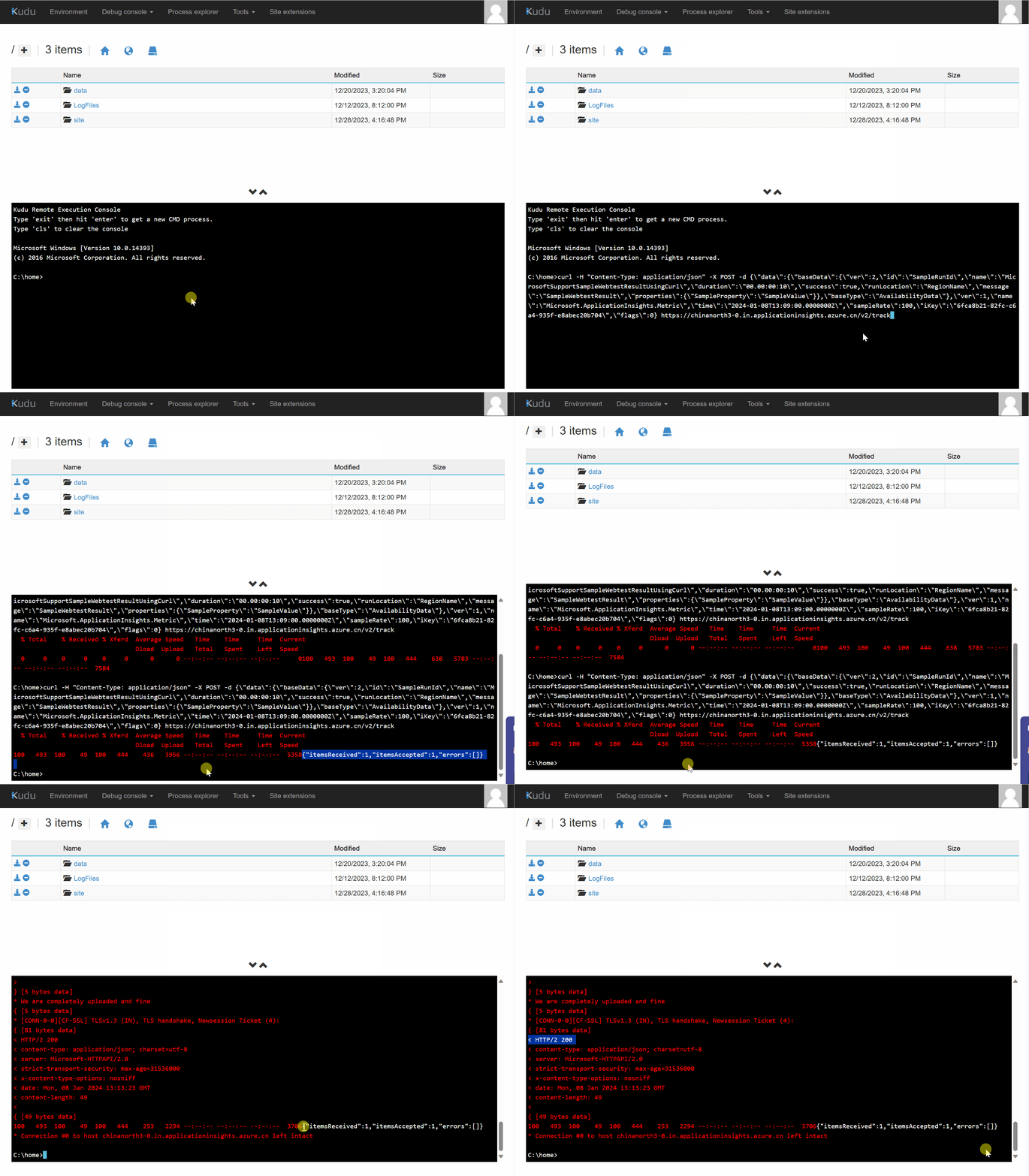
下图为在App Service Kudu中的测试和验证过程:
第一步:准备 curl 命令并进入App Service Kudu站点:
C:\home>curl -H "Content-Type: application/json" -X POST -d {\"data\":{\"baseData\":{\"ver\":2,\"id\":\"SampleRunId\",\"name\":\"MicrosoftSupportSampleWebtestResultUsingCurl\",\"duration\":\"00.00:00:10\",\"success\":true,\"runLocation\":\"RegionName\",\"message\":\"SampleWebtestResult\",\"properties\":{\"SampleProperty\":\"SampleValue\"}},\"baseType\":\"AvailabilityData\"},\"ver\":1,\"name\":\"Microsoft.ApplicationInsights.Metric\",\"time\":\"2024-01-08T13:09:00.0000000Z\",\"sampleRate\":100,\"iKey\":\"xxxxxxxx-xxxx-xxxx-xxxx-xxxxxxxxxxxx\",\"flags\":0} https://chinanorth3-0.in.applicationinsights.azure.cn/v2/track

  % Total    % Received % Xferd  Average Speed   Time    Time     Time  Current

                                 Dload  Upload   Total   Spent    Left  Speed

100   493  100    49  100   444    436   3956 --:--:-- --:--:-- --:--:--  5358

{"itemsReceived":1,"itemsAccepted":1,"errors":[]}
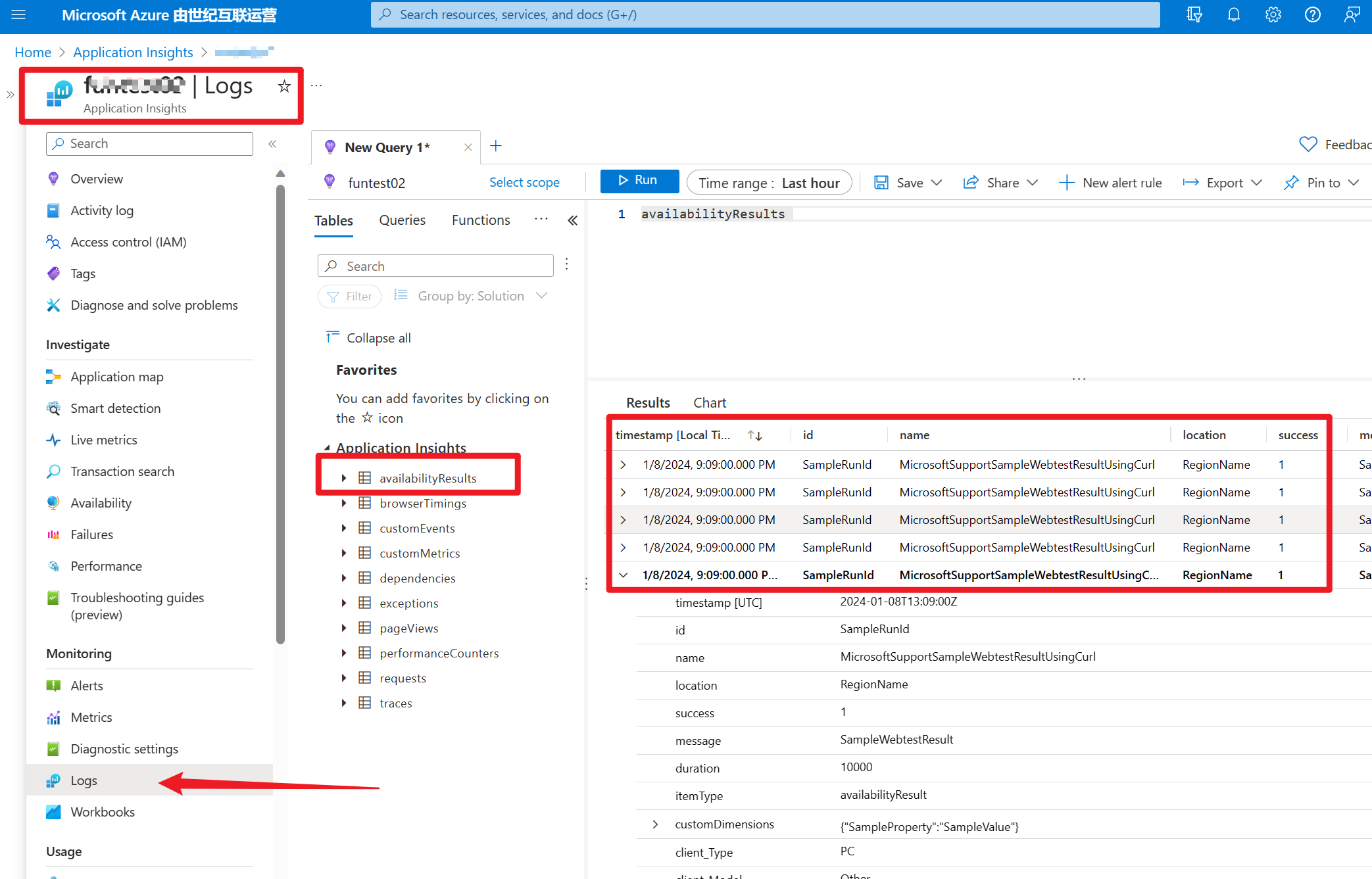
第二步:在Application Insights中验证数据是否发送成功
进入Application Insights的Logs页面,直接查看 availabilityResults 表中最近1小时的数据:
参考资料
用于发送可用性测试结果的 Curl 命令 : https://learn.microsoft.com/zh-cn/troubleshoot/azure/azure-monitor/app-insights/investigate-missing-telemetry#curl-command-send-availability-test-result
【Application Insights】使用CURL命令向Application Insgihts发送测试数据的更多相关文章
- 【应用程序见解 Application Insights】使用Azure Monitor Application Insights Agent获取Azure VM中监控数据及IIS请求指标等信息
问题情形 为了使用Application Insights也可以监控Azure VM中的相关性能数据,如CPU, Memory,IIS Reuqest等信息,可以在VM中开始一个一个扩展插件: Azu ...
- 【应用程序见解 Application Insights】Application Insights 使用 Application Maps 构建请求链路视图
Applicaotn Insigths 使用 Application Maps 构建请求链路视图 构建系统时,请求的逻辑操作大多数情况下都需要在不同的服务,或接口中完成整个请求链路.一个请求可以经历 ...
- 【Azure 应用程序见解】Application Insights Java Agent 3.1.0的使用实验,通过修改单个URL的采样率来减少请求及依赖项的数据采集
问题描述 近日好消息,如果是一个Java Spring Cloud的项目,想使用Azure Applicaiton Insights来收集日志及一些应用程序见解.但是有不愿意集成SDK来修改代码或者配 ...
- 使用Application Insights 做分析
Application Insights on Windows Desktop apps, services and worker roles : https://azure.microsoft.co ...
- 关于Application Insights遥测功能使用【遇到问题】
简介:Application Insights是微软发布的一个在线服务,可以监测自己的网站应用,进行性能管理以及使用分析. Application Insights功能一开始是出现在Visualstu ...
- [整理]Visual Studio 的Application Insights
简单介绍 Application Insights(预览版) Visual Studio 的Application Insights插件简介 Application Insights for Visu ...
- (编译)使用 AppCenter 持续输出导出到 Application Insights
原文地址:https://blog.xamarin.com/appcenter-continuous-export-application-insights/ 五星手机应用有一个特殊的特点:他们不会放 ...
- Azure Application Insights REST API使用教程
本文是Azure Application Insights REST API的简单介绍,并会包含一个通过Python消费API的示例/小工具. 新加入的team中的一项工作是制作日常的运维报表,制作方 ...
- Azure Monitor(一)Application Insights
一,引言 Azure Monitor 是 Azure 中的一项完整堆栈监视服务,是一种收集和分析遥测数据的服务.它提供了一组完整的功能来监视 Azure 资源以及其他云中和本地的资源.Azure Mo ...
- 【应用程序见解 Application Insights】在Application Insights中通过自定义查询结果定义指标并显示在Dashboard中
问题情形 通过Application Insights收集到指标数据后,如Request,Trace,Exception.但是默认的Insights图表不能满足业务的需求,需要自定义相应的类SQL语句 ...
随机推荐
- [转帖] Linux命令拾遗-软件资源观测
https://www.cnblogs.com/codelogs/p/16060443.html 原创:打码日记(微信公众号ID:codelogs),欢迎分享,转载请保留出处. 简介# 这是Linux ...
- 参照DefenseGrid在Unity中实现合理的塔防寻路机制
前言 在一款TD游戏中,最重要的单位就两大类:防御塔(Tower)和敌人单位(Enemy).在处理敌人单位的AI行为时,最基本也是最重要的就是自动寻路.在各式TD游戏中,防御塔的攻击方式以及敌人单位的 ...
- NutUI-React 京东移动端组件库 2月份上新!欢迎使用!
作者:京东零售 佟恩 NutUI 是一款京东风格的移动端组件库.NutUI 目前支持 Vue 和 React技术栈,支持Taro多端适配. 本次,是2月的一个示例输出,希望对你有帮助! 2月,我们对组 ...
- 不同版本的Unity要求的NDK版本和两者对应关系表(Unity NDK Version Match)
IL2CPP需要NDK Unity使用IL2CPP模式出安卓包时,需要用到NDK,如果没有安装则无法导出Android Studio工程或直接生成APK,本篇记录一下我下载NDK不同版本的填坑过程. ...
- SpringAOP配置要点
一.基于配置文件 1.关于aop配置文件相关 <!--配置aop--> <aop:config> <!--配置切入点表达式--> <aop:pointcut ...
- easyexcel只通过表名来动态查询并动态导出数据
EasyExcel动态表头即动态数据生成 1️⃣ 业务需求 需要将数据库中的所有表放在一个下拉框中,下拉框支持模糊查询到相关的表,然后通过这个表名查询到数据库的数据,切换不同的表查询出来相关表的列和数 ...
- CH32V208蓝牙从机sleep模式下功耗测试
本测试基于CH32V208W的开发板:蓝牙从机模式:使用程序BLE_UART 在进行功耗测试的时候尽量去除额外耗电器件,将开发板上的VDD于VIO相连接,测功耗时直接给VDD供电. 将会对500ms, ...
- JS 20道概念虽老但也略有收获的JS基础题,快速做题,高效复习,不妨试试?
壹 ❀ 引 在7月21交接完所有工作后,我也进入了休年假的阶段(没用完的8天年假),看似休息内心的紧张感反而瞬间加倍,到今天为止也面了几家,好消息是工作机会特别特别多,一封简历没投,面试邀请源源不断, ...
- python 中异常类型总结
异常类型: 异常名称 描述BaseException 所有异常的基类SystemExit 解释器请求退出KeyboardInterrupt ...
- go build gcc报错 /usr/bin/ld | cannot find -ldl cannot find -lpthread cannot find -lc
之前一直在kali或者其他ubuntu设备编译sliver, 临时在centos7上编译时报错了 # github.com/bishopfox/sliver/server /usr/local/go/ ...