
WPF中的文字修饰——上划线,中划线,基线与下划线
我们知道,文字的修饰包括:空心字、立体字、划线字、阴影字、加粗、倾斜等。这里只说划线字的修饰方式,按划线的位置,我们可将之分为:上划线、中划线、基线与下划线。如图: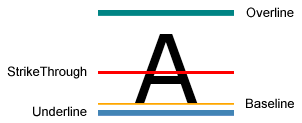
从上至下,分别为上划线(Overline),中划线(StrikeThrough),基线(Baseline)和下划线(Underline)。
如何实现?
(1)XAML代码:
<Page xmlns="http://schemas.microsoft.com/winfx/2006/xaml/presentation" xmlns:x="http://schemas.microsoft.com/winfx/2006/xaml" >
<TextBlock TextDecorations="Strikethrough" FontSize="72" FontFamily="Arial">A</TextBlock>
</Page>
这里TextDecorations属性可以设置为:OverLine, Strikethrough, Baseline, Underline或None,如果没有设置TextDecorations属性,则默认为None,即不带划线修饰。
(2)使用C#代码:
private void SetDefaultStrikethrough()
{
textBlock1.TextDecorations = TextDecorations.Strikethrough;
}
(为了简洁,这里只列出相关的关键代码,其他代码未用C#列出。textBlock1为TextBlock的名称,在XAML中使用 x:Name="textBlock1"形式标记)
如果要更复杂点的效果,比如需要设置划线的颜色、线粗等,如下图:
如何制作类似效果呢?
方法是:设置TextBlock的TextDecorations属性,再对TextDecoration的Pen属性进行设置。
如下XAML代码:
<Page xmlns="http://schemas.microsoft.com/winfx/2006/xaml/presentation" xmlns:x="http://schemas.microsoft.com/winfx/2006/xaml" >
<Canvas>
<TextBlock FontSize="84" FontFamily="Arial Black" Margin="0,0">
<TextBlock.TextDecorations>
<TextDecoration PenOffset="10" PenOffsetUnit="Pixel" PenThicknessUnit="Pixel">
<TextDecoration.Pen>
<Pen Thickness="5">
<Pen.Brush>
<LinearGradientBrush Opacity="0.8" StartPoint="0,0.5" EndPoint="1,0.5">
<LinearGradientBrush.GradientStops>
<GradientStop Color="Yellow" Offset="0" />
<GradientStop Color="Red" Offset="1" />
</LinearGradientBrush.GradientStops>
</LinearGradientBrush>
</Pen.Brush>
<Pen.DashStyle>
<DashStyle Dashes="1,2,3"/>
</Pen.DashStyle>
</Pen>
</TextDecoration.Pen>
</TextDecoration>
</TextBlock.TextDecorations>
GOOD
</TextBlock>
</Canvas>
</Page>
C#关键代码:
private void SetLinearGradientUnderline()
{
TextDecoration myUnderline = new TextDecoration();
Pen myPen = new Pen();
myPen.Brush = new LinearGradientBrush(Colors.Yellow, Colors.Red, new Point(0, 0.5), new Point(1, 0.5));
myPen.Brush.Opacity = 0.8;
myPen.Thickness = 5;
myPen.DashStyle = DashStyles.Dash;
myUnderline.Pen = myPen;
myUnderline.PenThicknessUnit = TextDecorationUnit.FontRecommended;
TextDecorationCollection myCollection = new TextDecorationCollection();
myCollection.Add(myUnderline);
textBlockGood.TextDecorations = myCollection;
}
引申问题:
可不可以同时画上划线、中划线和下划线?比如:可不可以画如下图所示的文武线呢?
答案是:可以!留给有兴趣的朋友去思考吧。
相关阅读:Typography in Windows Presentation Foundation http://msdn2.microsoft.com/en-us/library/ms742190.aspx
WPF中的文字修饰——上划线,中划线,基线与下划线的更多相关文章
- WPF文字修饰——上、中、下划线与基线
我们知道,文字的修饰包括:空心字.立体字.划线字.阴影字.加粗.倾斜等.这里只说划线字的修饰方式,按划线的位置,我们可将之分为:上划线.中划线.基线与下划线.如图: 从上至下,分别为上划线(Overl ...
- WPF编程,TextBlock中的文字修饰线(上划线,中划线,基线与下划线)的使用方法。
原文:WPF编程,TextBlock中的文字修饰线(上划线,中划线,基线与下划线)的使用方法. 版权声明:我不生产代码,我只是代码的搬运工. https://blog.csdn.net/qq_4330 ...
- WPF中的文字修饰
我们知道,文字的修饰包括:空心字.立体字.划线字.阴影字.加粗.倾斜等.这里只说划线字的修饰方式,按划线的位置,我们可将之分为:上划线.中划线.基线与下划线.如图: 从上至下,分别为上划线(Overl ...
- Python 私有变量中两个下划线 _ _item 与 一个下划线的区别 _item
python中没有常量的说法, 但是可以通过元组实现一个常量 在python的私有变量中, 存在两个下划线 _ _item 与一个下划线 _item 的区别 前面带两个下划线的私有变量: 只能在本类中 ...
- Visual Studio vs2010 去掉中文注释红色下划线;去掉代码红色下划线;
vs去掉下挂线也分两种: 1.去掉中文注释红色下划线,需要去掉VisualAssist下划线鸡肋功能: 1.选择Visual AssistX Options: 2.把如图所示的勾去掉,解决. 以后再次 ...
- python变量前的单下划线(私有变量)和双下划线()
1.单下划线 变量前的单下划线表示表面上私有 ,但是其实这样的实例变量外部是可以访问的,但是,按照约定俗成的规定,当你看到这样的变量时,意思就是,“虽然我可以被访问,但是,请把我视为私有变量,不要随意 ...
- python实现将字符串中以大写字母开头的单词前面添加“_”下划线
在工作中写测试用例代码生成的时候,函数命令考虑采用参数文件的名称来命名,但是发现文件命名是驼峰的写写法,所以想按照字符串中的大写字母做分割,每个单词前面添加下划线,主要考虑采用正则的模式来匹配,替换然 ...
- Android中自定义ListView实现上拉加载更多和下拉刷新
ListView是Android中一个功能强大而且很常用的控件,在很多App中都有ListView的下拉刷新数据和上拉加载更多这个功能.这里我就简单记录一下实现过程. 实现这个功能的方法不止一个,Gi ...
- 私有化 : _x: 单前置下划线,私有化属性或方法;__xx:双前置下划线;__xx__:双前后下划线;属性property
私有化 xx: 公有变量 _x: 单前置下划线,私有化属性或方法,from somemodule import *禁止导入,类对象和子类可以访问 __xx:双前置下划线,避免与子类中的属性命名冲突,无 ...
随机推荐
- css样式继承规则详解
css样式继承规则详解 一.总结 一句话总结:继承而发生样式冲突时,最近祖先获胜(最近原则). 1.继承中哪些样式不会被继承? 多数边框类属性,比如象Padding(补白),Margin(边界),背景 ...
- RSA算法原理(转)
如果你问我,哪一种算法最重要?我可能会回答“公钥加密算法”.因为它是计算机通信安全的基石,保证了加密数据不会被破解.你可以想象一下,信用卡交易被破解的后果. 进入正题之前,我先简单介绍一下,什么是”公 ...
- "Swift"编程语言
来自英文文档.百度翻译以及自己没过4级的渣渣英语功底,为了自己以后看起来方便 About Swift 关于"海燕" IMPORTANT 重要 This is a prelimina ...
- 分布式ID解决方案
开发十年,就只剩下这套Java开发体系了 >>> 在游戏开发中,我们使用分布式ID.有很多优点 便于合服 便于ID管理 等等 一.单服各自ID系统的弊端 1. 列如合服 在游戏上 ...
- WPF实现射线效果动画
原文:WPF实现射线效果动画 最近的一个项目中有个需求是:从一个点向其它多个点发出射线,要求这些射线同时发出,同时到达. 我就想到了用WPF的动画来实现.WPF中有Line类用于绘制直线,但这个类中好 ...
- 【codeforces 779D】String Game
[题目链接]:http://codeforces.com/contest/779/problem/D [题意] 给你一段操作序列; 按顺序依次删掉字符串1中相应位置的字符; 问你最多能按顺序删掉多少个 ...
- 【29.89%】【codeforces 734D】Anton and Chess
time limit per test4 seconds memory limit per test256 megabytes inputstandard input outputstandard o ...
- Windows下curl使用
一.简介 在上一篇中我们涉及到了一个在Ubuntu下使用的curl命令,而且使用这个命令来模拟server的功能来向谷歌的C2DMserver发送数据. 以下简单的来说下在Windows下相同的使用c ...
- 学习 protobuf(一)—— ubuntu 下 protobuf 2.6.1 的安装
下载地址:https://github.com/google/protobuf/releases/download/v2.6.1/protobuf-2.6.1.tar.gz(如果初次下载失败,不妨多试 ...
- discuz数据库函数使用